
How to create a Voxbi API key
Generate a scoped API key from the Voxbi Cockpit in four steps, set its permissions and expiry, and use it as a Bearer token. Administrator access required.
API keys let your own tools and third-party integrations talk to Voxbi securely. You create them yourself in the Voxbi Cockpit, and each key carries its own permissions and expiry date, so you can give every integration exactly the access it needs and nothing more. This guide walks through it in four steps. For the bigger picture of what the API can do, see the Voxbi API and webhooks overview.
You can keep several keys active at once, which makes it easy to separate integrations or rotate access without any downtime.
Before you start
You need an administrator account on your Voxbi phone system. API keys are managed in the Voxbi Cockpit under Configuration → Integrations.
Step 1: open Integrations
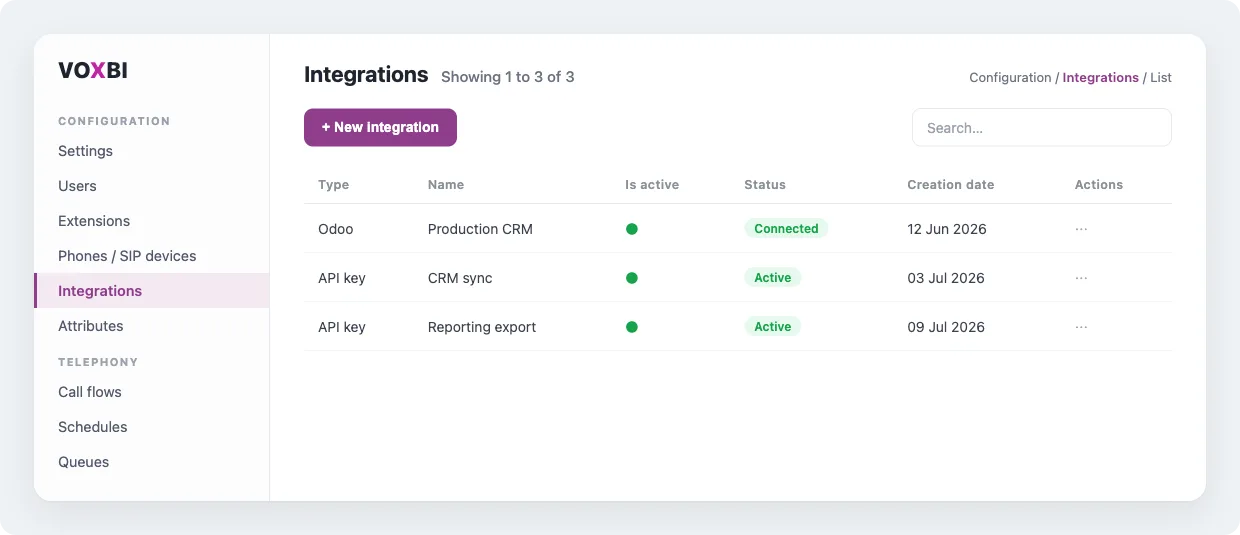
In the Cockpit side menu, under Configuration, select Integrations. This page lists every integration and API key on your phone system.
Step 2: add a new API key
Click + New Integration, open the Type dropdown, and choose API key.
Step 3: name it, then set scopes and expiry
Give the key a descriptive name so you can recognise it later (for example, the integration it belongs to). Then set:
Expiration date. The day the key stops working. Leave it empty for a key that never expires, or set a date for temporary and test integrations so the key cleans itself up.
Scopes. Tick only the resources and permissions this key needs, such as Contacts, Call history, or Phone numbers. Use Select all only when an integration genuinely needs everything.
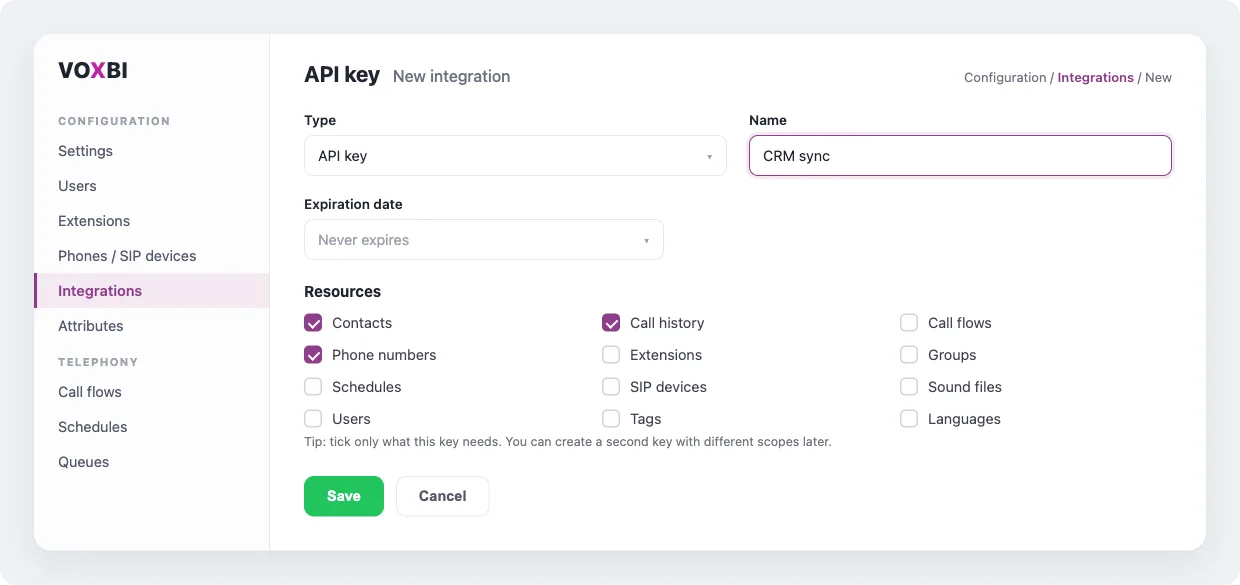
Then click Save.
Granting only the scopes a key needs limits the damage if it is ever exposed. When an integration needs more access later, create a second key with the extra scopes rather than widening an existing one.
Step 4: copy your key
The new key appears in the API key field. Use the eye button to reveal it and the copy icon to grab it. This is the value you send as a Bearer token.
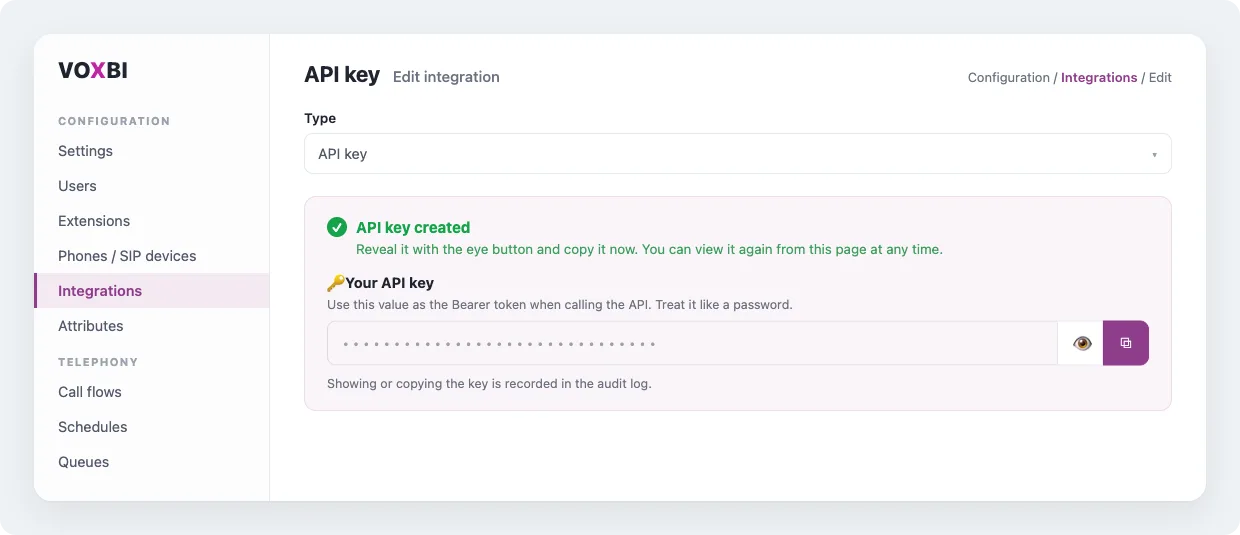
Treat the key like a password. Revealing or copying it is recorded in the audit log, and if you ever lose it you delete the key and create a new one rather than trying to recover it.
Use your key
Point your request at the Voxbi API base URL, https://cockpit.voxbi.com/v1/api, and send your key in the Authorization header as a Bearer token:
# Replace YOUR_API_KEY with the key you copied.
curl https://cockpit.voxbi.com/v1/api/contacts \
  -H "Authorization: Bearer YOUR_API_KEY" \
  -H "Accept: application/json"
The full list of endpoints, parameters, and response formats lives in the Voxbi API documentation.
Keep your keys safe
Never hard-code a key. Keep keys out of source control and out of client-side code. Use environment variables or a secrets manager.
One key per integration. Separate keys let you revoke or rotate a single service without breaking the rest.
Set an expiry on temporary or test keys so they clean themselves up.
Watch the audit log. Every reveal and copy is recorded, so you can review it if you suspect a key was shared or misused.
Frequently asked questions
Can I have more than one API key?
Yes. You can keep several active at once, each with its own name, scopes, and expiry. Giving every integration its own key is the recommended approach.
What happens when a key expires?
It stops working on its expiration date, and requests using it are rejected. Create a new key and update your integration before the old one expires.
I lost my key. Can I see it again?
You can reveal it again from the Integrations page with the eye button. If you no longer have access to it, delete that key and generate a new one. Revealing a key is recorded in the audit log.
How do I change a key's permissions?
Open the integration and adjust its scopes. To narrow access without interrupting a running integration, create a new key with tighter scopes and switch over to it.
Need a hand?
If you get stuck, email us at hello@voxbi.com. To see what you can build once you have a key, read the Voxbi API and webhooks overview or connect any CRM over the API.