
Teams stops at the meeting
On its own, Microsoft Teams has no phone numbers, no call routing, and no connection to the public telephone network. Customers can't call it.
Teams handles chat and meetings, but not phone lines. Voxbi adds that layer through Microsoft Direct Routing: your team makes and receives real calls on your business numbers inside Teams, on every signed-in device, while Voxbi handles the numbers, routing, and the public network behind it.
On its own, Microsoft Teams has no phone numbers, no call routing, and no connection to the public telephone network. Customers can't call it.
Your team lives in Teams all day, so a separate phone app gets ignored, and calls get missed or answered late.
A phone system next to Teams means two user directories to keep in sync and two places for IT to manage every joiner and leaver.
Direct Routing needs the Teams Phone license, included in Microsoft 365 E5 or added to other plans. We help you check what you have and what's missing.
Voxbi links your Teams tenant to the phone network through a session border controller we run and manage. There is no telephony infrastructure for your IT team to build.
Users get their business numbers inside Teams. Calls ring on every device they're signed into, and outbound calls show your company caller ID.
Make and receive external calls on your business numbers without leaving Teams, on desktop, mobile, or in the browser.
Voxbi's call flows keep working behind Teams: menus, queues, schedules, and routing rules apply to every call as before.
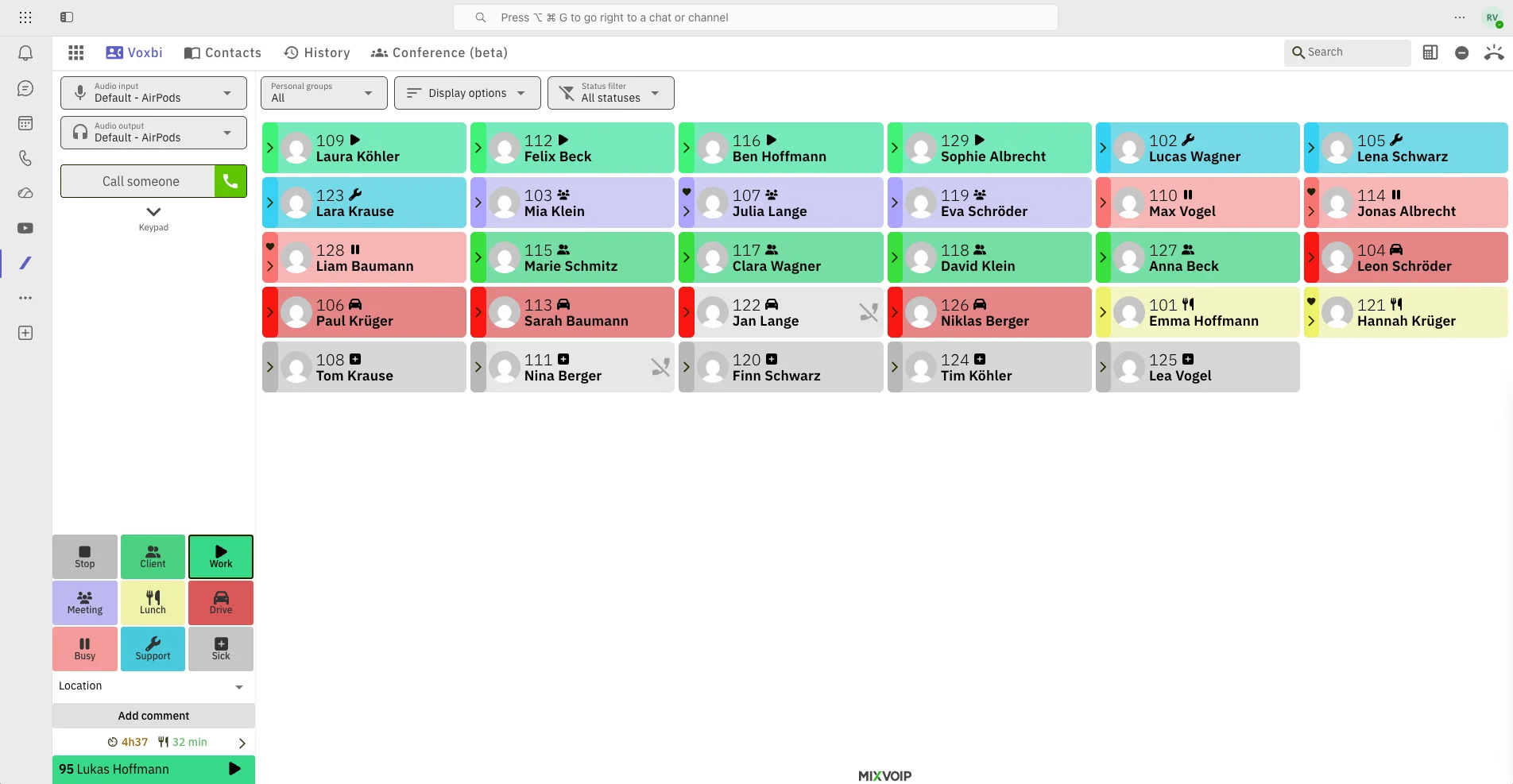
The Voxbi app runs natively inside Teams, with automatic Microsoft sign-in, and shows who is at work, on a call, driving, or at lunch, with one-click calling from the board.
Record the calls your industry requires you to, stored securely in the EU, even when they happen in Teams.
Doorbells, paging systems, and barriers connect into the same system, so the warehouse gate and the Teams call share one setup.
Numbers, users, and routing are managed centrally in Voxbi, so IT stops maintaining a phone directory next to the Microsoft one.
Teams becomes the phone interface. Voxbi stays the phone system: numbers, routing, and the public network, managed in one place.
Chat, meetings, files, and now calls in the same window. No second softphone to install, learn, or forget to open.
Your existing business numbers move with you. Customers dial the number they always have, and it rings in Teams.
A colleague working from home shares the same queues and numbers as the office, and customers never notice the difference.
Direct Routing requires a Microsoft 365 subscription with the Teams Phone license. It is part of an E5 plan and can be added to E1 or E3 plans as an add-on. Licensing can be confusing, and we walk you through exactly what your tenant needs before anything is ordered.
The session border controller that links Teams to the telephone network is run and managed by Voxbi. Your IT team keeps working in the Microsoft admin tools they know, with no telephony infrastructure to operate.
A telecom operator connects Teams to the public network and runs the infrastructure. The most flexible path on carrier choice, countries, and cost.
Numbers assigned inside the Teams admin center, but with an aggregation layer between you and the operator that can add cost and constraints.
Numbers and billing from Microsoft directly. Simple, but coverage is limited in Luxembourg and pricing follows Microsoft's terms.
For teams in Luxembourg, Belgium, Germany, and France, check local number availability and portability in every country, not just headquarters.
No. Your team keeps using Teams exactly as before for chat, meetings, and files. Voxbi adds the calling layer on top, running in the background.
A Microsoft 365 subscription with the Teams Phone license. It is part of an E5 plan and can be added to E1 or E3 plans as an add-on. We check your tenant's licensing with you before setup.
In most cases, yes. Voxbi supports number portability in more than 25 countries, so multi-site and cross-border teams can keep local, national, and international numbers while running everything through Teams.
Only if you want to. Voxbi's Microsoft-certified engineers can guide your team step by step, or run the whole thing as a managed service, licensing, Teams Phone configuration, and ongoing monitoring included.
Both need the same Microsoft licenses. Operator Connect adds an aggregation platform between you and the operator, which can add cost and limits. Managed Direct Routing offers the same ease with more flexibility on carriers, countries, and pricing.
Yes. Numbers live in Voxbi, not in a desk phone, so anyone signed into Teams can share the office number and its call queues from anywhere.
Teams calls need connectivity. Voxbi's routing rules can also ring a mobile number, so you can set incoming calls to fall back to mobiles and keep callers connected.
Start a free trial and watch your business number ring inside Teams, with routing and queues intact.