
Business SMS gateway: send and receive texts from your phone system
A complete walkthrough of the Voxbi business SMS gateway: what it does, the three sending routes, how a message travels, and how to get it set up.
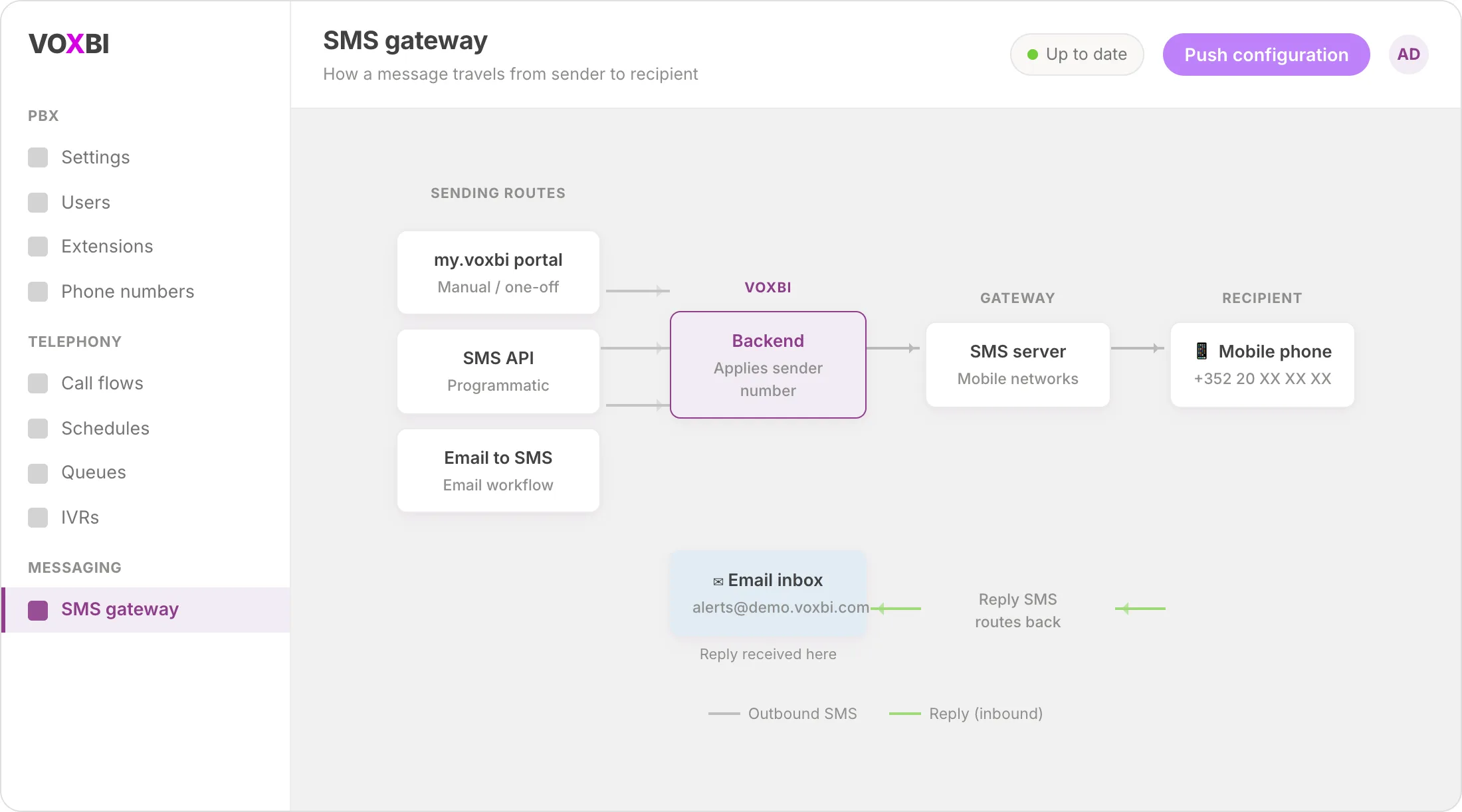
A business SMS gateway lets you send and receive text messages straight from your phone system, without handing anyone a personal mobile. You get a real mobile number that lives in the Voxbi platform, so security codes, server alerts, and customer notifications all flow through one dependable channel. Replies come back to you too, so it works both ways with no dead-end broadcasts.
This guide explains what the business SMS gateway does, the three ways to send a message, how a message travels end to end, and how to get it switched on for your account.
Why a business SMS gateway is worth setting up
SMS is not glamorous, but it lands. A text is read within minutes, needs no app, and works on any phone. That makes it the right channel for the messages you cannot afford to have ignored.
Security and authentication. Forward two-factor authentication codes automatically to email, so a code for banking or an email account still reaches you when the phone is out of reach. You can also route those codes to a shared inbox so more than one person on the team can act on them.
System monitoring and alerts. Let administrators receive server or application errors by text message inside their email, which makes escalation and logging far easier. Internet of Things devices that fire off alerts, such as a low-battery warning, can forward them to email for central monitoring too.
Convenience and reach. People in areas with patchy coverage can still get important messages by email, and anyone working on a laptop or tablet can read incoming texts without reaching for a phone.
What you need before you start
The business SMS gateway is provisioned by the Voxbi team rather than self-served, so the setup is short on your side. Before you begin, have the following ready:
A dedicated mobile number to use as the sender, or a request for one to be assigned.
Proof that you own any mobile number you want to use as the sender (a mobile invoice is usually enough). This keeps the channel compliant.
The email address or shared inbox that should receive incoming and forwarded messages, if you plan to use the email-to-SMS route.
An application programming interface key, if you plan to send messages programmatically. See how to create a Voxbi API key to generate one.
The three ways to send an SMS
Voxbi gives you three routes to send and receive messages through the gateway. Pick the one that fits how your team works, or mix them.
1. Email to SMS (and SMS to email)
The most hands-off option. Send an email and it goes out as a text; when someone replies, the response arrives back in your inbox as an email. This is the route to choose for automated processes and escalations because it slots into email workflows you already run. No new tool to learn, and replies are captured for you.
2. The my.voxbi portal
For manual, one-off sends, open the my.voxbi portal and send from the Contacts tab. Contact management is built in, and there is no technical setup to worry about. This suits occasional messages and staff who prefer a screen over a script.
3. The SMS API
For developers and automated systems, the API gives you programmatic control to send messages from your own applications. It is a RESTful API with full documentation, so you can wire SMS into a product, a workflow, or an internal tool. Start at the Voxbi API hub and generate credentials with the create a Voxbi API key guide.
How a message travels through the gateway
Once the gateway is live, the journey is the same whichever route you choose to send from.
You send a message from one of the three channels: email to SMS, the my.voxbi portal, or the API.
The backend applies your sender number. The message goes out with a number stored in the gateway as the sender, not a personal mobile number. The recipient sees your business identity rather than a staff member's handset.
The SMS server delivers the text to the recipient's mobile phone.
The recipient replies. Their response is routed back through the SMS server.
You receive the reply by email (for the email-to-SMS route), keeping the whole exchange in one place.
Because the sender is a fixed business number rather than a person's handset, the conversation stays consistent even if the staff member behind it changes.
An alert-system example
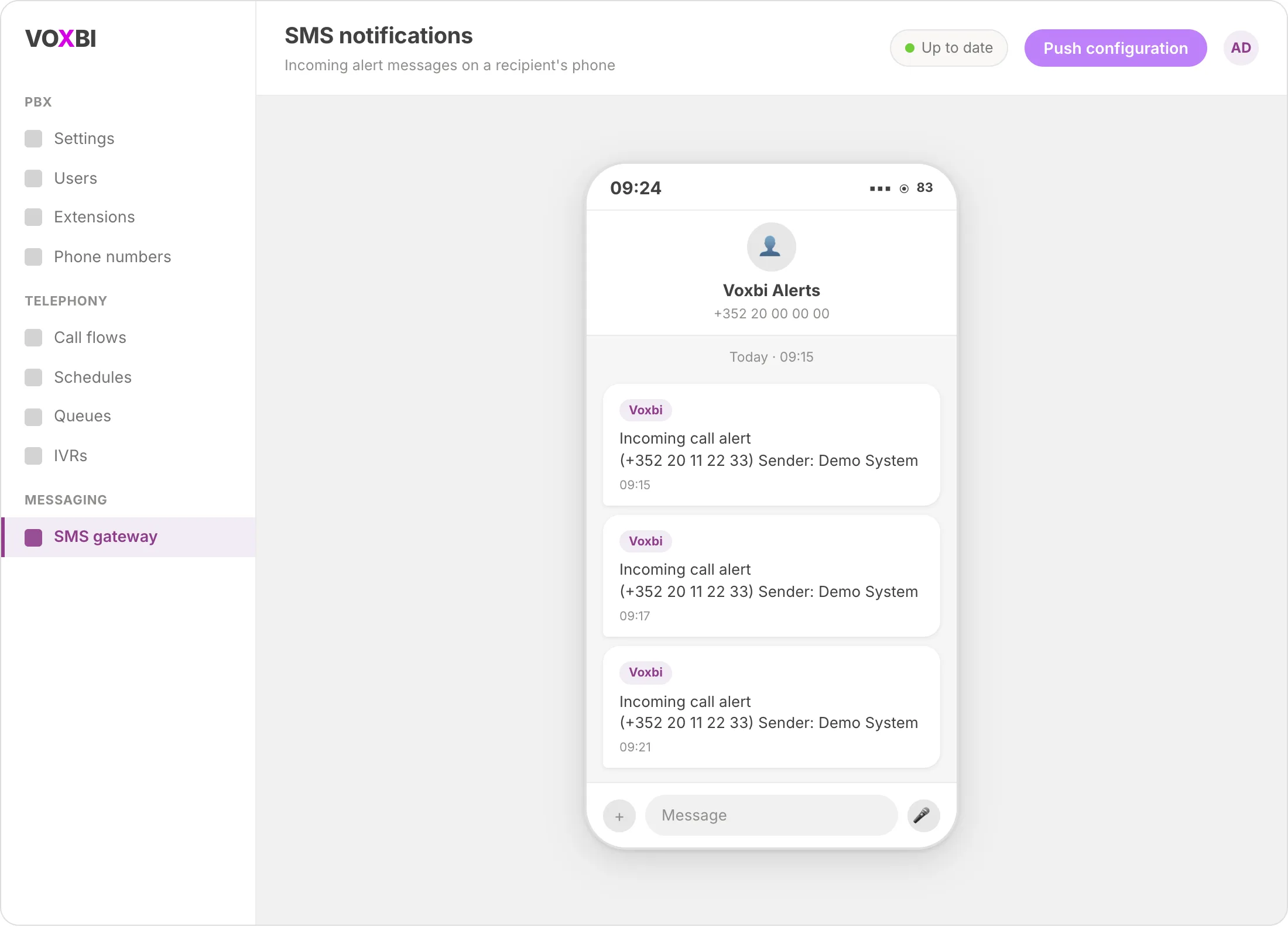
For escalation processes, the gateway can act as an extra notification channel. Your backend sends a text alert to a defined mobile number, the person on call gets the alert, and they can reply straight back to that number. The screenshot below shows incoming alert messages arriving on a recipient's phone.
Getting the gateway set up
Setup is handled by the Voxbi team. The moving parts and rough timings are:
Mobile gateway hardware. A SIM card is installed and configured in the corresponding device. This takes about ten minutes.
Mail to SMS. Included in the SIP trunk and Voxbi setup fees.
Send SMS. Included in the SIP trunk and Voxbi setup fees.
Custom integration for Voxbi clients. Setup and testing take at least 30 minutes, depending on how involved your project is.
To start, contact your Voxbi representative or support and tell them which sending routes you need. Have your ownership proof ready so provisioning is not held up.
Troubleshooting
Messages are not arriving. Confirm the gateway has been provisioned for your account (this is a team-assisted setup, not self-serve) and that the recipient's number is correct and reachable.
Setup is stalled on the sender number. You must prove you own the mobile number used as the sender, usually with a mobile invoice. Provisioning cannot complete until that proof is on file.
API calls are rejected. Check that your API key is valid and included in the request. If you have not created one yet, follow the create a Voxbi API key guide, then retry against the endpoints listed in the Voxbi API hub.
Replies are not coming back to email. Replies return by email only when you send through the email-to-SMS route. If you sent through the portal or the API, check where responses are configured to land.
Frequently asked questions
What is a business SMS gateway?
A business SMS gateway is a service that lets your company send and receive text messages through your phone system instead of a personal handset. Messages go out from a dedicated business number, and replies can be routed back to you by email, making it a two-way channel for codes, alerts, and notifications.
Can I send SMS from my existing phone system?
Yes. The Voxbi business SMS gateway connects to your telephony setup and lets you send texts by email, through the my.voxbi portal, or through the API. You do not need a separate messaging platform.
Do I need coding skills to use the SMS gateway?
No. Two of the three routes need no code at all: email to SMS works from any inbox, and the my.voxbi portal sends messages from a simple screen. The API is there when you want to automate sending from your own applications.
Why do I have to prove I own the sender number?
The number you use as the sender identifies your business on every message, so ownership has to be verified (usually with a mobile invoice) before the gateway goes live. This keeps the channel compliant and protects the number from misuse.
Can recipients reply to messages I send?
Yes. The gateway is bidirectional. When you send through email to SMS, the recipient's reply comes back to your inbox as an email, keeping the full conversation in one place.
Ready to switch on SMS?
A business SMS gateway turns text messaging into a reliable, two-way channel for the alerts and codes your team relies on. Talk to your Voxbi representative or support to get it provisioned, and if you plan to automate sending, start with the Voxbi API hub and the create a Voxbi API key guide.