
How to set up a multilingual call center
Set up a multilingual call center in Voxbi with language-selection IVR menus, per-language department queues, and timeout fallbacks so no call is ever dropped.
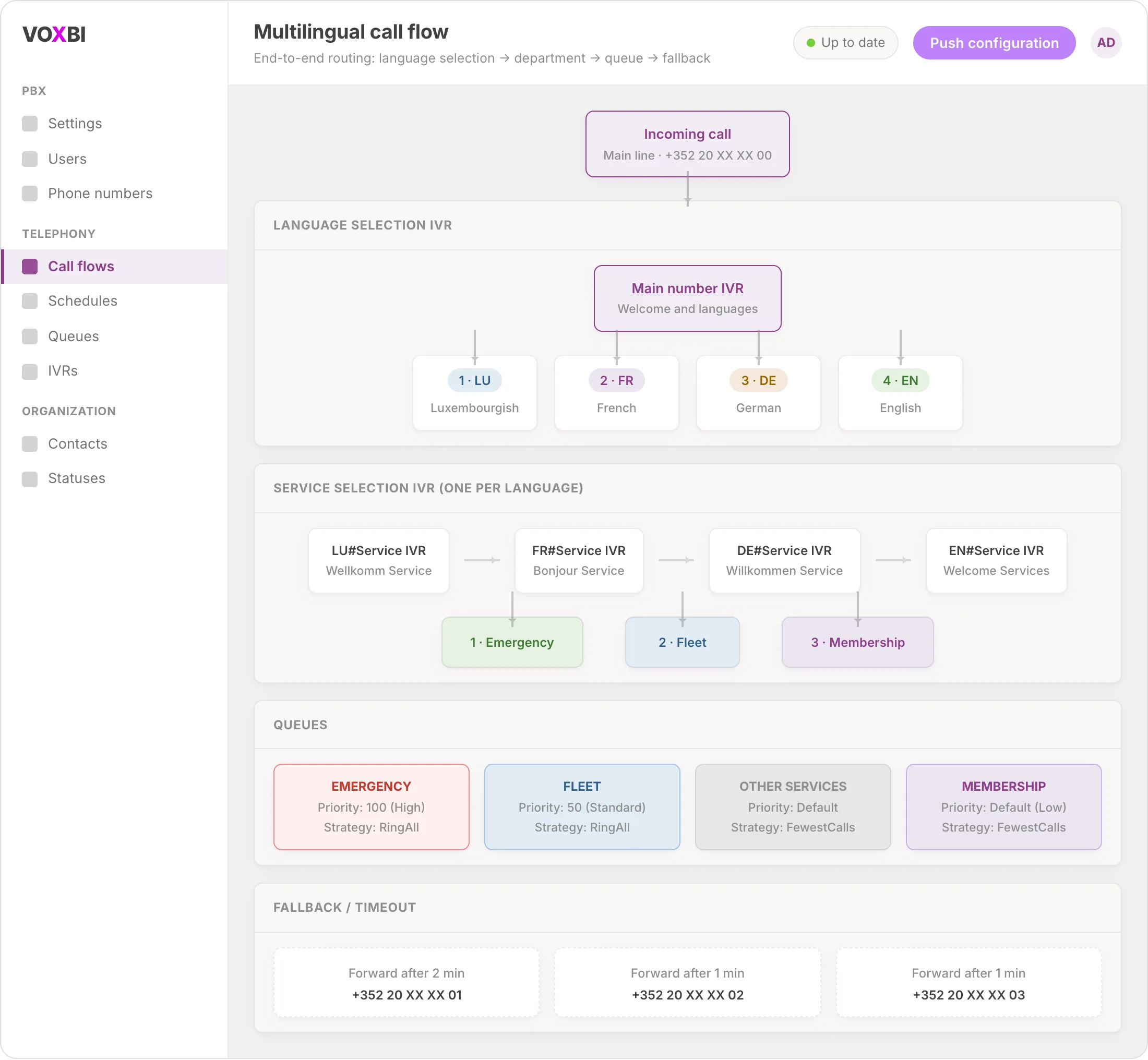
Callers should hear their own language from the first ring and reach the right team without repeating themselves. This guide shows you how to build a multilingual call center in Voxbi: one main number that greets everyone, a language-selection menu that lets each caller choose, department routing behind each language, prioritized queues, and timeout fallbacks so no call is ever dropped.
If you run a call center in Voxbi, this is the setup that handles multilingual volume at scale. By the end you will have a call flow that greets in four languages, routes to Emergency, Fleet, Membership, or a catch-all queue, and forwards to a backup number if nobody picks up. Everything is built in the Voxbi Cockpit, no scripting required.
If you only need a single-language phone menu first, start with our guide on how to create an IVR menu, then come back here to layer languages and departments on top. Once your multilingual setup is live, you can also configure after-hours call routing so calls outside business hours still reach someone. For the full picture of what call flows can do, see the call flows feature page.
How the multilingual call center works
Before you build anything, it helps to see the shape of the whole call flow. A caller moves through four layers:
Incoming call lands on your main number.
A language-selection IVR greets the caller and offers a choice (Luxembourgish, French, German, English).
A department-selection IVR (one per language) offers Emergency, Fleet, or Membership.
The call routes into the matching queue, and a timeout fallback forwards the call if no agent answers.
What you need before you start
Get these in place first so the build goes smoothly:
Administrator access to the Voxbi Cockpit.
At least one phone number configured (this becomes your main number).
The announcements or sound files recorded for each IVR menu, one per language (for example a "Welcome and languages" greeting, plus a service greeting in each language).
Your agents or users already created, ideally grouped by the language they speak.
Step 1: Create the department queues
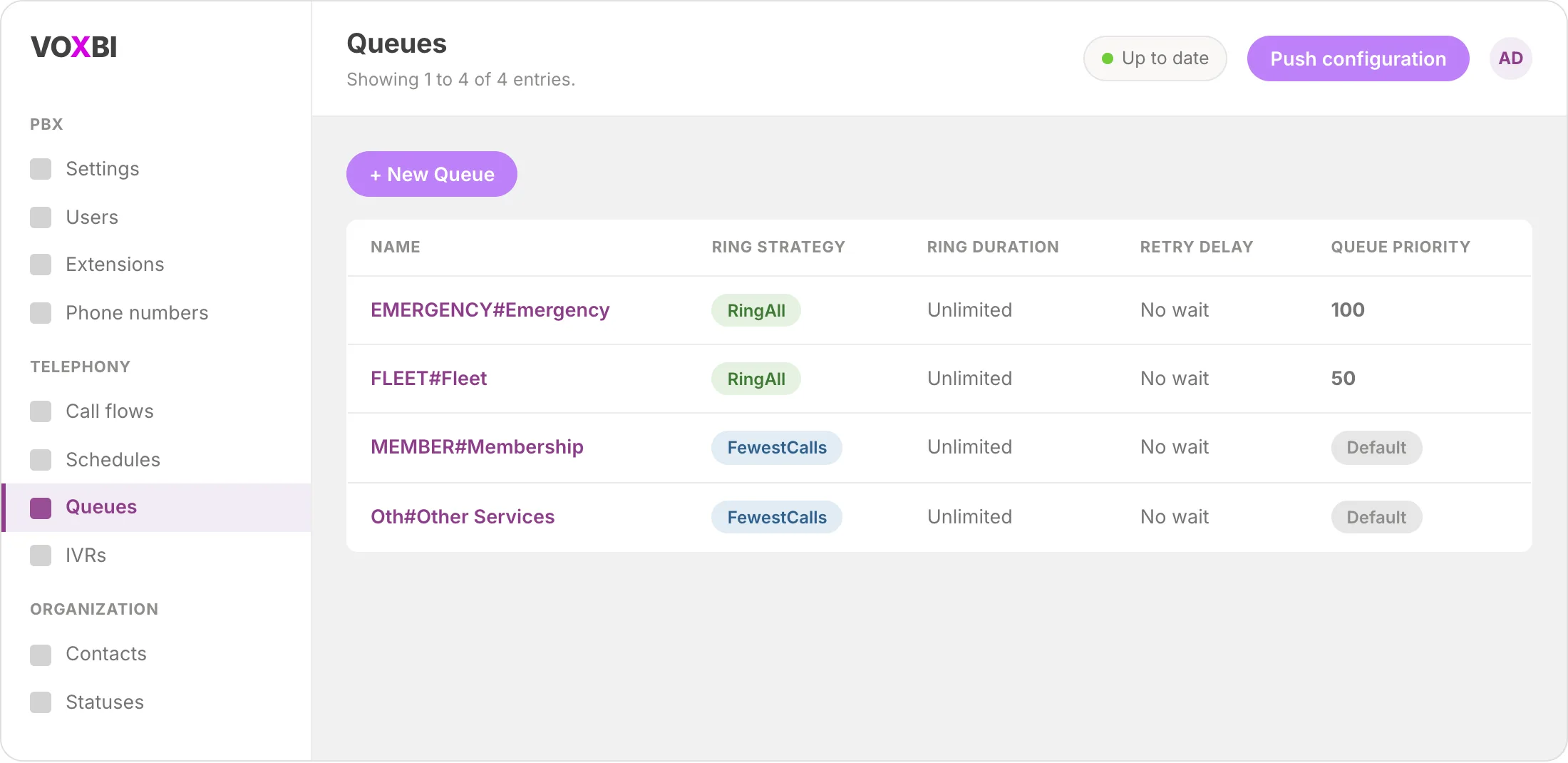
Queues are where callers wait for an agent. You will create four of them, each with its own priority and ring strategy so urgent calls jump ahead of routine ones.
Go to Telephony, then Queues.
Click "+ New Queue".
Create the following four queues:
| Queue name | Priority | Ring strategy | Used for |
| EMERGENCY#Emergency | 100 (High) | RingAll | Emergencies. Highest priority, all agents ring at once. |
| FLEET#Fleet | 50 (Standard) | RingAll | Fleet management. Medium priority. |
| MEMBER#Membership | Default (Low) | FewestCalls | Membership questions. Routes to the agent with the fewest calls. |
| Oth#Other Services | Default | FewestCalls | Anything that does not fit the other three. |
RingAll rings every available agent at the same time (best for urgent lines), while FewestCalls sends the call to whoever has handled the fewest calls (best for spreading routine load evenly).
Tip: assign agents to each queue by the language they speak, so a French caller who picks Emergency reaches a French-speaking responder.
Step 2: Create a service IVR for each language
Each language gets its own department menu. This is what lets a caller who picked French hear the department options in French and land in a French-speaking queue.
Go to Telephony, then IVRs.
Click "+ New IVR".
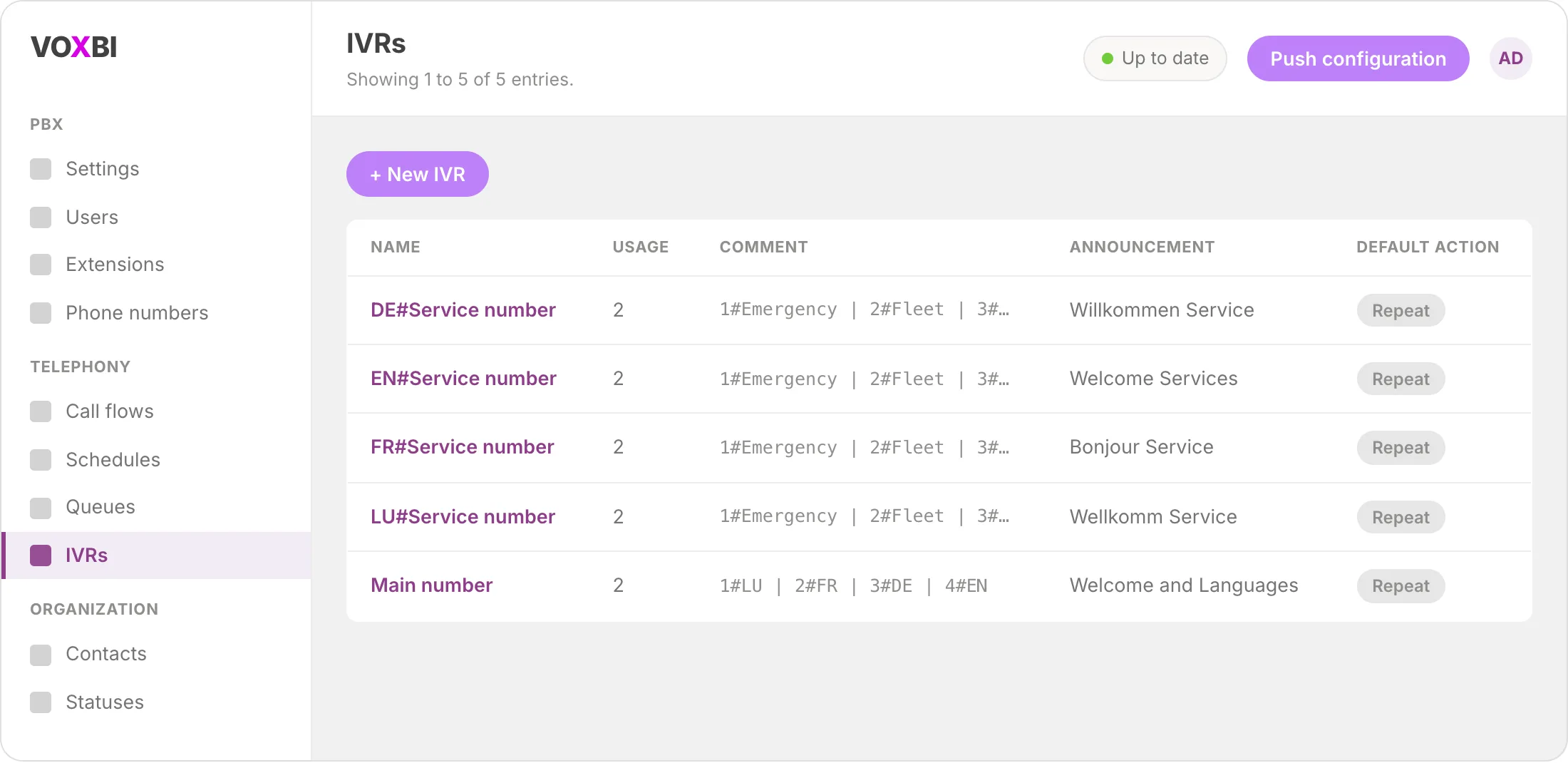
Create one service IVR per language, each with its own greeting:
| IVR name | Announcement |
| DE#Service number | Willkommen Service (German) |
| EN#Service number | Welcome Services (English) |
| FR#Service number | Bonjour Service (French) |
| LU#Service number | Wellkomm Service (Luxembourgish) |
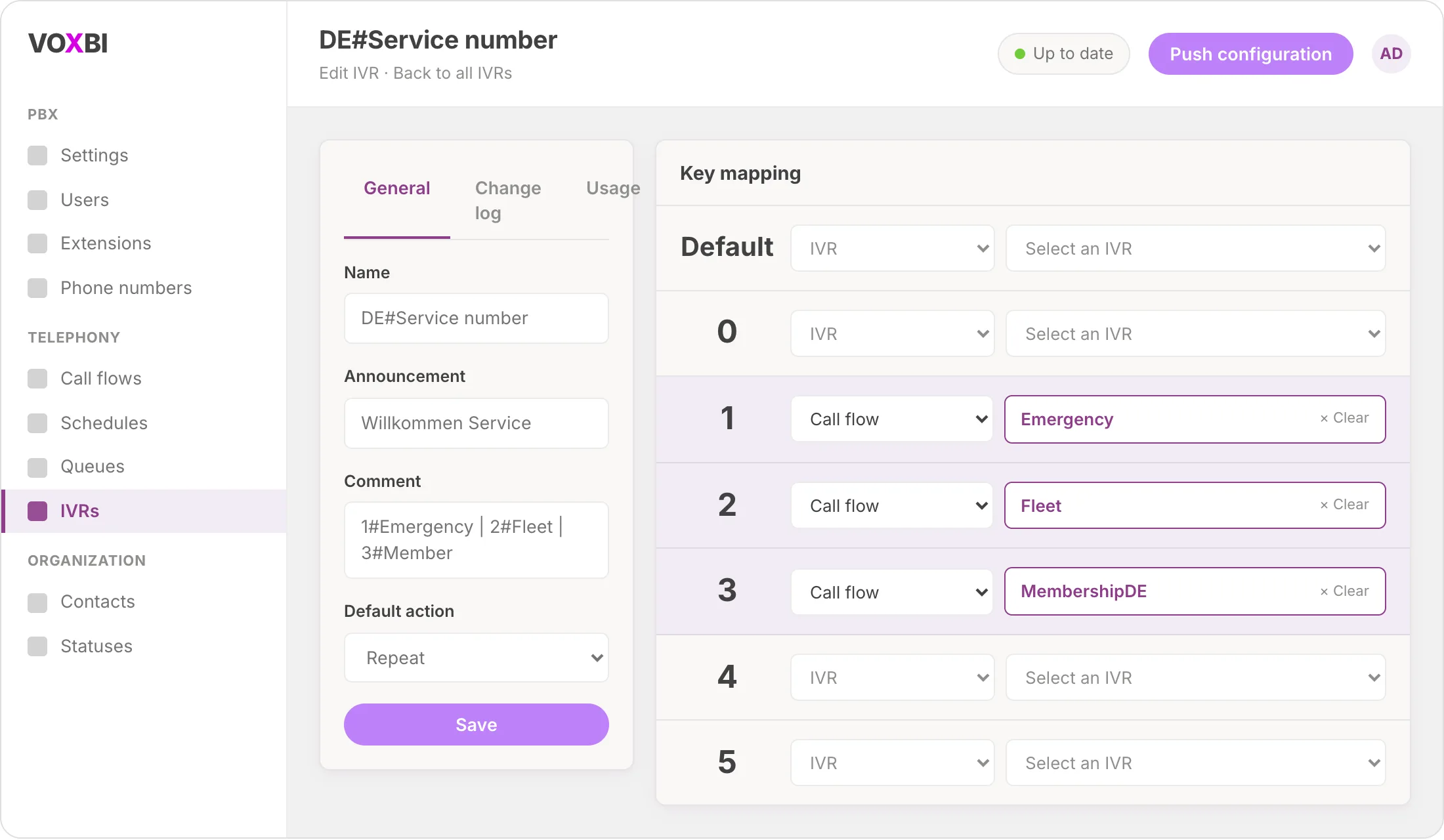
Inside every service IVR, map the same three keys so the caller experience is consistent across languages:
| Key | Routes to |
| 1 | Emergency queue |
| 2 | Fleet queue |
| 3 | Membership queue |
Step 3: Create the main language-selection IVR
This is the front door. It greets every caller and hands them off to the right language menu.
Create a new IVR named "Main number".
Set its announcement to your "Welcome and languages" greeting (record this so it names each option in the language it selects).
Configure the keys as follows:
| Key | Routes to |
| 0 | Other Services queue (for callers who make no choice) |
| 1 | Luxembourgish service IVR |
| 2 | French service IVR |
| 3 | German service IVR |
| 4 | English service IVR |
Key 0 is your safety net: a caller who stays silent or is unsure still reaches a human in the catch-all queue instead of hitting a dead end.
Step 4: Connect queues and IVRs with call flows
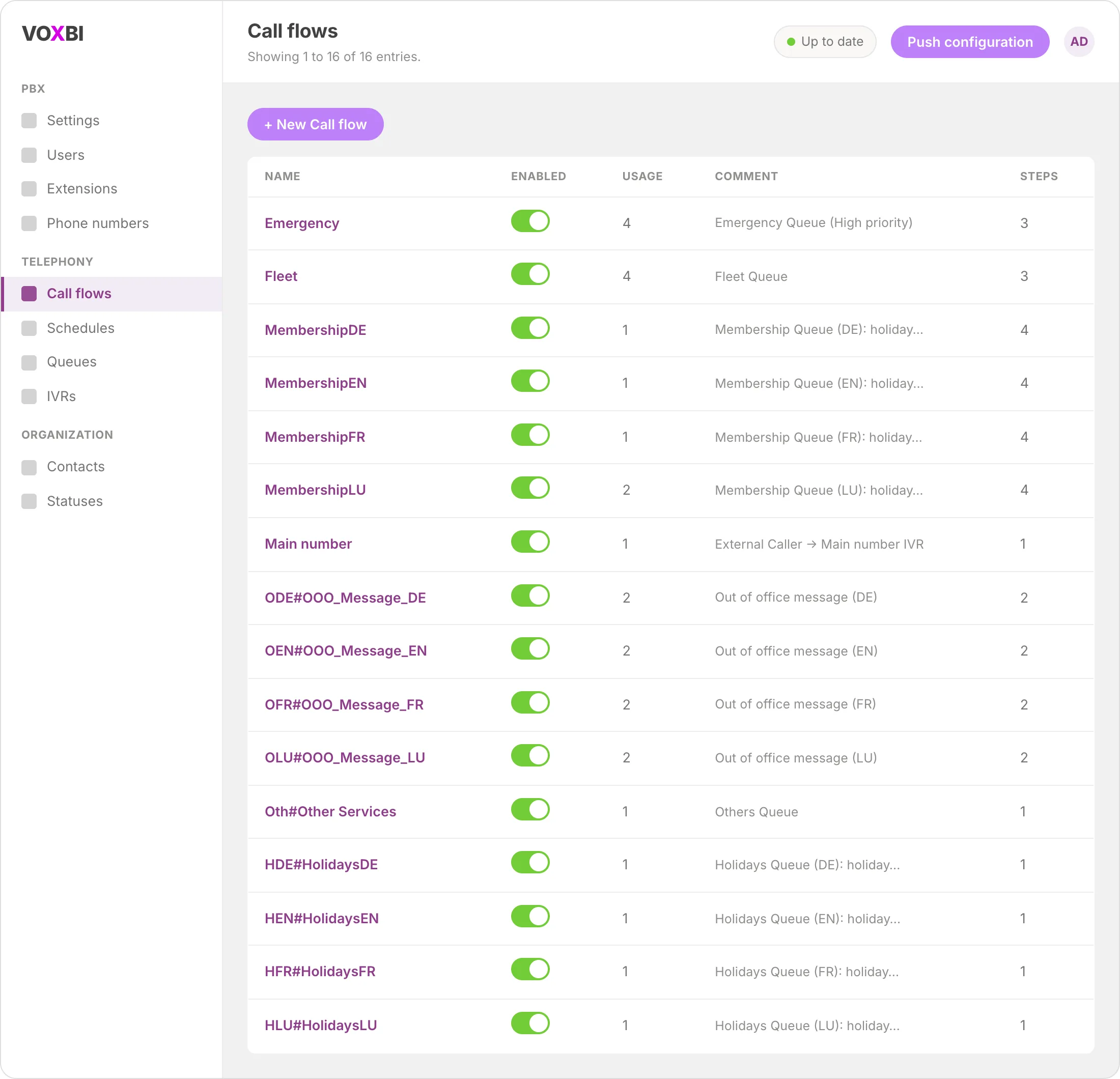
Call flows are the wiring that connects an IVR key to a queue, and defines what happens if the queue does not answer. You create one call flow per department and language.
Go to Telephony, then Call flows.
Create a call flow for each department and language combination.
Set the target queue and a timeout fallback. For the Emergency (German) flow, for example:
Target: EMERGENCY#Emergency queue
Timeout: 2 minutes
On timeout: forward to your backup number
Emergency uses a short 2-minute timeout because those calls cannot wait; routine queues can use a longer window before falling back. Point the fallback at a mobile, a central line, or voicemail so an unanswered call always has somewhere to go.
Step 5: Link your main number to the main IVR
Now point your public number at the front door you just built.
Go to PBX, then Phone numbers.
Select your main number.
Set the "Main number" IVR as the destination.
Save your changes.
Step 6: Test the full call flow
Call your own number and walk the whole tree before you go live:
Dial your main number and listen to the welcome greeting.
Test each language option (keys 1 to 4) and confirm the service menu plays in the right language.
Test each department option (keys 1 to 3) and confirm the call lands in the correct queue.
Let a queue ring out to confirm the timeout fallback forwards as configured.
Troubleshooting
The IVR greeting does not play, or plays the wrong language. Check that each IVR has the correct announcement assigned. If you just recorded a new sound file, make sure it is uploaded and selected on the IVR before you push the configuration.
A key press does nothing. Open the IVR and confirm that key is mapped to a call flow or queue. Unmapped keys are ignored, so a missing "2" is usually a blank slot rather than a bug.
Calls never fall back on timeout. The fallback lives on the call flow, not the queue. Open the relevant call flow and confirm both a timeout value and an "on timeout" destination are set.
Callers reach the wrong-language agents. Queues route by department, not by language, so language separation comes from assigning the right agents to each queue. Review your agent-to-queue assignments.
Changes are not taking effect. After editing queues, IVRs, or call flows, push the configuration so the changes go live on the PBX.
Frequently asked questions
How many languages can a multilingual call center support?
There is no fixed limit built into the flow. This guide uses four (Luxembourgish, French, German, and English), but you add another language by recording its greetings, creating one more service IVR, and adding a key to the main language-selection IVR.
Do I need separate agents for each language?
Not necessarily, but agents should be assigned to queues based on the languages they speak. Because queues route by department rather than by language, the language a caller reaches depends entirely on which agents you assign to each queue.
What happens if a caller does not choose a language or department?
The main IVR sends silent or undecided callers to the catch-all Other Services queue on key 0, so they still reach a person. Within each service IVR you can point unmapped or timed-out choices to a safe default as well.
Can I add holiday hours or out-of-office routing?
Yes. Use schedules to route calls outside business hours or on public holidays to an announcement or voicemail, and set an out-of-office forward for when every agent is away. These sit on top of the same call flows you built here. See our after-hours call routing guide for the full walkthrough.
Do I need any coding or scripting to build this?
No. The entire multilingual call center is built in the Voxbi Cockpit using queues, IVRs, call flows, and phone numbers. There is nothing to script.
Ready to build yours?
You now have a multilingual call center that greets in every language you serve, routes by department, prioritizes urgent calls, and never drops a caller on timeout. Explore the call flows feature page to see what else you can layer on, or start with the basics in our create an IVR menu guide. Running a busy support line? See how Voxbi fits teams like yours on our call centers page.