Here's how to send a fax online in five steps, with no fax machine and no analogue line. This guide is for offices that still get asked to fax something by a hospital, a solicitor or a public body and would rather not keep a machine just for that.
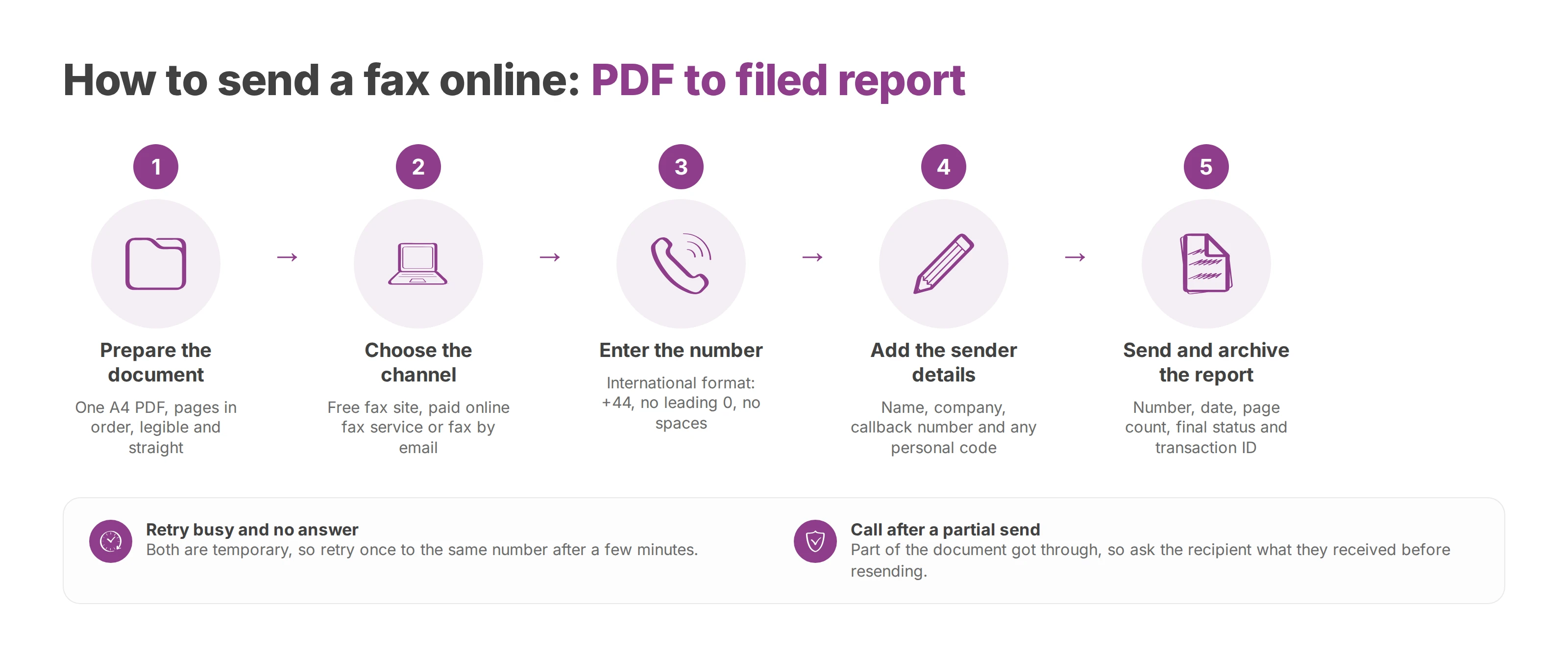
Prepare the document. One PDF, A4, pages in order, legible and straight.
Choose the channel. A free fax site, a paid online fax service, or fax by email through your phone provider.
Enter the number. Use international format. That means a plus sign and the country code, then the number without its leading 0 and with no spaces or dashes. A London number becomes +442079460000.
Add the sender details. Give your name, company and a callback number. If your service issues a personal sending code, enter it and keep it to yourself.
Send and archive the confirmation. The report shows the number dialled, the date and time, the page count, the final status and a transaction ID.
Those steps cover the mechanics. A harder question comes up later with anything contentious. What can you produce if the recipient says the fax never arrived? Most guides on online faxing stop at the send button. This one treats each fax as something you may one day have to prove, and that needs an identifiable sender, an intact file and a dated record.
How to send a fax online in five steps
A fax sent online travels over the internet connection your office already pays for. A web form, your email client or an API hands the PDF to a fax service, and the service dials the recipient's machine over the phone network. You don't need a dedicated analogue line, and there's no machine to keep in toner. If your provider is retiring copper lines, the analogue switch-off checklist covers the other devices that still sit on them.
What each step prevents
A PDF thrown together at the last minute. Use one A4 file with the pages in order. Pages scanned at 150 dpi can come out badly on a receiving machine in economy mode, so aim for 200 dpi. Check that landscape pages are rotated correctly and drop any screenshot nobody can read.
A leading 0 left in. International format drops it, and the guide to the E.164 number format shows the pattern for every country. For a recipient you've never faxed before, send a one-page test during office hours before the full file.
A skipped preview. The page count the service shows should match what you prepared. A duplicated cover page shows up at the recipient's end, never at yours.
A shared sending code. Some services issue a personal code that authorises sending from your address. Once that code goes round a team chat, the report can no longer show who actually sent the fax.
A lost report. The confirmation lands in an email or a browser tab and then sinks under three days of messages. File it straight away with the original PDF.
Faxes often land in a shared tray at the recipient's office. Two lines on a cover page with your team's name, a callback number and a short subject save the recipient a round of calls to find out who sent what.
When the report doesn't say delivered
Busy and no answer are temporary. Retry once to the same number after a few minutes. A negotiation error means the two ends couldn't agree on speed or compression, and the service usually fixes it on its side. A partial transmission is the riskiest result, because part of the document got through. Call the recipient to find out what they received before you resend anything.
Field rule: a fax counts as sent when you've filed its report.
Give every resend its own reference so the recipient doesn't open two files or process the same order twice. For recurring sends, an API link to your ticketing tool with a unique ID per fax removes that risk at the source.
Free fax sites, online fax services and fax by email
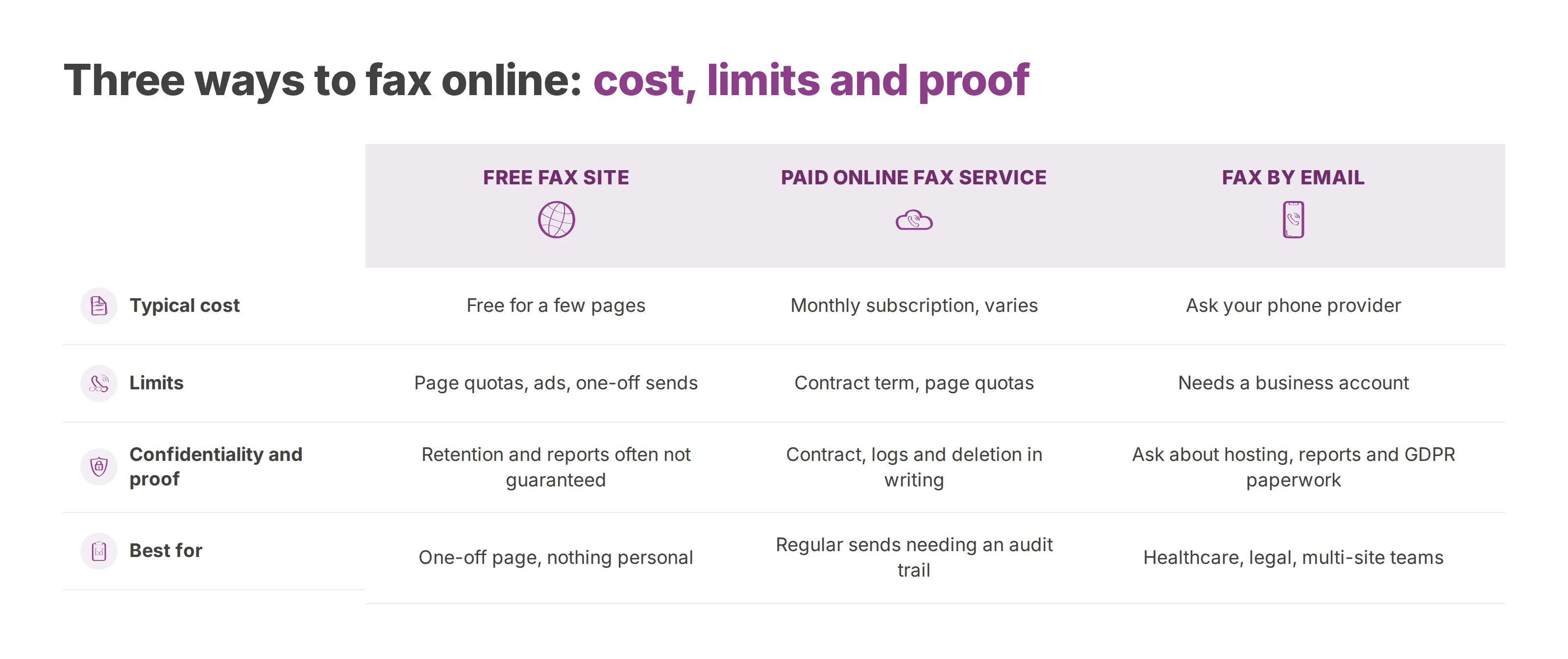
Free fax sites get an urgent page out. They come with page quotas and ads, and their file retention policy is rarely spelled out. Upload a client document there and you often won't know how long the file stays online or who can reach it.
Paid online fax services add a dedicated number, higher quotas, send logs and a support team you can reach. Judge them on the contract, the audit trail and the deletion policy, since the free pages offered at sign-up say nothing about any of those. A subscription with no written retention term protects a private file no better than a free site does.
Fax by email through a business phone provider sits on top of the phone system you already run. You write an ordinary email and the service converts it. The transmission report then comes back to your inbox. For a multi-site business or a clinic, that leaves no extra tool to administer, and with a provider hosted in the European Union the data stays inside the Union.
The GDPR applies to processing by a controller or processor established in the European Union, even where the processing itself happens elsewhere. Article 28 also requires a written contract with every processor, and your fax service counts as one. That gives you a way to compare offers on something other than price.
For business use, the test is what evidence remains if someone disputes a send, and where the files sit during and after it.
Fax by email with Voxbi
Voxbi, a cloud phone system hosted in the European Union, routes faxes through ordinary email. A document leaves as an attachment, and incoming faxes arrive as PDFs in the mailbox you choose. There's no analogue line to order and no toner to replace.
Send from your usual mailbox
You write a normal email, attach the PDF and address it to the service with the recipient's fax number. The service converts the attachment and delivers it to the recipient's fax machine, so nobody needs to log in to another portal.
Picture a legal secretary who needs a three-page document at a council office before closing time. They prepare the PDF, send it from the team mailbox and check the transmission report before filing the document in the case folder. The document and its confirmation end up in the same place.
Receive faxes in the mailbox you choose
Incoming faxes land in a named mailbox as PDF attachments, so a front desk can sort, file and forward them without leaving email. A shared team mailbox works too. Prescriptions and official letters stay visible to the people cleared to see them and never sit on a shared printer.
Any service built for business use gives you a report or send log after each fax. It shows the result: success, failure, and the pages actually delivered. Without that record, a fax that "went" carries no weight in a dispute.
European hosting matters as soon as a document holds health data, client files or anything covered by legal privilege.
Page limits per send vary between providers. For a long file, check the limit first and split the document into numbered PDFs with a subject such as "documents 1 of 3". The recipient can then put them back in order.
Keep your faxes private
The real confidentiality question is where attachments are stored and who can open them. Metadata, temporary copies, backups and support staff access decide how exposed your files are. Those count for far more than an encryption promise on a home page.
The checklist before you sign
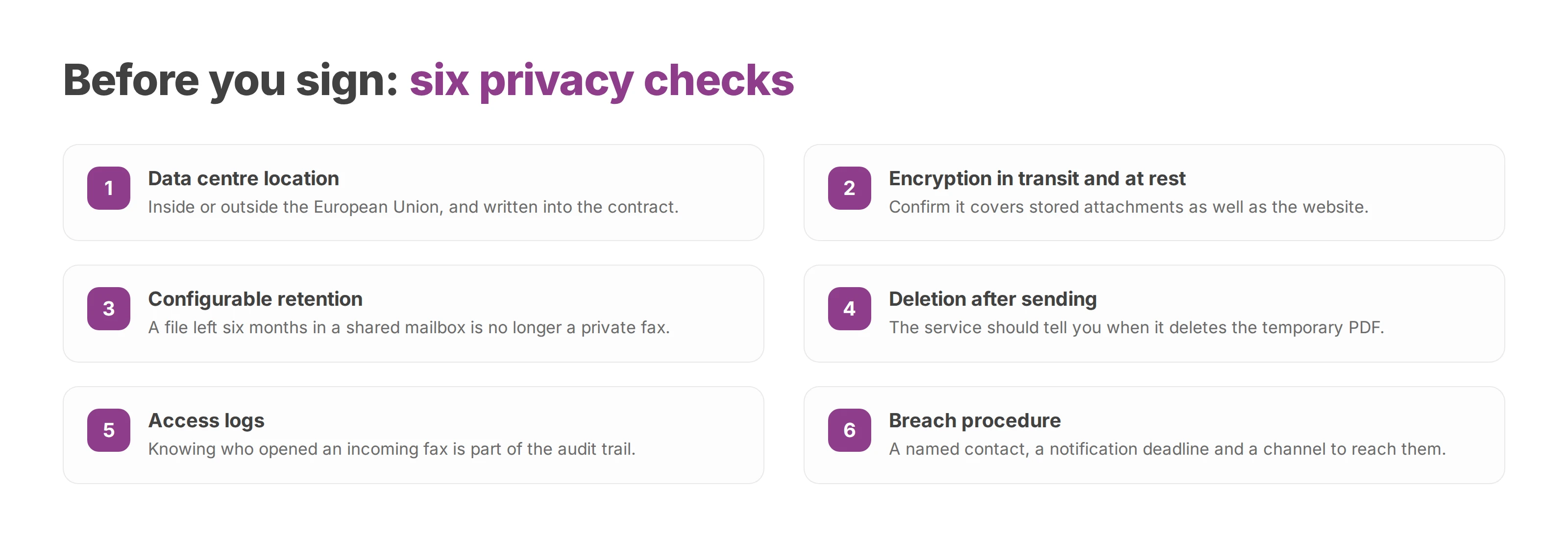
Data centre location. Inside or outside the European Union, and written into the contract.
Encryption in transit and at rest. Ask for confirmation that it covers stored attachments as well as the website.
Configurable retention. A file left six months in a shared mailbox is no longer a private fax.
Deletion after sending. The service should tell you when it deletes the temporary PDF.
Access logs. Knowing who opened an incoming fax is part of the audit trail.
Breach procedure. A named contact, a notification deadline and a channel to reach them.
The GDPR also asks you to record, for each processing activity, the categories of data, the recipients, the retention period and the security measures. A provider that can't give you those details in writing isn't fit for patient or client files.
Sending to the wrong number is the biggest risk
The costliest fax mistake is a named file sent to the wrong number, usually because of a badly kept contact list or a hurried retype. A second check on the recipient, permissions locked by role and inbox access limited to the people who need it close most of that gap.
A paperless service can widen your exposure if it keeps a copy of every fax in a shared mailbox, a backup and a support ticket. Send only the pages that are needed, and match the channel to how private the document is. Check the provider's encryption policy before you subscribe, because after the first incident it's too late to negotiate it.
Sectors that still rely on fax
Fax holds on where two organisations with uneven digital tools must swap a signed document with a dated record of sending. It also lasts where the other side won't accept registered electronic delivery.
Clinics, hospitals and care homes still fax prescriptions, test results and letters between specialists. Fax lets them exchange documents with less-equipped practices, and it leaves a record for health data. A service that handles health data has to provide security, confidentiality, traceability and incident handling. Where the risk to patients is high, the GDPR may require a data protection impact assessment. The healthcare phone system guide covers the rest of a practice's phone setup.
Solicitors, notaries, bailiffs and court offices value a channel that leaves a timestamped record of sending. A claim sent to a notary's office on a Friday afternoon often finds the fax machine is the only route to someone who'll see it straight away.
Some councils and public offices keep fax as a fallback channel. Property and insurance firms also run older internal circuits, mainly for case documents passed between branches and head office.
An online fax proves as much as the records you keep around it. Here's what to keep for each use.
So even a business that runs almost everything digitally gains from a working fax channel, because exchanges with these contacts don't stall. All it takes is the ability to send a compliant fax in a few minutes, and a machine isn't part of that. Is the fax dead? looks at the uses that keep the channel alive.
Pick your option and send your first fax
What you're sending and how often decide the tool, and the listed price comes after. A one-off page with nothing personal in it works on a free site, once you've checked what the site does with uploaded files. Regular sends that need an audit trail point to a paid service or to fax by email from your phone provider. Volume and the need for a dedicated number settle which.
If you have compliance duties, work in healthcare or run several sites, fax by email hosted in the European Union is the sensible default. Under the GDPR, a hosting or IT provider that handles personal data for you acts as your processor. The contract has to set out the subject, duration, nature and purpose of the processing, the types of data and categories of people concerned, and each party's obligations. It also has to give sufficient guarantees on technical measures, confidentiality and security.
Keep it simple for the people who send
A fax tool the front desk is nervous about gets used badly. Every extra account, password or portal gives someone a reason to skip the procedure or go back to paper. A tool that lives in the mailbox everyone already uses takes those reasons away.
Here's what to do in the next ten minutes. Prepare a two-page test PDF with a cover page. Send it to a test number or to your own receiving mailbox. Check the transmission report, especially the page count and the final status. Then write a one-page internal procedure that covers the number format, the page limit, where reports get filed and who approves faxes containing personal data.
Faxing online removes the machine, but proving a send and protecting its contents are still your job. A clean PDF, the right number format and an archived report cover most of it. The contract and the location of your files cover the rest.
Voxbi is a cloud phone system hosted in the European Union, and it handles fax by email. Incoming faxes land as PDFs in the mailbox you pick, and outgoing faxes leave from an ordinary email. IT integrators and telecom resellers roll it out site by site, with no analogue line to maintain. To add fax to your account, write to hello@voxbi.com.