
Call forwarding on Android: how to set it up and test it
How to forward calls on Android by condition, find the menu on Samsung, Pixel and Xiaomi, transfer a live call, test every rule and control who changes it.
Oct 30, 2026
How to run one on call phone number that reaches whoever is on duty, with out-of-hours routing, a weekly rota, a backup for unanswered calls and a monthly test.

A customer rings on a Friday evening after you've closed. Their service has stopped working, and a technician is on call that night. The phone still rings out in an empty office, because nobody linked the number the customer knows to the mobile of the person on duty.
An on call phone number makes that link. This guide is for IT support, maintenance and property management teams in small and mid-sized companies. For them, the hard part is keeping the route working through rota changes, annual leave and mobiles that go unanswered.
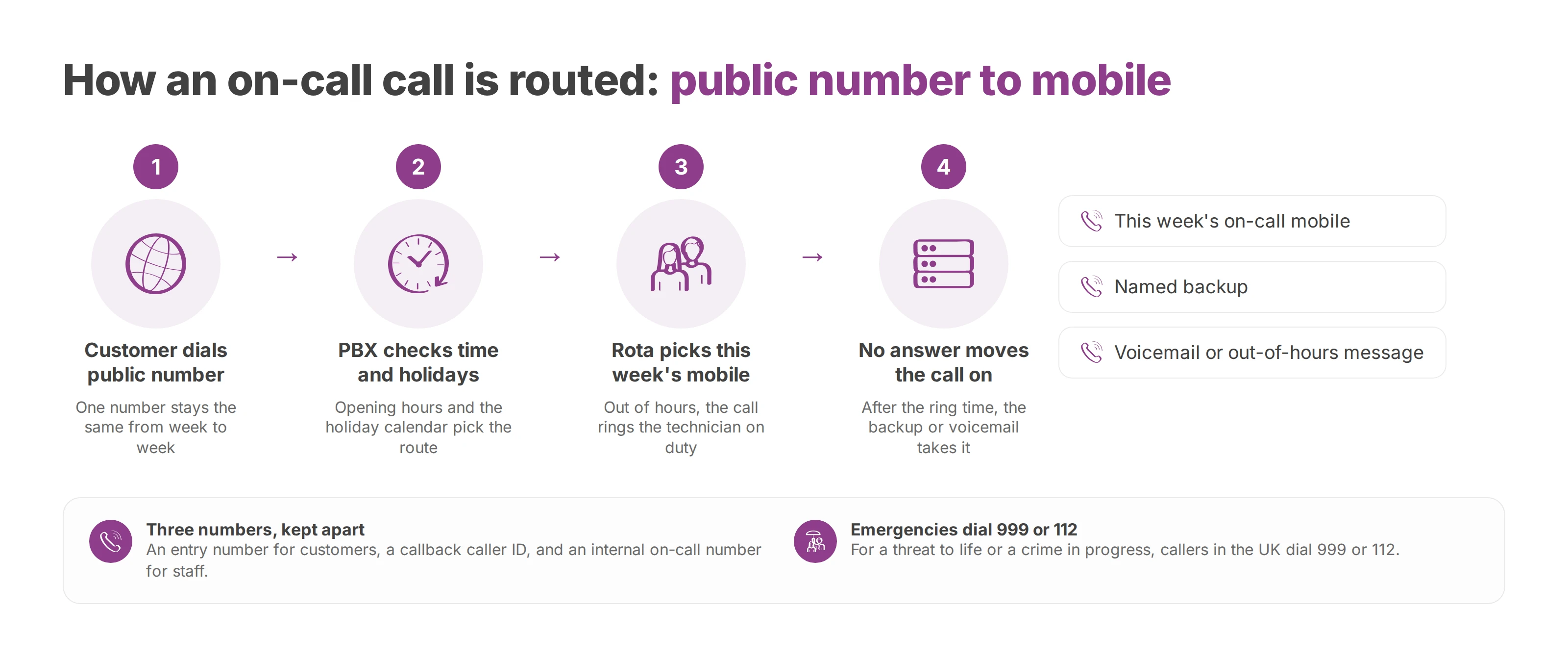
An on call phone number is one public number that always reaches whoever holds the on-call phone. The number stays the same from week to week. The destination behind it follows the rota, so out of hours the PBX rings this week's technician, and seven days later it rings the next one.
Behind that number, the PBX checks the time and the holiday calendar and picks the destination for the current week. When nobody answers, it moves the call on to a backup or to voicemail. Customers keep one number in their contacts and never need a technician's personal mobile.
Your on call phone number covers your own service. For a threat to life or a crime in progress, callers in the UK dial 999 or 112, and your out-of-hours greeting can remind them of that.
Most setups end up with a separate number for each kind of caller. The entry number is the one you publish to customers. The callback number is the caller ID a technician shows when ringing a customer back. You set it in the PBX so the company line appears on the customer's screen, and our guide to outbound caller ID covers how. The internal on-call number is for staff and authorised partners only. With all three apart, internal calls don't queue behind customers and personal mobiles stay out of customers' call logs.
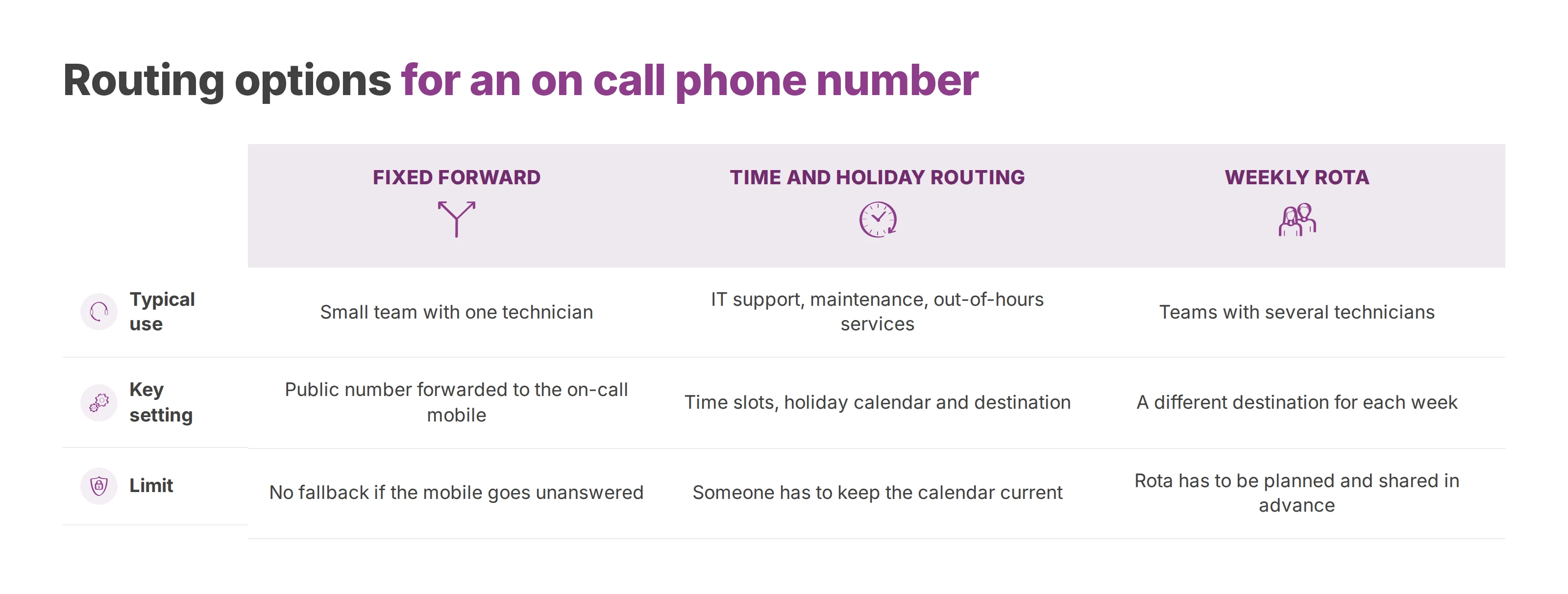
A fixed forward to one mobile works for a small team with a single technician. Once several people take turns, or a missed call has real consequences, the routing has to follow the calendar and deal with calls nobody picks up.
| Option | Typical use | Key setting | Limit |
|---|---|---|---|
| Fixed forward to one mobile | Small team with one technician | Public number forwarded to the on-call mobile | No fallback if the mobile goes unanswered |
| Time and holiday routing to the on-call mobile | IT support, maintenance, out-of-hours services | Time slots, holiday calendar and this week's destination | Someone has to keep the calendar current |
| Weekly rota | Teams with several technicians | A different destination for each on-call week | The rota has to be planned and shared in advance |
| Backup when nobody answers | Urgent work in healthcare, public services or multi-site operations | Ring time, then the next destination | Ring time has to match how fast people really respond |
| Voicemail or out-of-hours message | Non-urgent requests | Greeting and a dedicated mailbox | Nobody acts on the call straight away |
You can stack these options. A maintenance team might let the calendar switch on the on-call route, let the rota pick the destination and add a backup for unanswered calls. A voicemail system sits at the very end of that chain and holds the caller's details until morning.
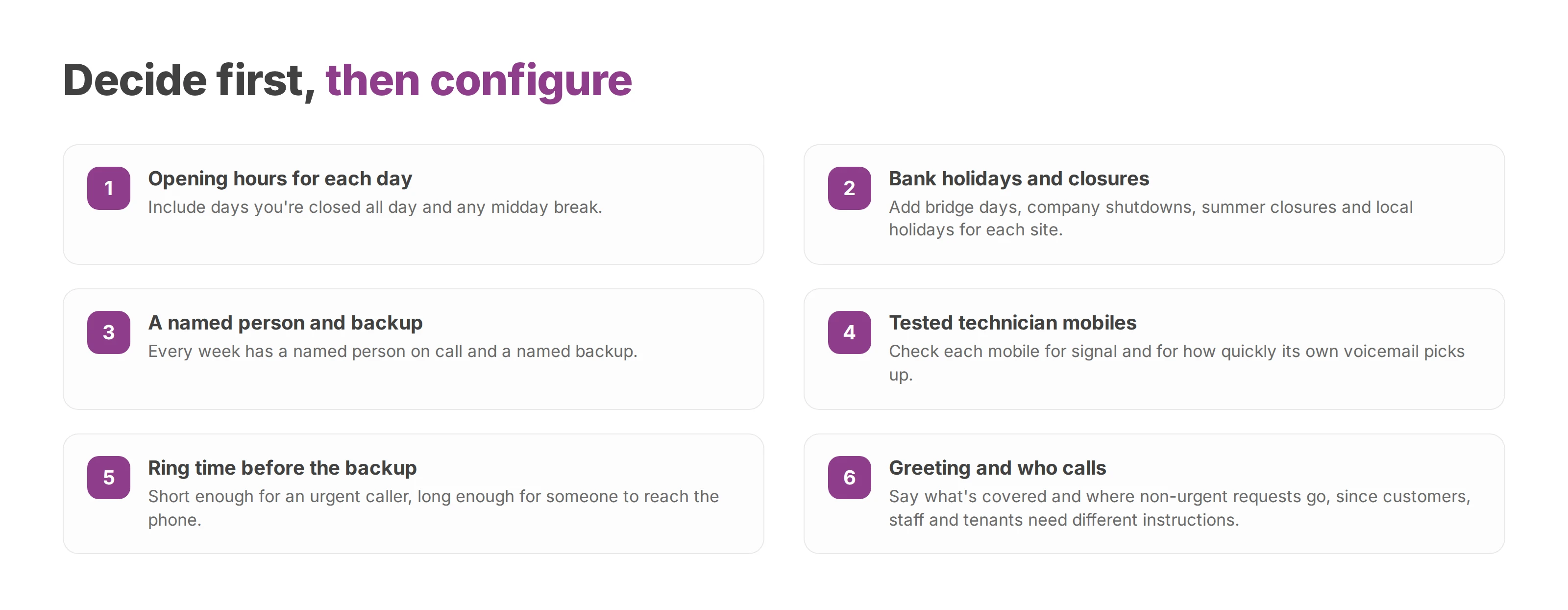
Most failed setups trace back to a decision nobody took. The administrator can only build a sound scenario from a brief the service manager has signed off, and that brief covers these points:
Opening hours for each day, including days you're closed all day and any midday break.
Bank holidays and one-off closures such as bridge days, company shutdowns or a summer closure, plus local holidays for each site if you run more than one.
A named person on call and a named backup for every week.
Each technician's mobile, tested before it goes live for signal and for how quickly its own voicemail picks up.
The ring time before the backup is tried. It should be short enough for an urgent caller and long enough for someone to reach the phone.
The out-of-hours greeting, which says what's covered and where non-urgent requests go.
Who calls. Customers, staff and tenants often have different priorities and need different instructions.
Every item on that brief needs an owner who can approve it.
Voxbi is a cloud PBX, and the routing rules live in the call scenario editor in Voxbi Cockpit. The administrator sets opening hours, bank holidays and on-call periods there. Outside opening hours, the call follows the on-call route.
On Voxbi One you build and change the scenario yourself, using Voxbi's setup guides and the Cockpit manual. On Voxbi Managed, our team sets the scenario up and runs it for you. On both lines the rules run in the cloud, so you don't install anything on site.
Open the scenario attached to the public number. Find the route that incoming calls really use, and note its current state before you change anything. Editing a scenario with a similar name that isn't attached to the number changes nothing for the caller.
Set opening hours day by day. Each time slot leads to the team's usual route, with no accidental gap at closing time. A common slip is copying Monday's hours to every day when one site closes early on Fridays.
Add bank holidays and one-off closures. Exceptions take the right route even when they fall inside normal opening hours. A forgotten bank holiday sends calls to a reception desk that's empty.
Assign the on-call destination. For the on-call slots, enter the mobile of this week's person on call. A destination left over from a swap rings the wrong person, even when every hour is set correctly.
Set the ring time and the backup. The route calls the backup when the person on call doesn't answer. Check that the technician's own mobile voicemail waits longer than the ring time, because a carrier voicemail that answers first ends the chain there.
Prepare the end of the route. A voicemail or out-of-hours message tells callers what happens next. Promise a callback only if someone's assigned to check the mailbox.
Publish, then test from an outside mobile. Cover business hours, the on-call period and one calendar exception, simulated if you need to. A call from an outside mobile takes the same path as a customer's call, which an internal extension can't reproduce.
Whoever runs the acceptance test logs the expected result and the actual result of each call.
The rota lives in a versioned schedule with one owner, and each week maps to one destination in Voxbi Cockpit. A shared spreadsheet that nobody owns drifts away from the phone configuration within a few weeks.
Annual leave, training days and other known absences go into the rota before it's published. Every week has a named person on call and a named backup, plus a written rule for last-minute swaps.
The manager changes the destination the day before the handover and checks that it takes effect at the agreed time. Switching mid-week without telling anyone opens a window where each person assumes the other is answering.
A weekly rota stops any one person becoming the permanent default, which also helps with fatigue.
The replacement accepts the week before anyone edits the rota or the scenario.
The handover note lists open incidents, the access needed and who to call for help.
The call log shows who took each call and when, so nobody has to rely on memory.
Call forwarding does the underlying work. The destination moves from one week to the next while the public number stays put, so customers never need to know the rota or keep a technician's personal number.
A personal calendar status shouldn't quietly reassign an on-call week either. Every swap is made explicitly and confirmed by the person taking over.
The rota decides who rings, and the configuration decides when.
The monthly test forces a missed call on purpose. The manager rings the public number from outside, and the person on call lets it go unanswered. The manager then watches the call move to the backup and gets the backup to confirm they've taken it.
Every step gets timed and logged. Repeated tests give you a real median, while a single test gives you one observed time.
| Indicator | How to calculate it | What it shows |
|---|---|---|
| Answer rate | Calls answered divided by out-of-hours calls received, per month | How reachable the service really is |
| Time to acknowledge | Time answered minus time the call arrived | How fast the first responder reacts |
| Time to resolve | Time closed minus time of first contact | Whether the team can fix the problem, beyond picking up |
| Escalation rate | Calls passed to the second level divided by all calls | The share of cases the first level can't handle |
| Monthly failover test | Seconds between the test call, the missed answer and the backup's acknowledgement | Whether the chain works with no manual help |
The log keeps a person answering apart from voicemail picking up. When a technician answers but can't take the job yet, record the operational acknowledgement on its own line and treat the answered call as a telephony figure.
Live call dashboards come with Voxbi Plus and above on Voxbi One, and with Voxbi Business and above on Voxbi Managed, and they show routes and call volumes. Diagnosis and closure details belong in the incident ticket, since the call log only records the call itself.
A technician who answers without system access, a procedure or the authority to decide can't actually handle the incident. The acceptance test checks those three things too, without setting off anything risky in production.
Reports split the on-call period, remote work and site visits, so time worked and time off are easy to count. For medical or confidential calls, keep the metadata you need, limit content recording and control who can access it and for how long. Our guide to call log retention covers the timelines.
When the on-call mobile stays silent and the rota shows the right name, start with the destination that's actually published. Repeat the call from an outside mobile before you suspect a wider outage.
| Symptom | Likely cause | Fix |
|---|---|---|
| The on-call mobile never rings | Wrong destination for the week, or the rota wasn't published | Check the destination and test from an outside mobile |
| An out-of-hours call lands on the main line | A time slot with the wrong boundary, or the wrong time zone | Review the time slots and the time zone setting |
| A bank holiday call isn't routed | The holiday is missing from the calendar | Add this year's holidays and closures |
| A night call goes unanswered | No second level set up | Add the next destination and a ring time |
| The mobile is busy or out of signal | No fallback to a backup | Turn on the backup, then the fallback voicemail |
| The technician answers but can't act | Access and procedure aren't written down | Document access, procedure and who can decide |
A technician can answer the phone and still have no capacity for a new incident. The backup is a second, available person with their own mobile.
The manager decides who reassigns the incident and how the caller hears that someone has taken it.
Staff who ring the public number reach a greeting meant for customers, and their urgent request waits behind it. Internal instructions name the staff number, the incidents that justify using it and the details to give when calling.
A property manager uses the same logic to separate an admin request from a technical fault that needs a visit. A plain greeting sorts the calls, and the caller never has to understand how the team is organised.
Troubleshooting also tells a scenario error apart from a mobile network outage or a fault in the phone service. PBX high availability covers the platform side, and a backup person who's actually free covers the human side.
Before each handover, the service manager collects explicit confirmations. A setup that worked last week can drift when a person changes, a closure approaches or a mobile is replaced.
The week is published, the person on call has accepted it and the backup has confirmed.
The scenario's hours, holidays and both destinations match the live rota.
A call from an outside mobile followed the expected route in business hours and out of hours.
The team knows which number goes to customers and which one stays internal.
On Voxbi, the administrator opens the call scenario editor in Voxbi Cockpit and checks the time slots and destinations before the handover. On Voxbi One that's a change you make yourself. On Voxbi Managed, our team makes it for you.
Voxbi is built and hosted in the European Union, so your calls and data stay within European Union borders under the GDPR. Access rights, staff instructions and confidentiality remain the employer's job.
Put the next monthly test in the operations calendar and name the person who fixes any gap it finds. To plan an on-call route or have yours reviewed, write to hello@voxbi.com.
How to forward calls on Android by condition, find the menu on Samsung, Pixel and Xiaomi, transfer a live call, test every rule and control who changes it.
How to configure VoIP in Odoo, from the access right and SIP provider settings to user extensions, international number format, troubleshooting and the GDPR file.
Your phone system sends a number and a name. Whether your business name shows depends on number authentication and the receiving operator.
Start a free trial, or work with a certified Voxbi partner.