
Law firm phone system: the complete guide
How a law firm phone system routes every call, keeps professional secrecy intact under the GDPR, and what to check before you migrate or pick a provider.
Oct 26, 2026
How to choose, secure and migrate a healthcare phone system: queues, on-call routing, GDPR health-data rules, resilience and the contract terms that matter.

It's Monday, 8.30, and the switchboard is already overflowing. Reception is juggling cancellations, requests for test results, worried relatives and transfers to the wards. For anyone running a clinic, a care home or a multi-site hospital group, the healthcare phone system is often the patient's first point of contact. Sometimes it's the only one, and it's the last safety net before a care pathway breaks down.
A good purchase starts from three risks: risk to patients, cyber risk and regulatory risk. The architecture follows from them. A feature catalogue makes a livelier sales deck, but this order gives you a system that still answers on the bad days.
A healthcare phone system is the telephony platform a care provider uses to receive, route and track calls from patients, relatives, partner services and its own staff. It's usually a cloud or on-site PBX tuned for care work. That means queues per department, an IVR that separates clinical from administrative calls, out-of-hours and on-call routing, short internal extensions, and recording and voicemail rules that respect health-data law.
Office telephony and a healthcare phone system share the same building blocks. The healthcare version adds tighter rules for who hears a recording, where voicemail is stored and what happens to a call at 3 a.m.
A care provider finds out how good its phone system is on the day everything gets tight at once. Admissions are full, a doctor calls in sick, the rota changes and two sites need to coordinate a transfer. On that day the voice line connects patient, reception, clinicians and partner services. If it fails, access to care degrades within minutes.
Patients now reach clinics by email, text message and online booking as well, a shift that sped up after 2020. The phone stayed, and its job changed. It now takes the calls the other channels can't resolve, sorts them and sends each one to the right desk.
For an IT department, this puts the phone system next to the network and the clinical record as a business-continuity component. A recovery plan that leaves out telephony also leaves out the first thing patients try when something goes wrong. Our guide to PBX high availability covers what failover should include.
The test for each feature is the operational risk it removes when it works under load and outside office hours. A feature that only shines in a demo adds cost and nothing else.
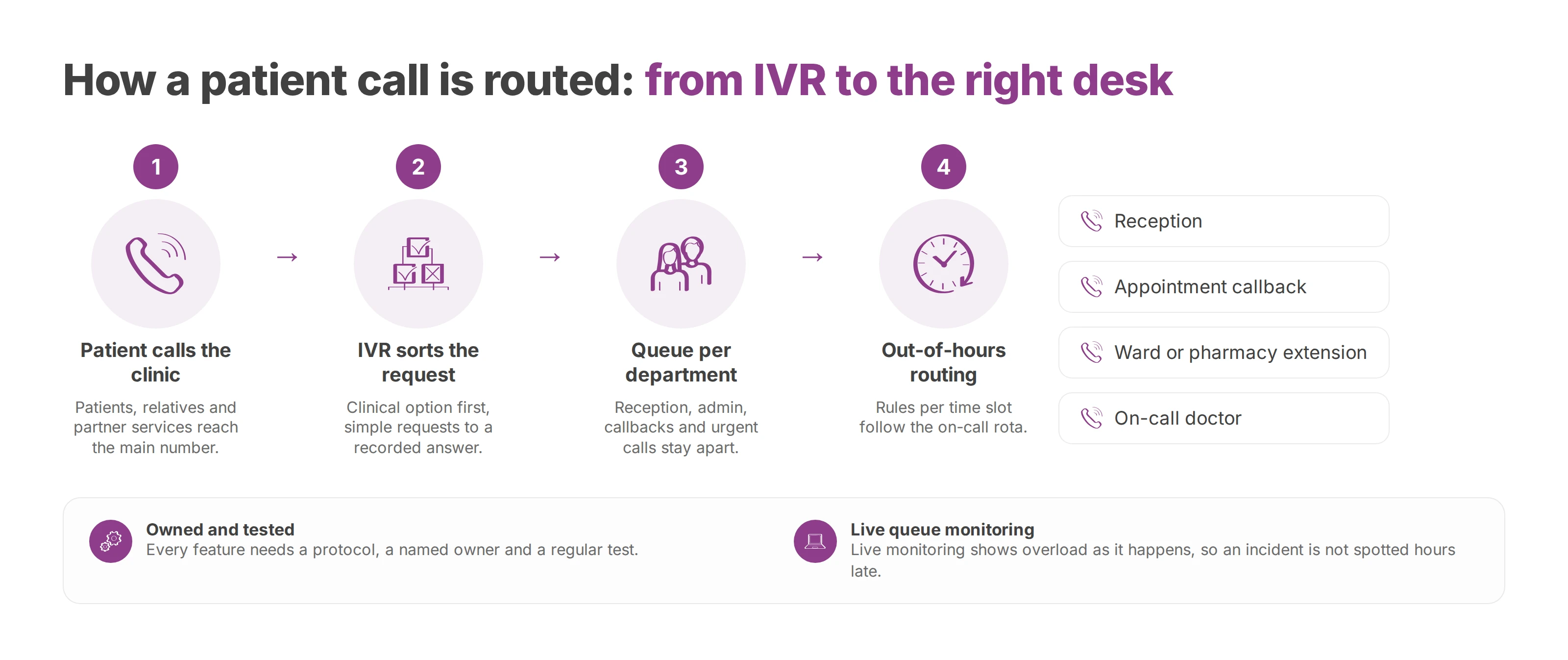
Queues stop a busy morning from turning into lost calls. Set up per department, they keep reception, admin requests, appointment callbacks and urgent calls from competing in one line. Our guide to call queuing in a cloud PBX walks through the settings that matter.
A well-built IVR cuts misrouted calls and stops reception acting as an improvised dispatcher. It stays short, puts the clinical option where a worried caller hears it first, and sends simple requests (opening hours, directions, repeat prescriptions) to a recorded answer or a callback. A badly built one annoys callers and hides the bottlenecks you'd want to see.
Out of hours, each department needs written failover rules for each time slot, and a named person who owns them. When the on-call doctor changes at 20:00, the routing should follow the rota automatically. Rules that live in a technician's memory fail the first time that technician is on holiday.
Short, consistent extension numbers keep internal calls quick. On a multi-site group, they let a ward on one campus reach the pharmacy on another without going through the main switchboard.
A solid specification also covers paging and group announcements, overflow scenarios, live queue monitoring and outbound callbacks. It should separate an administrative emergency from a clinical request, so reception staff aren't left making triage decisions that belong to the organisation.
Every feature needs a protocol, a named owner and a regular test.
Here's the minimum each feature should deliver:
| Feature | Job | Incident it prevents |
|---|---|---|
| Queue per department | Absorb peaks | Lost or misrouted calls |
| Targeted IVR | Qualify the request | Overload on the main switchboard |
| Out-of-hours routing | Keep access open | No answer in the evening or at weekends |
| Short extensions | Speed up internal calls | Needless transfers |
| Live monitoring | Show overload as it happens | An incident spotted hours late |
Designed this way, the phone system becomes a tool for organising care and admin, with its own rules for clinical priority.
Compliance starts by mapping what passes through the system, where it's stored, who can reach it and in what legal role. On a healthcare phone system, that covers call recordings, voicemail, some call metadata, admin logs and any transcripts an AI feature produces.
Article 9 of the GDPR treats data concerning health as a special category. Processing it is prohibited unless one of the article's exceptions applies. The one most care providers rely on covers medical diagnosis and the provision of health care by professionals bound by confidentiality. A voicemail that says "I need to move my chemotherapy appointment" is health data. So is the recording of a triage call, and so can be the bare fact that one number keeps calling the oncology queue.
That classification raises the bar. Large-scale processing of health data usually calls for a data protection impact assessment under Article 35, and Article 32 expects security measures that match the risk. If you're in the UK, the UK GDPR carries the same articles, and the Information Commissioner's Office is the authority you'd answer to.
The care provider remains the controller. The phone provider acts as a processor, on a scope you'll define precisely in an Article 28 contract. If a personal data breach is likely to put people's rights and freedoms at risk, Article 33 requires the controller to notify the competent supervisory authority without undue delay and, where feasible, within 72 hours of becoming aware of it.
A provider worth signing with therefore supplies alerting, logging, escalation and evidence retention. Without those, the controller can't qualify an incident quickly or meet the deadline. Recording adds its own questions of lawful basis, notice and retention, which our guide to call recording and GDPR works through.
Hosting in the European Union keeps the data under European law and simplifies questions about transfers abroad. The controller still has to document the processing, classify the data and set out each party's role before deciding the system fits. "The servers are in Europe" answers only the first of those questions.
Transcription, call summaries and call analysis are now common on phone platforms, and each one turns speech into text that can contain health data. The EU AI Act phases in over several dates. Its prohibitions applied from 2 February 2025 and its rules for general-purpose AI models from 2 August 2025. General application follows on 2 August 2026, and some high-risk rules on 2 August 2027. The European Commission has since proposed moving some high-risk deadlines, so the current timetable is worth checking before you plan around it.
For systems classed as high-risk, the regulation requires documented risk management, record-keeping, human oversight and cybersecurity measures. A supplier that adds an AI feature should be able to show how it documents each of them. A bare "AI Act compliant" label says nothing about that documentation.
Resilience decides this choice. The question for every architecture is whether voice keeps working when the IT network degrades, a site goes dark, an admin account is compromised or a carrier is unavailable.
A cyberattack can halt all or part of a hospital and leak sensitive data. That's why the phone system belongs in the critical IT estate, with network segmentation, encryption where it's supported, strong authentication, logging and a procedure for falling back to degraded mode. Backups, continuity plans and recovery procedures cover it too.
An on-site PBX in a single network room, poorly segmented and poorly backed up, is more fragile than a well-designed cloud service. A cloud service that won't show you its hosting, logs, admin access and carrier failover is just as hard to defend.
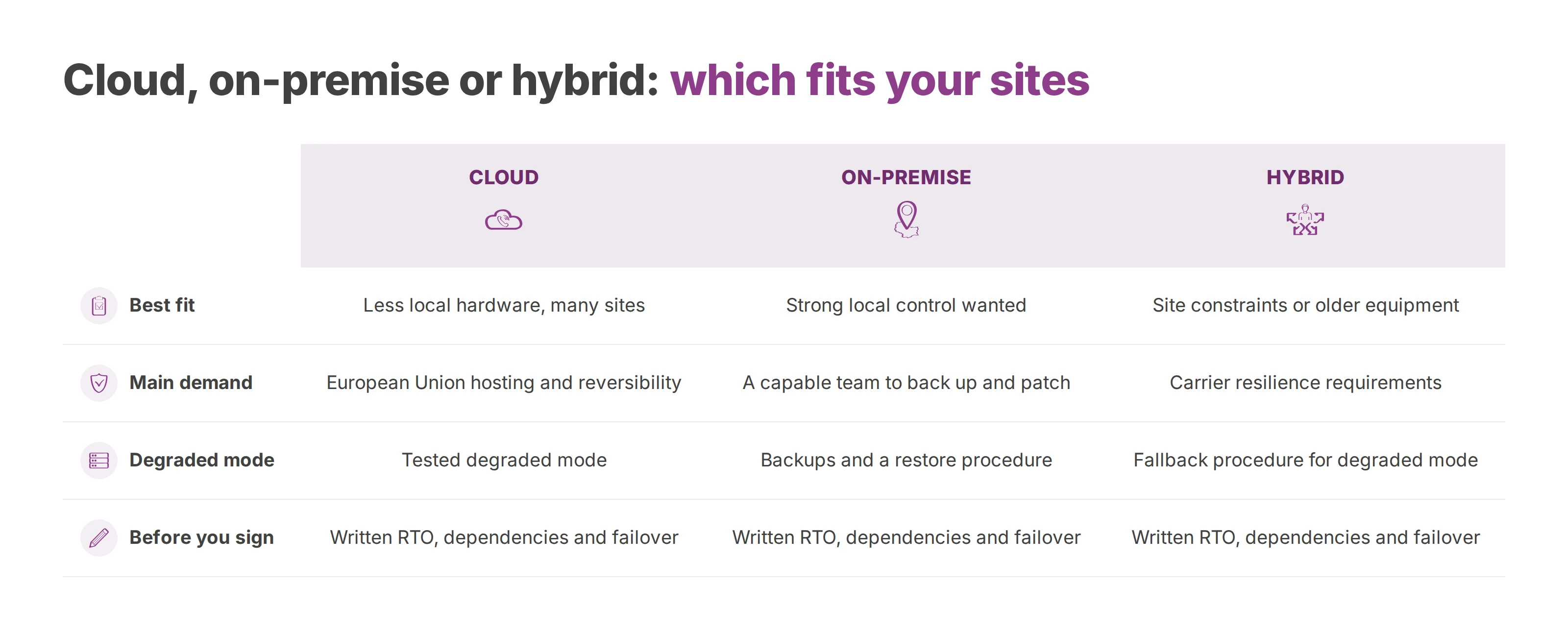
Cloud fits when you want less dependence on local hardware, central administration and faster changes across sites. The demands then shift to EU hosting, reversibility, encryption and a tested degraded mode.
On-premise fits an organisation that wants strong local control, has a capable operations team and accepts the work of administering, backing up and patching the system.
Hybrid often suits groups with site constraints, carrier resilience requirements or older equipment that has to keep running.
Whichever you pick, the recovery time objective (RTO), the network dependencies and the failover need an owner and a written answer before you sign. A system with no defined RTO has no promise you can test.
A phone system that sits apart from the rest of IT costs more than it returns. Staff fill the gaps by hand, reception re-qualifies requests and clinicians call back without context. The phone belongs inside the tools staff already use, with each connection kept narrow so it doesn't open a new attack surface.
The first layer identifies the caller and shows the right record, department or appointment when the phone rings. A receptionist who sees that context answers better and transfers less, which cuts the noise in a busy front office.
The second layer runs through APIs and computer telephony integration. Three cases need telling apart:
Native integration, where the phone platform already talks to the target tool.
A standard connector, acceptable when data flows, permissions and logs are under control.
Custom development, kept for needs that set the organisation apart, because it creates technical debt.
Microsoft Teams comes up quickly in most care organisations. It can suit some staff groups well. Queues, reception, overflow and continuity still need rules built for care, and the decision follows how each group of staff works, whatever licences are already paid for.
Voxbi is a cloud PBX hosted in the European Union. On the self-service Voxbi One line, Odoo, Microsoft 365 and API access come with the Plus plan and up, and Microsoft Teams costs €50 a month extra. On Voxbi Managed, API access starts on Professional, with Odoo at €29.50 a month and Microsoft Teams at €72.50 a month as add-ons priced per phone system. That setup suits a provider that wants central administration, usage records and several sites on one platform without rebuilding a stack of local hardware.
Which service account calls which API, and how often are its credentials rotated?
Which logs prove an access, a change or a failed sync?
Which data appears on screen, and which has no reason to be there?
Which fallback stays available if the clinical tool or the integration goes down?
The integrations that age well are minimal, documented and reversible.
The market sells licences, handsets and promises of simplicity. A care provider is buying control over risk, so the specification should rule out vague answers and demand evidence you can check.
Ransomware, theft of health data and unauthorised access can endanger patient safety and stop a facility working. That's the case for a zero-trust approach to SIP phones, softphones and admin interfaces. The minimum looks like this.
Network segmentation between voice, administration and other sensitive environments.
Encryption of signalling and media where the architecture supports it.
Strong authentication on every admin account.
Logging of configuration changes, with logs kept in a form you can actually use.
Configuration backups and a documented restore procedure.
A degraded mode with a backup reception number and rules for isolating a compromised handset.
The contract should set out the GDPR roles, where backups are stored, who can access recordings and metadata, how you leave and how numbers port out. It should also say how evidence is preserved after an incident.
Administration is where silent contracts hide the most risk. Who can listen, export, change or delete? If the contract doesn't say, that risk still exists, and it lands on you when something goes wrong.
Service levels belong in the contract as well. On Voxbi Managed, the Business and Enterprise plans carry the Business SLA level: 99.90% monthly service availability, a maximum response time of 3 hours and fault processing seven days a week from 07:00 to 19:00. Voxbi One comes with email support and no SLA.
A cheaper offer gets expensive as soon as it forces the organisation into manual workarounds, extra audits or local fixes. In the scoring, the resilience you actually get deserves more weight than the price per user.
Most cutover incidents happen in the same places: an incomplete inventory, forgotten numbers, routing rules nobody wrote down, and hidden dependencies on a lift phone, an alarm, an on-call line or a reception handset. Project discipline prevents more of them than any technology choice.
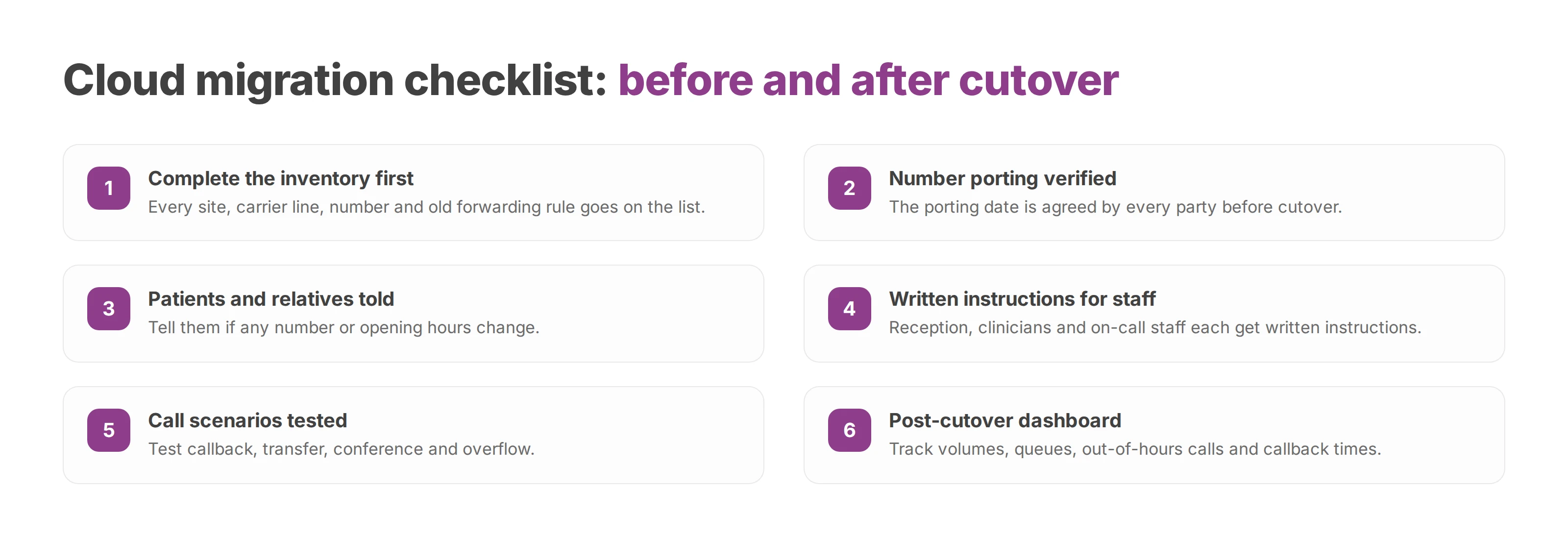
Sites and carrier lines. Every connection, backup line, local dependency and critical operating window goes on the list.
Numbers and uses. Main line, admissions, theatres, wards, direct numbers, technical lines, on-call numbers and old forwarding rules. Nothing should live only in one technician's or secretary's head.
Data processed. Recordings, voicemail, logs and privileged accounts get identified, so the Article 9 basis and the retention rules can be set.
The pilot runs on a real department you can control, and the main reception stays off it on day one. It tests audio quality, routing, answer times, admin rights and behaviour when the network drops or a service is partly down.
A well-sequenced cloud PBX migration also covers internal communication, targeted training and formal sign-off on overflow scenarios.
On cutover day you'll want a small cell that's decisive and reachable. After the switch, hypercare fixes what testing never shows. Typical finds are a queue with the wrong priority, an out-of-hours forward that contradicts the rota and a dashboard the team misreads.
The final checklist:
Number porting verified, with the date agreed by every party.
Patients and relatives told if any number or opening hours change.
Written instructions for reception, clinicians and on-call staff.
Tests of callback, transfer, conference and overflow.
A post-cutover dashboard with volumes, queues, out-of-hours calls and callback times.
A clean migration brings predictable incidents under control within hours of them appearing.
The right timetable is the one your organisation can absorb without improvising. A small practice with one site and simple call flows can move quickly. A multi-site group with on-call rotas, technical lines and years of forwarding rules needs more preparation. The best predictor of a smooth cutover is how complete the inventory is before the switch.
A small team with a clear mandate does the job. At minimum that's a lead from reception or the medical secretaries, an infrastructure lead, and a decision-maker who can settle questions fast. Depending on how sensitive the data is, someone from security or data protection joins them. Projects drift when everyone takes part and nobody decides.
The two work best as separate functions, even when they share technical components. The main switchboard handles patient and administrative traffic. Internal emergencies need immediate availability, priority, dedicated routing and their own degraded mode. On Voxbi Managed, wake-up calls and emergency routing come with the Business and Enterprise plans.
The GDPR governs how personal data, including health data, is processed. EU hosting governs where that data sits. Hosting in the European Union helps you control location, while the legal analysis, the processor contract and the documentation of data flows remain your job as controller.
The floor is a backup reception number, the ability to isolate a compromised handset, a configuration you can restore and a minimal service that runs in degraded mode. Everything above that floor is open to negotiation.
The useful measures are abandoned calls by reason, time to answer per department, callbacks actually made, out-of-hours calls and how escalation rules performed. Phone overload or a long spell in degraded mode reaches patient care quickly, especially in care homes and community services.
Voxbi runs a cloud PBX built and hosted in the European Union, with central administration and integrations such as Microsoft Teams, Odoo and an API on the plans above. Mixvoip, which owns Voxbi, supplies the phone numbers and the carrier side. Before you sign with any provider, check the architecture, the GDPR roles, the degraded mode and the exit terms. If you'd like to go through them with us, write to hello@voxbi.com.
How a law firm phone system routes every call, keeps professional secrecy intact under the GDPR, and what to check before you migrate or pick a provider.
A call handling process decides who answers, how long callers wait and where a call goes next. Here's how to build the routing, IVR, queues, scripts and KPIs.
Call queuing holds callers in an ordered line inside your cloud PBX. How it works, which options to switch on, which metrics to watch and how to configure a queue.
Start a free trial, or work with a certified Voxbi partner.