
On call phone number: a step-by-step guide for a cloud PBX
How to run one on call phone number that reaches whoever is on duty, with out-of-hours routing, a weekly rota, a backup for unanswered calls and a monthly test.
Oct 31, 2026
A how-to for AI phone answering on your business number: start with after-hours and overflow calls, hand callers to a person, then run a short pilot.

The shop has just closed. The phone is still ringing, but the team has gone home, and the caller hangs up without leaving a message. Next morning, nobody knows whether they wanted the address or had a project to discuss.
AI phone answering can make that moment count. It works when you start small: a narrow set of calls, instructions you can check, and a way through to a person. The goal is not to automate every call. It is to pick the calls where a limited answer beats no answer at all.
This guide walks through the setup step by step, from the first calls to hand over to a pilot on your real number.
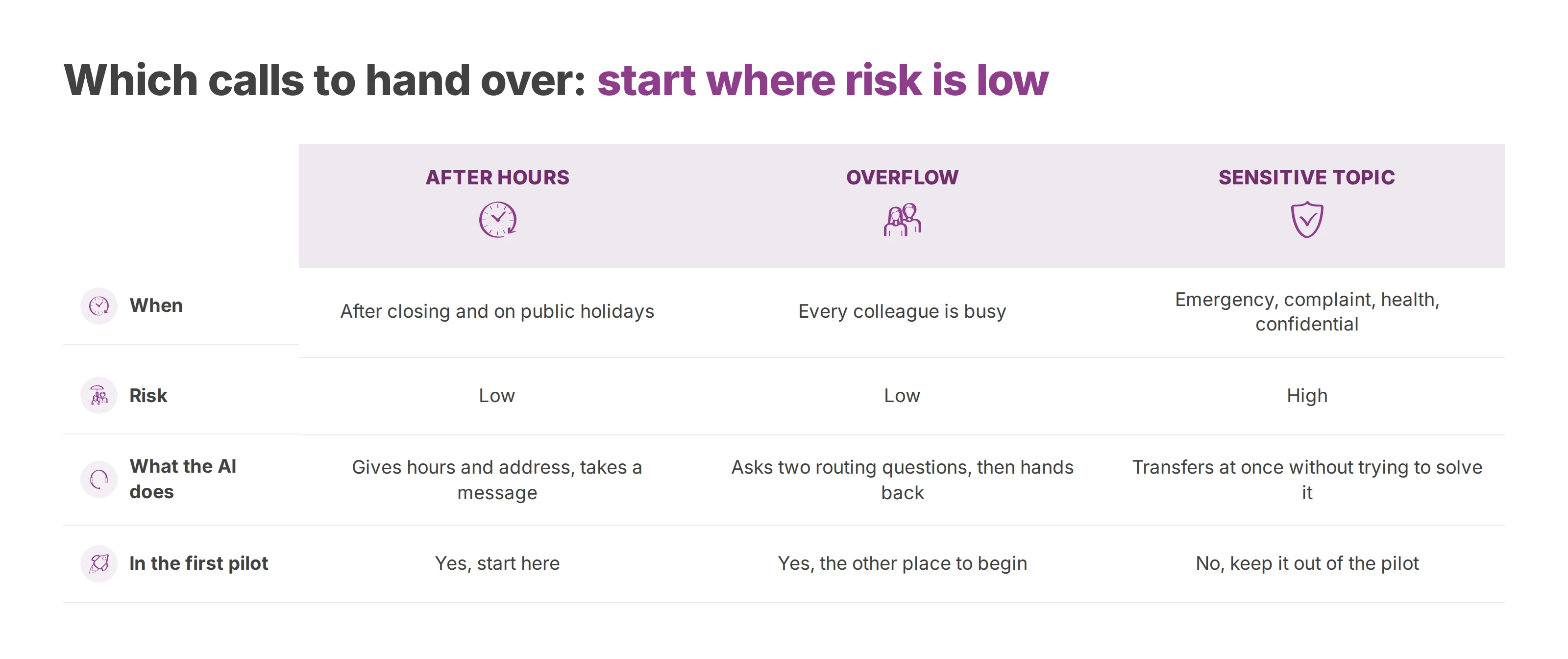
Start with after-hours answering for non-urgent requests. Overflow, when every colleague is already on a call, is the other sensible place to begin.
| Scenario | When | Risk | What the AI does |
|---|---|---|---|
| After hours | After closing and on public holidays | Low | Introduces itself, gives hours and address, takes a message |
| Overflow | Every colleague is busy | Low | Asks two routing questions, then hands back |
| Routine questions | Repeated requests about hours, directions or availability | Medium | Answers briefly and offers a person |
| Sensitive topic | Emergency, complaint, complex quote, health or confidential matter | High | Transfers at once without trying to solve it |
Outside opening hours, the assistant says it is automated in its first sentence. It offers a person straight away, if your business can provide one at that hour. Then it gives your hours and address, or it collects a name, a callback number and a one-line reason.
The greeting can tell callers when the team will ring back, but only if someone owns that callback. A promise to call back next morning means nothing when nobody has the job of reading the messages. So name that person before the assistant goes live.
The risk is low only if sensitive calls take a separate route. An emergency plumber or a locksmith can't treat every evening call as a question about opening hours.
Starting rule: the AI handles the requests you planned for. It doesn't decide on its own which call deserves an exception.
When the team is already on calls, the assistant can ask whether the call is about an existing order or account, then which department the caller wants. Those two questions are there to route the call, not to keep the caller busy. A free colleague, a queue or voicemail then takes over, with no unexplained silence.
Frequent questions come next. Opening hours and directions are good candidates. Availability needs more care: without current information, the assistant offers to have a person check, and never claims a product, room or slot is free.
Before you widen the scope, ask the team to jot down rough reasons for calls during one ordinary week. That record separates repetitive requests from rare calls that matter. It will also help you improve how your business handles calls, even with no extra automation.
Keep emergencies, complaints, complex quotes, health topics and confidential matters out of the pilot. Write the tone plain and polite, with short sentences. The assistant is one function of your cloud phone system.
Customers call the number saved in their contacts, printed on an invoice or published on your website. AI answering has to sit inside that route. A test on a separate line checks neither your opening hours nor the routing of your main number.
List the numbers in use. Your main number is rarely the whole picture. Add published direct lines, numbers for each site and any forwarding already in place. Give each number an owner and an expected route.
Plan porting if numbers move. Keep your old system live until the agreed porting date. The steps and timings vary by country, and our guide on how to port a business phone number without losing calls walks through them.
Set the call destinations. Configure opening hours, public holidays, queues and voicemail in your call flows. Check who receives messages and which route applies on an unplanned closure.
Switch on one branch at a time. Connect the AI to the closed-hours branch or the overflow branch and leave the rest of the route untouched. You can then go back to the previous setup without rebuilding your telephony.
Plan a fallback after each transfer. If the colleague doesn't answer, the call moves on to another user, a queue or a voicemail box that suits that department.
Call the public number. Test the pickup, the routing and the final destination before the switch, then again on porting day. Listening to the greeting alone proves very little.
Your call flow should record who may change each rule. You approve opening hours and business exceptions. Your IT integrator or telecom reseller checks the routing and keeps the service running.
Voxbi AI Receptionist answers calls on your business numbers and can pass the call to a colleague in the same phone system. On Voxbi Managed, our team sets up and runs the phone system, and you reach a real person by phone. On Voxbi One, you set up the phone system yourself with our guides and the Cockpit manual, and our team sets up the AI part for a fixed fee. In Belgium and Luxembourg the AI receptionist comes with Voxbi Managed only. Either way, the AI joins the numbers and call flows you already have. It doesn't replace your phone system. The AI receptionist page covers prices and plans.
Whether you run one office or several sites, connect the AI first to a branch where a missed call costs little. Check the route on that number before you extend AI answering to other lines.
This short video shows how the Voxbi phone system works.
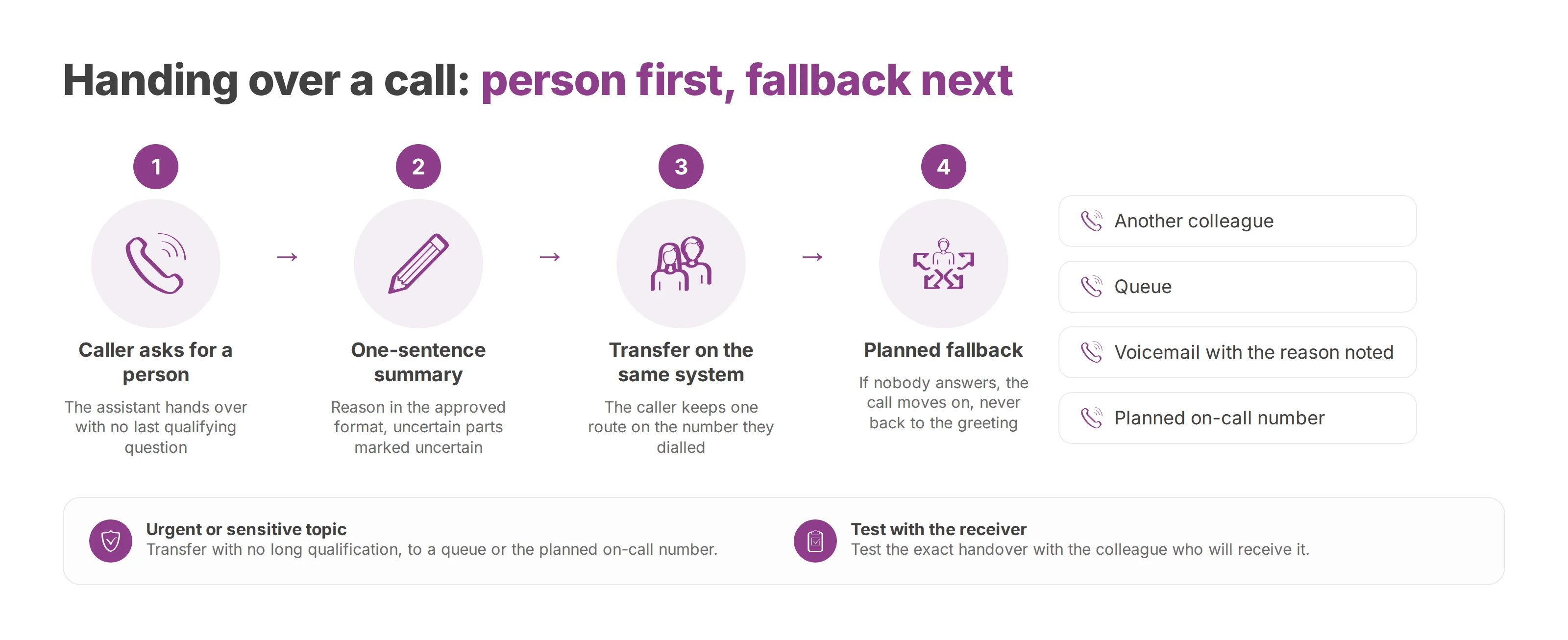
As soon as the caller asks for a person, the assistant hands over. It doesn't squeeze in one last qualifying question. If the colleague doesn't pick up, the planned fallback applies, and the caller doesn't land back at the start of the dialogue.
An evening call can open with a question about hours and turn into a repair request. At that point the AI drops its ordinary script. What the caller needs now matters more than the route the call started on.
| Signal | Action | Fallback if nobody answers |
|---|---|---|
| Caller asks for a person | Immediate transfer | Another colleague, then a queue, then voicemail |
| Caller repeats the question | Stop the dialogue and transfer | Voicemail with the reason already noted |
| Urgent or sensitive topic | Transfer with no long qualification | Queue or the planned on-call number |
| Routine question answered | End the call or take a message | No transfer |
The transfer lands with a colleague, a queue or an extension on the same phone system. The caller keeps one route on the number they dialled. Nobody asks them to redial another number and start over.
The assistant sums up the reason for the call in one sentence for the colleague, in the format you approved during setup. It marks anything uncertain as uncertain. "Repair request, details to confirm" helps the colleague far more than an invented diagnosis.
An attended transfer helps colleagues organise a handover between people. That is not a promise that every detail travels with the call automatically, so test the exact handover with the colleague who will receive it.
A successful transfer ends with a person or with a fallback the caller was told about. It never sends them back round to the same greeting.
At a restaurant after closing, the assistant takes the caller's name and preferred time as a callback request. It won't confirm a booking without reliable information. If the caller insists on speaking to a manager, the call goes to the planned destination, as long as someone there can pick up.
At a medical or law practice during the morning rush, the assistant absorbs the overflow and hands back as soon as a line frees up. It needs none of the confidential detail to send a caller to the front desk.
The opening line can read: "You're speaking with an automated assistant. You can ask for a person at any time." You then adapt the wording to your business. What matters is that no caller thinks an employee is on the line.
To take a message, the assistant needs a brief reason and a way to call back. It has no use for a diagnosis, a family situation or the details of a dispute. Write its instructions so that it stops politely when a caller starts giving too much detail.
The European Data Protection Board says voice data is inherently biometric personal data. Using it to identify a specific person needs a legal basis under Article 6 of the GDPR and a derogation under its Article 9, as the Board's guidelines on virtual voice assistants explain. For a small business front desk, the safe default is to switch voice biometric identification off.
Set these collection limits before anyone writes the conversation scripts.
Knowing why someone is calling tells you nothing about who they are. If a request needs an identity check, your usual procedure or an employee handles that step. Don't use voiceprints to speed it up.
Set a retention rule for each type of data:
Message. Keep what you need to call back and deal with the request.
Transcript. Keep the content lean and set a retention period tied to its purpose.
Recording. Justify it separately, restrict who can open it and schedule its deletion.
You decide who can open each record, you protect the data, and you give callers a way to exercise their rights. Keeping data forever to train a model is not an acceptable default. Our guide to call recording and the GDPR covers lawful basis, notice and retention in more depth.
Sending personal data outside the European Union is not banned in itself. The European Commission lists the mechanisms for international transfers, including adequacy decisions, standard contractual clauses and, in some cases, derogations. The mechanism has to match the processing that takes place.
Voxbi is built and hosted in the European Union. Calls, recordings and call notes never leave the European Union, and every call is encrypted in transit. That supports European data sovereignty. You still need to check GDPR roles, access rights and retention periods on your side.
The AI Act phases in its obligations over several dates, according to the European Commission's implementation timeline:
2 February 2025: prohibitions, definitions and AI literacy.
2 August 2026: the transparency requirements of Article 50, which cover systems that talk to people, and the start of enforcement.
2 December 2027: obligations for the high-risk systems listed in Annex III.
2 August 2028: obligations for high-risk systems built into regulated products (Annex I).
A timeline on its own doesn't prove that a phone assistant complies with the AI Act.
So write down exactly what the AI may do. Bar it from settling a complaint, granting a discount or answering a health question. The usual mistakes are concrete ones: hiding the automation, leaving out the human transfer, giving the AI every call, piling on questions and forgetting the fallback.
We suggest a pilot of two to four weeks on one well-defined intent, with someone reviewing the failures every day. Callers sometimes say more than the assistant needs. The European Data Protection Board's guidelines, written for voice assistants that switch on by accident, say that a controller who finds personal data collected by accident should check there is a legal basis for keeping it, or delete it. A caller who overshares on your phone line is a close cousin of that case, and a daily review is where you catch it. Length matters less than the quality of the tests, and the pilot should include the situations you worry about most.
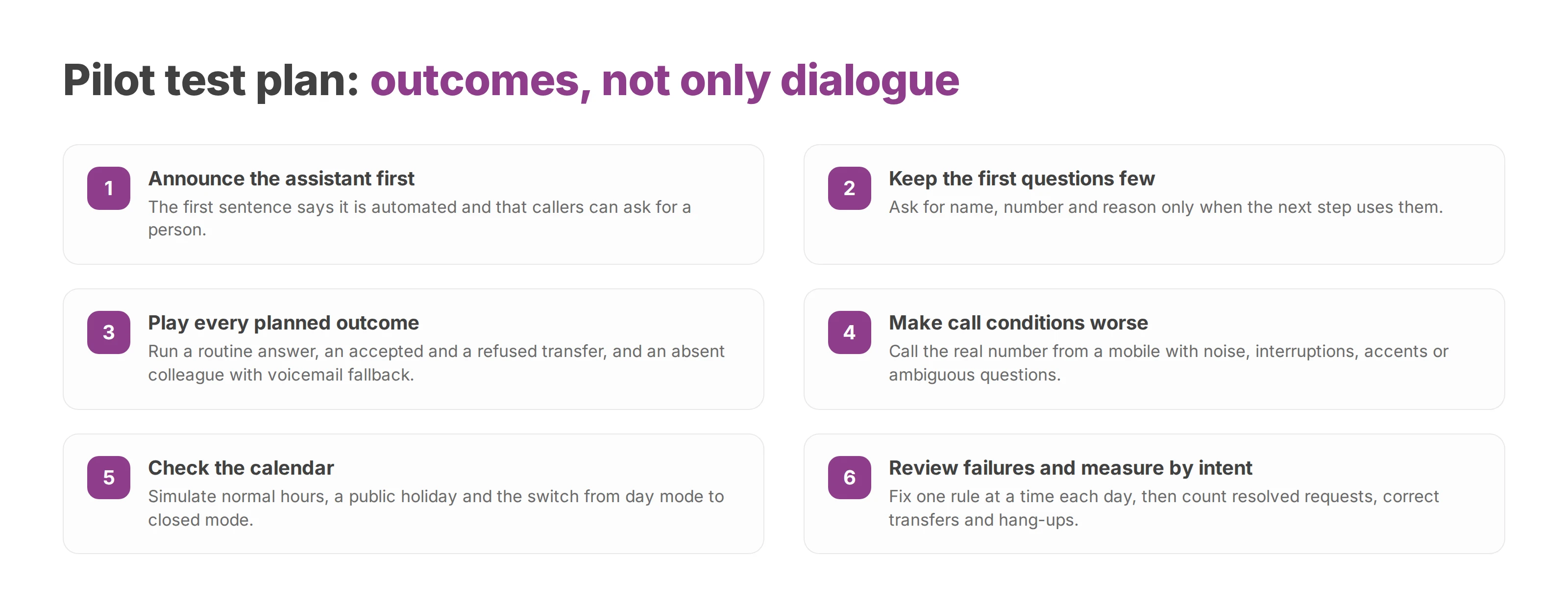
You can hand the test plan below to the people who set up the answering.
Write the first sentence. It announces the automated assistant and the option to ask for a person. Your business name comes through clearly, with no long introduction.
Keep the first questions few. Closed questions make routing easier. Ask for name, number and reason only when the next step uses them. A request for your address needs no personal details.
Play every planned outcome. Run a routine answer, an accepted transfer, a refused transfer and an absent colleague with the fallback to voicemail. A caller who refuses a transfer gets another plain option and no pressure.
Make the call conditions worse. From a mobile, on the real number, the tester adds background noise, interrupts, uses an accent or asks something ambiguous. The assistant should recognise its own uncertainty and hand back.
Check the calendar. Simulate normal hours, a public holiday and the switch from day mode to closed mode. A correct answer sent to a closed department still counts as a failure.
Review failures every day. Fix one rule at a time so you can see its effect. Keep test notes free of any personal details the fix doesn't need.
Measure by intent. Count requests resolved without a person, correct transfers, hang-ups, misunderstandings and topics that should have left the AI at once. Keep the transcript, intent, decision and transfer records apart.
The number of automated calls says little about the pilot on its own. A long conversation can hide repetition, misunderstanding or over-collection. A quick transfer can be exactly the result you wanted.
Pass mark: a request passes when it reaches its permitted outcome, even if that outcome is a transfer rather than an automated answer.
Our team sets up and tests the answering with you before any caller reaches it. You approve the business answers, and whoever installs the system checks destinations and exceptions. Widen the scope only once you understand the remaining failures and a return to the previous route is ready.
The launch starts with a list of instructions, not a choice of voices. You gather the information the setup will use. A short document approved by the people who usually answer the phone is enough for the first trial.
Closures: usual hours, public holidays and known exceptions for each site involved.
Evening calls: the reasons you've observed, and the requests that need action before you reopen.
Approved answers: a handful of routine questions, each with approved wording and a person who keeps the information up to date.
Fallback destinations: a colleague, queue or voicemail box, plus the person who checks the messages.
Greeting and on-call cover: the opening line, instructions for urgent topics and an on-call number where you run one.
Send this brief to your integrator or the Voxbi team for a test on your real numbers. You can buy Voxbi directly from us or through a certified IT integrator or reseller, who handles setup, number porting and ongoing support. Whoever installs it checks the whole call route as well as the assistant itself.
Even when someone else runs your phone system, your business needs its own contact person. That person approves changes to hours, reviews unhandled messages and decides whether a new kind of request joins the scope.
The pilot has one operational goal. It counts the out-of-hours requests you now capture and checks that each one gets a follow-up.
A message that's taken and never returned is still a lost call. Success depends as much on the next-morning follow-up as on the automated pickup. So widen the scope when your team keeps up with the requests the AI collects, not when the AI manages longer conversations.
To plan an after-hours or overflow pilot, send your opening hours, approved answers and fallback destinations to us through the contact page.
How to run one on call phone number that reaches whoever is on duty, with out-of-hours routing, a weekly rota, a backup for unanswered calls and a monthly test.
How to forward calls on Android by condition, find the menu on Samsung, Pixel and Xiaomi, transfer a live call, test every rule and control who changes it.

How to configure VoIP in Odoo, from the access right and SIP provider settings to user extensions, international number format, troubleshooting and the GDPR file.
Start a free trial, or work with a certified Voxbi partner.