
Call logging: what it is and how teams use it
Call logging records every call your team makes and takes. Here's how to use the call log for callbacks, CRM handoffs and peak-hour staffing.
Nov 20, 2026
A checklist for the analogue switch off: when it happens, which devices still sit on copper, what to test, and five gated steps to IP.

The analogue switch off rarely breaks the desk phone first. What fails on the day is whatever has sat on a wall socket for years without an owner on paper: the fax in the back office, the alarm communicator, the lift emergency phone. Card terminals, franking machines, door entry panels and the ageing PBX in the comms cupboard belong on the same list. Until each of them has a tested replacement, picking a cut-over date means picking the day something might stop working.
This checklist is for facilities managers, office managers and IT leads who look after one site or several. It starts with the inventory, site by site, and leaves your operator's calendar until after the tests.
The analogue switch off is the retirement of copper telephone lines and of the public switched telephone network (PSTN) that runs over them. Calls that used to travel as an analogue signal on a copper pair move to IP, carried over fibre, broadband or a mobile network. Our guide to what PSTN is explains the network itself.
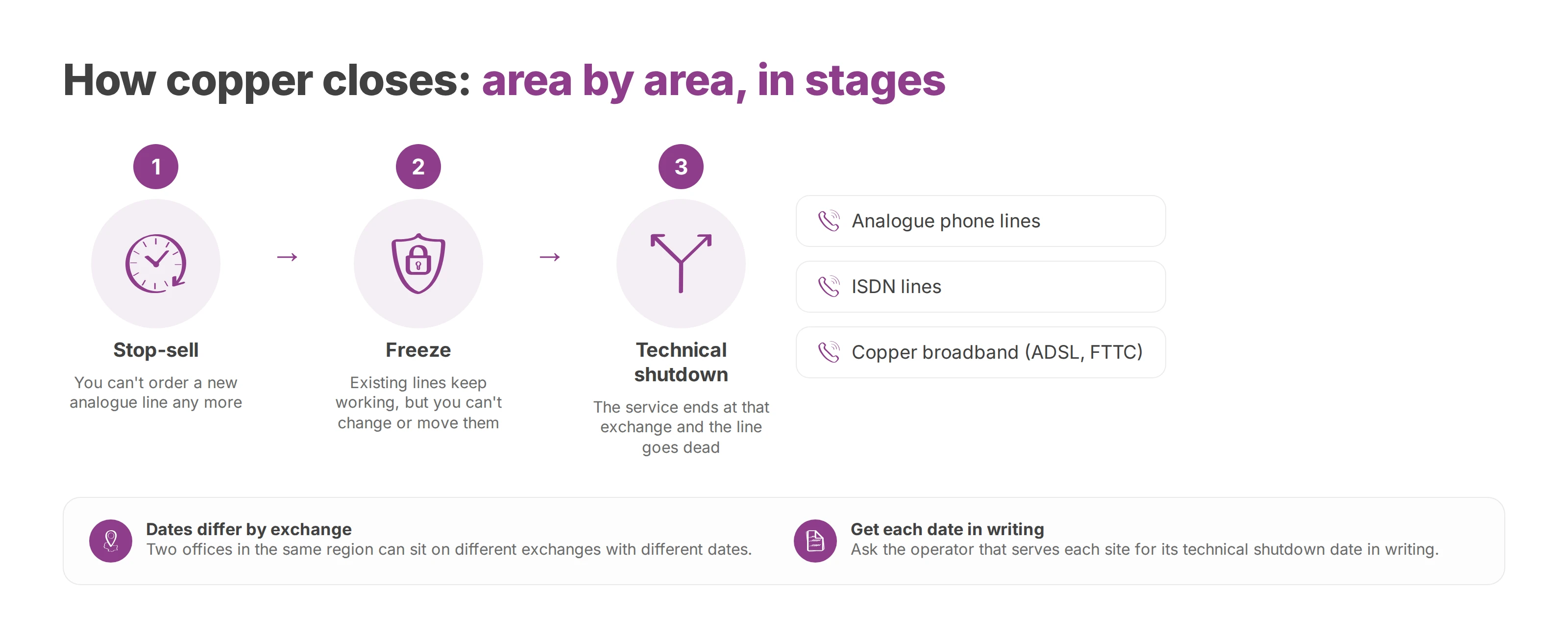
Operators close copper in stages, area by area, and each stage removes something different.
Stop-sell. You can't order a new analogue line any more.
Freeze. Existing lines keep working, but you can't change or move them.
Technical shutdown. The service ends at that exchange and the line goes dead.
Copper broadband goes at the same moment. In France, the regulator Arcep says every service on the copper network stops at technical shutdown, from the analogue phone line to ADSL internet access. In the UK, Openreach says the PSTN retirement affects every service powered by copper lines, including Integrated Services Digital Network (ISDN) lines and ADSL and FTTC broadband. So an alarm, a card terminal or a franking machine that talks over a DSL connection is on the list too, even if it never touches a phone socket.
It depends on the country, and inside a country it can depend on the exchange.
United Kingdom. BT Group will retire the PSTN by 31 January 2027, according to Openreach's February 2026 announcement. Openreach called that deadline locked. At the time, roughly 2.8 million lines still had to move, more than half a million of them in business premises. Openreach also raised the wholesale price of legacy line rental in three steps during 2026, up to about double the 2025 rate from 1 October.
France. Arcep's consumer guide to the copper shutdown says most lines stopped taking new subscriptions in January 2026 and the rest follow in January 2027. Orange plans to switch off every copper line by the end of 2030.
Belgium and Luxembourg. No national calendar replaces your operator's. Ask your operator for the published date at each address.
Two offices in the same region can sit on different exchanges with different dates. Get the technical shutdown date for each site in writing, from the operator that serves it.
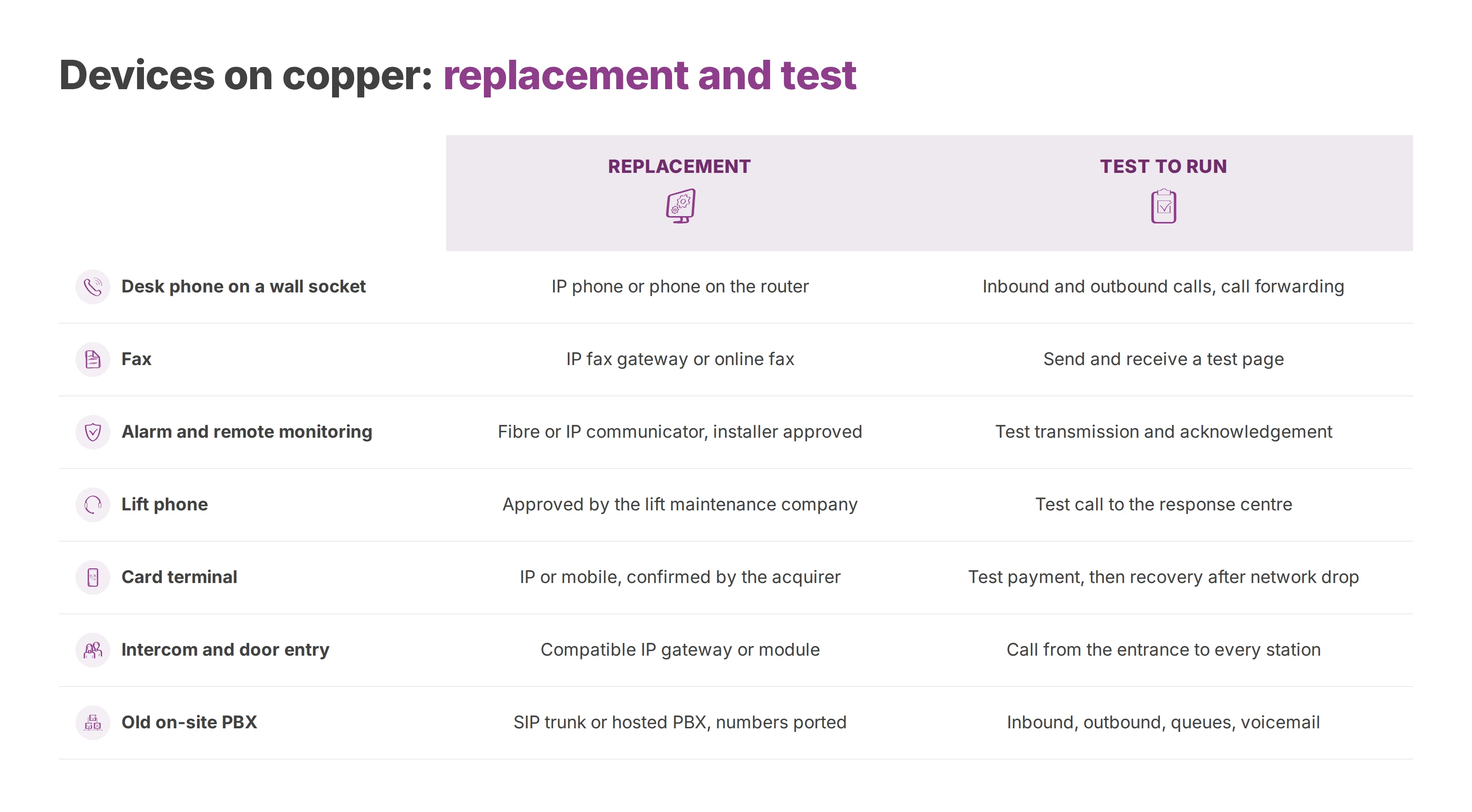
Every row in the table below is a use that may still depend on a phone socket or a copper broadband line. Write the owner, the contract and the maintenance company beside each one. If a cell is blank, ask the supplier and write down their answer.
Each device needs three answers. Does it work over IP or mobile? Does it keep power during an outage? How is it monitored?
| Device | Copper dependency | Replacement after the switch | Test to run |
|---|---|---|---|
| Desk phone on a wall socket | Direct analogue line, no router | IP phone, or a phone connected to the router or fibre box | Inbound and outbound calls, call forwarding |
| Fax | Transmission over an analogue line | IP fax gateway or online fax, confirmed with the manufacturer | Send and receive a test page |
| Alarm and remote monitoring | Automatic transmission to the monitoring centre | Fibre or IP-compatible communicator, approved by the installer | Test transmission and acknowledgement |
| Lift phone | Dedicated emergency line | Solution approved by the lift maintenance company | Test call to the response centre |
| Card terminal | Connection to the acquiring bank | IP or mobile connection confirmed by the acquirer | Test payment, then recovery after a network drop |
| Franking machine | Remote connection for top-ups and updates | Connection method agreed with the leasing company | Test top-up |
| Intercom and door entry | Calls to indoor stations | Compatible IP gateway or module | Call from the entrance to every station |
| Old on-site PBX | Analogue trunks on the PSTN | SIP trunk or hosted PBX, numbers ported | Inbound, outbound, queues, voicemail |
| Other special uses (security, building monitoring) | Analogue backup line | Fibre or IP-compatible device, confirmed by the manufacturer | Test agreed with the supplier |
These three need sign-off from a third party. Replacements already exist for monitored alarms and lifts, but the manufacturer, the installer or the maintenance company still has to confirm compatibility in writing. Then you need a result you can show. For the alarm, the monitoring centre acknowledges a test signal. In the lift car, a test call reaches the response desk. On the card terminal, a payment goes through after the network has dropped and come back. Keep the device on the open list until you have that result.
Fax and franking machines work the same way, except that the other party or the leasing company often decides the method. The old PBX is a bigger job than it looks, because it carries the numbers, the queues and the voicemail. A new SIP phone covers the conversation itself. Every other row in the table needs its own fix.
UK businesses can also have equipment tested for free at Openreach's test labs before they switch.
Blocking rule: a device without a tested solution blocks the date. Nobody cancels a line around an open item.
A new handset doesn't reproduce how the old line behaved. A traditional copper line usually drew its power from the exchange, so a corded phone on it would often keep working through a power cut on site. An IP phone depends on the access line, the local equipment and mains power. If the router, the network switch or the uninterruptible power supply (UPS) goes down, the calls stop. The old socket would probably still have rung.
For a clinic, a care home, a hotel, a council office or a multi-site agency, write these requirements into the migration spec: a backup connection, a sized battery runtime and a set of call tests. Add the list of numbers to keep, and a sign-off for each analogue device still in place.
Work out battery runtime from what the site actually needs during an outage. That might be the time to reach the on-call contact, to finish serving a visitor or to evacuate the building. Each site gets its own figure.
Power. Router, switch and PBX on a labelled circuit, with a UPS sized for the runtime you estimated.
Access. A second connection, often dedicated business fibre or a mobile backup, with a failover you've actually tried.
Local network (LAN). A known answer for what happens when the core switch fails, and a second path for the phones that matter most.
Power loss. Emergency calls, the alarm and the lift phone tested during the outage itself.
Recovery. Configuration restored, auto attendant and queues back in service once the connection returns.
Public guidance on copper retirement mostly covers the timetable and says little about continuity testing. That work falls to you and your integrator. Before anyone cancels a line, measure four things: availability between sites, time to recover, audio quality, and whether emergency calls connect.
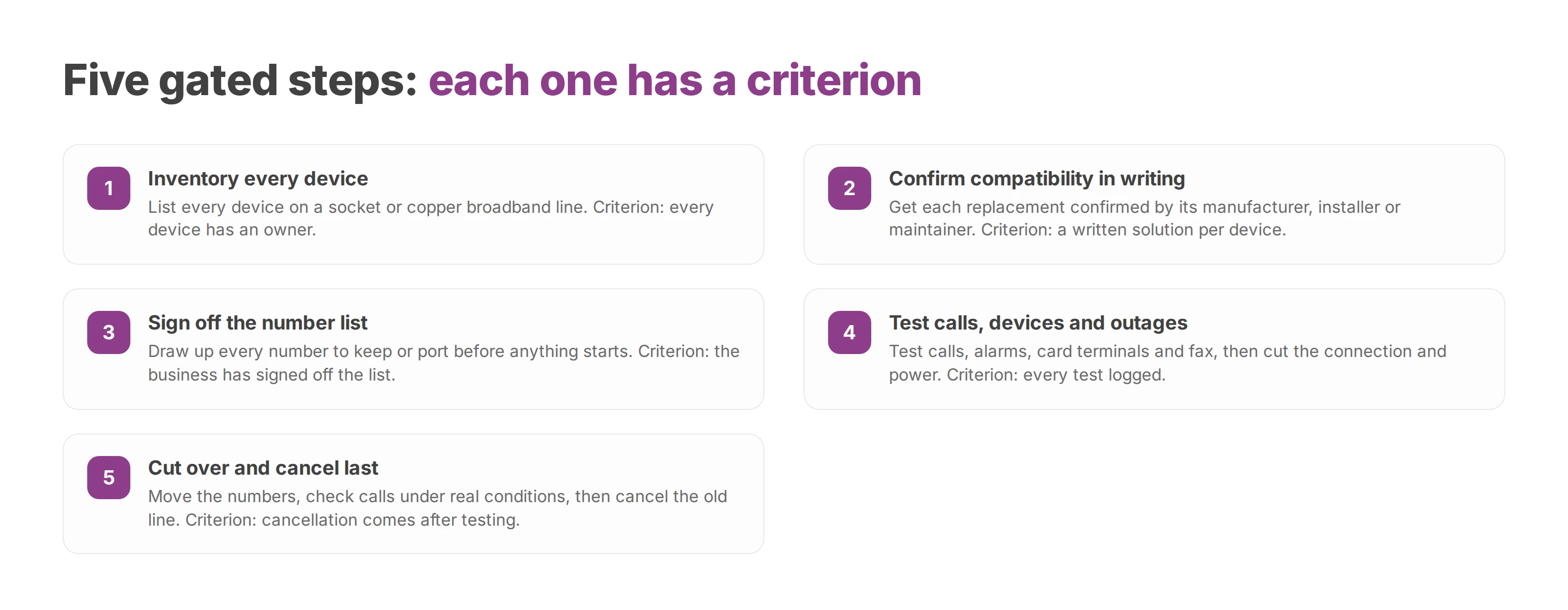
Each step below ends with a criterion, and the next step starts only once that criterion holds. For an integrator this is a site audit. It shrinks for a small office and repeats for every building in a multi-site group. Run every step even if an area sits outside the operator's first wave.
Inventory. List every device on a socket or a copper broadband line, with its owner, contract and maintenance company. Use the table above as the starting list. Criterion: every device has an owner.
Compatibility. Get each replacement confirmed by its manufacturer, installer or maintainer. Check the internet connection and the local network. Read the shutdown date your operator publishes for each address. Criterion: a written solution per device.
Numbers. Draw up the full list of numbers before anything starts. You can keep existing numbers by porting them, or take new ones. Porting runs without interruption, so the numbers stay in service through the change. The guide on how to port a business phone number covers the paperwork and the timing. Criterion: the business has signed off the list.
Testing. Test inbound, outbound and emergency calls, then alarms, card terminals and fax. Then pull the main connection and cut the power. Criterion: every test passed and logged.
Cut-over. Move the numbers, check calls under real conditions, and cancel the old line last. Criterion: cancellation comes after testing.
Set the date once the first four criteria are met. A solution that is planned but not yet tested stays on the open list.
Staff need bringing along too, and our piece on cloud PBX migration covers that side of the move.
Most surprises come from a forgotten device replaced in a hurry, or from a copper contract that ends at the wrong moment. The IP phones themselves are rarely the problem. There's no published rate card for this work, so each business prices its own hardware, call-out fees and any overlapping subscription months. The table lists the mistakes in the order they usually hurt.
| Cause | What happens | Prevention |
|---|---|---|
| Secondary device forgotten (alarm, lift phone) | It never appeared in the internal directory. On the day the line goes, the maintenance company bills an emergency visit, sometimes for a part that isn't in stock | Full inventory before the date is set |
| Old contract cancelled too early | A device is cut off before its replacement works | Cancel after successful testing |
| Old contract cancelled too late | Two subscriptions run until someone notices | Tie the cancellation date to the validated cut-over, not to the operator's letter |
| Untested network dependency | The new connection works on installation day. Then a switch reboots or the main line drops, and users find the outage before IT does | Connectivity-loss test at every site |
| Incomplete number list | Calls stay on the old operator or ring into nothing | Freeze the list before porting starts |
Send these questions to the integrator, reseller or operator, and ask for the answers in writing.
Hosting. Where are calls, recordings and call notes stored, and does processing stay in the European Union?
Data protection. Is the data processing agreement GDPR-compliant, and are the subprocessors named?
Porting. What lead times apply, and which documents does each number need?
Continuity. Which backup connection and battery runtime are planned for sensitive sites?
Special devices. Has each maintainer confirmed the alarm, lift phone, card terminal and fax in writing?
Testing. Which tests run before the old line is cancelled, and who signs the acceptance report?
Voxbi is one option that answers part of this list. It's a cloud PBX built and hosted in the European Union, so call data never leaves it. Once it's running, your team makes and takes calls from a browser, the desktop app or a mobile, on the same number. On Voxbi One you can port existing numbers in from the Starter plan up (Voxbi Free doesn't include inbound porting). Voxbi Managed adds a team that sets the system up and runs it, and it ports existing Belgian and Luxembourg numbers. If you're weighing a trunk against your own carrier, our explainer on what a SIP trunk is sets out the options. Whichever provider you choose, the contract still has to spell out hosting, subprocessors, porting lead times and the test plan.
This week, open the inventory table, give each socket its own row, and have your operator and integrator check it. Pick the migration date after that.
Call logging records every call your team makes and takes. Here's how to use the call log for callbacks, CRM handoffs and peak-hour staffing.

How the four VoIP codecs you'll meet on a business phone system differ, and how to choose one for each site without adding conversions.
What a freephone number is, who pays for the call, the UK's 0800 and 0808 ranges and how other countries differ, and how to route and test the line before launch.
Start a free trial, or work with a certified Voxbi partner.