Most 3CX systems run in one of two ways. You host the PBX on your own server or virtual machine, or a 3CX partner licenses, hosts and supports it for you. This guide is for IT leads and the partners who serve them, and it picks its 3CX alternatives with those two buying models in mind. A switch has to carry your numbers, call flows, queues, SIP trunk and recordings across. That's why the question of who runs the new system shapes the project more than any feature list does.
The shortlist mixes cloud platforms, partner-led systems and one self-hosted option. Each competitor is described from its own public material. The only competitor prices quoted come from 3CX's published price list.
What 3CX alternatives are, and what each one replaces
3CX alternatives are business phone systems that can take over the job your 3CX PBX does today. They answer on your numbers, route calls to extensions and queues, and connect to a carrier for calls in and out. 3CX licenses its software per system and sizes each licence by simultaneous calls. As of October 2026, the 3CX global price list shows a free Basic edition for four simultaneous calls, self-hosted only. It lists PRO 8SC at €380 per system per year. Calls and numbers aren't in the licence, so you bring your own SIP trunk and carrier.
Each alternative changes who runs the PBX, how you pay for it, or both. The table below sorts the options on that axis. Our 3CX pricing comparison sets the full cost of 3CX against Voxbi line by line, and this guide leaves that arithmetic there.
A 3CX alternative for each buying model
Voxbi takes two rows because Voxbi One and Voxbi Managed are two lines of the same product.
1. Voxbi One and Voxbi Managed
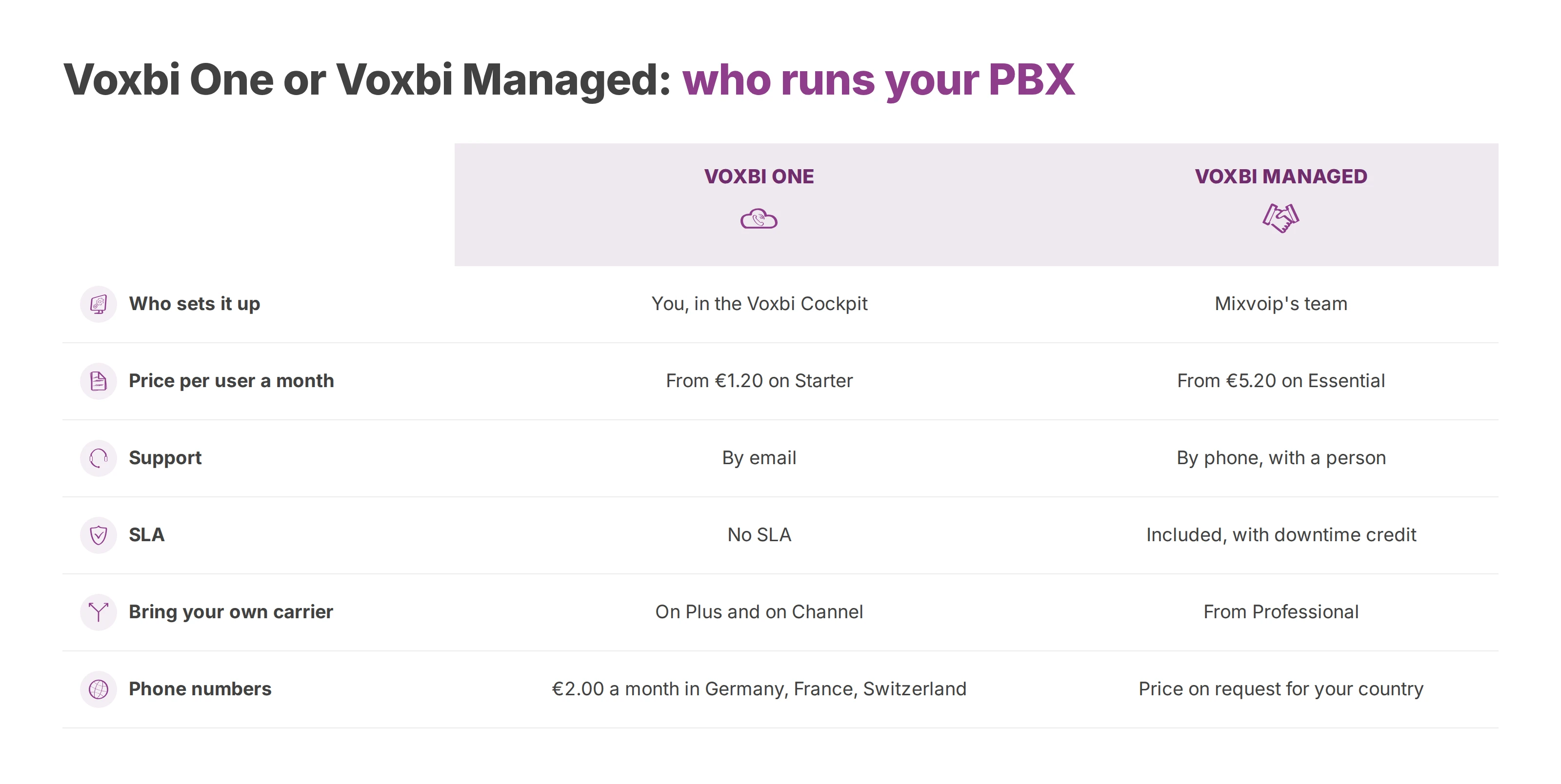
Voxbi is a cloud PBX built and hosted in the European Union. It comes in two lines, and each one matches one of the ways you run 3CX today.
Voxbi One, for teams that run 3CX themselves
Voxbi One is self-service. You set it up in the Voxbi Cockpit using Voxbi's guides and the Cockpit manual, and you pay a published price per user each month. Starter costs €1.20 per user a month. Plus costs €2.90 per user a month. It adds numbers in other countries, live call dashboards, bring your own carrier, and the Odoo, Microsoft 365 and API integrations. Plus AI, at €3.10 per user a month, transcribes and summarises every call. Microsoft Teams is an add-on at €50 a month for the phone system. Calls are billed per minute at the destination rate.
Voxbi Channel prices the system the way 3CX sizes a licence. It costs €14.50 per channel a month, with a minimum of three channels (€43.50 a month), and each channel carries one call at a time. You pay for concurrent calls instead of named users. That suits shops, hotels and shared desks, where phones outnumber people. Channel also lets you bring your own carrier, so the SIP trunk behind your 3CX can stay where it is.
On Voxbi One, a number costs €2.00 a month in Germany, France or Switzerland, and more countries are coming. If you need a number anywhere else, including the UK, talk to us about your options. From the Starter plan up, you can port the numbers you already have. Support is by email, and Voxbi One has no SLA.
Voxbi Managed, for teams that rely on a partner
Voxbi Managed is the full-service line. It's run by Mixvoip, which owns Voxbi. Mixvoip's team sets the system up and runs it, and you can reach a person by phone. An SLA with downtime credit is included. Essential costs €5.20 per user a month with calls billed per minute, or €11.60 with unlimited calls. Professional costs €7.70, or €14.10 with unlimited calls, and adds bring your own carrier, API access and call reports. Business costs €11.20, or €17.60 with unlimited calls, and adds PBX monitoring, alerts and single sign-on.
Every Managed package includes automatic PBX software upgrades and automatic firmware upgrades for desk phones such as Yealink and Gigaset. Security updates and antifraud protection are included too. On a self-hosted 3CX, you or your partner do that work. Your SLA level depends on your plan and on your internet provider. On Business, the public SLA table sets 99.90% monthly availability and a maximum response time of three hours. Voxbi Managed publishes no price for a phone number, so ask Voxbi for the price in your country.
2. Wildix
Wildix sells through certified partners, and its phone system runs in the browser over WebRTC. If a partner handles your 3CX today, you'll find the buying model familiar. Wildix offers web, desktop and mobile apps, plus a marketplace of add-ons that extends into contact centre analytics.
Your partner's skills shape the result. Setup quality, configuration and support all come from the reseller you choose, so ask each one for references from 3CX migrations. Run your pilot behind your own firewall too, because WebRTC traffic behaves differently on every network. Your price comes from the partner's quote, and the Wildix website lists partners by region.
3. FreePBX
FreePBX is an open-source web interface for the Asterisk PBX, and Sangoma maintains it. It keeps the self-hosted model you know from 3CX. You choose the server, apply the updates and connect your own SIP trunk. The core is a free download from the FreePBX project site, and Sangoma sells commercial modules, phones and support on top.
Your team does all the security work. A self-hosted PBX that's reachable from the internet needs firewall rules, limits on outbound calls to stop fraud, and fast patching, and nobody does that for you. FreePBX fits when you've got Linux and SIP skills in house and want control over every component.
4. NFON Cloudya
NFON is a German provider, and Cloudya is its cloud PBX. It comes with web and mobile softphones, support for SIP trunks and a Contact Center Hub module. You can start with telephony and add contact centre features later.
That modular approach keeps the first order small. Each module, trunk, number and recording option adds a line to the quote, though. Prices vary by country, so check NFON's website for your market or ask a reseller. Ask where NFON stores calls, recordings, metadata and backups, and which subprocessors handle them.
5. Dstny
Dstny provides cloud telephony, SIP trunks, unified communications and connectivity in several European countries, mostly through partners. That range suits a business with offices in more than one country that wants one supplier for the phone system and the lines underneath it. Fixed-mobile convergence and a Microsoft Teams integration are part of the offer.
Packaging differs between countries, and Dstny's website shows what's offered in yours. Split the contract into PBX, SIP trunk, connectivity and support. With that split on paper, a network fault won't get handled as a software fault, and a routing change won't turn into an unplanned service charge.
6. Microsoft Teams Phone
Teams Phone adds a phone system to Microsoft Teams. You connect it to the public network in one of three ways: Microsoft's own Calling Plans, Operator Connect through a carrier, or Direct Routing through your own session border controller (SBC).
A 3CX team usually grasps Direct Routing fastest, because you keep a SIP trunk and a carrier you choose. Our Direct Routing vs Operator Connect guide compares the two routes. You manage it all in the Teams admin centre, which helps when your IT team has already standardised on Microsoft 365.
Most of the risk sits in licensing and architecture. Before you commit, you'll need a map of the SBCs, trunks, numbers, queues and emergency calling rules. Teams Phone handles call queues and auto attendants. A busy contact centre may need a specialist tool on top. Microsoft lists its licence prices on the Teams Phone page.
7. RingCentral RingEX
RingEX puts phone, messaging and video on one platform, and RingCentral sells contact centre products alongside it. It suits a business with sites and numbers in many countries that wants one supplier and a wide set of integrations. If you move from a self-hosted 3CX to RingEX, RingCentral takes over the whole stack, including the carrier side.
RingCentral's UK pricing page lists its plans by number of users. Your pilot should cover routing between sites, international numbers and how long recordings are kept.
8. Aircall
Aircall is a cloud phone system built for sales and support teams. Its desktop and mobile apps and click-to-call link each call to a customer record. It also connects to CRM and helpdesk tools such as Salesforce, HubSpot and Zendesk. There's no server for you to run and very little SIP to configure.
You give up some control for that convenience. If your 3CX sends calls through your own SIP trunk today, find out how Aircall handles numbers and carriers before you plan the move. Aircall's pricing page lists its plans and licence minimums.
Moving off 3CX without dropping calls
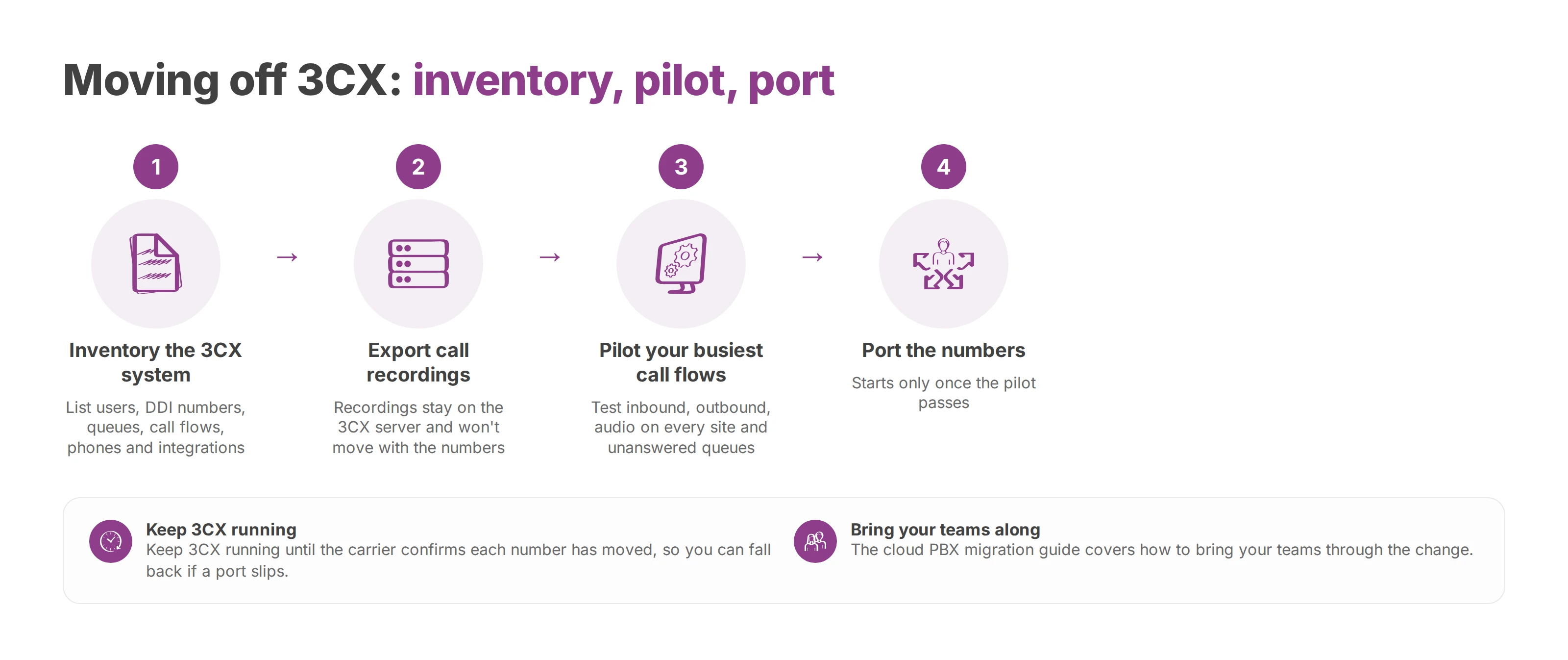
A migration starts with an inventory of the 3CX system you're leaving. It lists every user and extension, every DDI number, queue, ring group, opening-hours rule, recorded message and overflow route, and every desk phone and integration. Export any call recordings you must keep. They're stored on the 3CX server, and they won't move with the numbers.
The pilot comes next. Rebuild your busiest call flows on the new system. Then test inbound and outbound calls, the audio on every site, and what each queue does when nobody answers. Our cloud PBX migration guide covers how to bring your teams through the change.
Porting comes last, once the pilot passes. Keep 3CX running until the carrier confirms that each number has moved, so you can fall back to it if a port slips. Our number porting guide explains the steps and the dates to watch.
Questions for every vendor on your shortlist
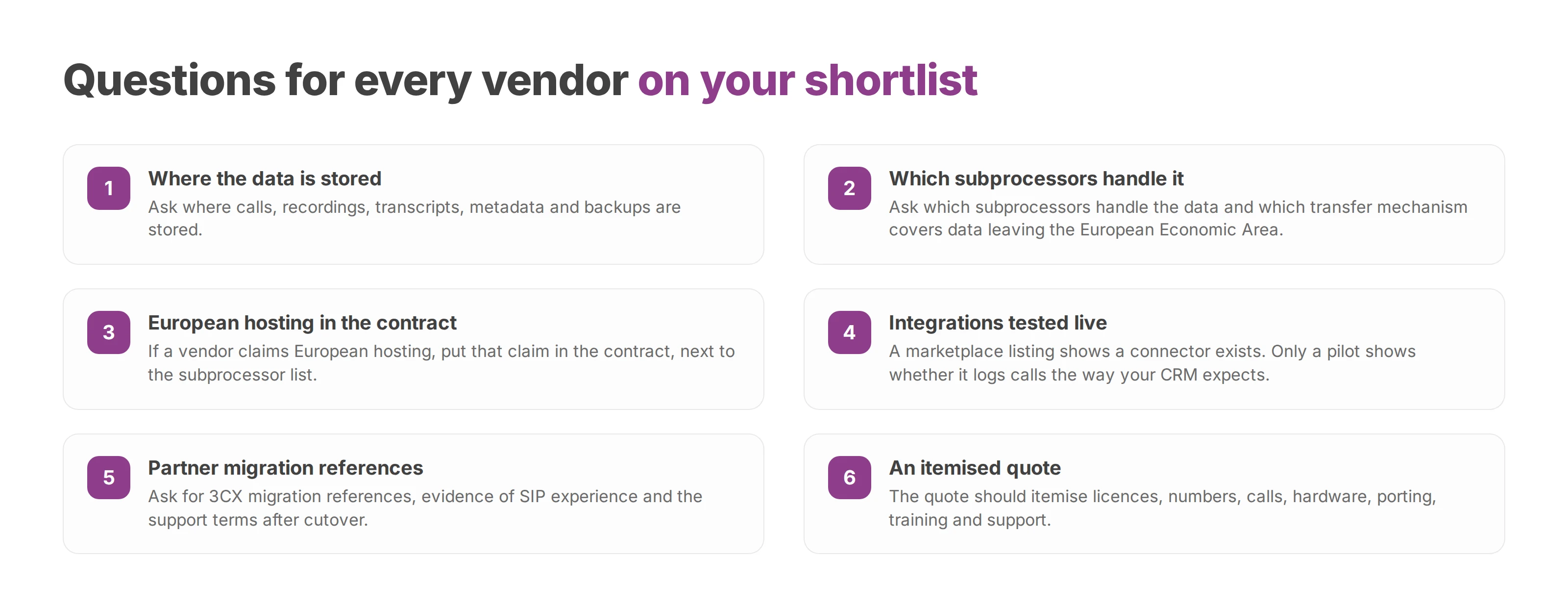
Start with data location. Ask where calls, recordings, transcripts, metadata and backups are stored and which subprocessors handle them. Also ask which transfer mechanism covers any data that leaves the European Economic Area. If a vendor claims European hosting, that claim belongs in the contract, next to the subprocessor list.
Integrations need a live test. A marketplace listing shows that a connector exists. Only a pilot shows whether it logs calls the way your CRM, ERP or helpdesk expects.
When a partner does the work, their skills count as much as the software. Ask for 3CX migration references, evidence of SIP experience and the support terms after cutover. The quote should itemise licences, numbers, calls, hardware, porting, training and support, so you can compare vendors line by line.
Shortlist two or three systems, pilot each one with your real call flows, and choose on what the tests show. If Voxbi is on your list, write to hello@voxbi.com with your current 3CX setup: users, simultaneous calls, numbers and SIP trunk. We'll show you how it maps onto Voxbi One or Voxbi Managed.