
Outbound caller ID: how to choose the number your team presents
How to set outbound caller ID per user, site or queue, check it across Teams, mobile and softphone, and keep every presented number authorised and authenticated.
Sep 26, 2026
Keep every number when you change operator. Build the inventory, match the holder name, let the new operator lead the port and test before the old service ends.

Your operator contract ends in three months. The on-site PBX needs a technician every quarter, and the branches want one shared switchboard. Nobody will accept losing the main number or anyone's direct line. To port a business phone number under that kind of pressure, you'll need more than a request form. This guide is for IT managers, integrators and telecom resellers who are moving a company's numbers in Luxembourg, Belgium, Ireland or the Netherlands.
The right to keep the number is settled across the European Union. The European Electronic Communications Code (Directive (EU) 2018/1972) lets every subscriber keep their number when they switch provider, and that includes businesses. What's left is the organising, so that no line drops out along the way.
Porting a business phone number moves it from your current operator's network to a new operator's network. The number stays the same, so the people who dial it and the listings that publish it don't change. Only the provider that routes the calls changes. Under the European Electronic Communications Code, the receiving provider leads the process. Any loss of service during the port may not exceed one working day.
Each national regulator adds its own detailed rules on top of the EU framework. In Luxembourg that's the ILR, in Belgium the BIPT, in Ireland ComReg and in the Netherlands the ACM.
A number stays inside its national numbering plan. A Belgian geographic number moves to an operator authorised to serve Belgian numbers, and it stays Belgian whichever country the new provider is based in. If your group has sites in several countries, you'll run one port per country, and each one comes with its own paperwork.
Rejections usually start with the numbers nobody listed. People remember the main number, the team DDIs and the managing director's mobile. The forgotten ones turn up on porting day: an old fax, the lift line, an alarm dialler, a card terminal, the on-call number, DDIs from a department that closed years ago.
Work through the estate in this order:
By physical site. List the numbers tied to each address, floor, reception desk or workshop.
By business function. Separate reception, user DDIs, technical lines and numbers that outside services depend on.
By dependency. Check whether several numbers ride on the same access line or the same contract.
By criticality. Mark what can move later and what has to stay reachable at all times.
Orphan lines cause the most trouble in larger estates. The number still rings somewhere, yet nobody knows which contract it sits on or who answers it. This happens a lot in SMEs that added a line every time a team asked for one.
| What to check | Why it matters | Warning sign |
|---|---|---|
| Number and site | Stops numbers landing on the wrong site | Several teams claim the number |
| Contract holder | Decides whether the request is accepted | The invoice shows an old company name |
| Use of the number | Lets you sequence the port | Nobody knows what the line does |
| Shared access | Exposes hidden dependencies | Several numbers ring over the same link |
| Business impact | Sets the cut-over date | The line serves a round-the-clock service |
The new operator runs the request, but it can't correct inaccurate data for you. The holder name, the service address and the supporting documents all have to match what the current operator has on file.
A complete file usually holds:
The exact holder name. Copy it as it appears on the current operator's contract. A slightly different spelling of the company name can be enough to get the request refused.
The company registration number. In Luxembourg that's the RCS number, in Belgium the enterprise number, in Ireland the CRO number and in the Netherlands the KvK number. It carries the most weight when several legal entities share one estate.
The latest invoice. Both operators use it to cross-check numbers, account references and access lines.
The consolidated list of numbers to port. It covers every number in the inventory, including the ones reception has never heard of.
The signed porting mandate. Some operators call it a letter of authority. It authorises the receiving operator to act for you.
Every number with a job the business can't lose deserves its own record, naming the holder, the site, the use, a contact person and the fallback.
A port keeps whichever holder the current contract names. If that name differs from the company that will own the number afterwards, the holder has to change first. It happens when a company has been renamed or merged into another entity. It also happens when a founder registered a number personally, or when a branch arrived through an acquisition with its lines still in the seller's name.
Ask the current operator for a change of holder, which some operators call a transfer of ownership, and wait until it completes. Many operators want signatures from both the outgoing and the incoming holder. File the port afterwards, under the new name. If you run both steps at once, the name on the porting mandate won't match the name on file, and the request risks a rejection.
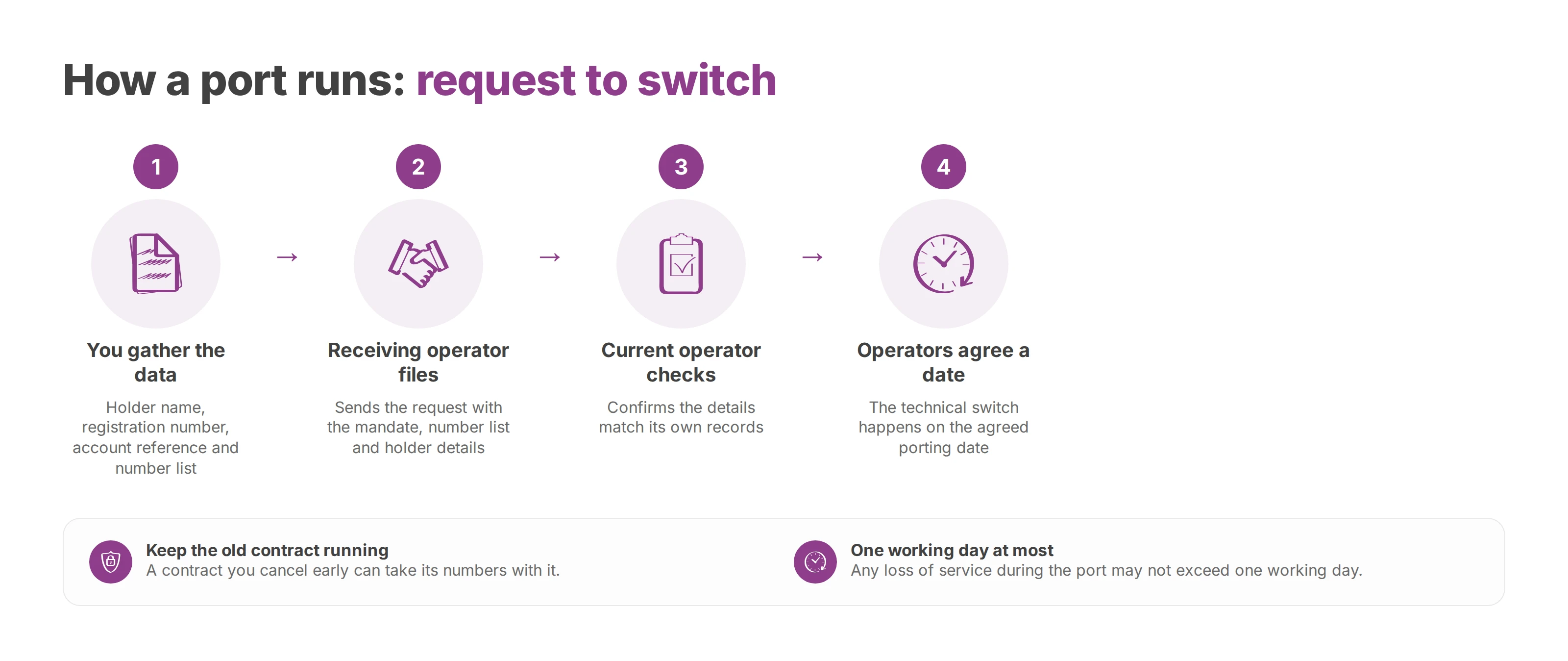
The new operator drives the port. You give it the right details, and it handles the exchange with the old operator. A port that goes well follows a short chain:
You gather the data. That means the holder name, the registration number, the account reference and the number list.
The receiving operator files the request with the porting mandate, the number list and the holder details.
The current operator checks that the details match its records.
The operators agree a porting date, and the technical switch happens on that date.
Keep the old contract running until the port has completed. A contract you cancel early can take its numbers with it, and getting a released number back is slow at best. Once the port completes, the old service ends for the numbers that moved. Other lines and notice periods on the same contract follow their own terms.
The same few issues cause most refusals:
Holder mismatch. The name on the request differs from the one the current operator holds.
Blurred scope. The number list leaves out real dependencies between lines.
Wrong site or country. The service address or the numbering country isn't identified correctly.
Early cancellation. Someone cancels the old service before the port finishes.
The porting date sets your project plan. It decides how long the old and new services run side by side, how many tests you'll prepare and when you tell staff. EU rules require the port to happen as quickly as possible and on the date agreed with the customer. The lead time for a business number range varies by country and with the size of the port, so the receiving operator's quoted date is the one to plan around.
The work splits into three layers:
| Layer | What it covers | What works |
|---|---|---|
| Administrative | Porting mandate, holder, number list, approval | The file is frozen before submission |
| Technical | Routing, handsets, forwarding, tests | The cloud PBX is ready before the port |
| Operational | Reception, teams, opening hours, fallback | Cut-over falls in a quiet period |
Set up the new system before porting day. Users, queues, ring groups and opening hours should already work on the cloud PBX. On the day itself, the port only flips inbound traffic to a platform that's already been tested.
Several continuity options hold up in practice:
Temporary coexistence works when the new switchboard is ready before the port.
Temporary forwarding protects the main number during the cut-over window.
Porting outside peak hours lowers the risk for front-office teams.
Testing inbound call flows beforehand catches routing mistakes that an outbound test call never reveals.
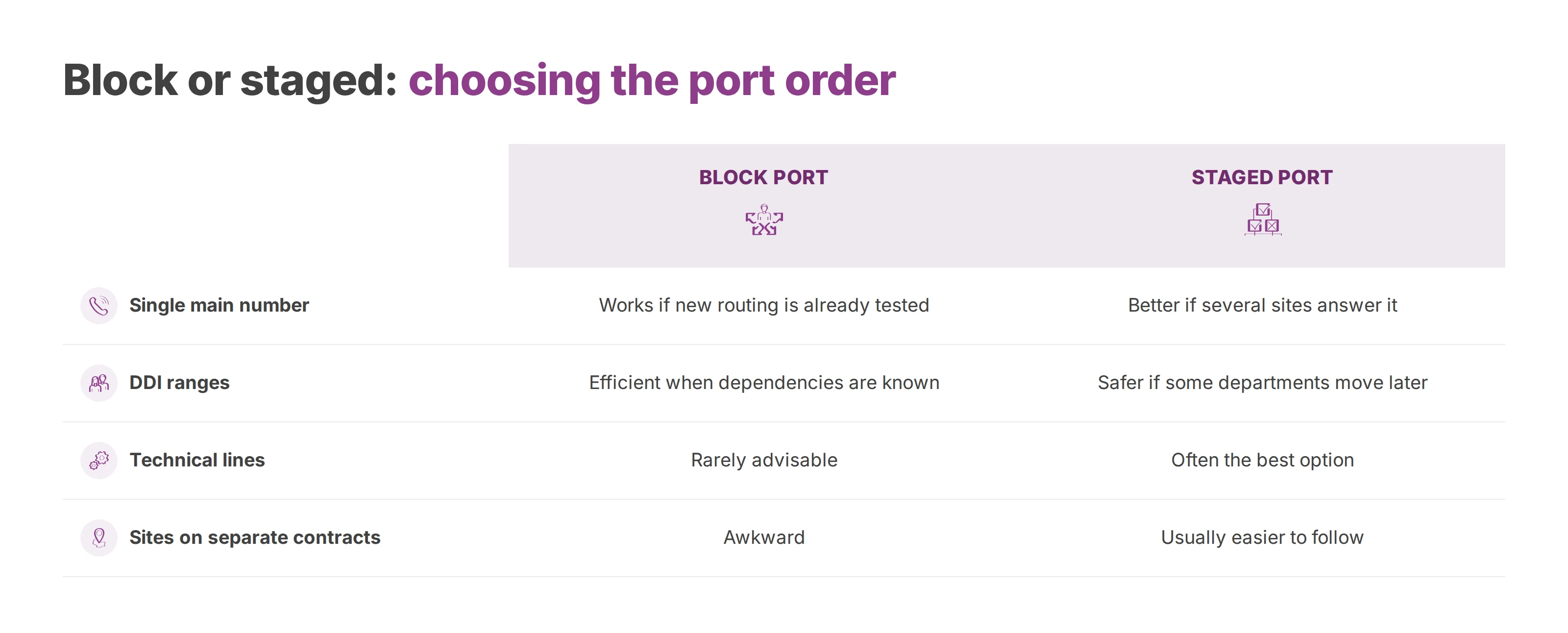
A single-site company with a handful of direct lines can often port everything in one go. Once you have branches, a head office, shared services or technical lines, compare the options before you fix the order. Usage decides the choice more than volume does.
| Case | Block port | Staged port |
|---|---|---|
| Single main number | Works if the new routing is already tested | Better if several sites answer it |
| DDI ranges | Efficient when dependencies are known | Safer if some departments move later |
| Technical lines | Rarely advisable | Often the best option |
| Sites on separate contracts | Awkward | Usually easier to follow |
DDI ranges need extra care. A range that looks uniform can serve management, reception, the night desk, logistics, maintenance and on-call staff. Moving it in one block keeps the administration simple. It can also carry across dependencies you'd have preferred to isolate.
Some lines should never be handled like ordinary user numbers:
Alarms and lifts. These often expect an analogue line, so the maintainer has to confirm the equipment works over the new access before cut-over.
Multi-site reception. Test the target routing against the real opening hours of each site.
Numbers published everywhere. The website, signage, directories, business cards and official documents all carry them.
Residual lines. Old fax machines, the security lodge, backup access lines and equipment nobody has switched off yet belong here.
Many of these lines date from the copper network, and the basics of the PSTN explain why they behave differently from VoIP extensions.
A block port suits a company that has already standardised how it uses its numbers. A staged port suits one where some sites still run analogue equipment, where technical lines haven't been dealt with, or where central reception has to stay stable throughout the transition. The business decides the order as much as IT does. A service that can't tolerate uncertainty moves last, with its own scenario.
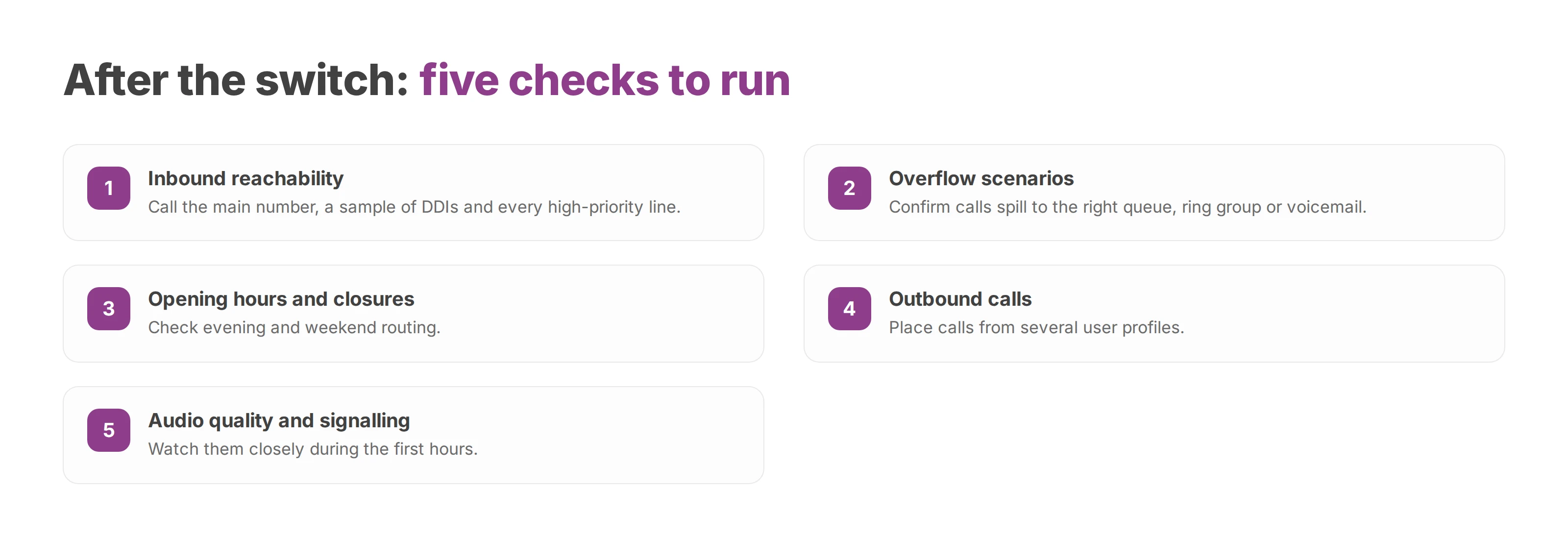
Porting day is when real operations begin on the new platform. Once the numbers have switched, check that the new switchboard reproduces the call flows people rely on and drops the old workarounds. The checks are short:
Inbound reachability. Call the main number, a sample of DDIs and every high-priority line.
Overflow scenarios. Confirm calls spill to the right queue, ring group or voicemail.
Opening hours and closures. Check evening and weekend routing.
Outbound calls. Place calls from several user profiles.
Audio quality and signalling. Watch them closely during the first hours.
Where the new platform is hosted matters at this stage too. IT teams, integrators and resellers want to know where call data, recordings and metadata live. EU hosting and GDPR compliance don't make a port go any smoother, but they count when you choose the platform that takes over. Voxbi is a cloud PBX hosted in the European Union. Mixvoip, the operator behind Voxbi's numbers, handles number management, and you administer everything centrally in Voxbi Cockpit.
Leave the wider project for its own guide. Retraining teams and redesigning call flows are covered in cloud PBX migration. A successful port means calls reach the right person at the right time with the right routing. To plan a multi-site port in Luxembourg, Belgium, Ireland or the Netherlands, email your number inventory to hello@voxbi.com and ask which countries can be ported in one project.
How to set outbound caller ID per user, site or queue, check it across Teams, mobile and softphone, and keep every presented number authorised and authenticated.
Which cloud PBX providers actually integrate with Odoo, how each one connects, what the integration costs and where call recordings are stored.

Entry prices compared with numbers, calls and support added back in, because the headline seat price is never the total. Ten providers priced.
Talk to us or to a certified Voxbi partner.