
Call queuing: what it is and how to set it up in a cloud PBX
Call queuing holds callers in an ordered line inside your cloud PBX. How it works, which options to switch on, which metrics to watch and how to configure a queue.
Oct 24, 2026
A call handling process decides who answers, how long callers wait and where a call goes next. Here's how to build the routing, IVR, queues, scripts and KPIs.

For a small or mid-sized business, the phone still carries appointments, urgent requests, bookings, support and sales follow-up. A missed call rarely shows up in your CRM. It still interrupts a colleague, delays a file or sends a prospect elsewhere. A sound call handling process sizes the service to your call types, your opening hours and your peaks. It rests on four things you can configure and measure: routing rules, queues, service levels and data governance.
A call handling process is the written set of rules that decides what happens to each inbound call. It names the destination, the time within which someone should answer and the fallback when that person's busy or away. It also covers the IVR menu, the queues, the scripts your team reads from, the out-of-hours routes and the figures you track to check the whole thing works.
The phone sits alongside your website, your forms and your inbox. Urgent requests, complex explanations and upset callers usually need a live conversation, so the phone system has to recognise the caller, route each call consistently and keep a history your team can use.
The right setup depends on the calls you get. In a clinic, a call might be about an appointment or a sensitive medical matter. In a hotel, it's usually a booking. In a business with several sites, the caller often wants a department in another building. A single phone ringing with no overflow rule turns a normal rise in volume into missed calls and a string of interruptions.
Rule of thumb: every inbound call needs a destination, a time to answer and a fallback, all defined before the first call arrives.
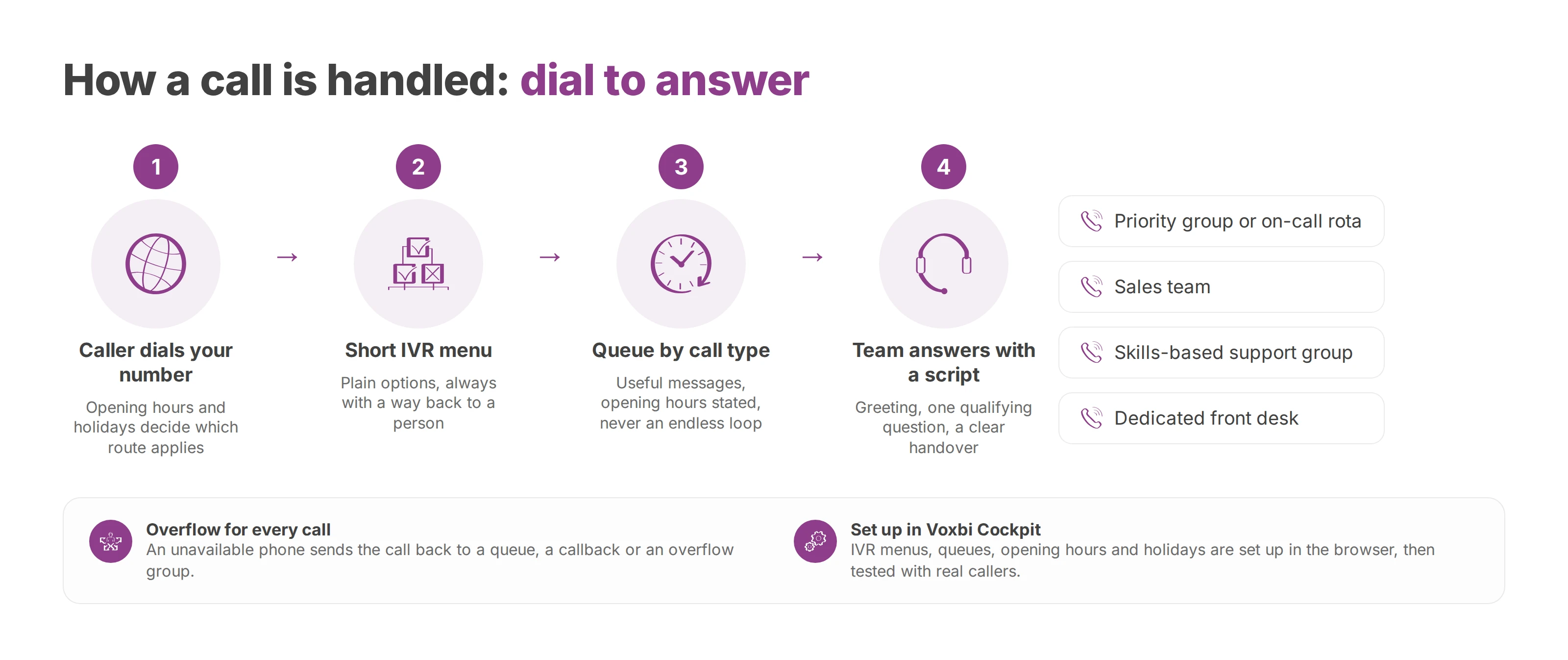
Reliable routing starts from the reasons people call. Gather the real call reasons, who's present at which hours, which skills sit in which team and how emergencies get handled. A short menu that callers understand at once gets them to a person faster than an exhaustive tree they have to work through first.
Use this matrix to decide where each kind of call goes first:
| Call type | First destination | Overflow rule | Figure to track |
|---|---|---|---|
| Emergency or critical incident | Priority group or on-call rota | Mobile user, second group or callback | Time to answer |
| Sales enquiry | Sales team | General queue with a scheduled callback | Answer rate and conversion in the CRM |
| Support or case follow-up | Skills-based group | Secondary queue or ticket | First-contact resolution |
| Appointment or booking | Dedicated front desk | Callback or shared calendar | Abandoned calls and callbacks |
| Admin request | General reception | Voicemail with transcription or callback | Volume per time slot |
The first menu level should announce the options plainly and always offer a way back to a person. Our guide to choosing a cloud IVR goes through menu design in more depth. Queue messages should give the caller something useful, state the opening hours and never loop forever. A call transferred to an unavailable phone goes back into a queue, triggers a callback or reaches an overflow group, so the caller never sits in silence. The call queuing guide shows how to set those rules up.
In Voxbi, administrators set up users, extensions, IVR menus, queues, opening hours and public holidays from the browser in Voxbi Cockpit. That removes manual edits on the PBX. The scenarios still need testing with real callers before you go live.
Scripts keep answers consistent when different people pick up the same queue. A good one opens with a greeting that names the business and the department. It follows with one qualifying question that confirms the reason for the call. It ends with a handover that tells the caller what happens next, whether that's a transfer, a callback time or a ticket number. Each call type in the matrix above gets its own script. When the routing changes and the script stays the same, the caller hears a promise the system no longer keeps.
The everyday scenario is one case among many. Test the opening, the lunch break, closing time, public holidays, an absent colleague and a full queue. A healthcare practice handles an urgent call differently from an admin request. A hotel needs a different overflow for a booking than for a general question.
After every change, check the number shown to the caller, the destination, the announced wait, the callback option and whether the call is logged. A colleague on the road, a mobile handset and a desk phone can each give the caller a different experience. The routing plan has to stay readable for the team that'll run it after go-live.
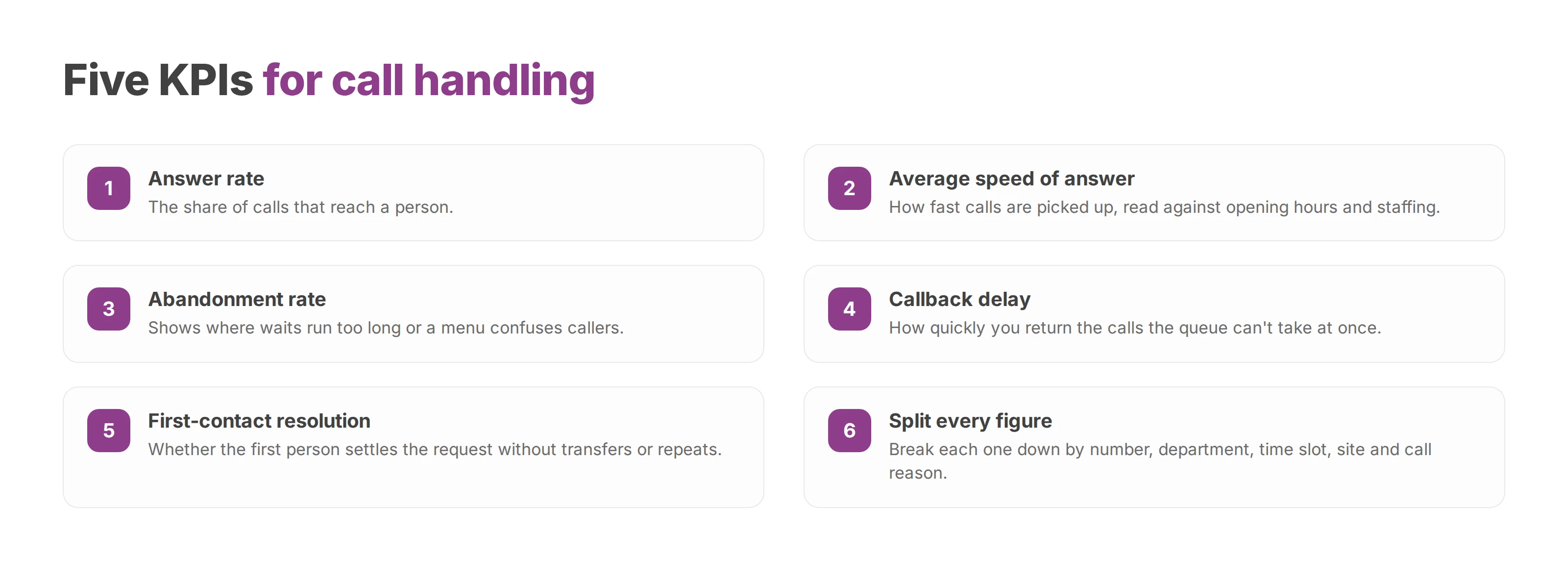
Good call handling shows up in numbers, and those numbers have to tell a capacity problem apart from a routing problem or a technical fault. Your dashboard should show at least these:
| KPI | What it tells you |
|---|---|
| Answer rate | The share of calls that reach a person |
| Average speed of answer | How fast calls are picked up, read against opening hours and staffing |
| Abandonment rate | Where waits run too long or a menu confuses callers |
| Callback delay | How quickly you return calls the queue can't take at once |
| First-contact resolution | Whether the first person settles the request without transfers or repeats |
Split each figure by number, department, time slot, site and call reason. An overall average can hide a sales queue that's swamped every morning or an admin line nobody reaches after four. Call history then lets you staff around the volumes you actually see, instead of a theoretical rota.
On Voxbi One, live call dashboards come with Plus, Plus AI and Channel. On Voxbi Managed, Professional adds high-level call reports and Business adds in-depth live dashboards. Each indicator should map to a decision, such as reinforcing a queue, changing a message, switching on an overflow or scheduling a callback.
Audio quality needs its own technical measures. The telecom industry rates perceived voice quality with a mean opinion score (MOS), often calculated with the POLQA method. A dropped or choppy call can come from the local network, the internet connection, the Wi-Fi, the handset or the telephony platform.
Diagnose layer by layer, measure the audio faults and compare results by site and by device type. Voice prioritisation on the network, regular test calls and an overflow route keep the queues working when a connection turns unstable. The guide to VoIP call quality lists what to measure at each layer.
A European cloud phone system gets chosen for where its data lives and who can reach it. Check where calls, recordings, transcripts and metadata are stored, who can access them, from which jurisdiction and through which subcontractors. That assessment belongs in your architecture file and in your supplier review.
The European Data Protection Board's guide to international data transfers explains that the GDPR strictly governs any transfer outside the European Economic Area. Such a transfer needs an adequacy decision or, where none applies, appropriate safeguards. Hosting in the European Union makes compliance easier to demonstrate, and the rest of the GDPR still applies in full.
Data sovereignty also depends on the provider's jurisdiction and on who holds admin access. A database can sit in Europe while a subcontractor based elsewhere supports it. Ask the provider for a data flow map, the support locations, the access conditions and the encryption in place.
The data processing agreement should set out roles, security, access rights, export and deletion. Data minimisation and access management apply wherever the servers are. Voxbi is built and hosted in the European Union, so your calls and data stay within European Union borders.
Healthcare providers, public bodies and schools need extra care, because their calls can carry medical or social information or details about minors. A suitable cloud phone system lets them separate environments, restrict rights and document the purpose of each processing activity.
AI features need a separate analysis. The EU AI Act was published on 12 July 2024 and entered into force on 1 August 2024. The European Commission's AI Act overview describes a staged application, with some rules for general-purpose AI models applying from 2 August 2025 and some transparency obligations from 2 August 2026. An AI feature in a phone system therefore carries its own compliance check under the AI Act.
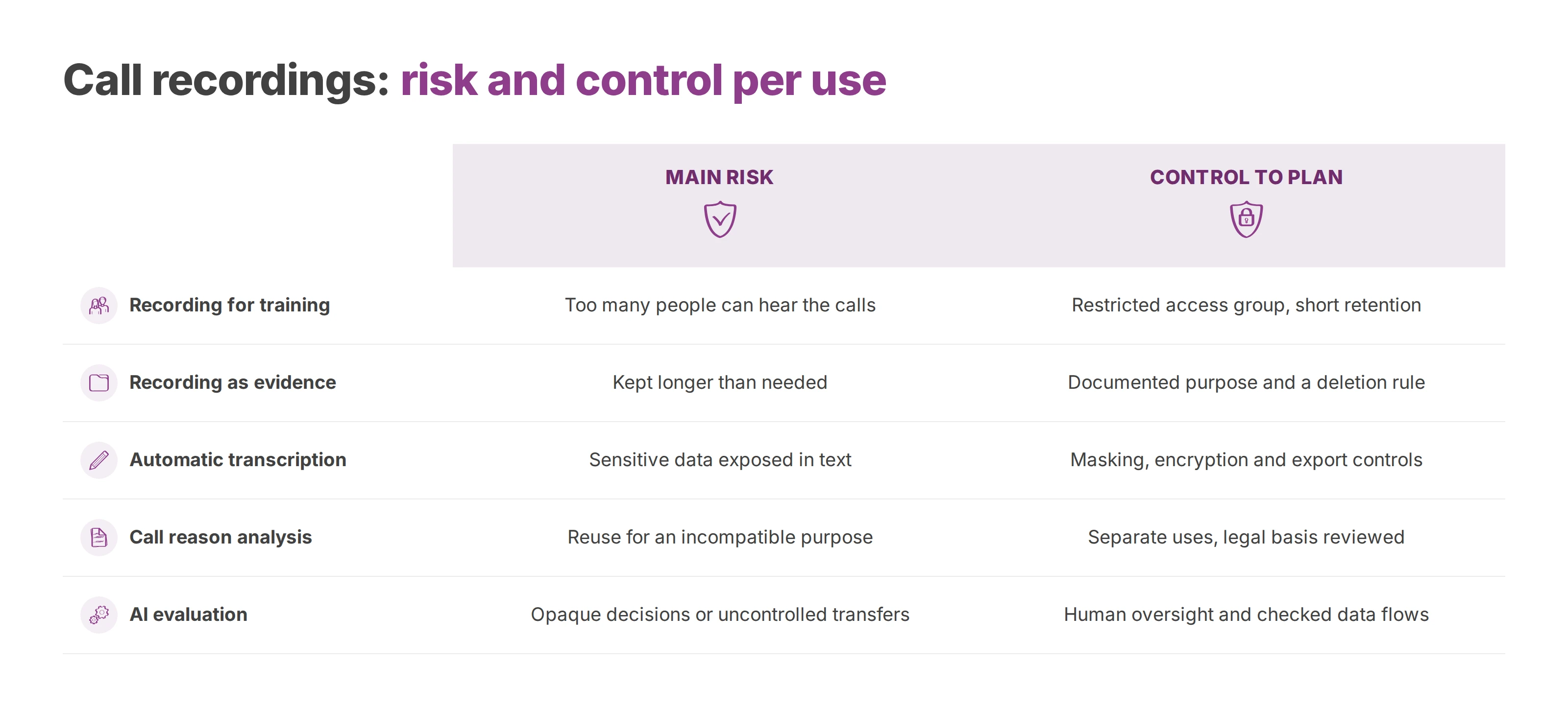
A call gets recorded for a specific reason: training a team, documenting a contractual exchange, checking quality or producing a transcript. Each purpose needs its own justification, its own access group and its own retention period.
| Feature | Main risk | Control to plan |
|---|---|---|
| Recording for training | Too many people can hear the calls | Restricted access group and short retention |
| Recording as evidence | Kept longer than needed | Documented purpose and a deletion rule |
| Automatic transcription | Sensitive data exposed in text | Masking, encryption and export controls |
| Call reason analysis | Reuse for an incompatible purpose | Separate uses and a review of the legal basis |
| AI evaluation | Opaque decisions or uncontrolled transfers | Documented processing, human oversight and checked data flows |
Before the conversation starts, a message tells the caller about the recording, its purpose and how to exercise their rights. Your team also needs to know when to pause recording, for example when a conversation turns to health data or other sensitive details. The guide to call recording and the GDPR covers the lawful basis and the notice in detail.
On Voxbi Managed, recordings stay on our server for 3 days on Essential, 14 days on Professional, 60 days on Business and 120 days on Enterprise, with more storage available from Professional up.
Recordings kept for training run on their own retention clock, apart from those kept as contractual evidence. Transcripts get their own access rights, and exports to an analytics tool carry only what's needed. Training or evaluating an AI system needs its own stated purpose. It can't be added quietly to a recording made for quality checks.
A register links each processing activity to its owner, legal basis, recipients, retention period and deletion procedure. With that register in place, an audit won't turn up every call stored indefinitely and open to people who never needed it.
A dependable call handling process combines a cloud phone system that fits your organisation, routing by call type, measured service levels and documented data governance. It has to work for people in the office, for mobile users, for secondary sites and for the hours when you're closed.
Replacing an on-site PBX starts with an inventory of numbers, hours, groups, transfers, emergency routes, volumes and recurring complaints. That inventory shows which calls stay with a person, which go to a queue and which trigger a callback.
Voxbi gives you users, extensions, IVR menus, queues and opening hours in the browser, with dashboards for volumes and queue health on the plans that include them. Your IT team still validates the data flows, access controls, network quality and who's responsible for what before go-live.
Next, measure a representative period, set a service level for each call type, test the overflow scenarios and check that your recordings meet the rules. You'll end up with more predictable call handling than new hardware alone delivers, and with room to add sites and people later. To review how your business handles calls today, write to hello@voxbi.com.
Call queuing holds callers in an ordered line inside your cloud PBX. How it works, which options to switch on, which metrics to watch and how to configure a queue.
How a hotel phone system routes reservation, room and maintenance calls, connects to your PMS, and helps you stay secure and meet the GDPR across one site or many.
An inbound call reaches your organisation and an outbound call leaves it. Here's how to route, measure and govern each one, and keep your numbers when you migrate.
Start a free trial, or work with a certified Voxbi partner.