
Hotel phone system: the complete 2026 guide
How a hotel phone system routes reservation, room and maintenance calls, connects to your PMS, and helps you stay secure and meet the GDPR across one site or many.
Oct 24, 2026
An inbound call reaches your organisation and an outbound call leaves it. Here's how to route, measure and govern each one, and keep your numbers when you migrate.

A company takes customer calls on its head-office number while the sales team rings people back from three other sites. At lunchtime the inbound queue backs up, and some callers hang up before anyone answers. Meanwhile the people making outbound calls aren't sure which number the customer sees. Nor do they know whether that customer asked last month never to be called again.
Both problems sit on the line between inbound and outbound calls. An inbound call comes into your organisation. An outbound call goes out from it, to a customer, a prospect or a supplier. The two directions usually share one phone system, yet a setting that helps one can do nothing for the other. This guide is for IT leads, telecom integrators and managers at small and mid-sized organisations who run both flows.
An inbound call starts when someone dials one of your numbers. It can land on a receptionist, an interactive voice menu, a queue or straight on a person's phone. Say a resident calls the town hall, picks the births and marriages option in the menu and reaches that team. Your phone system has to know where to send the call and what to do if nobody picks up.
An outbound call starts with someone on your staff. It might be a callback a customer asked for, a support follow-up, a prospecting call or an internal call to another site. Here the PBX decides who may call which destinations, which number the other side sees and how the call is logged. A requested callback and a cold prospecting call both leave the building, yet the law treats them very differently.
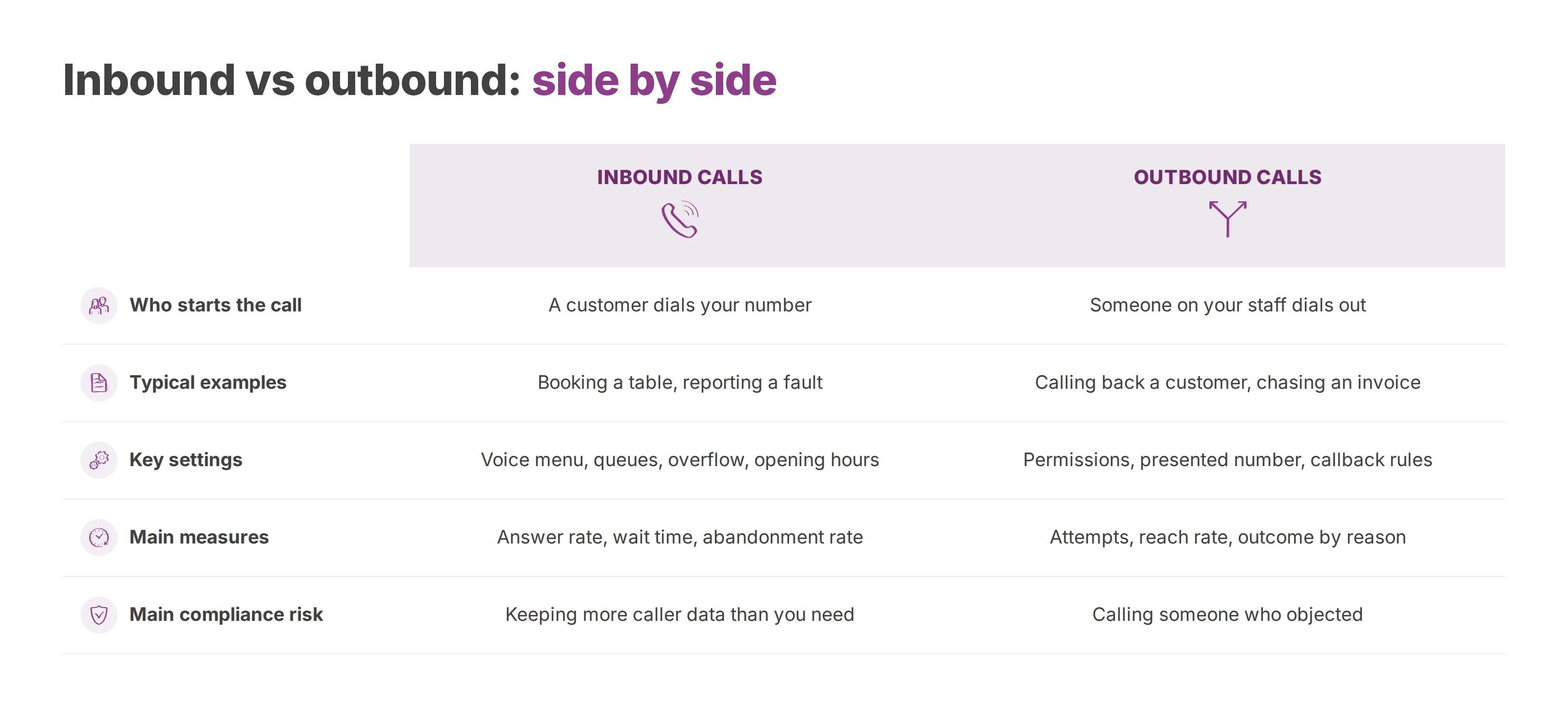
| Inbound calls | Outbound calls | |
|---|---|---|
| Who starts the call | A customer, resident, patient or supplier dials your number | Someone on your staff dials out |
| Typical examples | Booking a table, reporting a fault, asking a council department a question | Calling back a customer, chasing an unpaid invoice, a sales prospecting call |
| Key settings | Voice menu, queues, overflow, opening hours | Call permissions, the number you present, callback rules |
| Main measures | Answer rate, wait time, abandonment rate | Attempts, reach rate, outcome by reason for the call |
| Main compliance risk | Recording and keeping more caller data than you need | Calling someone who objected or who sits on a do-not-call list |
Inbound calls follow distribution rules, while outbound calls follow permissions and caller ID choices. A caller who gives up in a queue and an outbound attempt nobody answers also point to different problems, so they belong in different reports. Recording raises questions on both sides. It can capture the caller, your employee and anyone else named during the conversation, so you need to know why each call happens and keep only the data that purpose requires.
Map how your phones are used before you touch any setting. Many organisations keep a public number their customers have known for years while they change the system behind it. Others have to tie together a head office, branches and staff who work from their mobiles. Write down who calls you, who your teams call, which calls take priority and what information you have to keep. With that map you can choose settings that fit, instead of copying an old switchboard that has grown hard to manage.
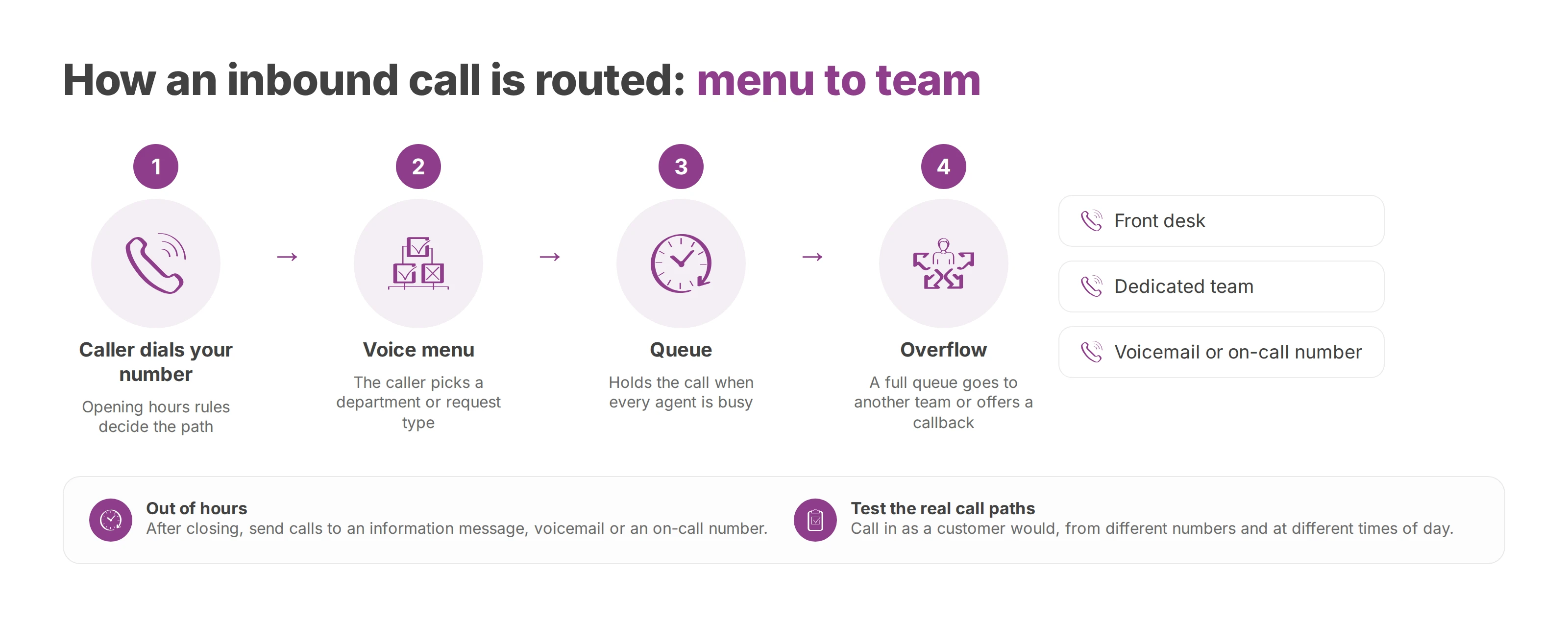
A cloud PBX sends each call where your rules say it should go. Those rules can depend on opening hours, the department the caller asked for or the skills of the people who are free. Outbound rules work in the other direction: they decide which users may call out and which company numbers they can present.
An IVR (interactive voice response) greets the caller and offers choices. A clinic can send appointment requests to the front desk and sensitive questions to a dedicated team. A hotel can separate new bookings from guests calling about a stay that is already under way. A local council can split calls by department, as long as the options stay easy to follow. Our guide to choosing a cloud IVR covers the menu side in more depth.
The menu picks the destination, and the queue handles the wait when every agent is busy. Depending on your system, a full queue can overflow to another team, offer a callback or play an announcement. Keep announcements honest. A promised two-minute wait that turns into ten does more damage than a plain list of the caller's options.
Out-of-hours rules deserve the same care. A call after closing can go to an information message, voicemail or an on-call number, if that suits the service. Design emergency routing with the managers responsible for it and test it separately, since a voice menu can't triage every critical situation.
Rule of thumb: every menu option should lead to someone who can help, with a fallback for when that team doesn't pick up.
A routing diagram usually looks logical on paper. Testing turns up the gaps: an option that loops back to the same menu, a queue that never overflows, a transfer to a team that has gone home. Call in the way a customer would, from different numbers and at different times of day. Then write down each rule, who owns it and how to change it, so that a change to opening hours doesn't depend on the one colleague who remembers the old configuration. In Voxbi you build these call flows in a visual editor.
A call log turns phone events into something you can act on. It shows missed calls, frequent transfers, busy periods and outbound attempts that went unanswered. How far back you can look depends on the plan. On Voxbi Managed, call history runs from 60 days on Essential to 730 days on Enterprise. On Voxbi One, live call dashboards come with Plus, Plus AI and Channel.
For inbound calls, most teams track volume, answer rate, wait time and abandonment rate. For outbound calls, look at call volume, callback attempts and outcomes grouped by the reason for the call. A rising abandonment rate tells you which queue to look at. To learn why callers give up, review a sample of those calls and walk the call path yourself.
A high answer rate can hide a poor experience if the caller gets passed around three times or has to ring back because nothing was solved. So pair your answer figures with outcome measures. Was the transfer to the right person? Was the issue resolved on first contact, where that applies? Did the caller avoid a second call? What do the teams on the phones report?
Priorities shift by sector. A clinic cares about fast access to the right person for sensitive requests. A hotel wants booking calls to reach reservations every time. A town hall needs to know how reachable each department is across its opening hours.
Split your views by queue, site and time period. Don't compare departments that keep different hours or handle different work, because their numbers won't line up. Set alert thresholds that fit each team. When one trips, review the calls behind it before you touch the configuration.
Access to logs needs rules too. The people who analyse call volumes rarely need to hear the conversations. Keep activity statistics apart from audio, and tie each kind of access to a defined business need.
An outbound call worth making has a stated reason, the right recipient and an easy way for that person to say no. Sort your outbound calls by type: prospecting, callbacks customers asked for, urgent service calls and information campaigns. A prospecting call and a requested callback serve different goals, so write separate rules for each type.
In the European Union, Article 21 of the GDPR lets anyone object to direct marketing at any time, and once they do, you may no longer use their data for it. Telephone marketing also has national rules on top. Two examples, one inside the European Union and one outside it:
United Kingdom: you must not make marketing calls to numbers on the Telephone Preference Service (TPS) for individuals or the Corporate TPS for businesses unless that person has consented, and you have to keep your own do-not-call list as well (Information Commissioner's Office guidance).
Belgium: every organisation that markets by phone has to check its call lists against the Do Not Call Me list, which covers consumers and businesses alike (Do Not Call Me). A legislative proposal would end that central list, so check the current rule before each campaign.
If you call into several countries, screen each list against the rules of the country you are calling.
A callback policy sets the hours your team may call, the maximum number of attempts and the steps to follow when someone objects. Staff need a quick way to log a do-not-call request, and that request has to reach the list before the next campaign starts. Every number you present should be assigned to you and authorised for that use. Our guide to outbound caller ID covers how to choose it.
Spoofed caller IDs have made people wary of numbers they don't recognise. Log which user or team placed each call, and watch for calls that the network rejects or labels as spam. If your own number gets flagged, our article on numbers marked as suspected spam explains what to do.
Recording supports training, evaluation and quality checks, but it shouldn't turn into an archive of every conversation. Record a defined share of calls for a stated purpose, tell your staff, and consult employee representatives where national law requires it. Our article on call recording and the GDPR sets out the lawful basis and the notice in full.
Retention periods depend on the purpose and the country. France's data protection authority, the CNIL, gives a useful benchmark: recordings made for training or evaluation are kept for six months at most, and the written evaluations for up to one year (CNIL guidance on recording calls at work). A recording kept as proof that a contract was agreed by phone follows a different rule. Its retention runs with the limitation period for a claim (CNIL retention reference for human resources). Check your own regulator before you copy those numbers. Our guide to call log retention covers the call records themselves.
On Voxbi Managed, recordings stay on our server for 3 days on Essential, 14 on Professional, 60 on Business and 120 on Enterprise. More recording storage costs €0.30 per user per month from Professional up.
A retention policy works best with automatic deletion by category. Training audio expires on its own schedule, while evaluation results can be kept separately if their purpose justifies it. Delete local exports nobody needs, log every access to recordings and limit that access to authorised staff.
Separation means you won't keep a whole conversation when a score or a short extract would do. It also helps with internal requests, since a manager can read an evaluation sheet without opening the audio. If you change what you record, update the notice callers and staff hear.
Voxbi hosts your calls and data in the European Union. Hosting alone doesn't make you GDPR compliant, though. You still document who acts as controller and who as processor, who has access, how long you keep each kind of data, how you secure it and whether any of it leaves the European Union. If you switch on AI transcription or call summaries, add that processing to your record of processing activities and tell callers about it in your recording notice.
Number porting lets you keep your fixed numbers when you change provider, so customers keep dialling the number they already know. On Voxbi One, porting your numbers in is available from the Starter plan up, and we handle the move with your current provider. Ask how long the line may be down during the switch. In France, Arcep caps the interruption at four hours when a business keeps its existing fixed or mobile numbers (Arcep's 2026 business guide, porting sheet). Ask your new provider for the rules that apply where your numbers are registered.
The project lead's first job is to confirm who holds the current contract and to list every number you're keeping. Then they file the port request with the new provider, agree a cutover window and prepare a fallback plan. Test inbound calls to each department and site. Check that outbound calls present the numbers you expect.
Your migration plan should name owners, list the tests and give staff one channel for reporting problems. Where the technology and the contracts allow it, moving traffic in stages lets you prove the routing before the full switch. The port itself only moves the number, so the call tests and staff briefings still decide whether the cutover goes smoothly. Our guide on porting a business phone number walks through the steps.
Inbound and outbound calls are linked flows with separate settings. Inbound calls need routing rules, queues sized to demand and a fallback when a team can't answer. Outbound calls need a stated reason, verified numbers and opt-out handling that works every time.
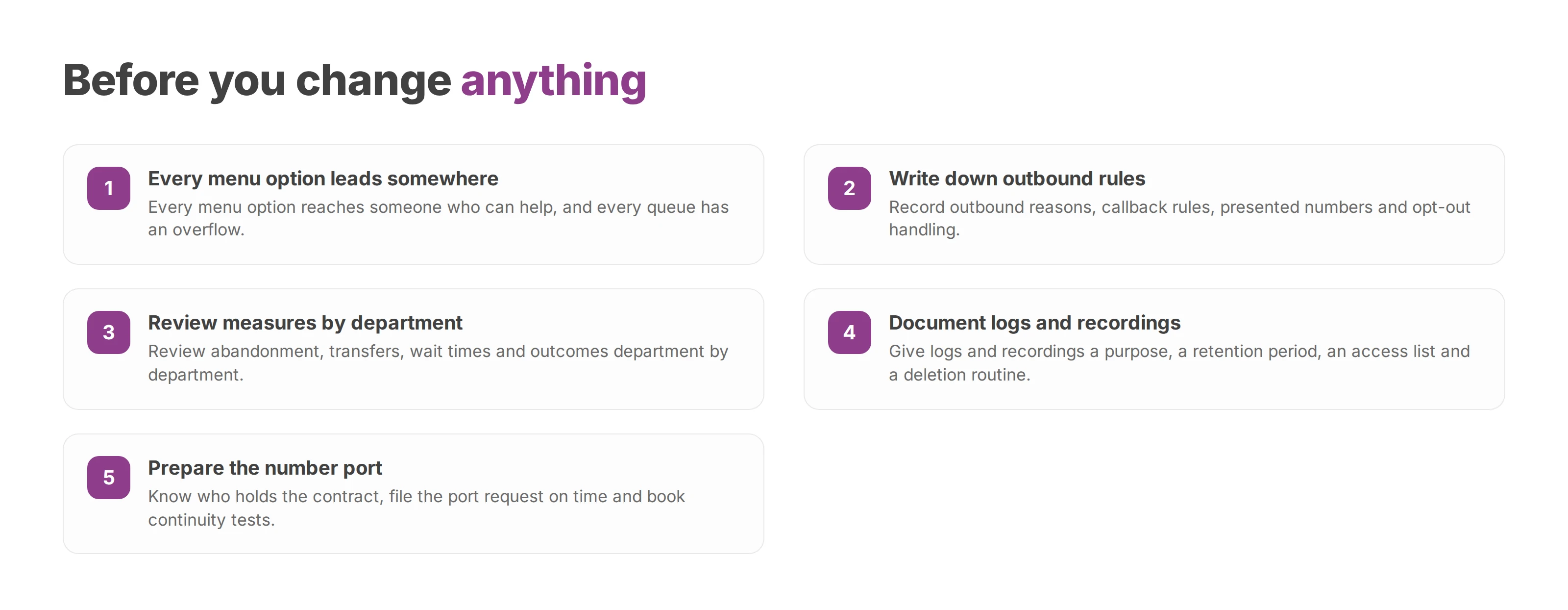
Every menu option leads somewhere useful, and every queue has an overflow.
Outbound reasons, callback rules, presented numbers and opt-out handling are written down.
Abandonment, transfers, wait times and outcomes are reviewed department by department.
Logs and recordings have a documented purpose, retention period, access list and deletion routine.
You know who holds the contract, the port request goes in on time and continuity tests are booked.
The review works best with IT, department heads, the staff who answer the public and your telecom integrator in the same room. It usually turns up quick fixes before you commit to a larger project. Training matters as much as configuration, since a well-built menu won't help a team that doesn't know how to handle a callback or log an objection.
Your phone system should match how your organisation actually works. In Voxbi Cockpit you manage users, call flows, queues, IVR menus and opening hours in one place, with data hosted in the European Union. Start by calling your own main number at lunchtime and following the call to wherever it ends up. If you'd like to walk through your inbound and outbound setup with us, write to hello@voxbi.com.
How a hotel phone system routes reservation, room and maintenance calls, connects to your PMS, and helps you stay secure and meet the GDPR across one site or many.
What the GDPR asks of a business that records calls. It covers the lawful basis, notice before recording starts, fixed retention, tight access and the national rules to check.

Click to call turns a tap on a phone number into a routed call. See how it works from the click to the SIP INVITE, where it helps and what GDPR asks.
Start a free trial, or work with a certified Voxbi partner.