
International phone number format: the E.164 guide for CRM and PBX data
How E.164 works, how to convert a national number to it, and how to keep the numbers in your CRM and phone system in one consistent form.
Oct 24, 2026
Call transcription turns a phone call into a summary and a next step in your CRM. This guide covers the architecture, field mapping, the review queue, the GDPR and testing.

A customer call ends. The agent hangs up and moves on to the next task. Ten minutes later, all that's left is a one-line note too vague for anyone to follow up on. Call transcription can turn that conversation into a summary, a qualified intent and a next step in your CRM. That only works if you decide what goes into the customer record and keep the rest out. This guide is written for small and mid-sized businesses that want transcripts in the CRM without copying every spoken word into it, and for the IT integrators who serve them.
Picking a speech engine is the easy part. You also have to settle which calls to transcribe, where the audio is stored, which data reaches the CRM, who can read it and when it's deleted. The setup in this guide is deliberately lean. A short summary goes to the CRM, the full transcript sits behind restricted access, and everything is hosted in the European Union.
Call transcription turns the audio of a phone call into text. A speech recognition engine does the work, and it can run at two moments. Real-time transcription writes the text while people are still talking, which suits live agent prompts or captions. Post-call transcription processes the recording once the call has ended. It takes a little longer, but the engine hears the whole conversation before it commits to a word, and for a CRM record that is usually what you want. Voxbi works this way. It transcribes the audio within minutes of the call ending, then writes the summary.
Accuracy depends less on the brand of engine than on the calls you feed it. A clean headset line beats a mobile in a car. One speaker at a time beats crosstalk. Common words beat product codes and surnames, and an engine trained on your callers' language beats one that only met it in a demo. A good engine also labels who said what, a step called speaker separation or diarisation, though it gets it wrong when voices overlap.
Then there is the question of where the transcript lives. It can stay in the phone system, sit in a separate transcription service, or be copied into the CRM. This guide argues for keeping the full text in one restricted place and sending only a short summary onward.
A second layer works on the text itself. It can summarise the call, pick out the caller's request and suggest a next action. Voicemail is a narrower case with its own rules, covered in our guide to voicemail transcription. This article follows the full two-way conversation and the route it takes into your CRM, which is one form of computer telephony integration.
On an ordinary day, a request comes in by phone. A salesperson answers from the cloud phone system, and the customer explains what they need, what limits them and when they need it. The agent may well identify the contact, yet the record often stays unchanged until they find time to write a report. If the call lands on the wrong contact, the opportunity gets no task, the ticket gets no context, and the next colleague has no history to work from.
A transcript attached to the right record changes that. The system can keep the reason for the call, write a summary, flag a sales or support intent and propose a next action. The agent still approves the result. What you gain is that the request no longer lives in one person's memory or in a recording nobody will replay.
Keep the scope concrete. After a sales call, the opportunity gets a restated need and a follow-up date. After a support call, the ticket gets the problem as the customer described it and the last commitment your team made. A healthcare practice needs a stricter filter, because a call can carry health details that have no place in a record the whole team can open.
A transcript earns its keep when it puts a reliable fact in the right file, behind the right level of access.
Having a CRM is not enough on its own. Each call has to be tied to a record by a phone number, contact ID, extension, ticket or opportunity. If that match fails, the automation creates a duplicate contact or gives an action to the wrong customer. Audio quality, accents, interruptions and telling callers they're being recorded all affect the result too. So settle one question first: what should your team find in the CRM, and what should stay out of it?
The most important choice comes before the API. A sound architecture keeps four jobs apart: a cloud PBX hosted in the European Union, a transcription service, a review queue and the CRM. Audio shouldn't be copied into every one of these systems. The PBX holds the recording for a set period, the engine produces the text, a processing layer extracts the fields you need, and the CRM receives only that result.
There are two ways to build this. The first uses an engine built into the phone platform, which leaves fewer integrations to maintain and keeps the call, the recording and the transcript matched to each other. The second uses a specialist external engine with its own API. That can give you more control over the model or the vocabulary. In return, you'll have to review every transfer, subprocessor, processing location and deletion route yourself.
Test the engine on your own vocabulary, in the languages your callers actually speak. An engine that handles small talk well can still stumble on product names, part numbers, surnames or medical terms. Put regional accents, background noise, people talking over each other and calls from mobiles in your test sample.
Speaker separation helps with sales and support summaries, but treat it as a good guess, not proof. When the engine can't tell the speakers apart with confidence, keep the full text available for checking and hold back any automatic task.
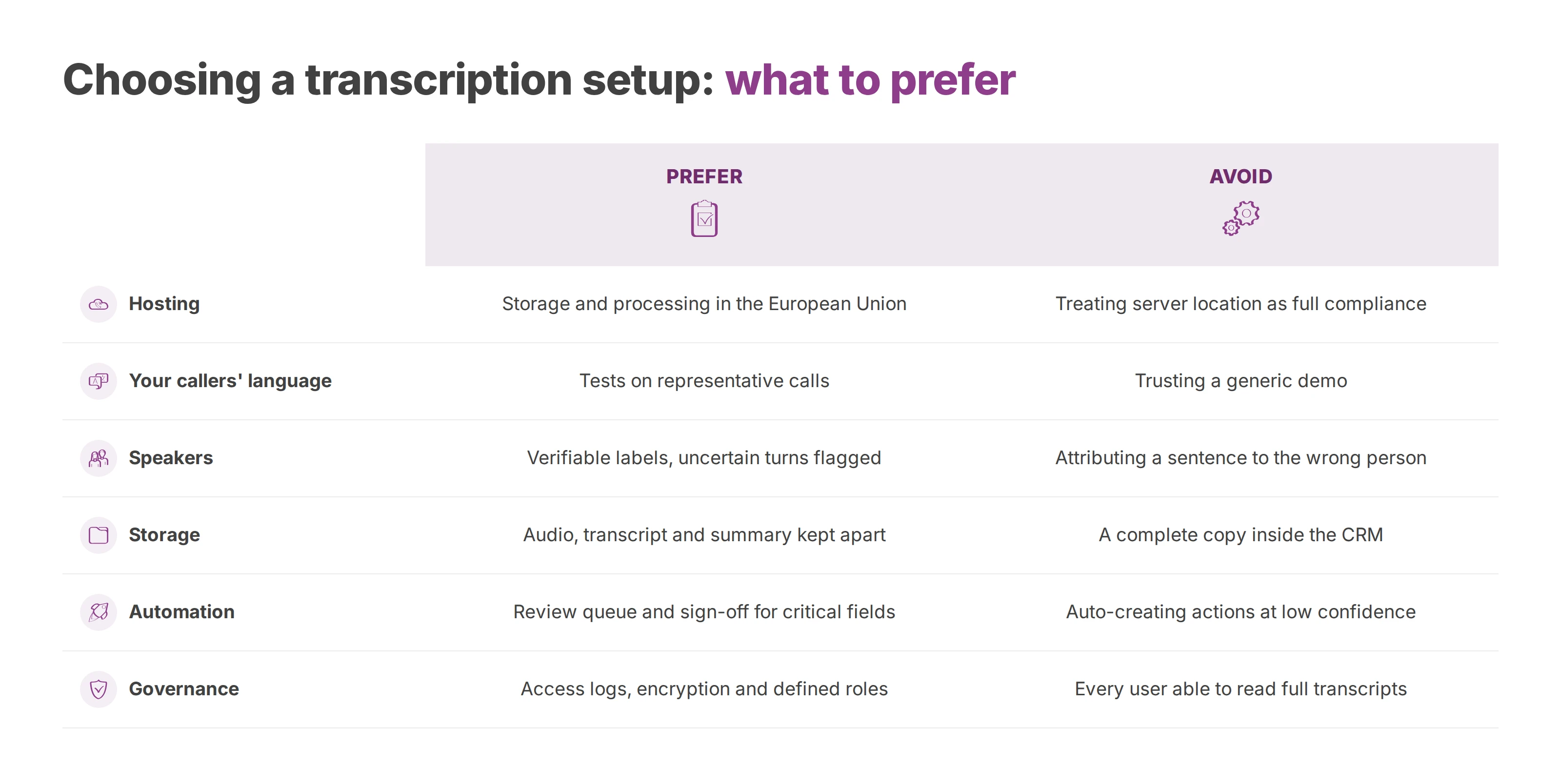
| Criterion | Prefer | Avoid |
|---|---|---|
| Hosting | Storage and processing in the European Union, with documented data paths | Treating server location as full compliance |
| Your callers' language | Tests on representative calls | Trusting a generic demo |
| Speakers | Verifiable labels, with uncertain turns flagged | Attributing a sentence to the wrong person |
| Storage | Audio, transcript and summary kept apart | A complete copy inside the CRM |
| Automation | Review queue and sign-off for critical fields | Auto-creating actions at low confidence |
| Governance | Access logs, encryption and defined roles | Every user able to read full transcripts |
Hosting in the European Union makes it easier to see where your data travels, and it keeps that data under European law. It does not prove GDPR compliance by itself. You still need a known list of subprocessors, defined purposes, access rights, deletion routes and a clear answer on whether the vendor reuses your data.
The European Union's Artificial Intelligence Act, Regulation 2024/1689, entered into force on 1 August 2024. Its bans on certain practices and its AI literacy duties have applied since 2 February 2025, and the Act as a whole became applicable on 2 August 2026. A later amending regulation, the AI Omnibus, entered into force on 27 July 2026 and pushed the rules for high-risk uses, employment among them, to 2 December 2027.
The Act judges a tool by what it is used for. Transcribing a call to write an operational summary is one thing. Inferring how an employee feels is another: the European Commission lists emotion recognition in workplaces among the practices the Act prohibits. Scoring an employee's performance or reliability from their calls also deserves a careful legal review. Integrators and telecom resellers should get each use case assessed, write down who is responsible for what, and steer clear of blanket promises about AI Act compliance.
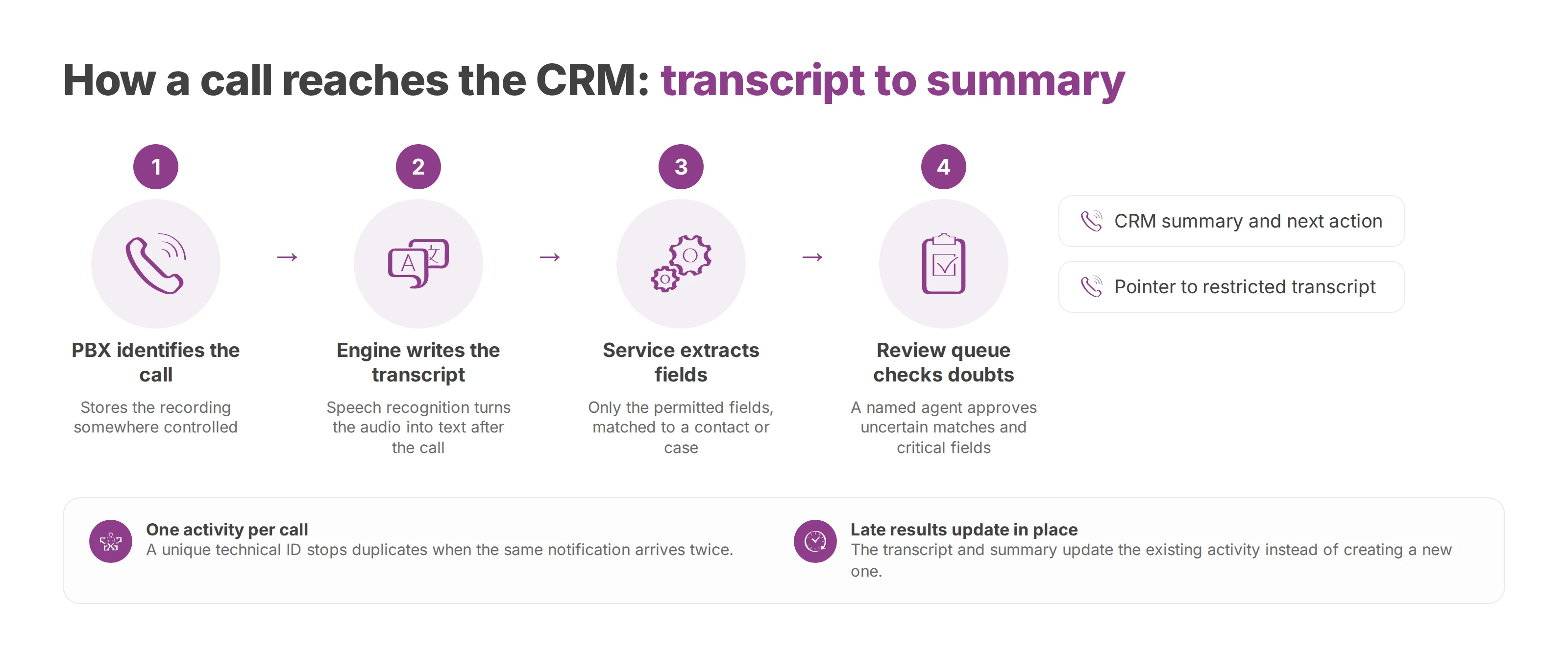
A dependable integration runs in a fixed order, and every step leaves a trace. The PBX identifies the call and stores the recording somewhere controlled. The engine generates the transcript, and a processing service extracts the permitted fields. The CRM then receives a targeted summary, plus a pointer to the full transcript for users who have the right to read it.
The end-of-call webhook shouldn't trigger a full write to the customer record straight away. It can start small, with the call ID, timestamp, number, queue, extension and status. The integration service checks the match against a contact or case, and only then requests the transcript or processes the one that's ready.
A unique technical ID stops duplicates when the provider sends the same notification twice. The system also has to cope with results that arrive late. The transcript may land some time after the call and the summary later still, so the CRM should update the one existing activity each time instead of creating a new one per event.
Favour fields a person can read and check:
Case identification. The contact, account, ticket or opportunity the call belongs to.
Context. Date, duration, queue, agent and call direction, kept only when the process needs them.
Summary. A few approved sentences on the reason, the request and the outcome.
Next action. Proposed task, owner, due date and confidence level.
Qualification. Sales stage or support category, with human sign-off whenever the field triggers something downstream.
Detailed access. A reference to the full transcript in a separate service, so the audio isn't open to every CRM user.
Pseudonymise names, numbers and sensitive details before they reach a CRM field that doesn't need the full identity. The summary shouldn't replay the whole conversation either. A medical request, a bank detail or a trade secret may come up on a call, and it can stay in the restricted transcript instead of becoming a permanent note half the company can read.
You need a review queue. It catches the calls where automation is likely to go wrong: a number that matches several contacts, speakers the engine couldn't separate, uncertain vocabulary, or a summary with an unchecked critical field. A named agent or team lead looks at the result, corrects the record and approves the action.
Before you switch anything on, run through a short checklist. Part of it comes straight from what France's data protection authority, the CNIL, asks of call recording at work: a stated purpose, people told about it, and access granted per person with individual logins. The rest is the practice we recommend on top. Map where audio and text travel, limit which calls are processed, pseudonymise what you can, log every access, encrypt data in transit, test quality on a sample of your own calls, and put a human sign-off on critical fields.
With Odoo or another CRM, the REST API can receive a structured object in place of a block of free text. Your integrator then decides which fields the CRM accepts, rejects unexpected values and keeps proof of each transfer. The Voxbi CRM integration is a reasonable starting point for scoping that flow. It connects natively to Odoo, and for other CRMs its REST API and webhooks return call history with recordings and AI transcripts, so nothing forces you to copy the full text into every record.
Hosting in the European Union reduces some transfer risks. It doesn't replace your records of processing or your access rules. You should be able to explain why you record, why you transcribe, why you summarise and why you keep each item. These purposes often sit close together, but they are not automatically the same, so each one gets its own entry.
Callers should hear about recording at the start of the call, in plain words, including what it's for, their rights and who the controller is. Your staff need the rules too, especially when transcripts feed quality checks or analysis of their own calls. Our guide to call recording and the GDPR covers the lawful basis and the notice in more detail.
How long can you keep call audio? The GDPR itself names no number of months, so a national benchmark helps. In France, the CNIL's simplified norm 57 on recording calls at work set a ceiling of six months from collection for the recordings, and one year for analysis documents such as call reports. That norm has had no legal force since the GDPR came into application on 25 May 2018, but the CNIL keeps it online as guidance, and six months is a sensible default to start from. Notice that the audio and the written report get different periods. A CRM summary can follow its own documented period too, as explained in our article on call log retention.
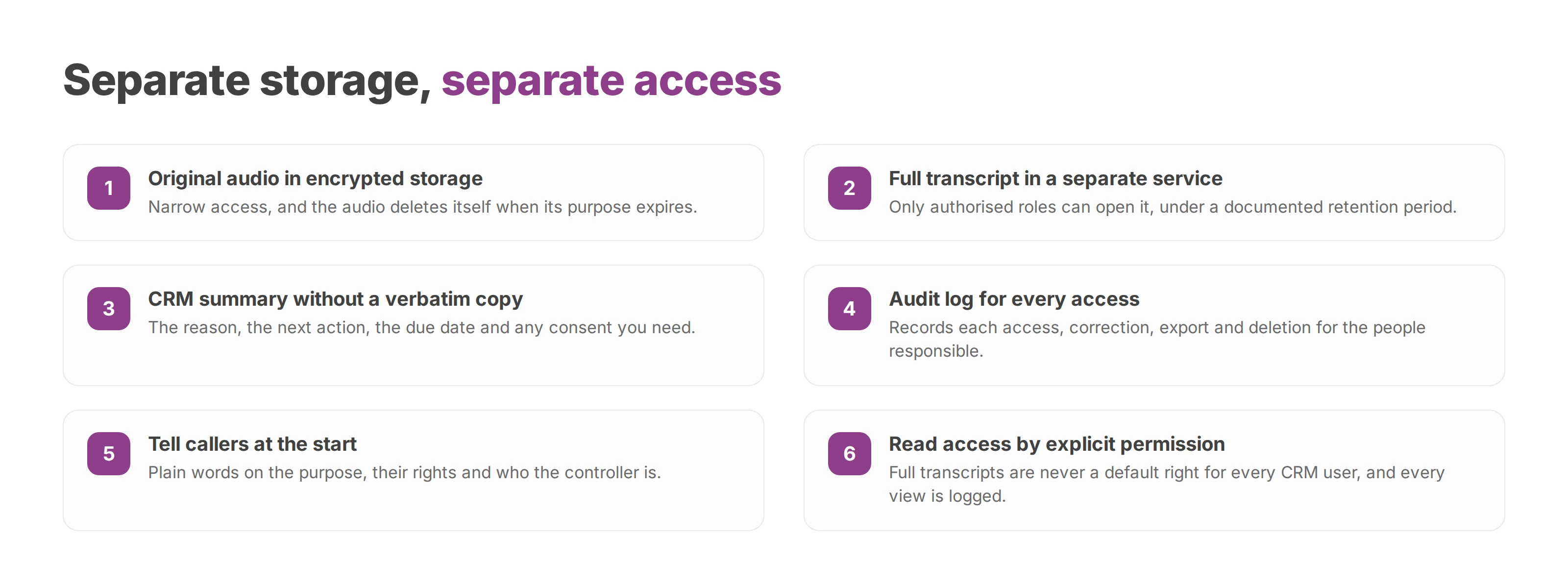
That is why each item needs its own place. The original audio goes into encrypted storage with narrow access and deletes itself when its purpose expires. The full transcript lives in a separate service that only authorised roles can open, under a documented retention period. The CRM summary holds the reason, the next action, the due date and any consent you need, with no verbatim copy. An audit log records every access, correction, export and deletion for the people responsible.
With this split, you can answer an access or erasure request precisely, and you can delete from the PBX, the transcription engine and the CRM in one pass. An erase button in the CRM alone leaves the original audio and any intermediate copies untouched.
Role-based access separates three people. The agent reads their own cases, the manager checks a sample, and the data protection officer or IT lead administers the rules. Reading full transcripts should never become a default right for every CRM user, so it sits behind an explicit permission. Every view is logged, and every export leaves a trace.
Security has a technical side, which covers transport, storage and the encryption keys, and a governance side that deals with vendors, subprocessors, transfers and human corrections. European hosting helps with both, but it proves neither that you collect only what you need nor that you have a right to process it. Your compliance file has to describe your own calls, users and purposes. Transcribing a few selected queues is usually easier to defend than switching it on everywhere by default.
Don't start the trial on every queue at once. Pick one where you can check results quickly, such as a support team or a sales line, and keep sensitive calls out of it. Compare the text with what was really said, and check above all whether the CRM fields came out right.
Your sample has to reflect real working conditions, so resist picking only the clearest calls. Include the accents your business hears, the noise of a busy front desk, crosstalk, customer names, case numbers and your trade vocabulary.
Track two numbers separately. Word error rate shows where the engine struggles with language. CRM field error rate shows when a mistake changed a qualification, an assignment or an action. For the business, the second figure often matters more.
In Odoo, the integration creates or updates an activity on the contact, ticket or opportunity. Keep the summary short and checked. Only create a task automatically when the call matched correctly, the action field makes sense and the confidence rules are met.
With Microsoft Teams, the checkpoint is the match between the user, the call and the CRM case. Your administrator verifies viewing rights, how transferred calls behave and what happens when several people join. A Teams call that can't be identified must not feed a record at random.
For a REST API, test slow responses, duplicate events, events that arrive out of order and authentication failures. Replaying an event mustn't create a second activity, and each event should carry a clear status: received, processed, rejected or sent to review.
Our guide to connecting Odoo to Voxbi helps you structure these checks on the phone and CRM side. Your integrator then adapts the mapping to the objects your business actually uses.
Support can get a summary of the reason, the symptom and the next action, while the full transcript stays with an authorised lead. Sales can use a proposed qualification, though the agent approves any follow-up with legal or commercial weight.
In a clinic, a care home or a public service, you can switch transcription off for certain queues or call types. The system can also filter sensitive data and require approval before it creates any task. The aim is to keep only what the process needs, not to transcribe more.
Hold the wider rollout until matching failures, misheard surnames and unwanted automatic tasks are fixed. A busy review queue is better than automation that feels smooth while it quietly fills your CRM with bad data.
A lasting integration starts with the question of need. Not every queue has to be transcribed, and not every transcript has to be kept. Most teams do better by picking a few scenarios, watching the errors and widening the scope step by step.
The architecture stays simple: a minimal summary in the CRM, the full transcript behind restricted access, and audio deleted after a short, documented period. Sensitive details stay contained, and sales and support still get a usable record of each conversation.
Review the setup regularly. Look at word, speaker and CRM field errors, and at whether agents actually read the summaries and correct the proposed tasks. Check access, deletions, exports and the purposes in your records of processing. Then switch off the queues that produce little value or too much sensitive content.
Integrators and telecom resellers gain a lot from writing responsibilities down. The business sets the purposes and approves each use, while the integrator documents the data path, the mappings and the review process. The cloud provider describes its hosting, subprocessors and security measures, and the data protection officer or designated lead checks that the pieces fit together.
The best integration isn't the one that fills the most fields. It's the one that creates a reliable action in the right place, keeps data no longer than needed, and hands over to a person when the system is unsure.
Voxbi is a cloud phone system hosted in the European Union, with a native Odoo integration and a REST API for other CRMs. On the Plus AI plan (€3.10 per user a month, excluding VAT), every call is transcribed and summarised. The full plan list is on our pricing page. To try a transcription pilot on one queue, with a minimal summary in the CRM and controlled access, start a free trial.
How E.164 works, how to convert a national number to it, and how to keep the numbers in your CRM and phone system in one consistent form.
Call logs, metadata and recordings each need their own retention period. This guide shows how to set them by purpose, who owns each one, and what happens when someone deletes a call in an app.
How to set outbound caller ID per user, site or queue, check it across Teams, mobile and softphone, and keep every presented number authorised and authenticated.
Start a free trial, or work with a certified Voxbi partner.