
How to port a business phone number without losing calls
Keep every number when you change operator. Build the inventory, match the holder name, let the new operator lead the port and test before the old service ends.
Sep 26, 2026
How to set outbound caller ID per user, site or queue, check it across Teams, mobile and softphone, and keep every presented number authorised and authenticated.

A salesperson rings a prospect from their mobile, and the prospect sees a personal number. A branch in Brussels runs on the same phone system as head office in Luxembourg, yet some of its calls show a number nobody recognises. Both problems come down to outbound caller ID: which number your calls present, and who's allowed to present it.
This guide is for anyone running telephony at a small or mid-sized company with several sites or remote staff. The method is short. You pick an authorised outbound number, attach it to the right user or queue, and then confirm that the carrier passes it on and authenticates it. Every step below follows that order.
Outbound caller ID is the number your phone system presents to the person you're calling. The network service behind it is called CLI (calling line identification). On a SIP call, your platform places the number in the From and P-Asserted-Identity headers, and the carrier checks that you're entitled to use it before it reaches the other side.
Think of a company with 25 staff: head office in Luxembourg, sites in Brussels and Dublin, and a handful of salespeople working from home. Management wants one central number on every call, wherever the call starts. A remote user doesn't need a local line for that. The call leaves through the Voxbi platform, and the platform applies whichever presentation rule you've set for that user, department or call queue.
The most direct setup gives each user their own DDI number. A salesperson presents their direct line, while the sales team as a whole presents the switchboard number. Our guide to how a DDI number routes calls covers the inbound side of the same number.
A site pool lets several users share one site or department number. Dynamic display picks the presented number from the number dialled, so a call to Ireland can show an Irish number and a call to Belgium a Belgian one.
Spoofing means presenting someone else's number without the right to use it. Presentation is a function of the SIP network, governed by the carrier and by national numbering rules, and that's what separates a legitimate setup from a disguise.
Integration rule: every presented number must be assigned to the company, ported to it, or explicitly authorised for it. An interface that accepts any number typed into a free field is a compliance risk.
It pays to write down who presents which number, from which device, towards which destinations. That record becomes the reference whenever you have to balance a recognisable brand number, direct callbacks and fraud control.
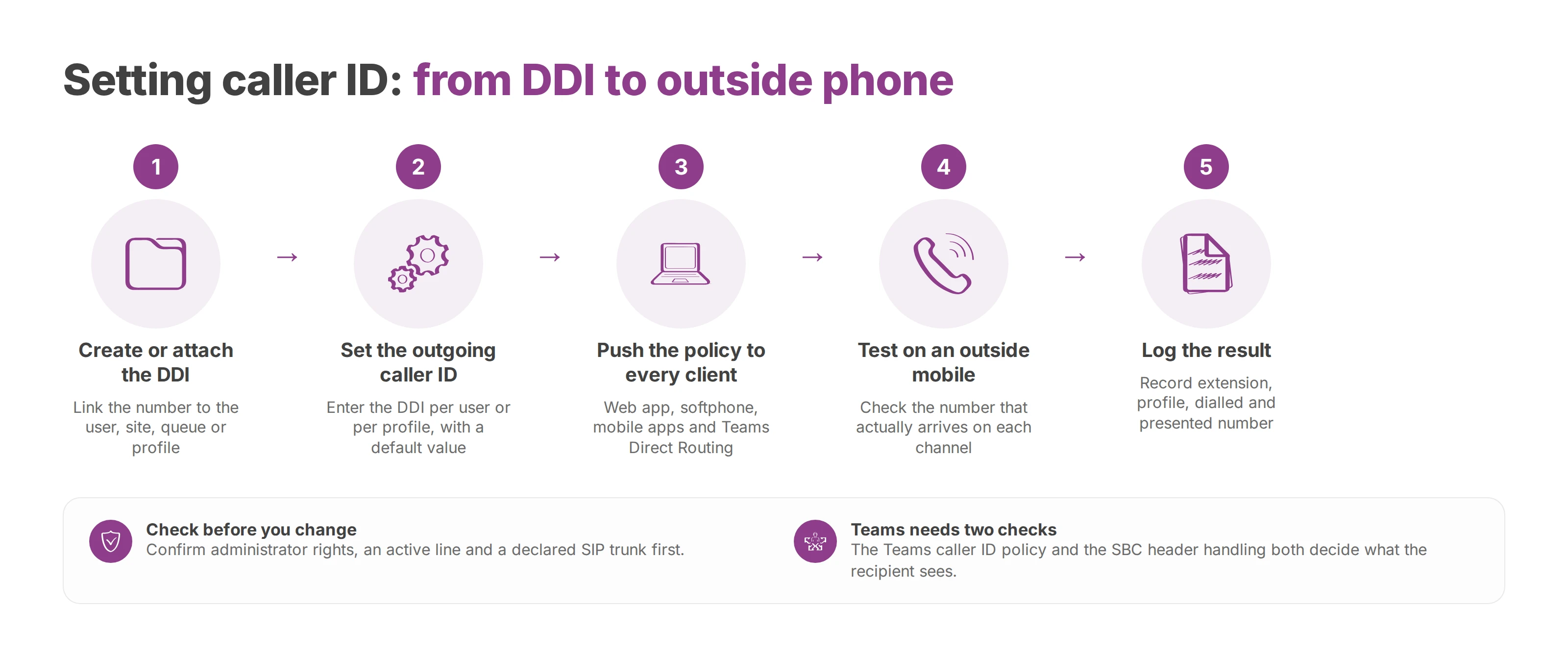
You configure caller ID in Voxbi Cockpit, not on the user's handset. Before you change anything, confirm you have administrator rights, that the line is active and that the SIP trunk is declared. If one of those is missing, a caller ID rule can look correct in the interface and still be rejected or rewritten further down the carrier chain.
Create or attach the DDI. The number has to sit in the company's inventory and be linked to the user, site, queue or profile that will present it. A ported number gets the same checks as one supplied directly by the carrier.
Set the outgoing caller ID. In the extension settings, enter the chosen DDI in the outgoing caller ID field. You can apply the rule per user or per profile, with a default value.
Push the policy to every client. Check the setting in the web app, the Voxbi softphone for Windows or macOS, the iOS or Android app, and the Teams Direct Routing connector. A client that hasn't resynced its profile can keep presenting an old identity.
Test on an outside mobile. Call a personal mobile and look at the number that actually arrives, which can differ from the value Cockpit shows. Repeat the test from every channel the user works on.
Log the result. Record the extension, profile, dialled number, presented number and the outcome you observed. That record shortens diagnosis when a customer calls back the wrong number.
In Microsoft Teams, the number the recipient sees depends on two things. One is the Teams caller ID policy assigned to the user. The other is how the session border controller (SBC) handles the identity headers on the way out. Migrations often hit this gap. Calls from the softphone show the right number while calls from Teams show something else. Check the Teams policy, the SBC configuration and the number that actually reaches the recipient. If you're still choosing how to connect Teams, see Direct Routing vs Operator Connect.
On mobile, check the link between extension and device and the sync status on their own. With fixed-mobile convergence (FMC) twinning, the outbound identity and the call path are two separate settings, and each one can drift without the other.
Number porting lets you keep a number while changing platform. Once you've ported a number to Voxbi (Mixvoip carries it as the operator), it can become a native outbound identity. A rented DDI, an overflow pool or a queue number needs its own usage rule. Fax-to-mail runs on a separate flow and has no bearing on your voice caller ID.
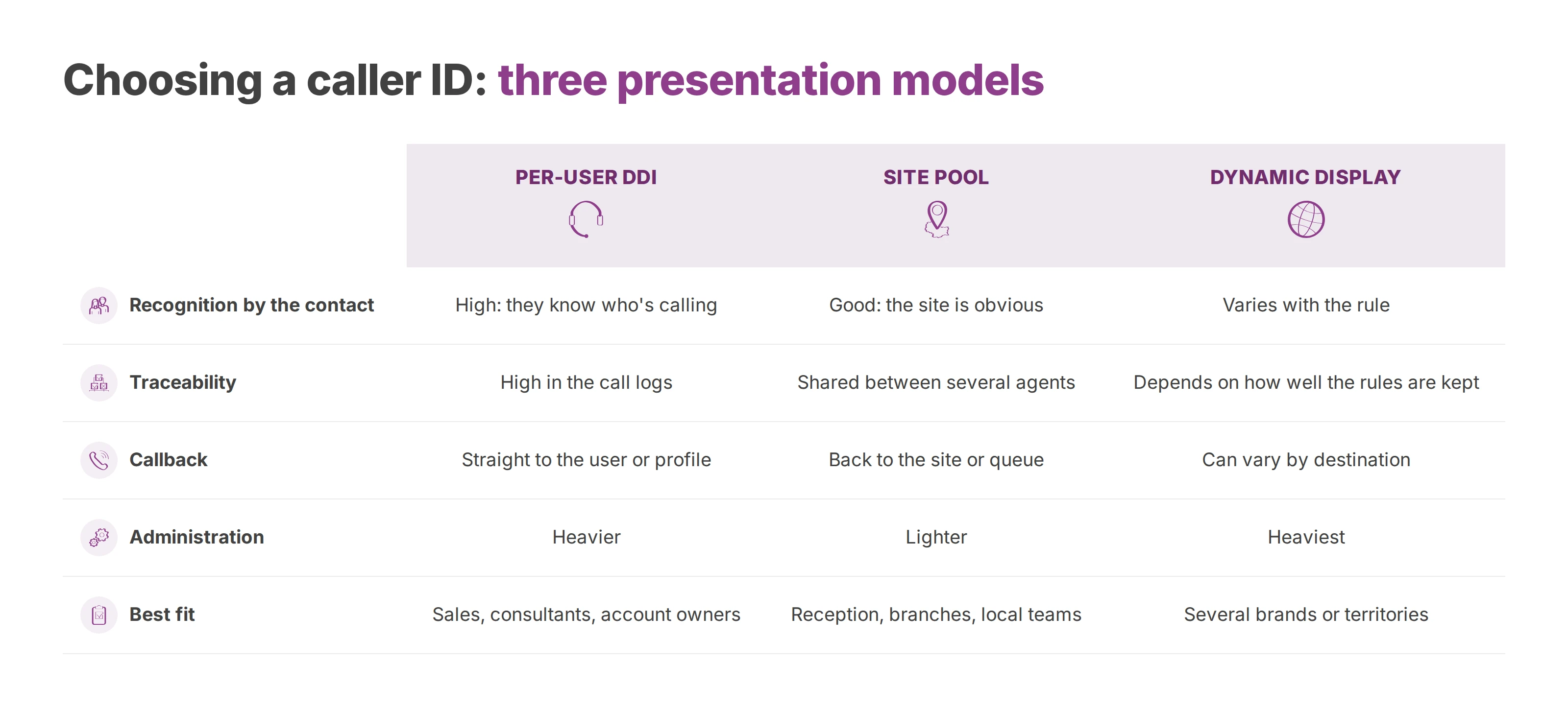
| Criterion | Per-user DDI | Site pool | Dynamic display |
|---|---|---|---|
| Recognition by the contact | High: they know who's calling | Good: the site is obvious | Varies with the rule |
| Traceability | High in the call logs | Shared between several agents | Depends on how well the rules are kept |
| Callback | Straight to the user or profile | Back to the site or queue | Can vary by destination |
| Administration | Heavier | Lighter | Heaviest |
| Best fit | Sales, consultants, account owners | Reception, branches, local teams | Several brands or territories |
Base the choice on call volume, your sector and your callback policy. In healthcare, a department number keeps individual lines out of patients' hands. In sales, a personal DDI keeps follow-ups with the same person. If you use overflow queues, check that the presented number can still be called back once a call has left the queue.
Porting a number keeps it in your inventory, and each trunk and queue that presents it needs its own authorisation.
A call from a mobile can show the switchboard number and stay fully compliant. The company must authorise the identity, and the carrier must authenticate it. Spoofing starts when a call deliberately presents a third party's number with no right of use and no trace.
Regulators across Europe are tightening the rules on spoofed domestic numbers, and that includes Ireland, Belgium, the Netherlands and Luxembourg. Carriers increasingly block or relabel incoming international calls that present a local number they can't verify. The details and the deadlines differ from country to country, and they keep changing. For numbers supplied through Voxbi, Mixvoip is the operator, and it can tell you which rule currently applies to each country you call into.
Calls that arrive labelled as spam are a separate problem with their own causes, covered in our guide to what the suspected spam label means.
Call logs should keep the configured identity, the trunk used and the authentication result for every outbound call. In Voxbi Cockpit, that translates into a presentation policy per user and a traceable list of outbound DDIs. It also means monitoring your queues and having a procedure ready for the day a customer reports a "fake number". The integration rules should cover these cases:
Switchboard number on a mobile. Check that the DDI is authorised for that user and that trunk.
Number ported to an undeclared trunk. Hold outbound calls until the carrier inventory is confirmed.
Overflow to a number from another region. Check the queue rule and the identity it presents.
Every business call produces data on top of the voice itself. There's the calling identity, the call logs, sometimes a recording, contact details and routing information. For a healthcare provider, a public body or any company handling sensitive information, where the provider hosts that data and which law it answers to both weigh on the choice of VoIP operator. If you record calls, our guide to call recording and GDPR covers lawful basis, notice and retention.
| Criterion | Voxbi, EU hosted | Trunk outside the EU |
|---|---|---|
| Data and logs | Kept within a European framework | Tied to the provider and its jurisdictions |
| Legal review | Centred on GDPR and EU law | Exposure to extraterritorial laws |
| Media flows | SIP over TLS and SRTP, depending on the architecture | May cross SBCs under another legal regime |
| Leaving the provider | Number porting and documented rules | Possible lock-in to the trunk and its tools |
When logs and recordings stay in the European Union, a call that presents an alternative number is easier to audit. Number porting adds to this by limiting lock-in during a migration.
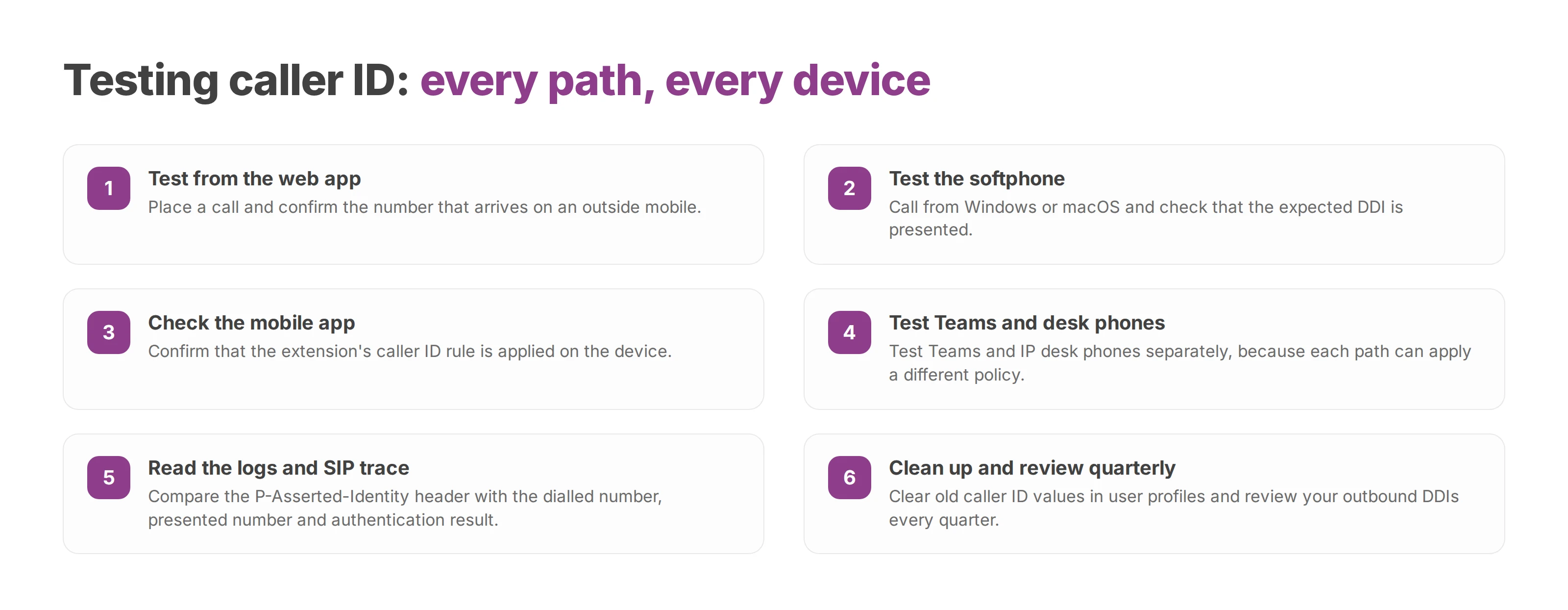
Only the number that reaches an outside phone confirms the setup. Caller ID has to survive the softphone, the mobile network, Teams and the SIP trunk, and each path can apply a different policy.
Web app: place a call and confirm the number on an outside mobile.
Softphone: test from Windows or macOS and check for the expected DDI.
Mobile app: confirm the extension's rule is applied.
Teams and IP desk phones: test each one separately.
Logs: check the dialled number, the presented number and the authentication result.
In a SIP trace, compare the P-Asserted-Identity header with what the call history recorded. Warning signs include rejected numbers, an unusual drop in answer rates, an unexpected 00 prefix and customers mentioning a number they don't recognise.
Once everything checks out, clear old caller ID values stored in user profiles, rotate SIP credentials as your internal policy requires and review your outbound DDIs every quarter. Voxbi Cockpit keeps users, queues, call rules and outbound identities in one place, and call flows and data are hosted in the European Union. To plan a migration or review your caller ID setup, write to hello@voxbi.com.
Keep every number when you change operator. Build the inventory, match the holder name, let the new operator lead the port and test before the old service ends.
Which cloud PBX providers actually integrate with Odoo, how each one connects, what the integration costs and where call recordings are stored.

Entry prices compared with numbers, calls and support added back in, because the headline seat price is never the total. Ten providers priced.
Talk to us or to a certified Voxbi partner.