
Outbound caller ID: how to choose the number your team presents
How to set outbound caller ID per user, site or queue, check it across Teams, mobile and softphone, and keep every presented number authorised and authenticated.
Sep 26, 2026
Call logs, metadata and recordings each need their own retention period. This guide shows how to set them by purpose, who owns each one, and what happens when someone deletes a call in an app.

A salesperson hands back their company mobile on their last day. A receptionist spots a sensitive call still showing on a shared screen. Someone asks IT to wipe the call history, and everyone assumes the problem goes away with one tap.
Call log retention sets how long your business keeps a record of each call and who's allowed to end that record. This guide is for IT managers, telecom resellers and integrators who run a cloud phone system for a small or mid-sized company. It treats the call log, the metadata behind it and the recordings as separate data, because under the GDPR each one runs on its own clock.
Call log retention is the period a phone system keeps its record of calls, plus the rules that end that period. Each log entry holds metadata. That covers the date, time and duration, the numbers on both ends, the extension or queue involved and the outcome of the call. Recordings and transcripts are content, and they carry their own retention period.
Retention is set on the platform. When a user deletes an entry in their app, their own screen changes. The platform's record keeps to whatever schedule the administrator has set for it. Most confusion about call history begins when those two actions get treated as one.
Your business decides one thing for every type of call data: hide it, delete it, archive it, or keep it for a specific obligation. If you skip that decision, you'll end up thinking data is gone when only the display has changed.
User-side deletion is useful for privacy at the desk. Examples include a returned mobile, a reassigned reception phone, or a test call left over from go-live. In each of these cases, removing the entry does exactly the job that's needed.
In a browser or Windows softphone, the log usually sits under recent calls. Most apps offer both a single-entry delete and a clear-all action. Mass deletions tend to start in two places. One is a filtered view that hides part of the list. The other is a shared PC where someone else's account is still signed in. Deleting one entry at a time is the safer habit for a single sensitive call.
On an iPhone, the Recents tab in the Phone app lets you swipe left on one call or tap Edit to clear the list. The filter matters here too, since "Missed" and "All" show different lists. On Android, the path depends on the handset maker and the dialler app. Support staff save time by asking the user to describe their screen before any bulk wipe.
Everything on this side of the system affects one person's view. It has no effect on the company's retention policy, which lives with the administrator.
An administrator works across three layers: what users see, what the platform stores, and who governs the data. Keeping those layers apart from day one prevents most retention mistakes. The admin policy covers logs, exports, any recordings, access rights and the purge at the end of each retention period.
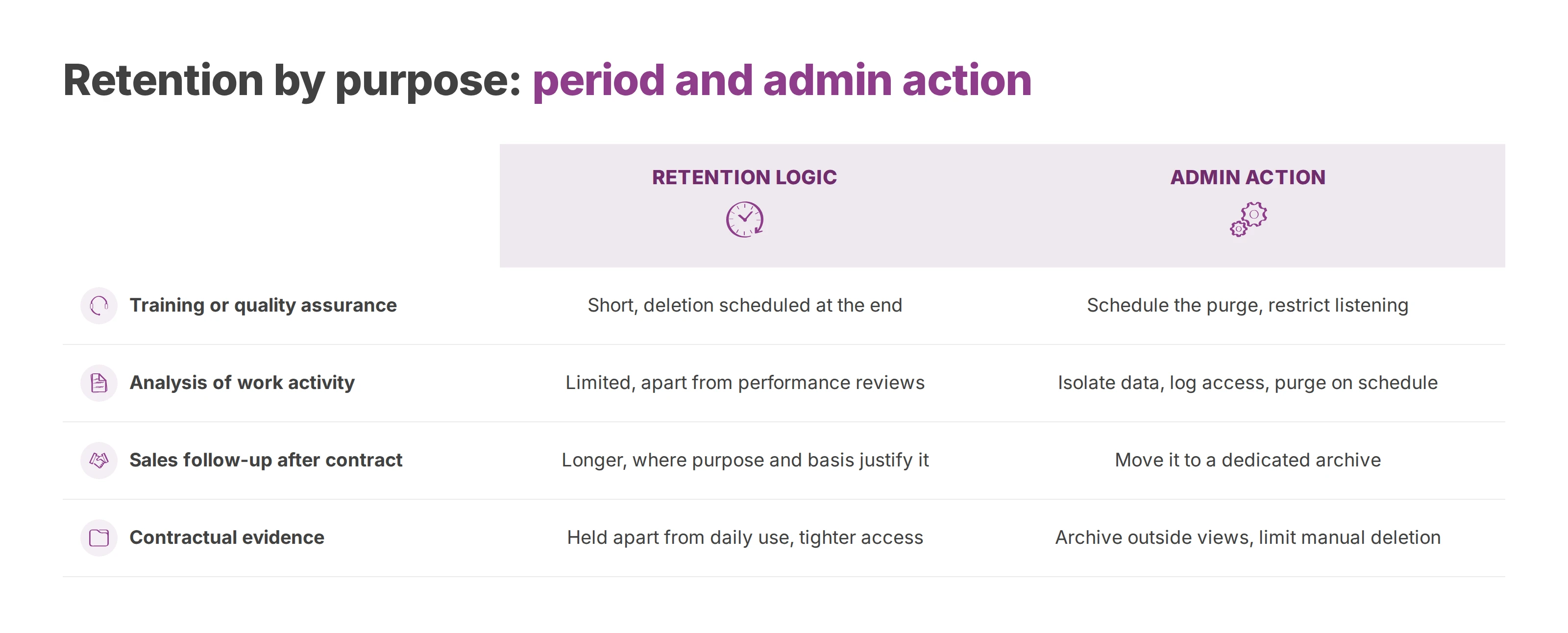
Purpose drives the period. A log used for day-to-day support gets different treatment from a recording used for training, and different again from evidence tied to a contract. When all of them share one rule, the business either keeps data too long or purges it too early.
| Purpose | Retention logic | Admin action |
|---|---|---|
| Training or quality assurance | Short period, with deletion scheduled at the end | Schedule the purge and restrict who can listen |
| Analysis of work activity | Limited period, controlled access, kept apart from individual performance reviews | Isolate the data you need, log who opens it, purge on the internal schedule |
| Sales follow-up after a contract ends | Longer period where the purpose and lawful basis justify it | Move it out of the live log into a dedicated archive |
| Contractual evidence | Held apart from daily use, with tighter access rights | Archive outside the operational views and limit manual deletion |
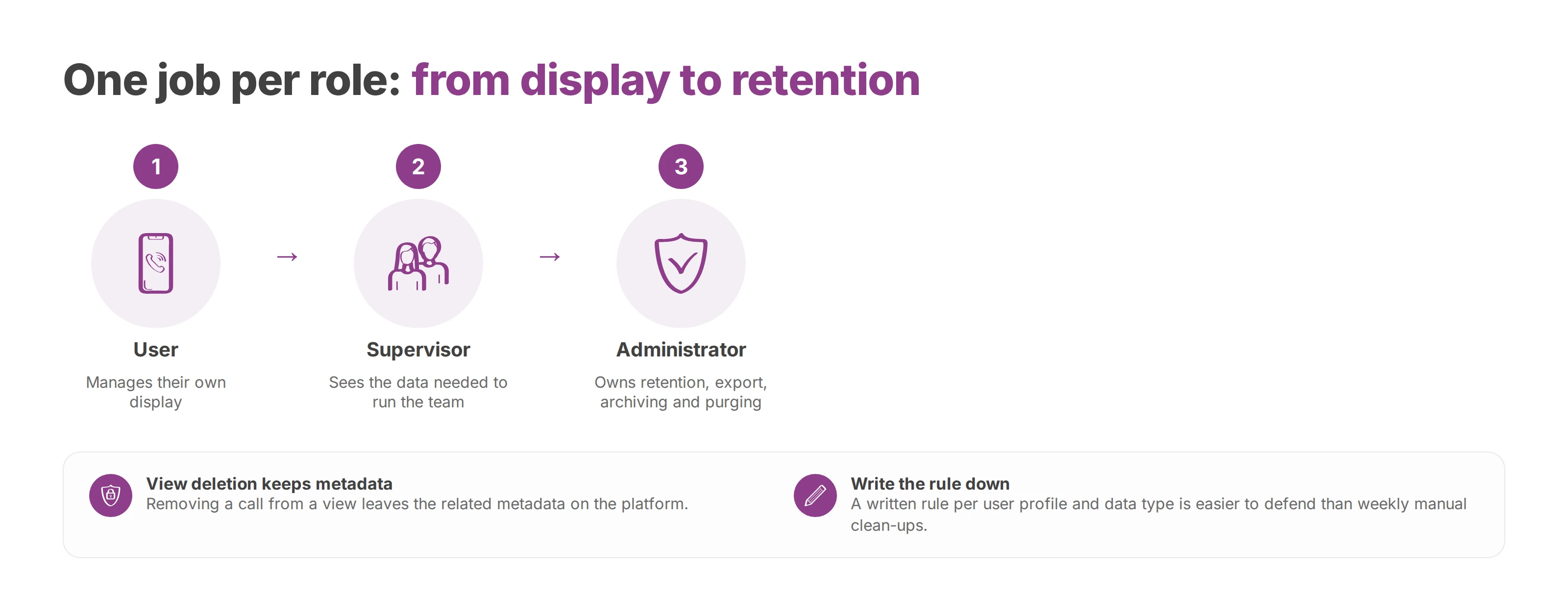
The setup that holds up over time gives each role one job. Users manage their own display. Supervisors see the data they need to run their team. The administrator owns retention, export, archiving and purging.
Removing a call from a view leaves the related metadata on the platform. In the other direction, an admin purge can reach further than intended if nobody has decided in advance which data serves daily operations, which serves as evidence and which serves quality control.
Weekly manual clean-ups create drift between teams and make audits harder. They also leave plenty of room for human error. A written retention rule, applied per user profile and per data type, is far easier to defend in the EU, where you'll need to explain the reasoning behind each period.
With telephony connected to Microsoft Teams, a user often sees two histories. Teams shows its own call list inside Microsoft 365, and the phone platform keeps a fuller telecom record. The link between them depends on how you've connected the two, as covered in Teams Direct Routing vs Operator Connect.
A salesperson calling from Teams tends to treat the Teams list as the whole record. For governance, the metadata and some call traces sit on the phone platform, so deleting a call in one interface leaves the other untouched. Support tickets drop when you train people on what each view covers, record deletions that matter, and write down which interface is the reference.
If nobody says which view is the record, users improvise, and improvisation produces tickets instead of compliance.
Tell users from the start that display, telephony and retention may live in different layers. Once that's understood, support knows where to look, users know what they can delete, and the administrator knows what has to stay.
The GDPR's storage limitation principle in Article 5(1)(e) of the regulation says personal data may be kept only as long as its purpose requires. Call logs, metadata and recordings all count as personal data once they can be linked to a person, so each needs a stated purpose and a period that follows from it.
Treat three objects separately:
the call log a user sees in their app,
the metadata, such as date, duration, number, status, extension or queue,
the content itself, meaning recordings and any transcripts derived from them.
A quality recording, proof that a call was handled, a fraud trace and a convenience entry on a screen each justify a different period. Recording brings its own rules on lawful basis and notice to callers, which call recording and GDPR walks through. Your carrier may also hold traffic data under its own national telecom rules. That copy sits outside your company's retention policy, whatever a user deletes.
A cloud phone service and Teams running side by side raise questions an auditor will ask early. Who sets the purpose, who stores the data, who deletes it, and who answers an erasure request? Your company is usually the controller. A provider can act as a processor, or share more of the responsibility, depending on how the service is used. The European Data Protection Board sets out how to tell these roles apart in its Guidelines 07/2020 on the concepts of controller and processor.
In practice, you'll want four answers on file. You need to know where the recordings are stored and who holds the metadata. You also need to know what Teams keeps, and which interface counts as the reference when someone makes a GDPR request. Hosting in the European Union makes transfers and contracts easier to read. A lawful basis, a defined retention period and a working erasure procedure are still your company's responsibility.
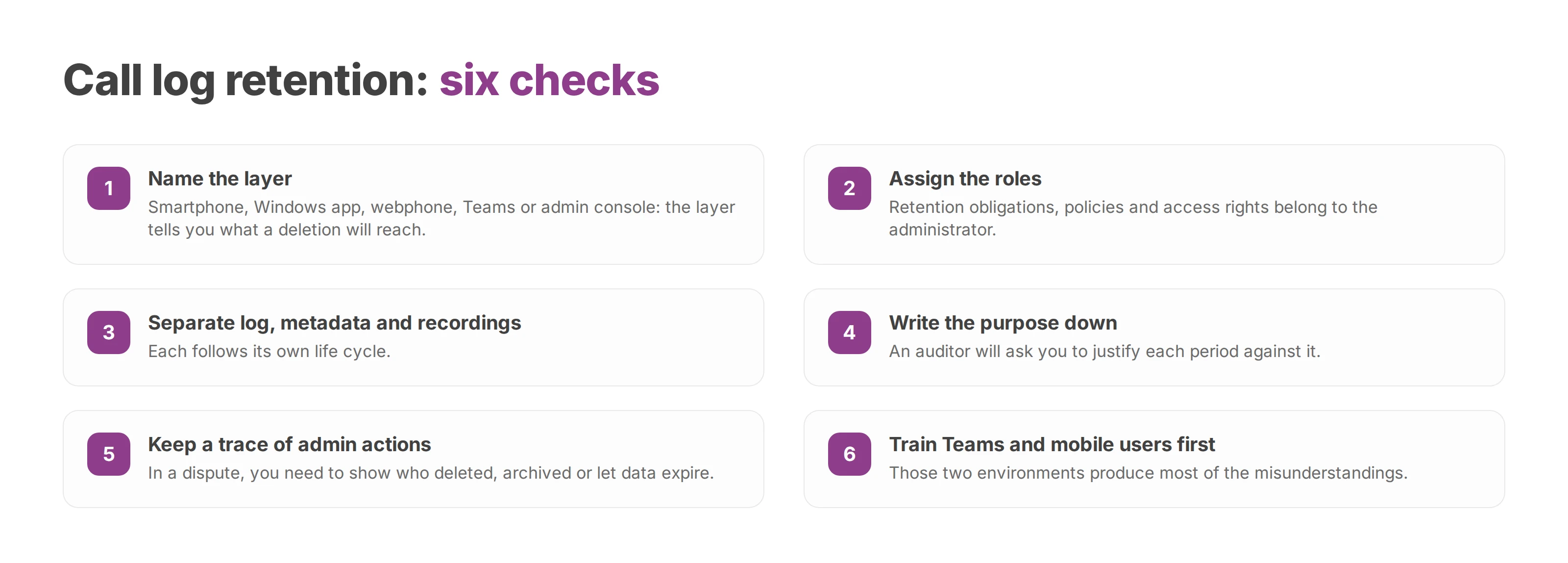
Name the layer. Smartphone, Windows app, webphone, Teams or admin console. The layer tells you what a deletion will reach.
Pick single delete or bulk purge. On a personal device, deleting entries one at a time carries the least risk.
Assign the roles. Retention obligations belong to the administrator, who also holds the policies and access rights.
Separate log, metadata and recordings. Each follows its own life cycle.
Write the purpose down. An auditor will ask you to justify each period against it.
Keep a trace of admin actions. In a dispute, you'll need to show who deleted, archived or let data expire.
Train Teams and mobile users first. Those two environments produce most of the misunderstandings.
Check hosting and cloud roles. Confirm where the data lives and what each party's contract says it does.
The most common mistake is one rule for every call. A well-run SME usually applies several rules in parallel. One covers the user display, one covers quality recordings and one covers contract archives.
The second mistake treats deletion as a one-off act. Without an internal procedure, users wipe entries on one side while the company keeps data elsewhere with no framework. That gap is what sets IT, business teams and compliance against each other.
Voxbi is a cloud PBX hosted in the European Union, with calls, rights and data managed from one admin console in Voxbi Cockpit. To see how its call logs and recordings would fit your retention policy, write to hello@voxbi.com, and bring your purpose table so the conversation starts from your own rules.

How to set outbound caller ID per user, site or queue, check it across Teams, mobile and softphone, and keep every presented number authorised and authenticated.
Keep every number when you change operator. Build the inventory, match the holder name, let the new operator lead the port and test before the old service ends.
Which cloud PBX providers actually integrate with Odoo, how each one connects, what the integration costs and where call recordings are stored.
Talk to us or to a certified Voxbi partner.