Computer telephony integration is the real-time connection between a phone system and the software a team already works in. When it's running, an inbound call opens the right customer record on the agent's screen, and a number stored in the CRM dials with one click. Everything below covers how that works and what to check before you sign anything.
This guide is written for small and mid-sized companies, and for the IT integrators and telecom resellers who deploy for them. The problem it solves is an ordinary one. Someone answers a call, hunts for the customer, retypes information that already sits in another window, and the caller waits through all of it.
What computer telephony integration means
A hotel takes a booking call. The person on reception checks the planning chart, opens the guest record, reads the internal notes, then comes back to the line to confirm the room. Every switch between tools costs seconds and invites a mistake.
The same sequence runs in a clinic, a customer service desk or a multi-site switchboard. A call arrives, someone has to identify the caller, open the right file, enter information and pick the conversation back up before the silence gets awkward. Computer telephony integration removes that back-and-forth between the voice channel and the business applications.
CTI in plain English
CTI is the acronym you'll see on datasheets, and in English it expands to computer telephony integration. One unrelated result shows up in search for the same three letters: CTI BioPharma, a pharmaceutical company with nothing to do with telephony. If your search is about phones, desktops and customer records, you're in the right place.
A simple test. If the phone triggers a useful action inside the business application, computer telephony integration is in play.
The technology started as standard equipment in contact centres, wired into on-premise hardware. It has since moved onto cloud platforms and APIs. The job stayed the same, which is getting a voice call to talk to the application where the work happens.
The components of a CTI architecture
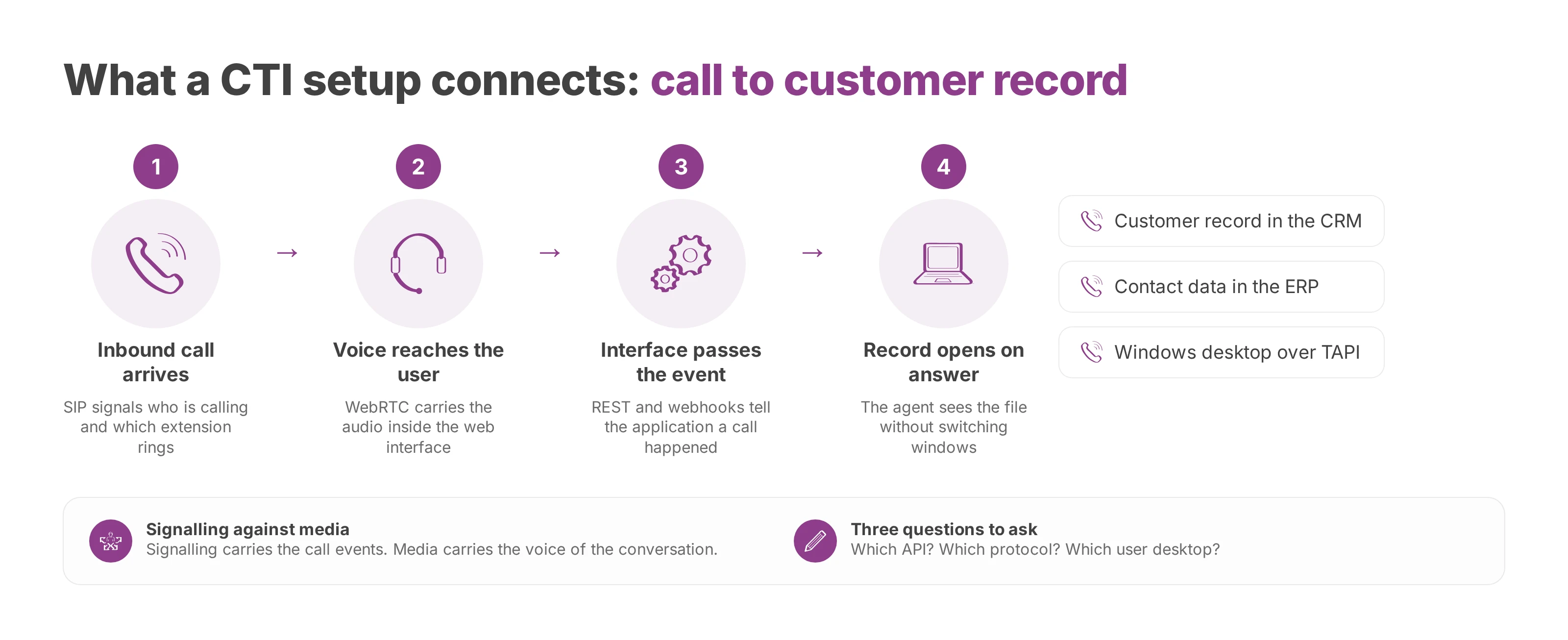
A CTI setup assembles several parts with different jobs. Making a phone ring is the easy half. The harder half is moving information to the right place at the right moment, between the phone system, the user's desktop and the business application.
The first separation to hold on to is signalling against media. Signalling carries who's calling, which extension rings, who picked up and which action fires. Media carries the voice itself, meaning the audio of the conversation.
SIP is usually the signalling language between devices, a shared standard that organises the call. WebRTC handles voice through the browser, so a user gets a working phone without extra hardware on the desk. For a workstation that has to stay simple, that difference matters every day.
Application interfaces complete the picture. TAPI behaves like a virtual cable between the PC and the phone system. REST lets a CRM or an ERP talk to the telephony layer. Webhooks send a notification the moment a call event happens.
Reading a product sheet
Bring each item back to its function and a datasheet gets much shorter:
SIP signals the calls between systems.
WebRTC carries voice inside the web interface.
TAPI drives calls from the Windows desktop.
REST exchanges data with the CRM or the ERP.
Webhooks push alerts triggered by a call event.
Then put three questions to your integrator. Which API? Which protocol? Which user desktop? Those answers separate what talks to the application, what carries the call and what the agent actually sees on screen.
A serious CTI datasheet keeps the application interface, the signalling and the audio transport apart. Where a vendor blurs all three into one paragraph of marketing, the scope of the project stays vague and so does the estimate. Compatibility across the web interface, softphones and business applications is what keeps the setup open afterwards. A proprietary coupling you can't modify later just adds another silo to the estate. If you're still comparing platforms at this stage, our notes on picking a cloud phone system cover the same ground from the buying side.
What CTI changes day to day
Nobody buys this to make an architecture diagram look better. The purchase is about removing wasted gestures, handling calls faster and giving management something real to look at. The gain shows up in three places.
Agent productivity
The first gain is less typing. When the record opens on answer and click to call launches the number straight from the CRM, nobody dials by hand, hunts for the right window or loses the thread of the conversation. In a support desk or an internal switchboard, that clears out most of the micro-interruptions that wear a team down.
It's sharper still for a field salesperson or an advisor moving from one call to the next. The desk phone stops being just a phone and becomes a working surface with the context attached. The agent talks while the application prepares the next step.
Customer experience
The second gain sits on the caller's side. With the file on screen at pickup, the exchange starts faster and the customer skips repeating details the company already holds. Call history synced into the CRM keeps the conversation coherent when a different colleague answers next time. A caller who can tell their file is already open reads a short pause as service rather than confusion.
Management visibility
The third gain reaches the managers. A well-integrated CTI layer feeds dashboards on queues, missed calls and team activity, which is what lets you move people around at the moment it helps. For a floor supervisor, an internal help desk or a switchboard spanning several sites, that live view changes daily decisions.
The platform underneath decides how heavy all this feels. On a modern cloud PBX, coupling is a feature you switch on rather than a project you schedule, which keeps ordinary business changes out of the telecom backlog. Our explainer on how a cloud PBX works sets out the model in full.
CTI in hospitality, healthcare and public services
In hospitality, the effect shows at reception. A guest calls to book, the system recognises a known number and pulls up the record, and the call can go to the right person or the right language. Across a multi-site chain, that continuity saves the team from starting cold on every call.
In healthcare, the same mechanics carry more weight. A medical secretary or a clinic switchboard gains real time when the file tied to the call appears immediately, because someone has to decide fast who takes it. The call gets logged, the urgent case gets routed, and the trace stays usable for follow-up.
In a public authority, the need shifts but the mechanics hold. The front desk needs to see which service the caller wants, send them to the right slot and leave a useful record for the internal teams. Residents mostly want a clear answer without repeating themselves.
Three settings, one pattern
Across all three, the promise is identical: fewer manual steps, more context at pickup, and a more consistent answer. A department head sees the value the moment the front desk stops navigating between screens and starts handling calls with a method.
Integrating CTI with a European cloud PBX
Integration gets much simpler when the phone system was designed for the cloud in the first place. With Voxbi, an administrator works from a single Voxbi Cockpit to set up users, extensions, queues, IVR menus and opening hours, without raising a ticket for every adjustment. That's the shift that matters for a growing company, because telephony stops behaving like fixed equipment.
The admin path
Start by connecting telephony to the working environment you already run. Native connectors to Microsoft Teams and Odoo keep people out of workarounds, and click to call in the web interface puts dialling on the same level as any other business action. Call history and contact synchronisation over the REST API keep the useful data where the team already sits. If Teams is your starting point, the comparison of Direct Routing and Operator Connect explains how the carrier side attaches.
Migration is the second thing to examine. Numbers port across without an interruption, handled on the Mixvoip carrier side, which takes most of the risk out of leaving an old on-premise PBX. For integrators and resellers, that's usually the point that settles a decision, because service downtime is the fear the customer voices first.
What to check before you sign
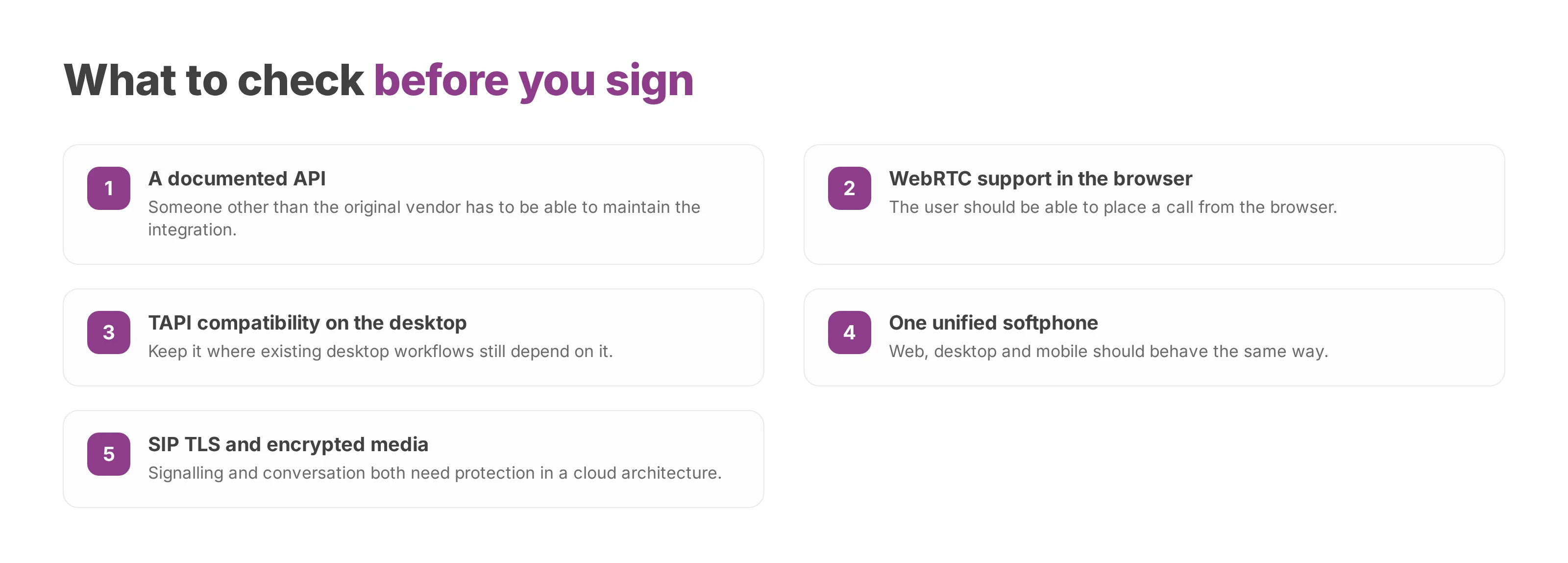
Documented API. Someone other than the original vendor has to be able to maintain the integration.
WebRTC support. The user should be able to place a call from the browser.
TAPI compatibility, where existing desktop workflows still depend on it.
Unified softphone. Web, desktop and mobile should behave the same way.
SIP TLS and encrypted media. Signalling and conversation both need protection in a cloud architecture.
Ask the vendor to describe the whole route out loud, from the ringing number to the record on screen. A supplier who can't narrate that end to end still has integration work in front of them. A well-built system doesn't need months of wiring to make a customer file appear. It attaches to the tools already in place, then lets each department decide how much automation it actually wants.
Where computer telephony integration stands today
CTI runs on cloud APIs, web interfaces and browser softphones. The hardware PBX was its original home, and the integration layer moved off it without changing purpose. The voice channel still has to reach the business application; only the plumbing modernised.
Small teams get the same value as large ones. As soon as a company equips a handful of desks and needs the right customer context at the right second, the subject is concrete. Click to call and a screen pop are within reach of a ten-person office, provided the tool stays easy to administer.
Compliance follows configuration. Hosting in European data centres with encrypted flows tends to improve traceability and control, and in regulated sectors the quality of the logging counts as much as the calling features. The useful question is how to govern CTI properly rather than whether to allow it. The decision then rests on architecture: API openness, administrative simplicity, hosting, and control over the data.
Computer telephony integration under GDPR
Call recordings, call metadata, supervision logs and any transcripts are personal data as soon as they identify a person or attach an exchange to an individual. In a CTI deployment those elements travel widely, through the phone system, the CRM, the dashboards and sometimes an analytics tool. Compliance can't stop at a line in a brochure.
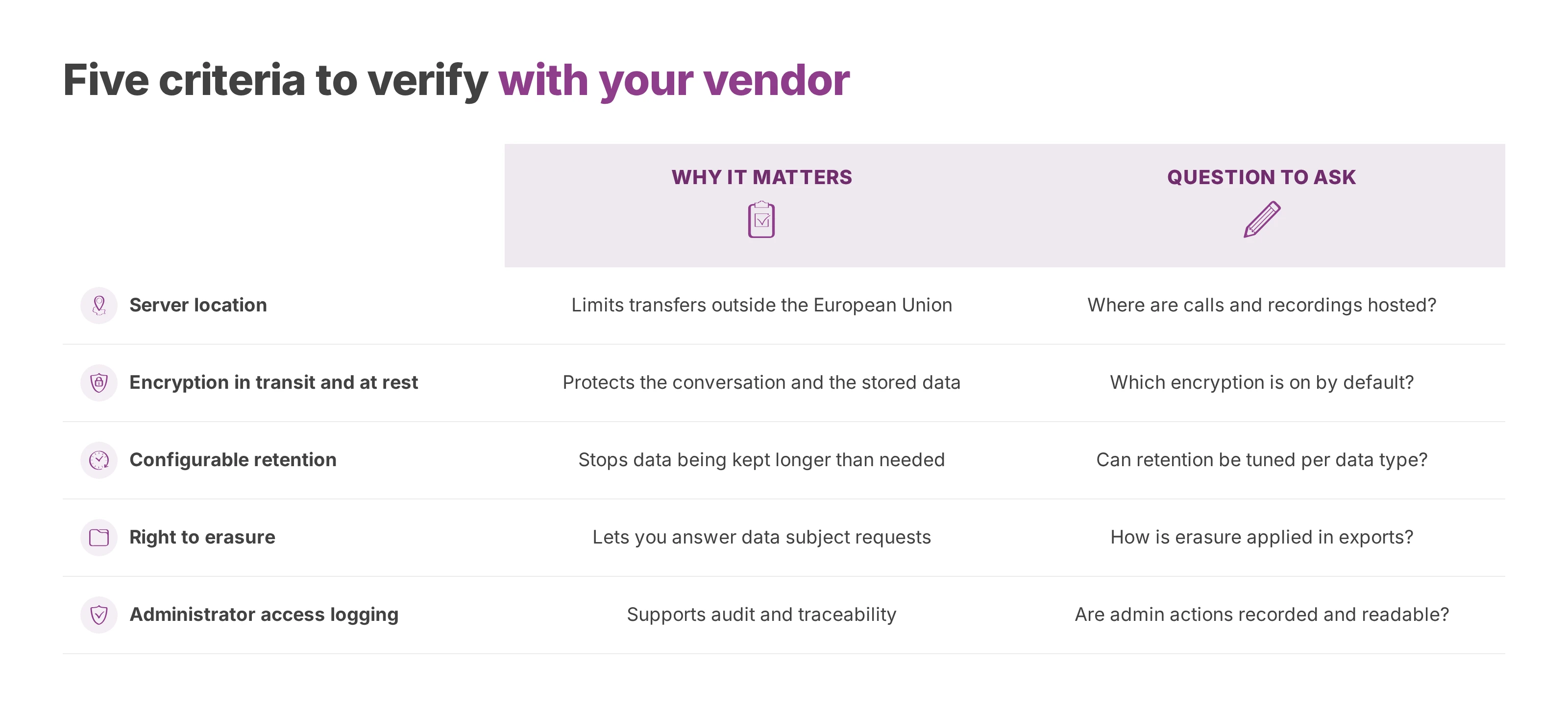
Hosting that data in the European Union simplifies governance. It avoids transfers to third-country jurisdictions and aligns processor contracts with European law. It remains a useful condition and not automatic compliance, because configuration, retention periods and access rights weigh as much as location does.
What to verify with the vendor
The subject grows with the regulation now arriving around artificial intelligence. For call analytics or transcription features, check the regulatory impact before treating compliance as settled. A credible supplier can describe its compliance roadmap and not only its feature list.
Sovereignty and technical choice run together. A system hosted in Europe, administered in detail and documented properly makes life clearer for the security lead, the IT director and the department that uses the phones. In a competitive tender, that criterion separates two CTI offers more often than price does. Our write-up on a cloud PBX built and hosted in Europe covers where the data actually sits.
Voxbi runs a cloud phone system administered from a single cockpit, hosted in the EU, with encrypted communications and the integrations that CTI needs. Take the five questions in the table above into your next vendor demo, and write down the answers you get.