
Freephone number: costs, prefixes and how to get one
What a freephone number is, who pays for the call, the UK's 0800 and 0808 ranges and how other countries differ, and how to route and test the line before launch.
Nov 15, 2026
How the four VoIP codecs you'll meet on a business phone system differ, and how to choose one for each site without adding conversions.

A call sounds rough, so someone opens the codec list and swaps the format. The name changes and the crackle stays. VoIP codecs decide how a voice gets packed for the network and rebuilt at the far end. Late packets, a congested access line and a badly configured handset all sit outside their reach.
This guide is for integrators, resellers and IT teams who run phones across several sites with uneven connections. It compares G.711, G.722, G.729 and Opus, then shows how to choose one per site. The order matters. Check the network first, the negotiation between devices second and the format last.
A codec works like a compression bag for luggage. You squeeze the clothes down to save space and shake them out on arrival. Everything's still there, though a crease sometimes shows. A VoIP codec shrinks what the network has to carry, and the voice that comes out at the other end can differ slightly from the one that went in.
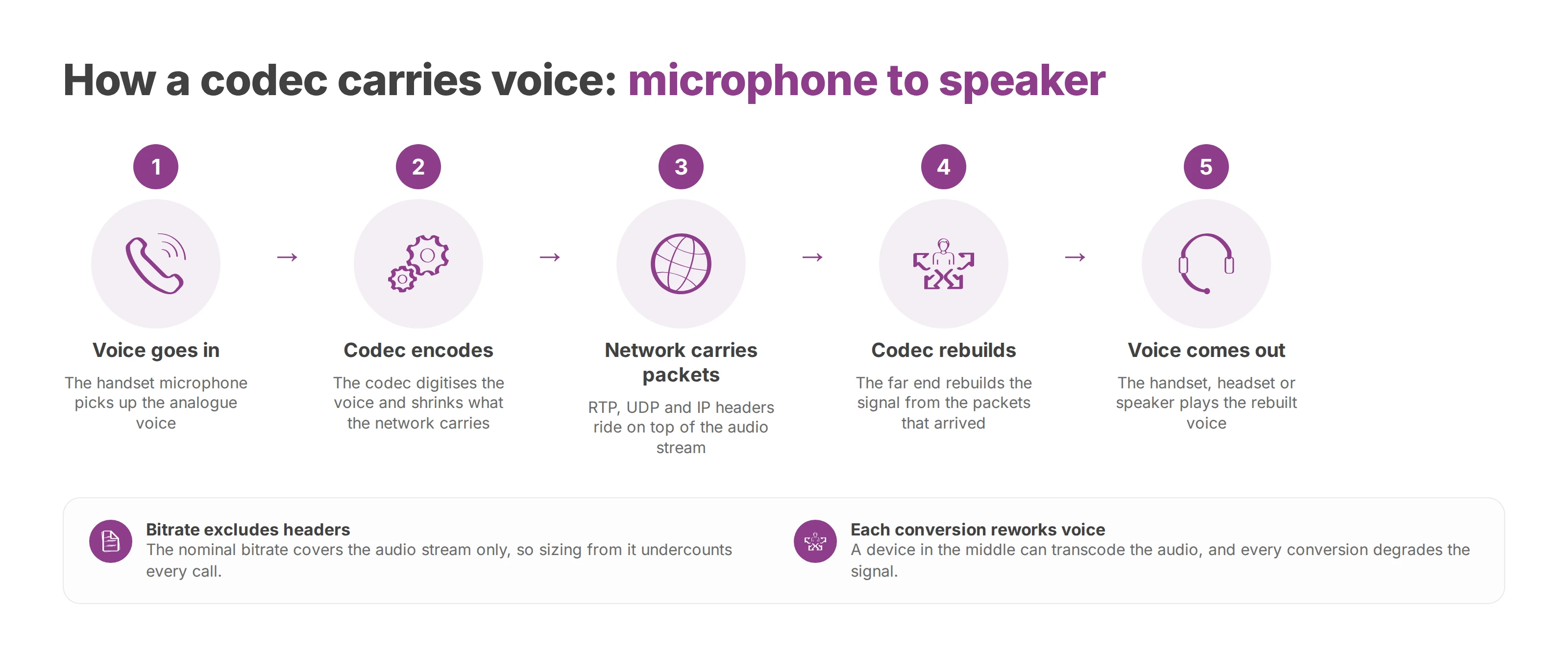
On the sending side, the codec turns the analogue voice into digital data. On the receiving side, it rebuilds the signal that the handset, headset or speaker plays.
Take a call between two sites that both stay on G.711, which is still common on interconnection trunks. MDN's guide to WebRTC codecs describes it as PCM: 8-bit samples taken 8,000 times a second, for a nominal bitrate of 64 kbit/s. There's no perceptual compression. Each sample is quantised and sent as it is. Artefacts stay low, and the stream weighs more than a format that discards part of the signal.
The nominal bitrate covers the codec's audio stream and nothing else. A live call also carries RTP, UDP and IP headers, and sometimes a VPN tunnel on top. If you size a connection from the codec figure alone, you'll undercount every call. An access line that looks generous on paper can fill up once several calls share it with video meetings and backups.
Two endpoints agree on a format when the call is set up. A device in the middle can transcode the audio, converting it to another codec, and each conversion reworks the signal. The network then decides whether packets arrive whole and on time. Three terms carry through the rest of this guide:
Codec: the step that digitises the voice and rebuilds it.
Nominal bitrate: the audio stream before headers are added.
Perceived quality: what the other person hears, with the network and every conversion included.
A tidy setting on a spec sheet won't rescue a call when the negotiation or the network path is poor.
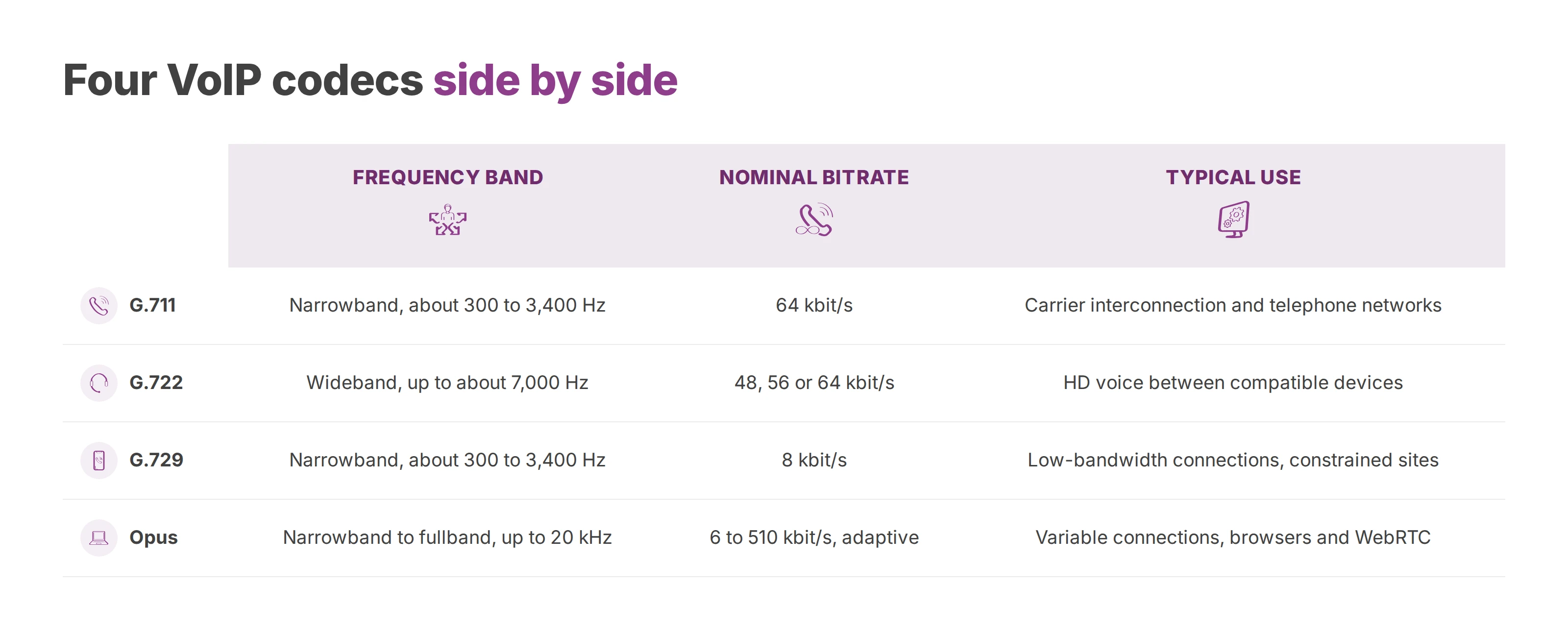
The table below is a reference point. Each row gives the frequency band, the published nominal bitrate and a typical use.
| Codec | Frequency band | Nominal bitrate | Typical use |
|---|---|---|---|
| G.711 | Narrowband (about 300 to 3,400 Hz) | 64 kbit/s | The reference for telephone networks and carrier interconnection |
| G.722 | Wideband, up to about 7,000 Hz (HD voice) | 48, 56 or 64 kbit/s | HD voice between compatible devices |
| G.729 | Narrowband (about 300 to 3,400 Hz) | 8 kbit/s | Low-bandwidth connections and constrained sites |
| Opus | Narrowband to fullband (up to 20 kHz) | 6 to 510 kbit/s, adaptive | Variable connections, browsers and WebRTC |
These are public nominal figures, and none of them was measured on a production call. The right row for you depends on the site, the connection and the equipment at the other end.
GL Communications' overview of voice codecs notes that traditional telephony covers roughly 300 to 3,400 Hz, the range the ITU-T associates with G.711. G.722 widens that to about 7,000 Hz, at 48, 56 or 64 kbit/s depending on the mode.
Picture a conversation heard through a closed door. The meaning gets through and the detail is muffled. Step into the room and the consonants, the sibilants and the speaker's timbre come back. Reception teams that move to HD voice, also called wideband, often describe exactly that shift.
G.722 can run at 64 kbit/s, the same as G.711, while covering a wider band. So the bitrate figure tells you little about how a call will sound. The wideband gain holds only when both endpoints, every device in between and the media path all stay wideband. One narrowband hop removes it, and the phone shows no warning.
Opus spans narrowband to fullband, up to 20 kHz, and adjusts its bitrate to what the connection can carry. On an unstable connection, the stream rises and falls with the bandwidth available. Both sides have to stay on Opus for that to work, since a conversion to a narrowband codec cancels the adaptation.
On a network of branches, hotels or clinics, the codec a call actually negotiated is the one that counts. The default ticked on a settings page can differ from it.
Sound quality, bitrate and delay pull on a call at the same time. Tune one in isolation and you'll usually set the others wrong.
Sound quality is what the other person catches the first time, from consonants to the speaker's level. A receptionist notices a drop straight away. A short recorded message hides it better.
Bitrate is the room a call takes on the access line. Lowering it helps a remote site on a slow connection. At a well-sized head office, it saves almost nothing and can cost fidelity.
Delay is the gap between speaking and being heard. Some low-bitrate codecs, G.729 among them, add a little processing delay of their own. Heavily compressed audio also tends to suffer more when a packet goes missing, because the decoder has less material to rebuild the sound from. In a live conversation, a lag gets in the way as much as a hole in a sentence.
At a hotel desk during check-in, a noticeable pause or a choppy voice stalls the exchange. The guest repeats, speaks louder, then hangs up. A lighter codec in that case trimmed a stream that mattered far less than the delay.
Give calls more quality where bandwidth allows and a lighter codec on weak connections. Make the network stable before you do either. Opus narrows part of this tradeoff on variable connections, because it adjusts bitrate and resilience to conditions as they change. It can't hold a call together across a connection that keeps dropping out.
Every conversion from one codec to another degrades the signal, and several on the same call add up. Engineers call this a transcoding cascade. Cutting conversions to a minimum protects the voice more than any single format change.
When phones share the access line with video, file transfers and business apps, voice traffic needs priority. Without it, even a well-chosen codec waits in the queue behind other traffic.
Decision rule: quality where the connection allows it, a lighter format on weak connections, and stability checked before any change.
Voice travels in packets, and the network can drop, delay or reorder them whatever the codec. With a typical packetisation of 20 ms, each lost packet can mean around 20 ms of missing speech. A few losses close together take out a whole word.
Jitter is the variation in arrival time. When packets reach the playout buffer too late or out of order, you'll hear dropouts even without outright loss. High latency leaves the sound itself clear, yet people talk over each other and then leave long silences.
Congestion, patchy Wi-Fi, routing problems and missing voice priority hurt G.711, G.722, G.729 and Opus alike. Swapping the codec in that situation moves the symptom around and leaves its cause in place. Our guide to VoIP call quality works through the measurements and fixes symptom by symptom, and the packet loss explainer goes deeper on that one cause.
One pattern does point at the codec layer. Muffled audio on a single type of call, such as outbound calls to a carrier, usually means a different codec was negotiated or a transcoder sits in the path.
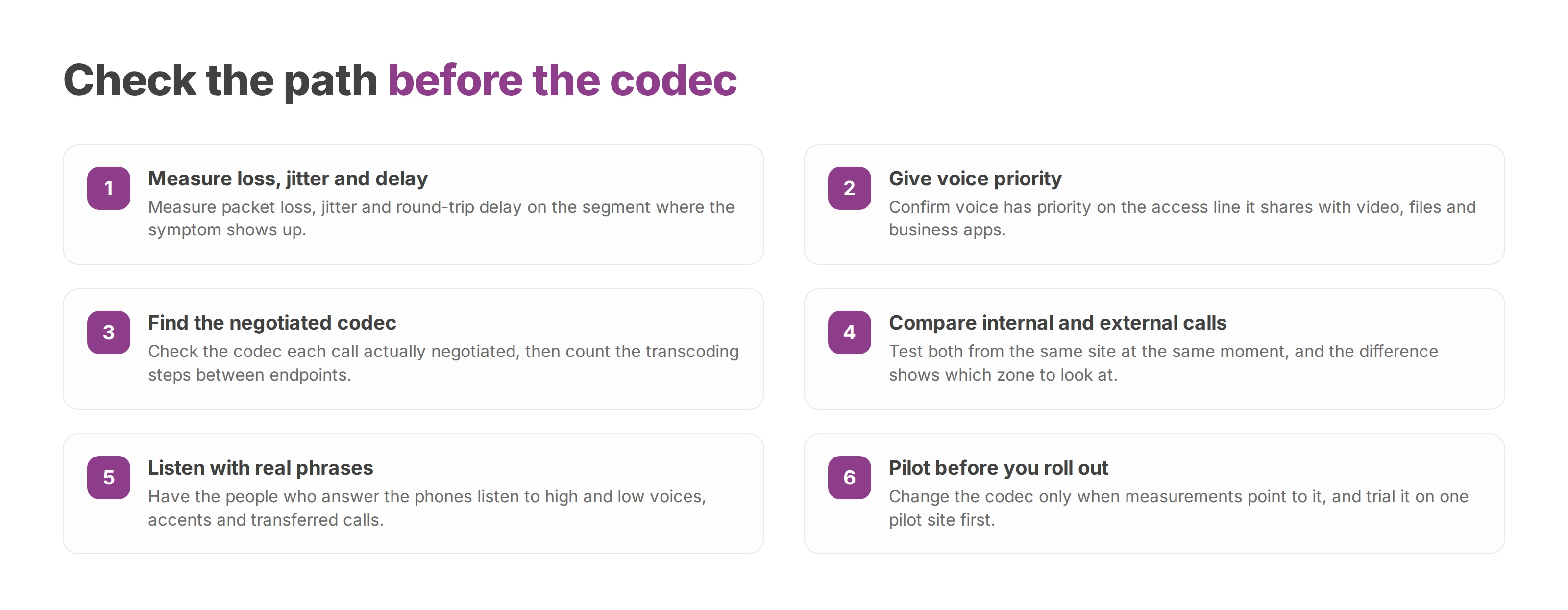
Run these checks in the same order every time. Skipping one sends you back to changing a setting that never explained the fault.
Measure packet loss, jitter and round-trip delay on the segment where the symptom shows up.
Confirm that voice has priority on the access line it shares with video, files and business apps.
Find the codec each call actually negotiated, then count the transcoding steps between the endpoints.
Compare internal and external calls from the same site at the same moment. The difference tells you which zone to look at.
Have the people who answer the phones listen to real phrases, with high and low voices, accents, recorded announcements and calls transferred between networks.
Change the codec only when the measurements point to it, and trial the change on one pilot site first.
Step five matters because a wideband codec makes speech frequencies sharper without guaranteeing that a conversation is understood. The microphone, noise processing, level, latency and the handset weigh just as much. In care homes, hospitals, schools, public services and hotels, callers who are deaf or hard of hearing need the whole path tested, alternative channels and checks with the people concerned. A published bitrate doesn't replace that listening.
Once the path checks out, the choice comes down to the situation in front of you. The table gives the first codec to look at and the point to verify before you touch the configuration.
| Situation | Codec to look at first | Check before changing |
|---|---|---|
| Interconnection with a carrier or a remote network | G.711 | Keep it on the trunk to limit transcoding |
| HD voice between compatible devices on a stable network | G.722 | Confirm the whole path stays wideband |
| Weak connection or isolated site | G.729 | Confirm the equipment supports it |
| Browser client or unstable connection | Opus | Let the bitrate adapt and keep watching packet loss |
| Several sites with uneven connections | A lighter codec on weak connections, higher quality elsewhere | Check each connection's stability first |
Opus adapts its bitrate, and packet loss still needs watching on those connections, because adaptation can't recover audio that never arrived.
A multi-site network seldom runs well on one codec everywhere. Put a lighter format where connections are weak and better quality where the network allows. A branch whose access line rises and falls through the day needs different settings from head office.
Each extra conversion degrades the signal, so aim for the fewest transcoders on any one call. Before you touch the negotiation order, get the list of codecs your provider and your PBX accept. SIP compatibility between the PBX and the handsets has to be tested on the devices themselves, and our SIP phone guide covers what to check on the handset side.
A change earns its place when a pilot site confirms it. Roll it out to the other sites only if the measurements show a clear gain on the same symptoms you started from. If they don't, go back to the network.
Voxbi is a cloud phone system you run from the browser. It's built and hosted in the European Union, so your calls and data stay within European Union borders, which supports GDPR compliance. The codec is one step in what your team hears, and the network carries the rest. You can test it all on the two-week free trial.
What a freephone number is, who pays for the call, the UK's 0800 and 0808 ranges and how other countries differ, and how to route and test the line before launch.
Vishing tricks staff over the phone into sharing codes or paying fraudsters. Learn the business scams, the warning signs and a short procedure that stops them.
What cold calling means in B2B, how it differs from warm calling, which calling rules apply, and how to script and measure a call that books a meeting.
Start a free trial, or work with a certified Voxbi partner.