
VoIP codecs: G.711, G.722, G.729 and Opus compared
How the four VoIP codecs you'll meet on a business phone system differ, and how to choose one for each site without adding conversions.
Nov 16, 2026
Call logging records every call your team makes and takes. Here's how to use the call log for callbacks, CRM handoffs and peak-hour staffing.

The switchboard shows six missed calls. One colleague may already have called back. Another left a note in the CRM, and reception can't tell which request is still open. Meanwhile the phone keeps ringing.
Call logging earns its place once a team uses it to decide the next action. This guide is for office managers, team leads and IT partners who run a shared business line. It covers callbacks, passing context between colleagues and putting enough people on the phones at the right hours, and it keeps the data in the right hands throughout.
Call logging is the automatic record your phone system keeps of every call. It shows when the call happened, who was on each end, how long it lasted and how it ended. It works like a meter reading. It tells you that a call took place and what the network did with it, and it leaves out what anyone said.
A single row tells you little. Group the rows by period, team or customer, and you can trace a request, confirm that a callback happened or follow a caller's path from reception to the right department.
| Field | What it shows | Everyday use |
|---|---|---|
| Date and time | The exact moment of the call | Find a call within a given period |
| Other party's number | The calling or called number | Identify the customer or prospect |
| Direction | Inbound or outbound | Measure the reception load and follow-up activity |
| Duration | Time from pick-up to hang-up | Spot very long or very short calls |
| Status | Answered, missed, busy or voicemail | List the callbacks to make |
| Extension or queue | The user or queue that handled the call | See who answered |
| Transfer | Call passed to another extension | Follow a customer's path |
Check the labels in each tool. Ringing time and talk time are separate numbers. A call that went to voicemail may still be an open request.
Transferred calls need the same care. Some systems write one row for each extension a call passed through. If you count every row as a new contact, your activity figures come out too high.
A number points to a caller, though not always to a confirmed identity. A shared switchboard, a withheld number or an out-of-date contact record can each stop the log from matching the right file.
The system fills in the extension and the queue on its own. A person has to type the reason for the call and the next step into a tracking tool. Find out which fields arrive automatically and which ones depend on your team.
On a new deployment, this check belongs in acceptance testing. A few test journeys show what the team will actually see once it's live: an inbound call, a transfer and a callback.
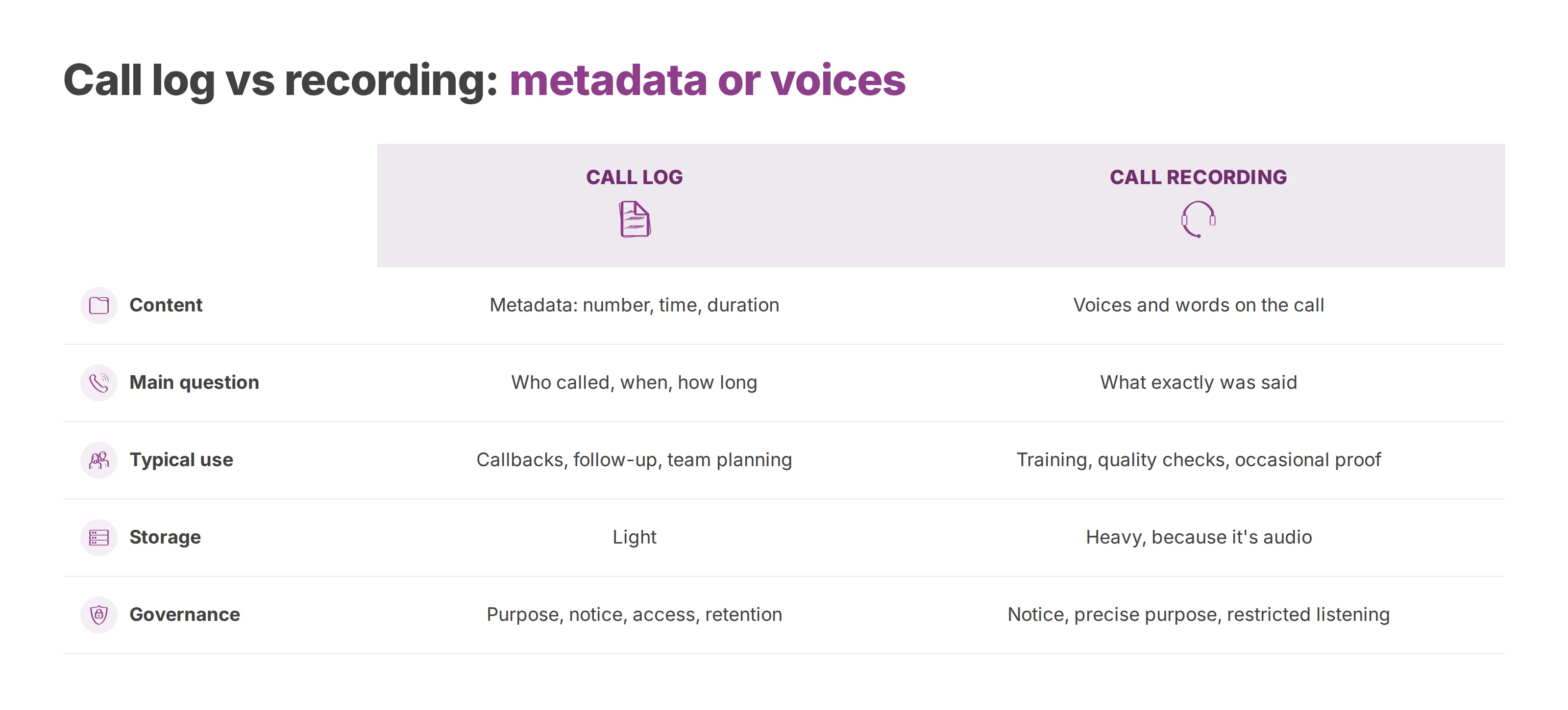
A call log keeps the technical traces of a call. A recording keeps the voices and the words.
A delivery slip makes the split clear. The slip shows that a parcel passed through, and the contents stay sealed. In the same way, finding a call in the log tells you it happened, and the conversation stays out of it.
| Criterion | Call log | Call recording |
|---|---|---|
| Content | Metadata: number, date, time, duration, status | The voices and words of the people on the call |
| Main question | Who called, when and for how long | What exactly was said |
| Typical use | Callbacks, customer follow-up, team planning | Training, targeted quality checks, occasional proof |
| Storage | Light | Heavy, because it's audio |
| Governance | Purpose, notice to the people involved, access rights and a retention period to set | Prior notice, a precise purpose, restricted listening rights and no blanket use |
The log is enough to find a missed call, see how reception copes or confirm that a colleague tried to reach a customer. A recording adds nothing to those jobs, and listening to one exposes the callers for no gain.
Audio serves other needs: coaching reception in a targeted training session, reviewing a sample of conversations, or keeping proof of a commitment in an exceptional case. None of these on its own justifies recording every call.
Under the GDPR, processing has to be necessary and in proportion to its purpose. A call log holds personal data too, so access to it needs rules even when no audio is involved.
Before you switch recording on, write down the question it should answer. If a factual note or a callback status covers it, keeping the conversation goes further than the purpose needs.
Automatic transcripts and summaries carry the same issue. They can hold sensitive details, so they need their own access and deletion rules. Once an AI feature is on, you still decide who may read what it produces.
Recording has its own rules on lawful basis and notice, set out in call recording and GDPR.
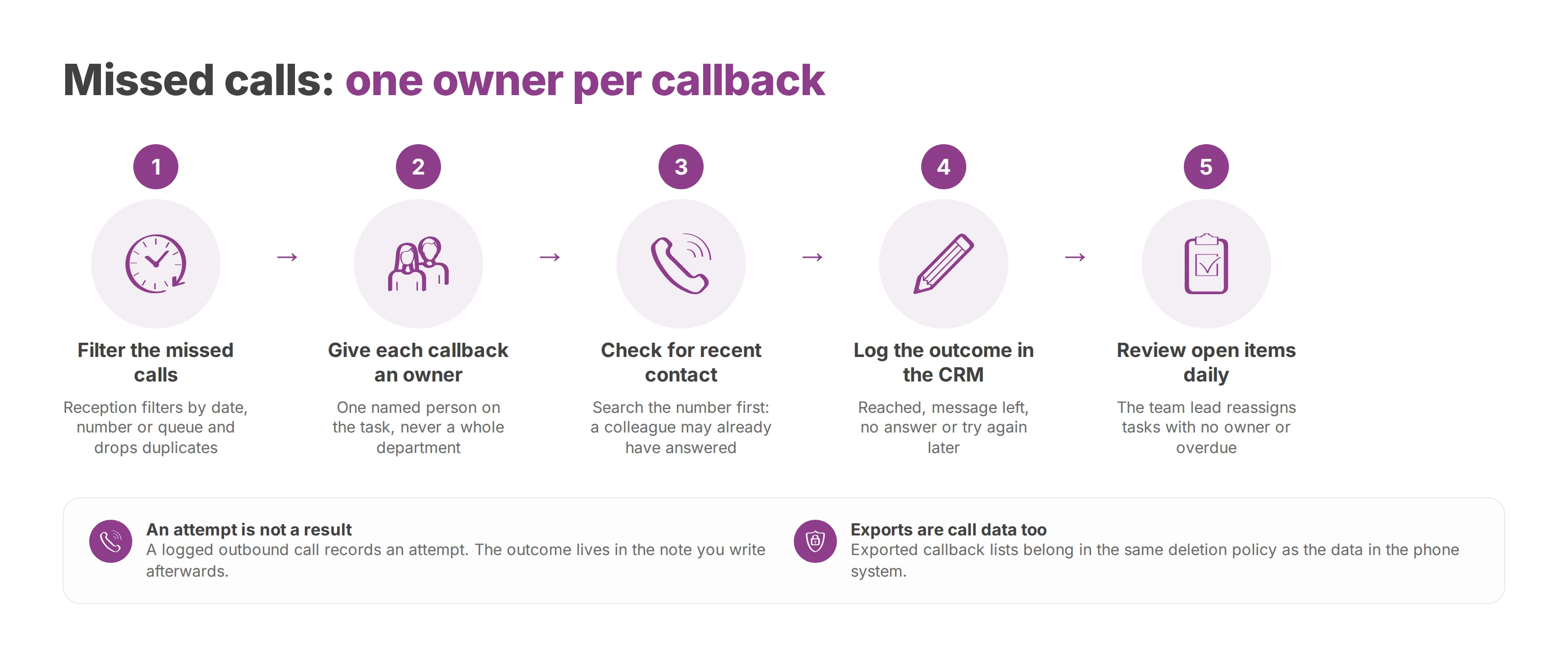
Filter the calls to pick up. The person on reception opens the missed calls from today or yesterday and filters them by date, number or queue. Technical duplicates go. Separate requests from the same caller stay.
Give each callback to one named person. The owner's name goes on the follow-up task. When a whole department owns a callback, everyone tends to assume a colleague has it.
Check for contact since the missed call. Before dialling, search the number and open the record. The customer may have rung back, or a colleague may already have answered. The callback slot is for requests that are still open, and replaying the raw list wastes it.
Log the outcome in the CRM. Reached, message left, no answer or try again later: each result maps to a clear next action. A failed attempt keeps the request open.
Review open items every day. The team lead checks for callbacks with no owner, overdue tasks and stuck cases. The lead then reassigns an absent colleague's tasks so that their list doesn't sit waiting.
This routine turns a technical record into a work list you can check. The team lead tracks open requests, and the person calling back has the context before they dial.
The usual slip is calling straight from the list without checking recent contact. The customer then has to explain that someone just phoned them, or repeat a request that's already in hand.
A logged outbound call records an attempt to reach the customer. The outcome lives in the note you write afterwards.
A withheld or plainly invalid number needs its own status too. Your team can then tell an impossible callback from a forgotten one, and nobody has to guess an identity or fill the record with assumptions.
The procedure fits on one page. It lists the allowed statuses, names the reviewer and says where the next action goes. A personal spreadsheet kept next to the CRM scatters the information, and covering for an absent colleague gets harder.
Exported callback lists count as call data. They belong in the same deletion policy as the data held in the phone system. The call log retention guide sets out how long to keep each type.
The call log shows where a customer went, and the CRM note says why. Take a customer who calls to dispute an invoice. Reception opens a case, records the reason in the CRM and transfers the call to support, who need to check the service in question.
Support adds its findings and hands the reply to the account manager. When the account manager calls back, the reason for contact and the expected action are already on screen. The customer doesn't have to tell the whole story again.
| Step | What the call log shows | Expected action |
|---|---|---|
| First call to the switchboard | Inbound call, duration and reception queue | Open a case and note the reason for the call |
| Transfer to support | Change of extension within the same sequence | Note why the call was transferred |
| Account manager's callback | Outbound call to the same number | Record the result, then close or follow up |
| Next step | Full sequence, visible to the authorised manager | Set the next action and its deadline |
A good note sticks to the facts: invoice disputed, support to verify, reply handed to sales. A personal opinion about the customer won't help resolve the case, and it shouldn't travel with it.
Searching by number works best when contacts match across your tools. Store numbers in international format, link each number to the right company and merge duplicates. One customer's calls then stay on one record.
Contact sync helps here. A person still has to check when one number serves several people or departments.
When the next colleague picks up the case, they read the timeline and the last expected action. The team lead can see who owns the next step, and that's tracked apart from who can view the case.
Access rights follow the role. Reception may need to know which department owns a case without reading detailed sales notes. A technical admin rarely needs the business content at all.
The people whose calls you log are entitled to know the purposes, who receives the data and what rights they have. That notice still applies when several sites work in the same tool.
A rota built on the call log starts with calls grouped by hour. Compare the same weekdays over several weeks in a row, and read inbound calls, unanswered calls and talk time together, with the same scope each time.
A single week hit by an outage or an unusual campaign won't justify a reorganisation. Note closures, absences and routing changes beside the figures, so that the gaps have an explanation before anyone blames headcount.
| Indicator | How to read it | Possible decision |
|---|---|---|
| Inbound calls per time slot | A peak that returns on the same weekday | Add reception cover in that slot |
| Unanswered calls per slot | A rise with no rise in inbound calls | Check absent extensions and queue settings |
| Average talk time | A clear rise in one slot | Set aside a seat for complex requests |
| Outbound calls per slot | Peaks during follow-up campaigns | Move follow-up calls away from inbound peaks |
| Answer rate per slot | A steady drop at the end of the day | Review closing hours |
The fix often stops short of hiring. A rush that lands in one slot may call for a moved break, extra cover at opening time or a backup seat over lunch.
Outbound follow-up calls give you room in the rota too. When the same people also staff reception, moving those calls away from inbound peaks stops the two jobs competing.
A rise in missed calls can come from a disconnected handset, a user left logged out of a queue or an overflow set up wrong. More staff won't fix a call sent to the wrong group.
Test the real path a call takes. It reaches the public number, is distributed in the queue, rings until the timeout and then overflows. The team lead checks separately that the people on the rota are actually available in the tool. The call queuing guide covers the queue settings involved.
Dashboards make trends easier to read as long as the definitions stay fixed. If you mix internal calls, external inbound calls and transfer segments, you get a total nobody can interpret.
Talk time also misses part of the work. A case can need research or data entry after the call ends. Ranking people on talk time alone penalises whoever takes the hardest requests.
Before you hire or reorganise, settle one point. Either a recurring time slot is short of people, or call distribution and task planning need fixing first.
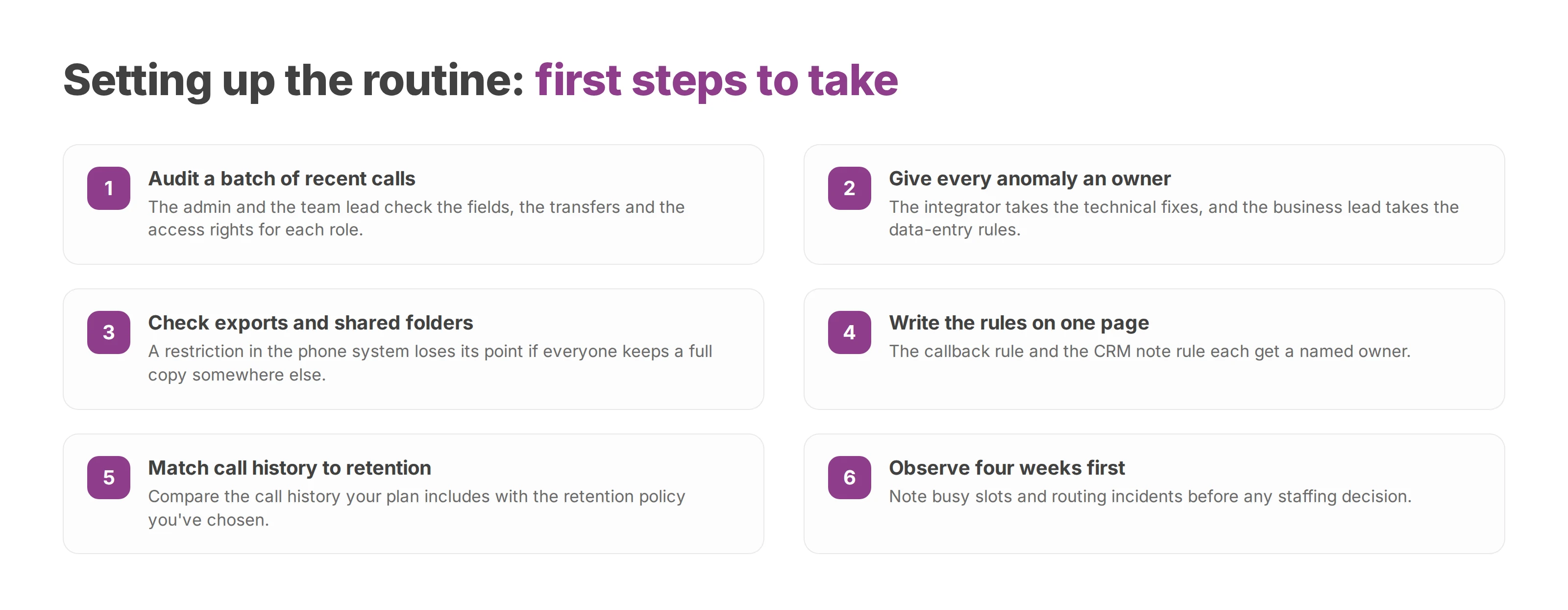
The admin and the team lead take a small batch of recent calls together. They check the available fields, the transfers and the access rights for each role. Every anomaly gets an owner. The integrator takes the technical fixes, and the business lead takes the data-entry rules.
Check exports and shared folders as well. A restriction in the phone system loses its point if everyone keeps a full copy somewhere else.
The callback rule and the CRM note rule fit on one page, each with a named owner. Then test a case handover while someone is absent, to confirm that the written rules work without a verbal briefing.
Compare the call history your plan includes with the retention policy you've chosen. On Voxbi Managed, call history runs 60 days on Essential, 180 days on Professional, 365 days on Business and 730 days on Enterprise. Voxbi is built and hosted in the European Union, so your calls and data stay within European Union borders. Your own policy decides how long you actually keep each record, whatever the plan allows.
Allow four weeks in a row of observation before any staffing decision. Note the busy slots and the routing incidents, then separate the recurring problems from one-off events.
Start with last week's log. Count the missed calls that are still unanswered and check who was meant to call each one back.
Voxbi is a cloud phone system built and hosted in the European Union and run from a web browser. To connect your call history to callbacks, customer follow-up and reception planning, write to hello@voxbi.com.

How the four VoIP codecs you'll meet on a business phone system differ, and how to choose one for each site without adding conversions.
What a freephone number is, who pays for the call, the UK's 0800 and 0808 ranges and how other countries differ, and how to route and test the line before launch.

Vishing tricks staff over the phone into sharing codes or paying fraudsters. Learn the business scams, the warning signs and a short procedure that stops them.
Start a free trial, or work with a certified Voxbi partner.