An account manager takes a customer call on a laptop at the office. On the train, the conversation carries on from a smartphone, and that evening the same business number rings at home. Nobody moved a desk phone, and the caller heard the same business line the whole time. That's the job a softphone does.
So what is a softphone, and what sits behind it? This guide is written for IT managers, integrators and telecoms resellers who work with SMEs and mid-sized companies. It starts with the definition and the technical layers of a call. Then it compares the softphone with a desk phone and an on-premise PBX, and ends on security, data and rollout.
What is a softphone?
A softphone is a software application that turns a computer, smartphone or tablet into a business phone. The name joins "software" and "telephone". It makes and receives calls over VoIP, which carries your voice as data across an IP network. You need a network connection and decent audio kit, usually a headset, and the app does the rest.
The app gives you the visible controls for dialling, answering, transferring and setting your status. The PBX, the telecoms service and the network handle everything behind that screen. Keeping the two apart stops anyone mistaking the app for the whole phone system.
Softphone offers fall into broad families:
Softphone on its own. A client app that places calls through a VoIP service.
Cloud PBX. The service that supplies the switchboard, extensions, call rules, queues and administration.
Unified communications. A suite that can combine calling, chat, video meetings and screen sharing.
AI features such as call analysis can sit on top of any of these. They're an optional layer and play no part in the definition.
Desk phones remain in service, and part of the work they used to do now runs in software. That shift brings voice closer to messaging and to the collaboration tools your staff already use. Every telecoms duty comes along with it. You still have to protect caller identity, keep voice quality steady, control who gets access and know where call data is hosted.
In short, the softphone is the phone in software form, and the platform behind it supplies the telephony services.
How a softphone works, from voice to IP network
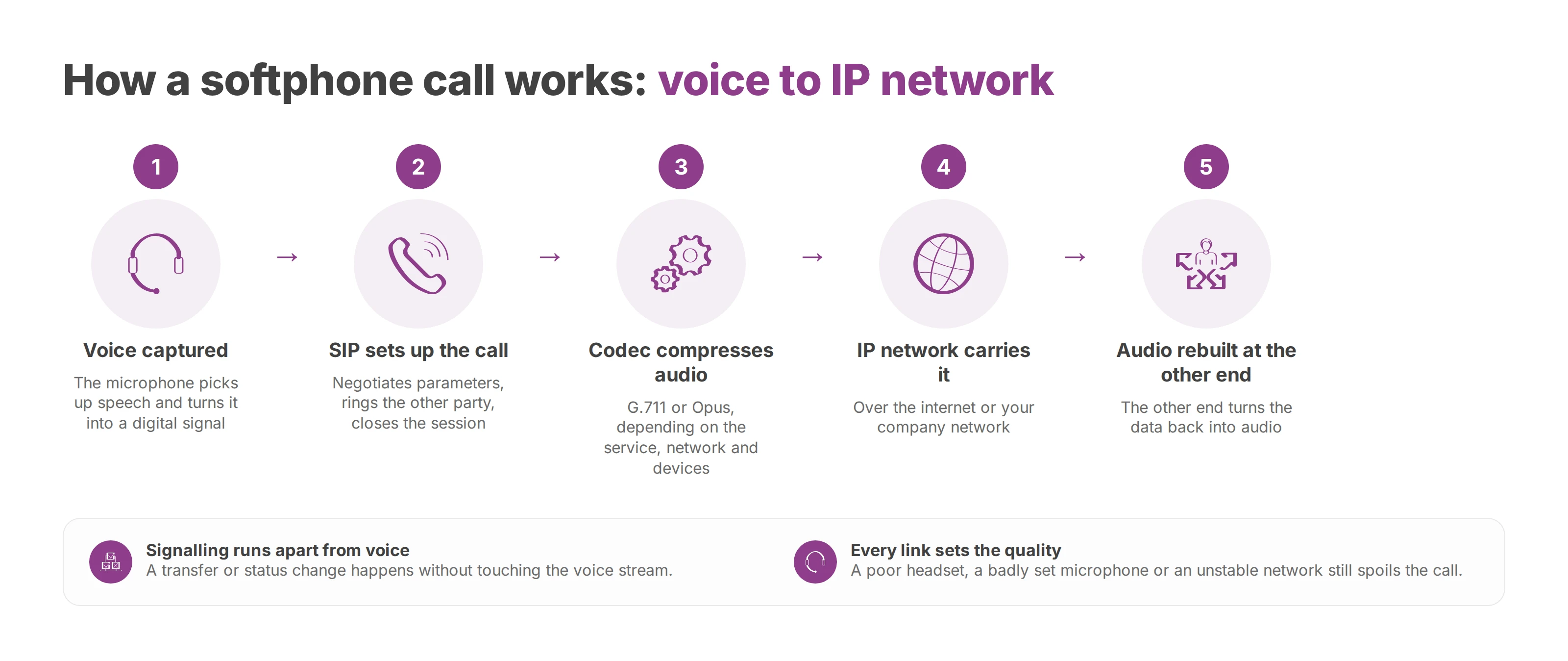
A softphone call passes through several separate steps. The app captures your voice and turns it into data. It sends that data across an IP network, and the other end rebuilds it as audio. Call quality depends on every link in that chain.
SIP signalling sets up the call
SIP sets up and manages the session. It tells the platform you want to place a call and negotiates the call parameters. Then it rings the other party, connects you, and closes the session when someone hangs up. SIP organises the conversation, and the voice itself travels separately.
Because signalling runs apart from the audio, the app can handle a transfer or a status change without touching the voice stream. The platform approves each request, and the conversation carries on along its own path.
Codecs turn speech into data
The microphone picks up speech and the system converts it into a digital signal. A codec then compresses and decompresses that audio. Business softphones commonly use codecs such as G.711 or Opus, depending on what the service, the network and the devices support.
G.711 favours conventional audio with fairly direct processing. Opus is built to adapt to different kinds of audio and copes well where network conditions vary. A poor headset or a badly set microphone will still spoil the call, even when the software's configured correctly. The same goes for an unstable network. The guide to measuring and fixing VoIP call quality covers the factors that decide what the caller hears.
The IP network carries the call
The data then travels over the internet or your company network. Your desktop, smartphone and tablet all become access points to the same phone system. That's why a user keeps the same business identity when they change location or device.
An analogy helps here. SIP is the dispatcher who plans the journey, the codec packs the audio luggage, and the IP network carries it to its destination. If the dispatcher doesn't coordinate the session, the call never starts. Badly packed luggage means poor sound. A disrupted journey brings dropouts and delay.
Softphone vs desk phone vs on-premise PBX
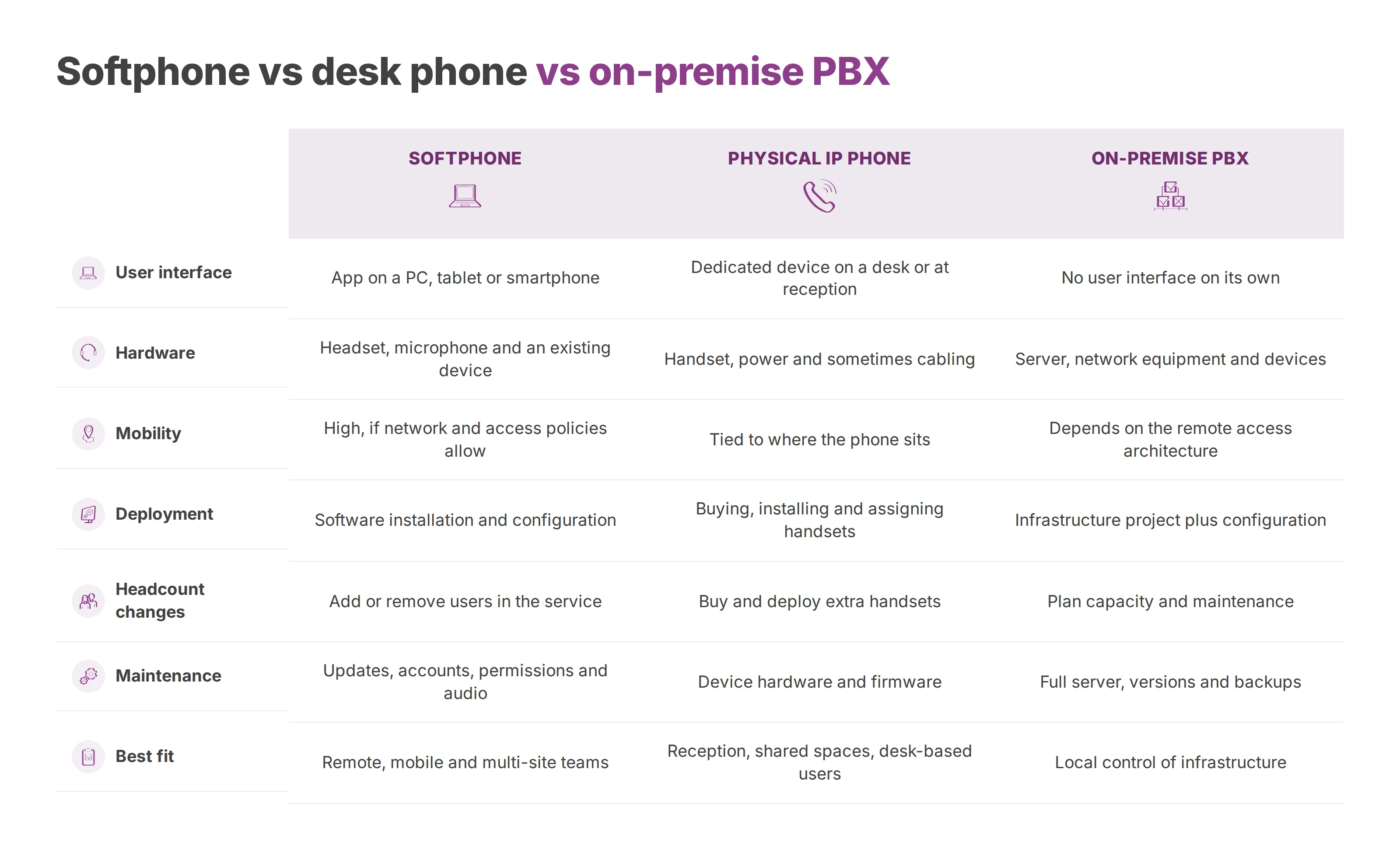
A softphone, a physical IP phone and an on-premise PBX sit at different levels of the phone architecture. The softphone is a software interface. The IP phone is a dedicated device. The on-premise PBX is switchboard infrastructure that you install and run on your own site.
Where hardware still earns its place
A physical phone still suits a reception desk, a hotel front desk or a security post. It also works well anywhere staff must pick up fast without opening an app. Some roles want a keypad and handset that are always there, especially at shared workstations. If you need that kind of device, the guide to choosing a SIP phone compares the models and what to look for.
The softphone comes out ahead when teams move between locations, already work on a company laptop, or need calling tied to business tools. An integrator can then roll out one consistent setup across several sites. Desk phones stay wherever they meet a genuine operational need.
An on-premise PBX is an infrastructure choice
A PBX on your own premises makes you directly responsible for servers, versions, backups, access and service continuity. That suits an IT department with the skills and procedures to run it. A softphone can connect to an on-premise PBX just as it connects to a cloud service, depending on the architecture you pick. The article on when to keep an IP PBX on site covers that decision in more depth.
Rule of thumb: the device answers "what does the user call with?", and the PBX answers "where is the phone system run?"
Softphone benefits and risks for a business
You can start a softphone rollout with a handful of users and extend it across several sites later. Telephony then becomes a software service. You run it through accounts, devices, permissions and network flows, and it produces data that needs protecting. For your IT team, the project is as much IT operations as it is telephony.
Operational gains
The software cuts your reliance on dedicated handsets. A user can reach their extension from a computer, smartphone or tablet. That supports hybrid working and multi-site rollouts, as long as you manage the audio kit and remote access.
Administrators handle accounts, profiles and rules from one interface. Adding a user or changing a permission often needs no hardware work at all. That flexibility relies on up-to-date records of numbers, roles and call flows.
Growth gets easier to plan. The same service can support a small team or several thousand users, provided licences, architecture, network and support keep pace. A new account still goes through the same permission sign-off as any other.
A softphone also brings calling closer to your business tools. Click-to-call, CRM sync, queues, IVR menus and dashboards cut the switching between applications. In a contact centre, AI can analyse calls to spot trends in requests or in the reasons customers complain. That analysis falls under GDPR, so it needs a defined purpose and a retention period of its own.
Softphone security goes beyond encryption
Caller ID spoofing puts account protection and number control at the centre of any softphone project. The project has to cover authentication, account protection, audit trails and the management of the numbers your callers see.
A softphone's level of protection comes from the platform, the provider, the configuration, the approved devices and your admin practice. A compromised account can place fraudulent calls even when the voice stream is encrypted.
Encryption therefore belongs inside a wider set of controls. These include an access policy, usage monitoring, a way to revoke a lost device and an incident response procedure. SIP over TLS protects the signalling. WebRTC sessions, logs, role separation and revocation procedures each need their own checks alongside it.
EU hosting, GDPR and sovereignty
EU hosting, GDPR compliance and sovereignty each describe a different guarantee. EU hosting states where data is stored and processed. GDPR compliance covers much more ground, including purposes, responsibilities, retention periods, access rights and security measures. Sovereignty adds the questions of legal control, who operates the service and any exposure to laws from outside the EU.
A data map for your softphone includes call logs, any recordings, backups and subprocessors. It also records where each of them is processed and who can reach them. An EU location on its own doesn't settle the sovereignty question.
EU rules govern transfers to third countries through an adequacy decision or through appropriate safeguards. These safeguards include standard contractual clauses and binding corporate rules, backed by a transfer impact assessment. Orrick's explainer on EU data localisation and sovereign cloud sets out how those mechanisms differ.
A provider should document its data flows, subprocessors, access and protection measures. Without that record, an audit has nothing to check the service against.
Softphone use cases by sector
The same app faces very different demands from one sector to the next. The call flow that carries the most value, or the most risk, is the right place to start, ahead of any feature list.
Multi-site SMEs and mid-sized companies
A business spread across several branches can give each team an extension and shared rules. Staff still answer from wherever they normally work. The main needs are an unbroken reception service, visibility of who's available and central administration.
The difficulty comes from mixed networks. One site may have a stable connection while another leans on Wi-Fi or remote access. The integrator has to validate call flows, audio kit and fallback procedures before rollout.
Healthcare and care homes
In a clinic, a hospital or a care home, mobility can ease communication between departments, but confidentiality drives the requirements. Administrators decide which call data is kept and who can view call history. They also set how accounts get disabled when staff change shifts or leave.
Continuity matters as much as mobility. Some care points may still need physical phones, with the softphone covering computers and managed mobile devices.
Hotels, public bodies and education
At a hotel, reception wants fast answering, transfers to other departments and control over opening hours. A hotel chain also wants consistent administration across properties without forcing the same configuration on every site.
A local authority has to handle public enquiries, opening hours, departments and sometimes closure periods. In a school or university, mobility for administrative and teaching staff often comes first, with permissions that differ by role.
In each of these settings, the softphone pays off once it fits into a numbering plan, access rules, reception call flows and a data policy suited to that line of work.
How to choose and deploy a softphone
A successful project starts with a technical and operational assessment run by IT, the business teams and the integrator. Interoperability comes first. That means SIP support, a REST API and TAPI CTI compatibility. It also means integrations with Microsoft Teams and Odoo, and number porting without a break in service.
Your specification then covers SIP over TLS, WebRTC session protection, device management, admin roles and logs. It also keeps three things apart: EU-hosted data, GDPR guarantees and the level of sovereignty you're after.
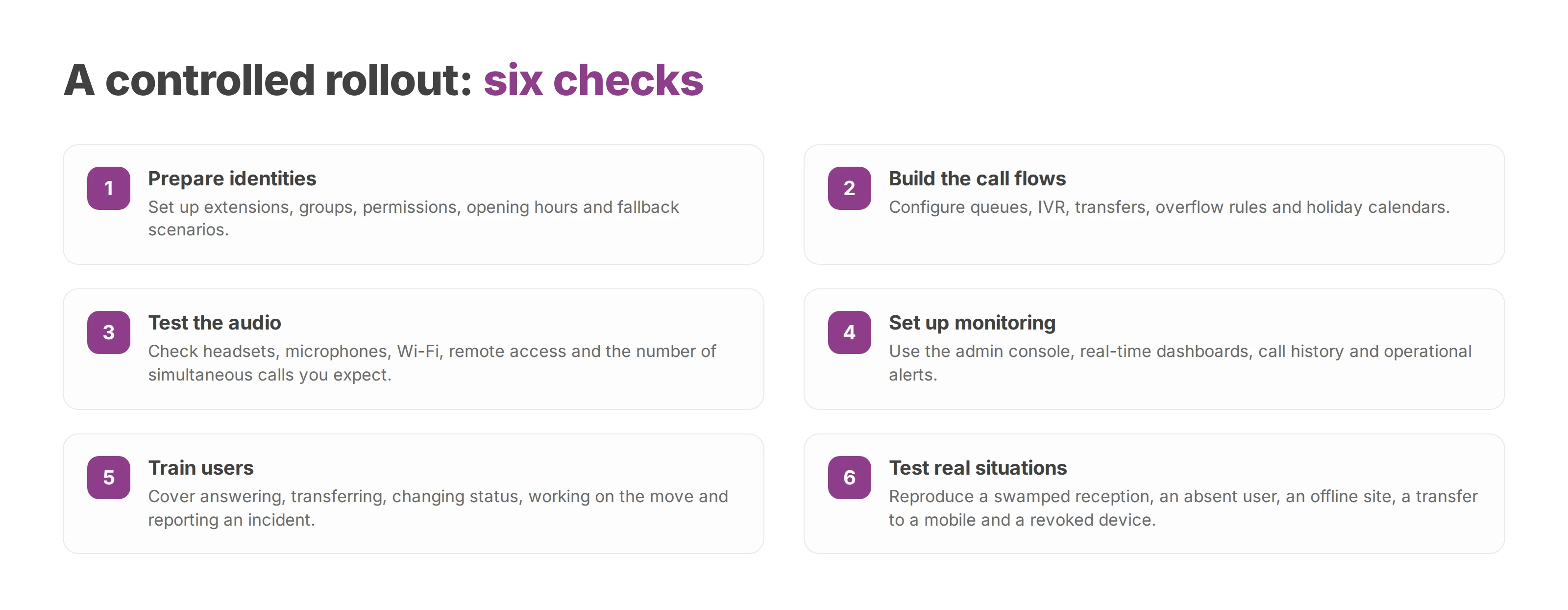
A controlled rollout
An integrator can organise the launch around a series of checks:
Prepare identities. Extensions, groups, permissions, opening hours and fallback scenarios.
Build the call flows. Queues, IVR, transfers, overflow rules and holiday calendars.
Test the audio. Headsets, microphones, Wi-Fi, remote access and the number of simultaneous calls you expect.
Set up monitoring. The admin console, real-time dashboards, call history and operational alerts.
Train users. Answering, transferring, changing status, working on the move and reporting an incident.
Acceptance testing should reproduce real situations. Test a swamped reception, an absent user and a site that's temporarily offline. Include a transfer to a mobile and a revoked device too. Integrators and resellers can also supply the cloud PBX itself as part of their own offer.
Voxbi pairs a multi-platform softphone with its cloud PBX, with apps for Windows, iOS and Android plus a web client. The softphone covers availability, transfers, call history and status management.
A softphone is a phone in software form, and its value depends on the system it connects to. Base your final choice on architecture, data guarantees, interoperability and your integrator's ability to support go-live. Weigh the network, the PBX, identities, security, compliance and day-to-day use together before you sign.
Voxbi is a cloud PBX hosted in the European Union. It gives you central administration of users, extensions, queues and call flows. See how it fits your softphone project at voxbi.com, or write to hello@voxbi.com.