
AI voice agent: from demo to real phone calls
What an AI voice agent does on a business phone system, which calls to give it first, how to test handover and languages, and what to ask about data.
Nov 6, 2026
How to choose music on hold, license it for each country, prepare a seamless loop and give every call queue its own audio file.

A real wait of 1 minute 58 seconds could feel like 4 minutes 56 seconds. That gap comes from a 2014 survey of 1,000 people in France by Coriolis Service and Havas, reported by Plage Web. For anyone running a business phone system, it moves the question away from finding a pleasant tune. What matters is what the caller understands while they wait.
Music on hold is the music or announcement callers hear while they wait in a queue or during a transfer. It can't shorten the wait: staffing and routing decide that. It can make the wait feel less empty, and it tells the caller the line still works. This guide is for IT managers, integrators and telecom resellers, and it argues against one company-wide playlist. A file chosen for each queue or each interactive voice response (IVR) menu gives callers a better sense of where they are.
Real wait, felt wait and hang-ups
| Measure | Figure | What it means for a phone system |
|---|---|---|
| Real waiting time quoted | 1 minute 58 seconds | Already long enough to feel long |
| Waiting time as felt | 4 minutes 56 seconds | About 2.5 times the measured time |
| Verdict on the wait | 3 people in 4 | Found the wait long |
| Hang-ups reported | 9 people in 10 | Had hung up at least once before reaching an adviser |
These figures come from the French survey quoted above. They describe how people perceive a wait and what they say they have done, not the abandonment rate of any particular business today. Having hung up once before reaching an adviser doesn't mean hanging up on every call.
Silence causes a concrete problem: the caller no longer knows whether the call is still connected. They look at the screen, check the call timer and wonder whether to hang up and dial again. At a clinic, a town hall or a hotel, that doubt comes on top of whatever made them call.
Music or an announcement confirms that the call is still moving through the system. No agent becomes free any sooner because of it, so treat the content you play and the way calls get answered as two separate jobs.
The call handling process guide follows a call's real path: arrival, routing to a team, waiting, then pickup. Walking that path helps you spot a wrong destination or an understaffed team before you blame the audio file.
A working rule: callers should know they're waiting for the right team. Knowing the line is still open isn't enough.
Silence doesn't explain every hang-up. An urgent request, a caller with two minutes to spare or a call routed to the wrong team can all end in abandonment too, whatever plays in the queue.
Start by calling the line from outside, without opening the configuration. Can you tell which company answered? Do you know which team you're waiting for? Does the handover to the agent sound natural?
That outside listen often shows a gap between the route designed in the admin panel and the one the caller actually hears. The fix might be a clearer message, better routing or a change in staffing. Swap the track before you've done this check and you've only replaced one file with another.
What to play while callers wait
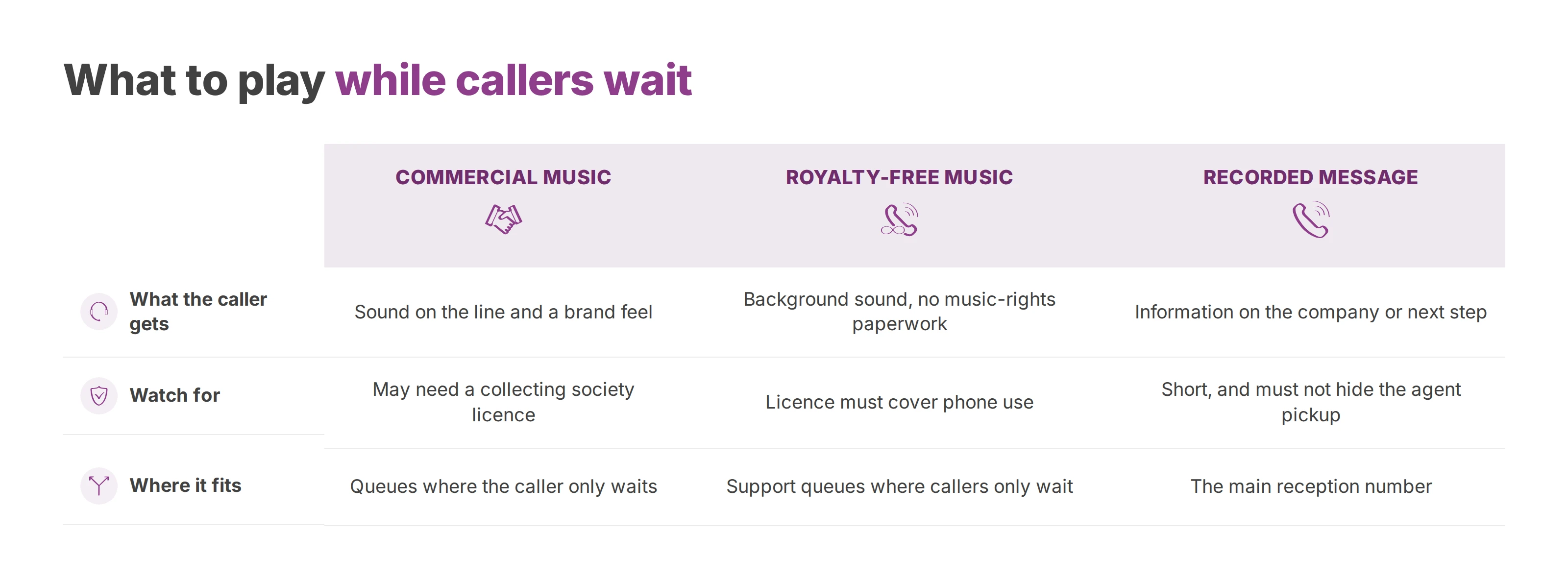
| Format | What the caller gets | Watch for |
|---|---|---|
| Silence | Doubt about the line, a wait that feels empty | Avoid it once a wait goes past a few seconds |
| Commercial music | Sound on the line and a recognisable brand feel | May need a licence from a collecting society |
| Royalty-free music | Background sound with no music-rights paperwork, when the licence covers phone use | A neutral style and a clean loop |
| Recorded message | Information about the company or the next step | Short and clear, and it mustn't hide the agent picking up |
Pick the format before the genre. A 2017 study by LSA with Sacem and Mood Media, reported by Ringover, found that 8 consumers in 10 would rather hear music than silence on the phone. 76% said music makes the wait feel shorter.
A call already routed to technical support usually needs only music. The caller knows where they are and is waiting for a person, so a sales pitch won't help them.
At the main reception number, a message can say which teams are available or what happens next. A well-written greeting names the company without reading out its catalogue, and the guide on professional voice messages covers how to script one. The text should still be useful to a caller who only catches part of it.
An original recording works best when it prepares the conversation, for example by asking the caller to have a case reference ready. It shouldn't ask for anything sensitive over a channel that isn't meant for it.
Silence is not the easy option. A well-chosen royalty-free track or a recorded voice gives you content you control, with no famous song involved. Keep any message brief, and make sure its ending doesn't sound like an agent starting to speak.
A song on a streaming platform isn't automatically cleared for a business phone line. Before you upload a file, find out where it came from and which uses its licence allows. Owning an audio file doesn't give you the right to play it to callers.
The rules follow the country where callers hear the music, and each country has its own collecting societies. Here is how it works in the three countries this guide started from:
France. Sacem collects for the authors and composers of the music, and SCPA (Société civile des producteurs associés) collects for the performers and the producers who paid for the recording. Both can claim royalties on music on hold, as the French building federation FFB explains.
Belgium. Unisono sells music licences to businesses, and one of them covers music played on the phone while callers wait.
Luxembourg. Sacem Luxembourg issues an authorisation for playing its repertoire as music on hold. Its FAQ adds that a work enters the public domain 70 years after its author's death, and from then on no Sacem authorisation is needed.
A file cleared in one country isn't cleared in the others just because you reuse it. Settle the question before the line goes live, not after a letter from a collecting society arrives.
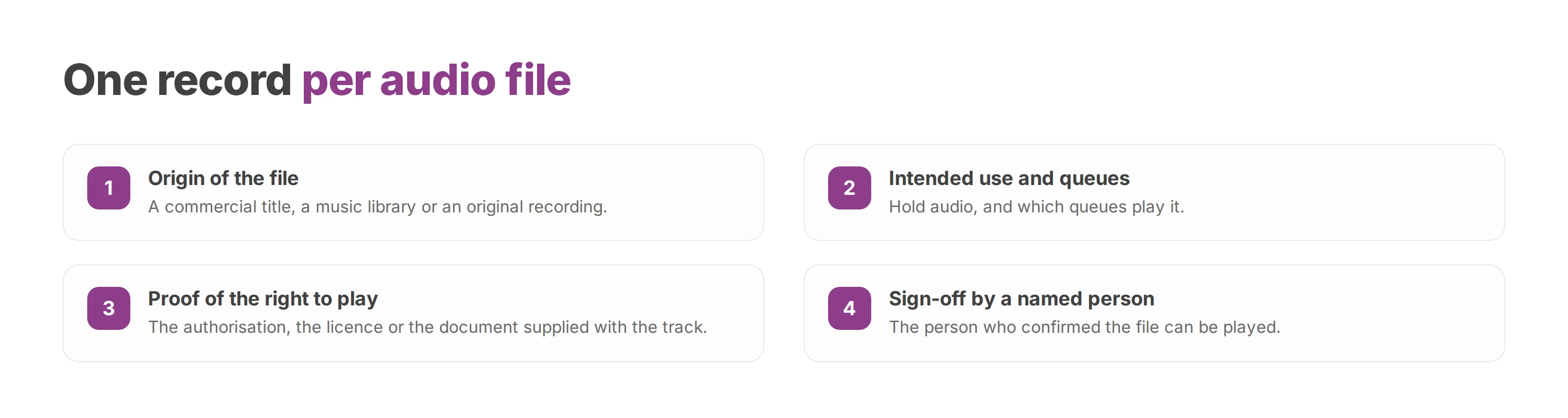
A group with sites in France, Belgium and Luxembourg can keep a short record for each audio file:
Origin: a commercial title, a music library or an original recording.
Intended use: hold audio, and which queues play it.
Proof: the authorisation, the licence or the document supplied with the track.
Sign-off: the person who confirmed the file can be played.
With that record, nobody revives an old track without knowing why it was picked. It also makes replacement quicker when a brand changes its sound or a new site joins the shared phone system.
A royalty-free track whose licence covers telephone hold, or a message the company records itself, avoids the commercial-title question altogether. Royalty-free still comes with terms of use, so read them. Keep the document supplied with the track, because a screenshot of its name proves nothing.
An original recording has to be original all the way through. Put a clip of a well-known song behind the voice and the rights question is back, even though your own staff recorded it.
The easiest option to run is a useful message about your services, or a track whose licence explicitly allows phone use.
None of this calls for a rate card or a contract review inside the technical project. It calls for a clear sign-off before upload, and an archive that the team running the phone system can find later.
A consistent sound doesn't need to be showy. For a healthcare provider or a public service, calm and sparse music is a good starting point. A shop can go livelier, as long as the music doesn't turn aggressive.
Sound by type of front desk
| Context | Feel | Volume and loop |
|---|---|---|
| Healthcare and public services | Calm, neutral, slow tempo | Low, a discreet loop with no intrusive vocals |
| Retail and front desks | Livelier and bright | Present, with no peaks that drown out the agent |
| A message instead of music | A steady voice, one idea at a time | Loud enough to follow, with a short script |
| Waits of several minutes | Steady music or spaced-out messages | A loop long enough that it doesn't repeat straight away |
Detail that sounds great on office speakers doesn't always survive a phone line. Dense arrangements, heavy bass or vocals can blur into one muddy sound. A simple track keeps the background apart from any announcement.
In a 2002 study in Psychology of Music, Nicolas Guéguen and Céline Jacob had participants wait on the phone with a hold message, with or without music. With music, they underestimated how long they had waited and thought they could hold on longer before hanging up. The study doesn't let you promise that any particular style will stop hang-ups.
Keep the volume steady across the whole file. A quiet intro followed by a much louder passage makes callers pull the phone away from their ear. A recorded voice should sit at a level that matches the music behind it.
A loop that's too short makes the repetition obvious. A long track adds little if most callers only hear its opening, so let the waits you actually measure set the length, not some ideal duration.
Listen to the join between the end of the file and its start. A hard cut, a gap or a sudden jump in level can sound like a dropped call. For a message, a pause between repetitions stops it running on as one long speech.
Vocals: pick music without singing whenever an announcement has to stay intelligible.
Dynamics: avoid big swings between quiet and loud passages.
Repetition: listen to the join, not only the opening of the file.
Handover: check that the agent is easy to understand the moment they speak.
Run the final test from a mobile, then from a desk phone, on the line callers actually use. Computer headphones are for preparing the file, not for judging what a caller hears. Pay particular attention to older callers, people in a hurry and anyone likely to ring at a difficult moment.
Music on hold doesn't have to be the same everywhere. The content can match the team the caller is trying to reach: a practical tip for billing, neutral music for technical support.
At reception, a message can give opening hours or say which team will answer. It has to match how the company really works, because an out-of-date announcement sends callers the wrong way.
For technical support, music without vocals lets callers get their question ready. A short prompt can suggest keeping a case reference to hand, if that helps the agent deal with the call.
For hotel bookings, the audio can give the reservation desk's hours. Stick to what helps the conversation and leave the list of offers out of it.
Call flows and IVR menus route calls to menus, queues and teams. Start from the destination when you pick the audio: which team is the caller trying to reach, and what would help them while they wait? The call queuing guide separates how a call is routed from what the caller hears in the queue, and the IVR menu guide covers the menu in front of it.
Reception: who the company is and which team will answer.
Support: neutral music, or a tip that helps callers prepare their question.
Billing: information tied directly to how the account gets handled.
Call every destination from outside and listen right through to pickup. Check that the message fits the team, then that the handover to the agent is clear. On a multi-site setup, note each site and team you tested, so the sign-off covers every planned destination.
The queue abandonment rate helps you decide whether to keep or replace a file. Compare like with like: the same hours, a similar team and enough calls to be representative. A quiet morning won't tell you anything about audio meant for the busy hours.
| What you see | Likely reading | Next step |
|---|---|---|
| Abandonment down, real waiting time stable | The audio has probably made the wait feel less empty | Keep the file and keep tracking |
| Abandonment unchanged | The cause may lie in agent availability or the real waiting time | Check staffing before changing the track |
| Abandonment up | The file may irritate or tire callers | Try a shorter message or a longer loop |
| Agents hard to hear at pickup | The volume or the content covers their voice | Lower the volume and listen again on mobile and desk phone |
Treat these readings as working hypotheses. A rise in call volume or a shift in what people call about can change caller behaviour even when the file hasn't changed. Read abandonment next to real waiting time and team availability, never on its own.
Voxbi's live call dashboards show call volumes, queue activity and trends as they happen. They come with Voxbi Plus, Plus AI and Channel, and the Voxbi Managed Business and Enterprise plans add in-depth analytics. Log the date of each change and the file you assigned, then read every queue on its own.
Hang-ups are one signal among several. Callers also need to understand the message, recognise the company and hear the agent clearly. A lower abandonment rate is no reason to keep an announcement that's gone out of date.
Accessibility deserves separate attention. For callers with hearing difficulties, clear company identification and announcements they can follow do more than any choice of music.
A useful result leads to a specific decision: keep the file, shorten the script, space out the announcements or rethink how the queue is staffed.
Agents fill in the rest. They notice the sentence callers keep misunderstanding, and the moments people sound surprised at pickup. That points to a targeted fix instead of a random change of track.
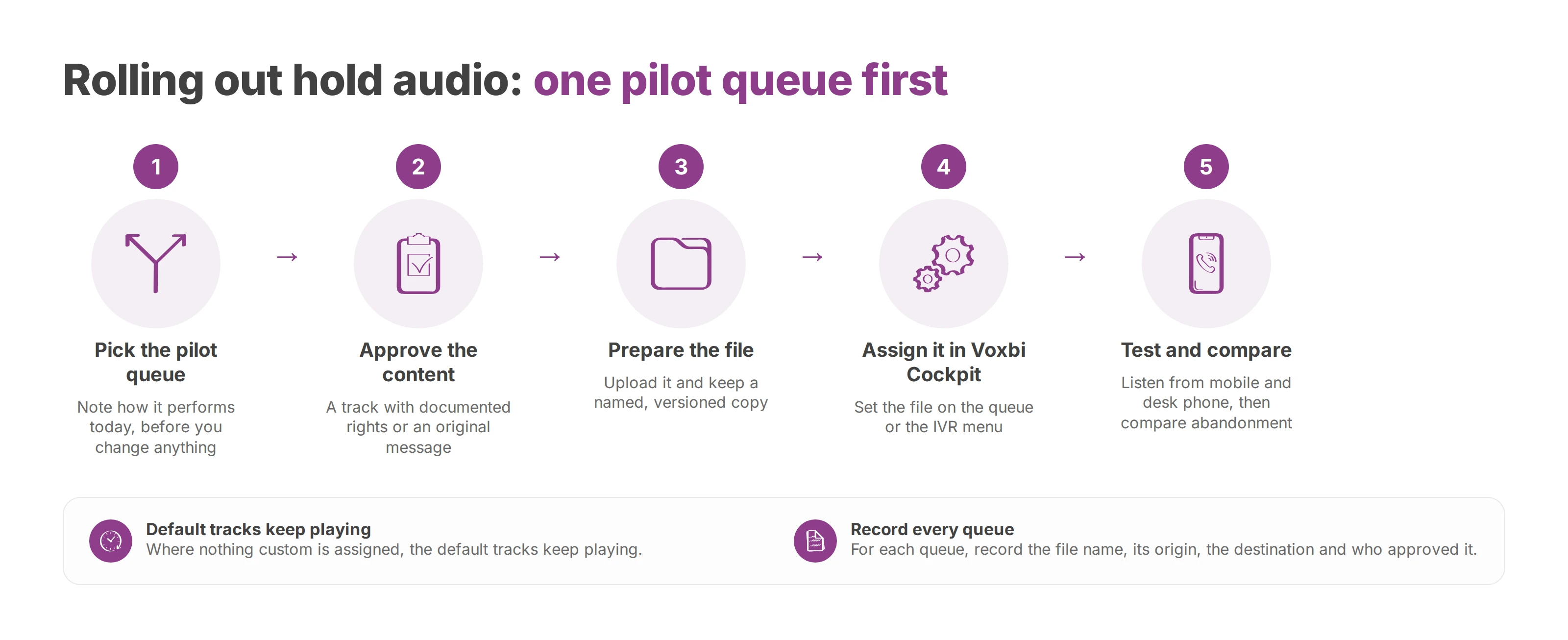
Start with one queue that regularly makes people wait. A single queue gives the integrator a clear scope, and the business can approve the audio before other teams get it. Rolling it out everywhere at once would make the cause of any problem harder to find.
Pick the pilot queue. Note how it performs today, before you change anything.
Approve the content. Choose a track with documented rights or an original message, and confirm it suits the team behind the queue.
Prepare the file. Upload it and keep a named, versioned copy.
Assign it. In Voxbi Cockpit, assign the file to the queue or the IVR menu. Where nothing custom is assigned, the default tracks keep playing.
Test and compare. Listen to the route from a mobile and a desk phone, then compare abandonment against a period like the one you noted at the start.
Voxbi is a cloud phone system built and hosted in the European Union, so calls and their data stay within European Union borders, under the General Data Protection Regulation (GDPR).
The call queues documentation shows where hold audio sits in the call's path. For each queue, record the file name, its origin, the destination and the person who approved it. A later change then can't wipe out the reason for the first choice.
For a telecom reseller or an IT integrator, that record is a simple document to hand over to the client. It speeds up opening-hours updates, team changes and listening checks. Validate one pilot queue end to end before you extend the setup to the rest of the phone system.
Voxbi is a cloud phone system hosted in the European Union, with default hold tracks and audio files you can set per queue or per IVR menu. Integrators, resellers and IT managers can visit Voxbi to plan a first pilot queue, or write to hello@voxbi.com for help setting it up.
What an AI voice agent does on a business phone system, which calls to give it first, how to test handover and languages, and what to ask about data.

The transport, security and voice components behind a hosted PBX, who runs each one, and what to test before you switch off the old service.
How to choose, secure and migrate a healthcare phone system: queues, on-call routing, GDPR health-data rules, resilience and the contract terms that matter.
Start a free trial, or work with a certified Voxbi partner.