On a Monday morning the symptom looks ordinary. The switchboard rings, the call connects, and then the voice turns metallic. A few seconds later, every second syllable is gone. On another site a remote team joins a video meeting, and the picture freezes at the moment someone has to confirm an order or check a customer file.
So what is packet loss? It's the share of data packets that leave one end of a conversation and never reach the other. It's a quiet fault, often intermittent, usually invisible on a speed test, and instantly audible to anyone on a call. If you run IT for a multi-site European company, this guide covers the measurement, the usual causes and the fixes, in that order.
The subject gets sharper during a move to a cloud PBX. On an old on-premise system, support teams could point at the central unit, the handset or the carrier. With IP telephony spread across several sites, Wi-Fi, virtual private networks, mixed internet access and WebRTC in the browser, diagnosis needs a method. It's an operations question, and it drives user satisfaction, ticket volume and service continuity.
Teams hear the same reports everywhere. "The bandwidth is fine, but calls sound bad." "Nobody has trouble browsing, yet voices drop out." "It only happens at certain hours, and only on a few desks." Those signals point at a network that carries some flows unevenly.
The European context adds a useful constraint. Plenty of organisations want to modernise telephony while keeping communications and data hosted inside the European Union, with a clear line on General Data Protection Regulation compliance and sovereignty. That architecture choice stands on its own, and it still asks for serious network work between handsets, sites, internet access and security equipment.
When a VoIP call degrades and the speed test looks fine, measure loss, latency and path stability instead of running the speed test again.
What is packet loss?
A network packet is a small envelope of data. A VoIP conversation doesn't travel as a single block. The system cuts the voice into a stream of packets that cross the network one after another, and packet loss is the proportion of those envelopes that never arrive. Enough of them go missing and the conversation arrives incomplete.
The word captures what a speed reading misses. The network drops whole fragments of the exchange, which is what makes the symptoms so irregular. Someone hears an almost normal sentence, then loses a word, then half a second.
Measurement works from the percentage of sent packets that don't reach their destination. Diagnostic tools usually calculate that rate over a run of 50 pings or more. Losses between 5% and 10% of the packet stream affect call quality significantly, according to the Wikipedia definition of packet loss.
When you're sizing a network for voice, read that figure next to what the traffic really consumes. Our explainer on how voice over IP works covers the bandwidth side of the same question.
Why voice suffers before anything else
Real time is the reason. On a file transfer the protocol retransmits whatever went missing, and the user sees a slightly longer download. On a call, a retransmitted packet arrives too late to help the conversation, so the gap stays where it is.
VoIP and WebRTC platforms do hide part of the damage. Jitter buffers, concealment algorithms and tolerant codecs absorb a share of the defects. Those mechanisms have a ceiling. Once losses pile up, the system picks between two costs: wait longer and add latency, or carry on and cut fragments of speech.
Choppy audio usually reveals brief, repeated instability. Users hear it in the first sentence, while a dashboard that averages over five minutes smooths it away.
Symptoms worth a check
Symptoms vary in shape, which complicates every conversation between support and the business.
Robotic voice. The audio arrives with holes big enough to distort it.
Swallowed words. The start or end of a sentence disappears during a microcut.
Frozen video with degraded audio. Video meetings compensate poorly, especially on Wi-Fi.
Unstable calls on one site only. The fault usually sits before the carrier handover, on the local network, the Wi-Fi or the security appliance.
In a multi-site organisation, even a small loss rate hits a switchboard, a reception desk or a booking centre straight away.
How to measure packet loss
The first commands to run
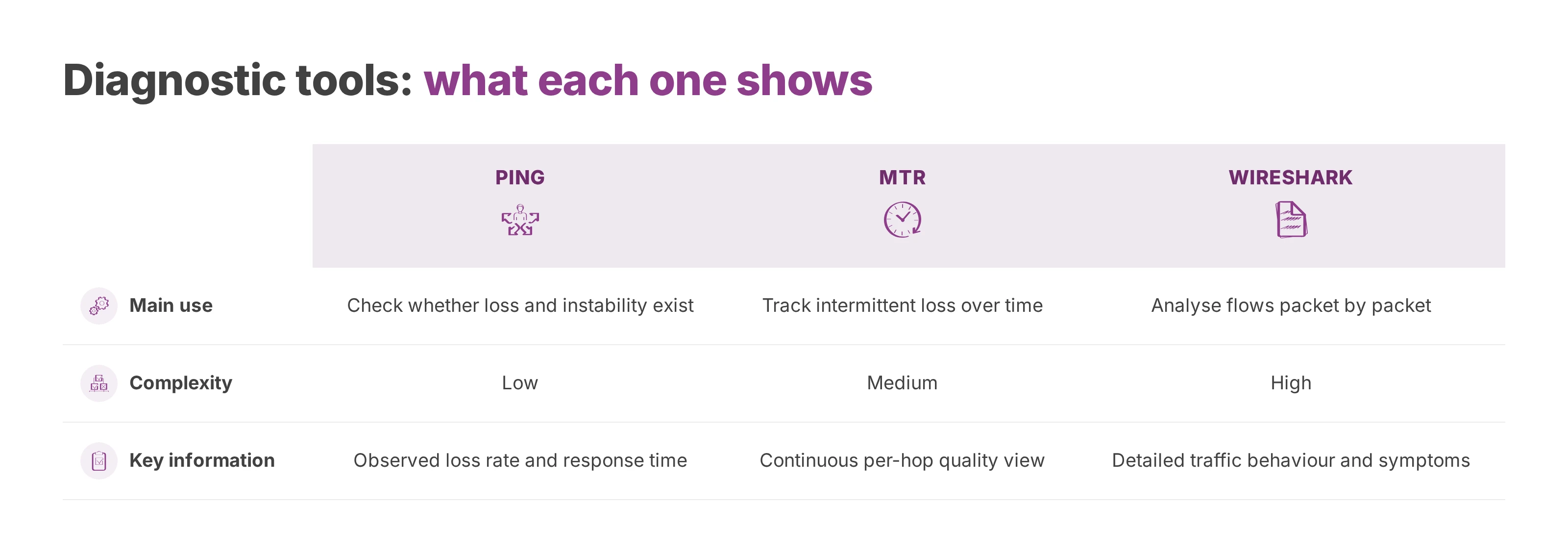
Diagnosis starts with a short sequence you can repeat and document. Network guides recommend a combination of ping, traceroute, mtr and Wireshark to locate where loss happens along a packet's route, as this Pandora FMS diagnostic guide sets out.
ping stays the first useful test. It gives you three things: whether loss exists, how regular it is, and whether response time holds steady. For cloud telephony, run it several times across the day, from several network segments.
traceroute adds the route. It won't reproduce the application experience, and it does show whether degradation appears on the first few hops, at the carrier edge, or further out. In a multi-site network that's often what separates a local problem from a wide-area one.
When to go deeper
mtr earns its place when ping confirms loss without saying where it starts. It runs the ping idea and the traceroute idea together in one continuous view, which is what catches intermittent loss on an intermediate hop or a pattern that follows the clock.
Wireshark comes in when you need the exact behaviour of the traffic. It shows retransmissions, protocol errors and sequencing anomalies, and it shows how voice really behaves in production. It's the tool for a network that "looks stable" while the application complains.
On Windows, Pktmon has real practical value. Microsoft documents it for capturing traces and attributing local loss to a precise cause. That angle helps when one workstation, one VLAN or one site shows the problem while the rest of the estate behaves.
Correlate every reading with the hour, the site, the access type and the real route the traffic takes. A single isolated test settles nothing.
What to read in the results
Four readings matter as much as the final percentage.
Where the loss appears. Loss on the first significant hop points at an internal cause.
How intermittent it is. Brief but repeated loss degrades voice heavily.
The time correlation. Incidents at site opening, late morning or during an application peak make congestion a serious suspect.
Asymmetry between sites. One affected site in an otherwise identical estate points at local equipment or a broken priority policy.
What causes packet loss
Congestion and network queues
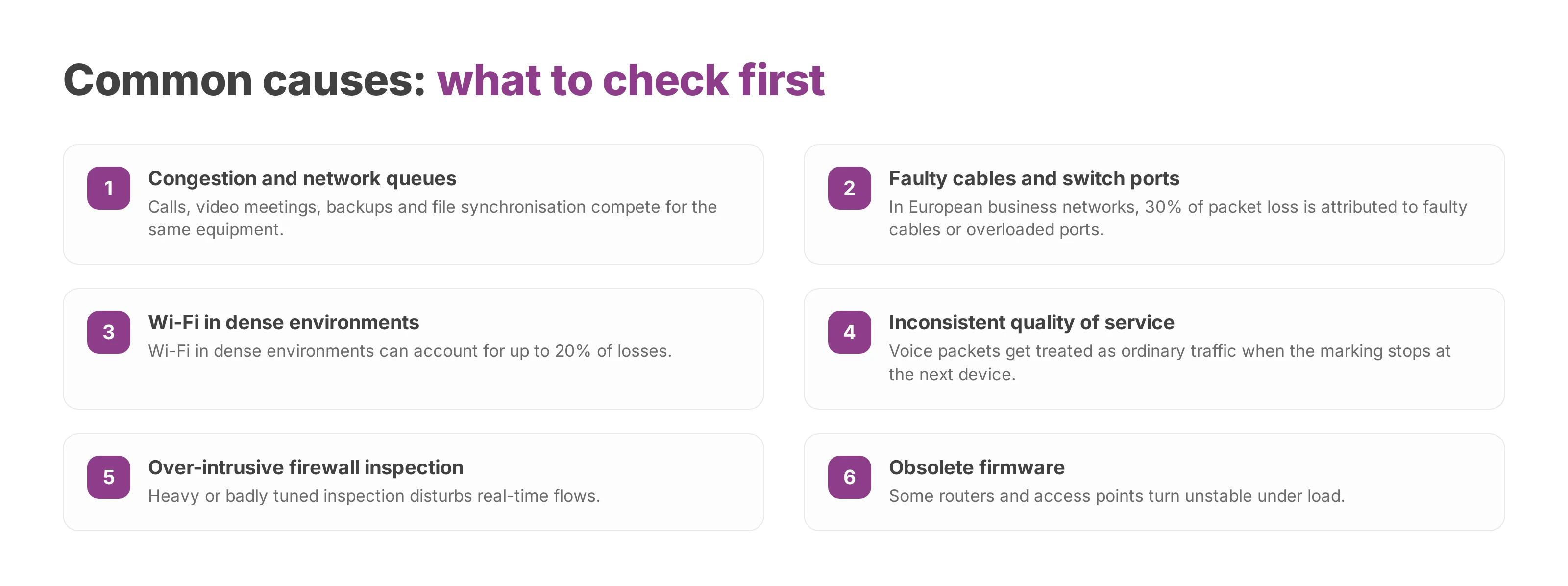
Congestion is the classic cause. It appears when several flows compete for the same resources at the same moment. Distribution explains it more often than raw capacity: a burst of application traffic, a firewall handling too many sessions, or a queueing policy set once and never revisited.
In multi-site small and mid-sized companies, that scenario turns up during a cloud migration. Calls, video meetings, backups, file synchronisation and remote access all cross the same equipment. Without an explicit priority, voice loses the competition.
Physical faults and unstable Wi-Fi
Physical causes stay underrated because they look too simple. Ageing routers, switches and firewalls degrade performance and cause loss, and a Wi-Fi connection suffers packet loss far more often than a wired one, as Fortinet's packet loss glossary sets out.
A port that negotiates badly, degraded patching, an old switch in a secondary rack or an access point placed too close to a crowded area is enough to produce intermittent incidents that resist isolation. Reception desks, softphones on laptops and open-plan spaces where many devices share the same radio environment feel it first.
The stakes rise once you connect several sites or hand calls to a carrier over a business SIP trunk. A local weakness then shows up on every call that leaves the building.
Configurations that degrade voice
A misconfiguration produces the same symptom as a damaged cable. Four settings come back often.
Over-intrusive firewall. Heavy or badly tuned inspection disturbs real-time flows.
Obsolete firmware. Some routers and access points turn unstable under load.
Absent or inconsistent quality of service. Voice packets get treated as ordinary traffic.
Misaligned VLANs or priority policies. The marking exists on one device and disappears on the next.
A stable VoIP network depends on one consistent policy across the handset, the switch, the Wi-Fi, the firewall and the internet access.
How to fix packet loss on a VoIP network
Start with the fastest fixes
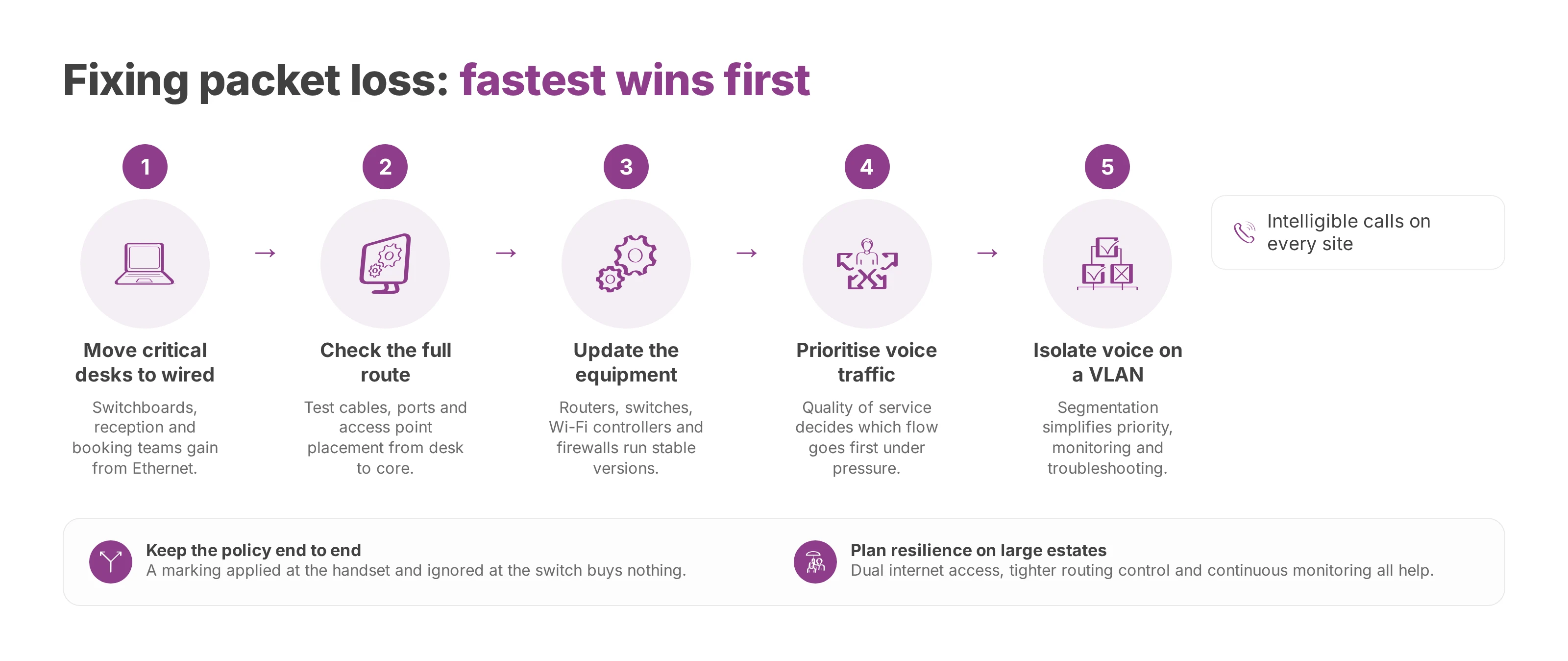
Simple actions often deliver more than a long tuning session. The first one moves critical handsets off Wi-Fi. A switchboard, a reception desk, a booking team or a customer service group nearly always gains from Ethernet.
The second checks the full route from the desk to the network core. A replaced cable, a changed port, a firmware update or a repositioned access point can make an intermittent loss disappear that hours of analysis wouldn't have resolved on their own.
A useful clean-up baseline looks like this.
Prefer wired. The most sensitive positions should skip Wi-Fi wherever an Ethernet socket exists.
Clean up the cabling plan. Suspect runs and overloaded ports get tested, then replaced if needed.
Update the equipment. Routers, switches, Wi-Fi controllers and firewalls should run stable versions.
Watch the peaks. Voice incidents follow a timetable, so metrics belong next to load hours.
Put quality of service to work for voice
Quality of service is one of the strongest levers when packet loss comes from competition between flows. It works with the bandwidth you already have, and it decides which traffic goes first when the network is under pressure.
In a multi-site context that decides whether a call stays intelligible. The gain is largest where loss comes from congestion rather than from a faulty link, because prioritisation only helps when packets are queueing, not when they are being dropped by broken hardware.
The real work sits in end-to-end consistency. A marking applied at the handset and ignored at the switch buys nothing. A priority recognised on the local network and then erased by a tunnel, a firewall or an intermediate access point loses most of its value.
Codec choice and multi-site architecture
Codec choice matters too. Some codecs tolerate network defects better than others, so match the configuration to the connections that really exist between branch offices. A more resilient codec preserves intelligibility where a demanding one falls apart faster.
Segmentation helps as well. Isolating voice traffic on a dedicated VLAN simplifies the priority policy, the monitoring and the troubleshooting. That separation sits alongside quality of service and keeps voice out of a crowded mix of application traffic.
Demanding architectures benefit from a resilience plan. Dual internet access, tighter routing control and continuous monitoring all help, and software-defined wide area networking earns its place on a large estate. The right call comes from one question: which site can tolerate degraded audio, and for how long?
Choosing a cloud PBX for European network conditions
The local network decides a lot. Your provider decides the rest, from overall stability to the route your traffic takes and the governance of your data. For a European company, that arbitration covers hosting inside the European Union, General Data Protection Regulation compliance and control over where processing happens.
Even minor packet loss carries immediate operational impact on switchboards and booking centres in a multi-site environment, as the measurement sources cited above set out. Your communication architecture therefore has to be reliable, well managed and designed around the routes traffic actually takes.
The right provider fits your operating strategy as well as your feature list. Hosting in the European Union, coherent network routes, encryption, monitoring capability and partners who can tune quality of service, VLANs, Wi-Fi and security together all count in that decision. Our guide to what a cloud PBX covers sets out those choices from the business side.
Voxbi runs a cloud phone system built for European companies, with data hosted in the European Union, an approach aligned with the General Data Protection Regulation, and deployments designed for multi-site estates. You can read how it was built in Voxbi 2, a cloud PBX made in Europe. To check what packet loss would do to a telephony migration or to the estate you already run, send your ping and mtr output to hello@voxbi.com and ask for a read on it.