
On call phone number: a step-by-step guide for a cloud PBX
How to run one on call phone number that reaches whoever is on duty, with out-of-hours routing, a weekly rota, a backup for unanswered calls and a monthly test.
Oct 31, 2026
How to forward calls on Android by condition, find the menu on Samsung, Pixel and Xiaomi, transfer a live call, test every rule and control who changes it.

Call forwarding on Android sends incoming calls from your mobile to another number whenever a rule you've set applies. If your business has staff answering customers on Android phones, forwarding keeps those calls moving when someone leaves their desk, travels between sites or walks into a building with weak signal. A rule only works once the operator's network has accepted it and the destination number is correct. That's why setup and testing belong in the same job.
Two different tools sit behind the word "forwarding". Conditional forwarding is set up in advance and handles calls before anyone answers. Mid-call transfer happens after you've picked up, and it hands the caller to a colleague, a department or an on-call line. Which one you need depends on the situation. It also depends on your operator, your coverage and the routing rules already in place.
Call forwarding on Android is a rule stored against your mobile line that redirects incoming calls to another number under one of four conditions. Always forwards every call, which suits a day off or a long absence. When busy forwards calls that arrive while you're already on the line. When unanswered lets the phone ring for a set time before sending the call on. When unreachable catches calls while the phone is switched off or out of coverage.
Wi-Fi calling adds a layer to this. Your phone may use the mobile network in one room and Wi-Fi in the next, and each call follows whichever service carries it at that moment. A rule that behaves in your office can therefore behave differently in a hotel room, a hospital corridor or a workshop on the far side of the site.
Mid-call transfer works on a different principle. You've already answered, and you choose to connect the caller straight away or to check first that the colleague can take the call. The section on blind and attended transfer below covers both.
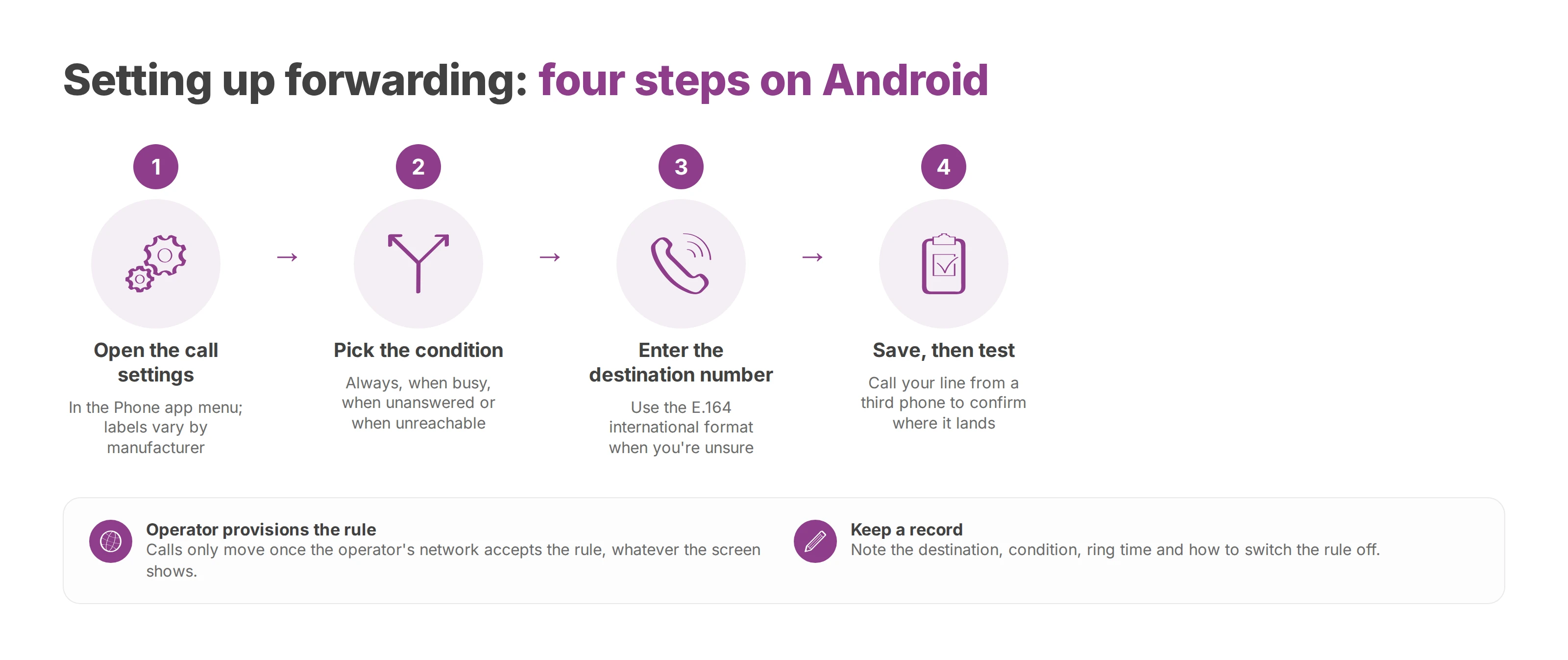
The Phone app is where you start on every Android handset, though each manufacturer files the setting somewhere slightly different. On a Samsung running One UI, look under the supplementary call settings. On a Pixel, the Google Phone app keeps it behind the calling account linked to your operator. On a Xiaomi, you'll usually find it in the advanced SIM card settings. When the Call forwarding entry is missing or won't save, your operator controls forwarding on that line, and the change goes through them.
Open the call settings. In the Phone app, open the menu and go to the call settings. Labels vary by manufacturer and Android version.
Pick the condition. Choose always, when busy, when unanswered or when unreachable. Permanent forwarding suits an absence, while forwarding on no answer lets the mobile ring first.
Enter the destination number. Check the number and its format, national or international, against what your operator expects. The E.164 international number format is the safe choice when you're unsure, because a single wrong digit sends every call to the wrong place.
Save, then test. Store the rule and call your line from a third phone to confirm the call lands where you meant it to.
The operator's network has to provision the rule before calls actually move, whatever the screen shows. On some plans you activate forwarding through the operator's online account or with network codes typed on the keypad, and the forwarded leg of the call may be billed to you. If the menu won't behave, the operator's support line will get you further than repeating the steps in Android.
Before you close the settings, note the destination number, the condition, the ring time before forwarding on no answer and how to switch the rule off. That record saves you rebuilding the setup three months later on a different handset.
Transferring a call you've already answered depends on the phone service and the app you're using, and the Android forwarding menu plays no part in it. Google Voice for Android is one example, in the markets where Google offers it. It's a separate app from the built-in dialler. There, you answer, tap Transfer, search for or type the colleague's number, pick a transfer mode and confirm.
Blind transfer. The caller goes straight through to the second number. It suits a hotel reception passing a request to a department whose number is obvious.
Attended transfer. Google Voice calls this "Ask first". The original call goes on hold while you reach the colleague, check they're free and brief them before you connect the caller.
In a clinic, an attended transfer stops a patient landing on someone who's unavailable. It also means the patient doesn't have to explain their reason for calling twice. For a quick request aimed at a well-known department, a blind transfer takes fewer taps.
Not every number accepts a transfer. Google's help page on transferring calls in Voice for Android lists exclusions, including emergency services, directory assistance and your own number. Those limits matter before you write the process into a team procedure.
Coverage, a handover between cells, the operator's provisioning and the state of the destination number all shape whether a forwarded call arrives. A failed test can point to the Android setting, the network or the routing, and the test log tells you which. A repeatable check covers four scenarios.
| Test scenario | What it confirms |
|---|---|
| Normal incoming call | The phone and the destination receive the call as planned. |
| Call during an active conversation | The "when busy" rule fires, if you've set one. |
| Call left unanswered | Forwarding starts after the ring time the service applies. |
| Phone out of coverage | The "when unreachable" condition is handled. |
For each test, record the time, the network in use, the Android model and the result. With that data you can compare handsets and sites, and see whether failures cluster on one condition or in one location. If you run several sites, test in busy, mid-density and rural locations as well as at head office, because coverage varies most outside the towns.
When a call can't reach anyone, it should still land somewhere: a voicemail box, a second number or a cloud call queue.
A forwarding rule hands part of your call control to another number. If it stays active after someone changes role, or points business calls at a number nobody approved, you lose sight of where your customers' calls go. The questions to settle are who may change a rule and how you'd spot a change you didn't expect. Treat a routing change the way you'd treat any other access change.
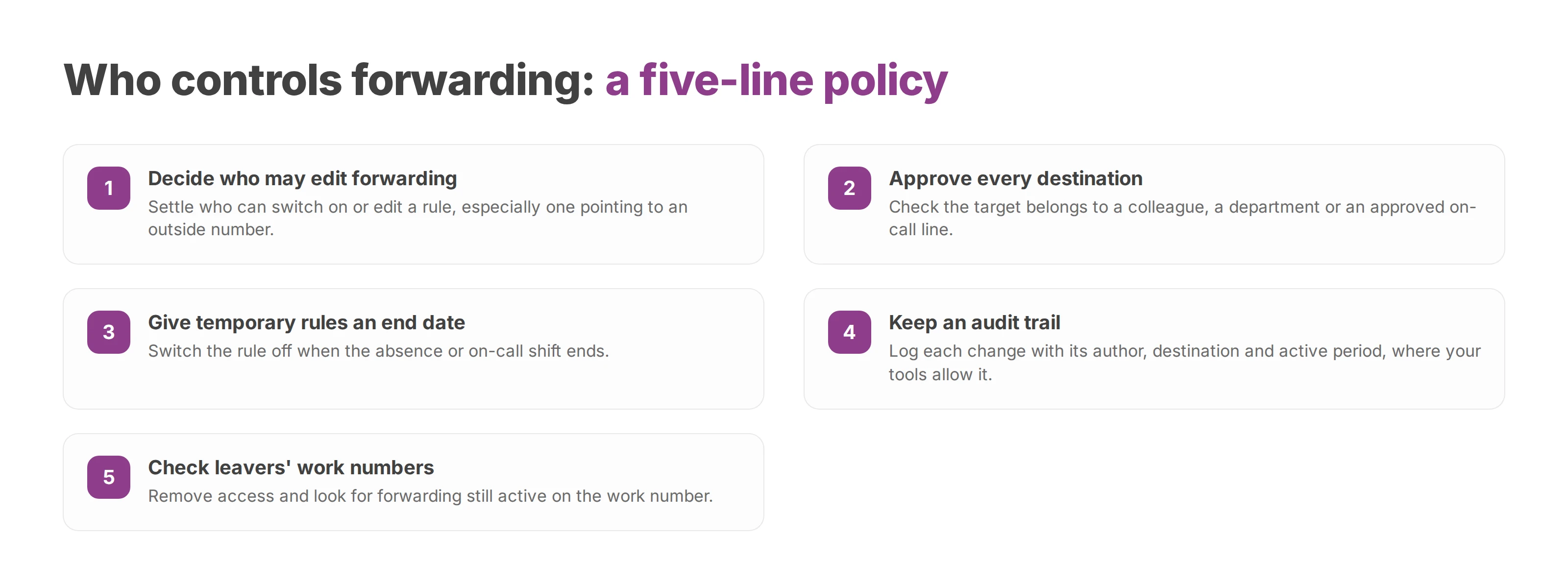
A telecoms policy can set this out in a few lines:
Permission. Decide who may switch on or edit forwarding, especially to an outside number.
Destination. Check that the target number belongs to a colleague, a department or an approved on-call line.
Duration. Give each temporary rule an end date and switch it off when the absence or on-call shift ends.
Audit trail. Keep a log of changes with the author, the destination and the active period, where your tools allow it.
Leavers. Remove the relevant access and check for forwarding still active on the work number.
Temporary forwarding to a colleague's mobile is often the right call. A permanent route that depends on one person's smartphone is harder to monitor and to keep up to date, so your policy should cover approval, access control and how a rule gets revoked.
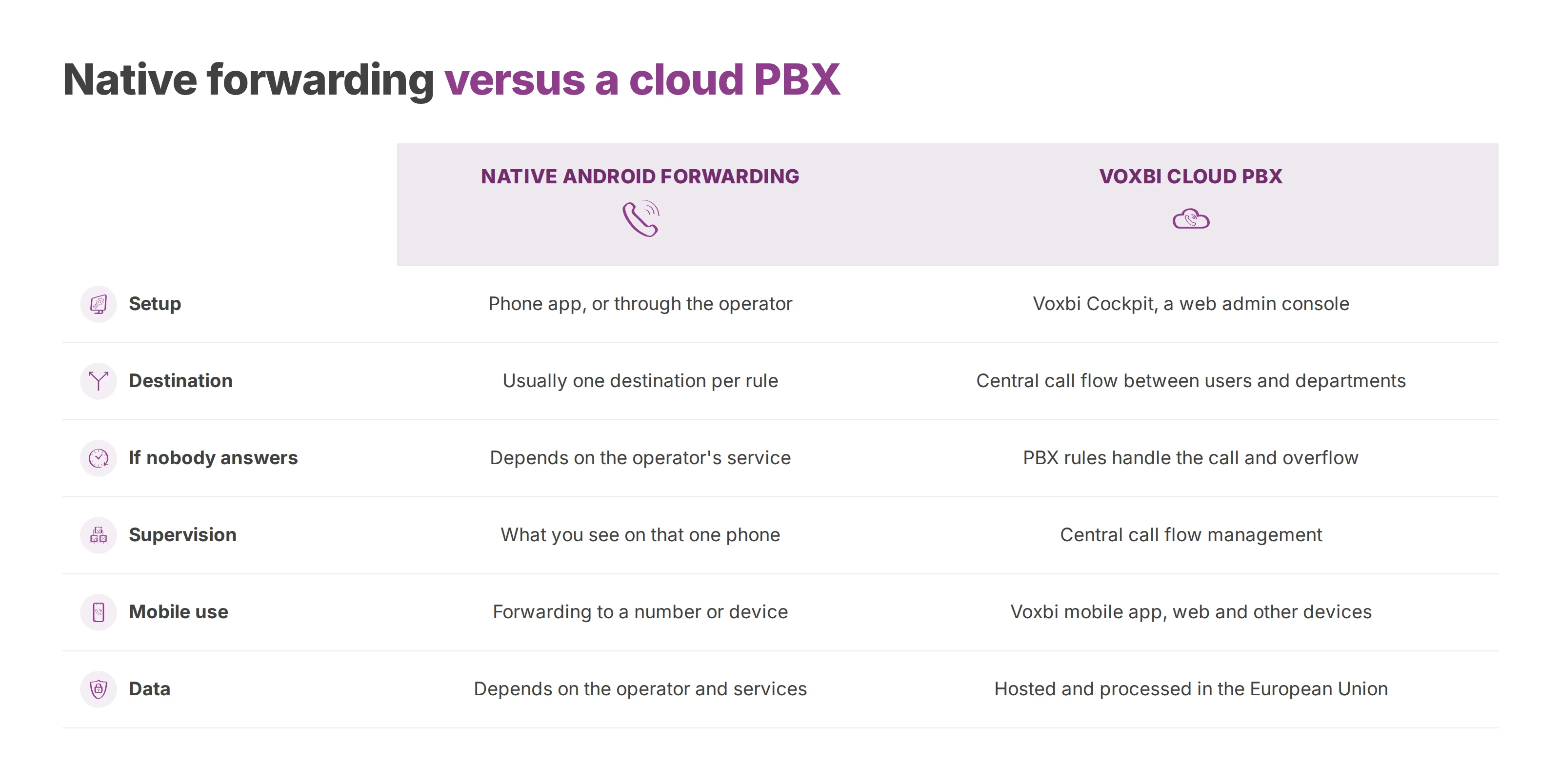
Native Android forwarding sends one number's calls to one destination under one rule. A queue, live supervision, overflow handling, a usable call history and central control all sit outside it. For a business spread across several sites, the practical question is what happens to the call when the person it reaches is busy, out of coverage or away.
| Native Android forwarding | Voxbi cloud PBX | |
|---|---|---|
| Setup | In the Phone app, or through the operator | In the Voxbi Cockpit, a web admin console |
| Destination | Usually one destination per rule on the phone | A central call flow routing between users and departments |
| If nobody answers | Depends on the operator's forwarding and service | The PBX's rules handle the call and its overflow |
| Supervision | What you can see on that one phone | Central call flow management; live call dashboards on Voxbi Plus and above (Voxbi One) and on Business and Enterprise (Voxbi Managed) |
| Mobile use | Forwarding to a number or another device | Business calls in the Voxbi mobile app, on the web and on other devices |
| Data | Depends on the operator and services used | Hosted and processed in the European Union |
Voxbi is a cloud PBX, built and hosted in the European Union. In the Voxbi Cockpit, administrators set up users, extensions, call flows, queues and opening hours. Your staff take business calls in the Voxbi mobile app, and the routing rules live on the PBX instead of on each handset. If you're new to the model, what a cloud PBX is covers the basics.
Hosting and processing in the European Union matter to businesses, public bodies and healthcare providers that must keep tight control of personal data. The GDPR allows transfers outside the European Economic Area under set conditions, such as an adequacy decision or appropriate safeguards, as the European Data Protection Board explains in its guidance for small businesses. European Union hosting can make transfers simpler to manage, and your obligations on security, data minimisation and lawful basis still apply.
European hosting on its own isn't an absolute shield against every foreign access request. The European Commission's explainer on the Data Act describes safeguards on access by non-EU governments to non-personal data held in the Union. The EU AI Act phases its obligations in over time, and they depend on your role and the system involved, so compliance is never automatic.
The choice between native forwarding and a cloud PBX comes down to how much continuity you need, how much supervision you want and whether your team can manage calls from one place.
Confirm which mechanism you're relying on: a rule set on the phone, or a service your operator manages. For a call you've already answered, choose blind or attended transfer according to the risk of connecting the caller to someone who's unavailable or unbriefed.
Run test calls for always, when busy, when unanswered and when unreachable, and record each result with its destination. Decide who can switch forwarding on, for how long, and how it gets switched off when someone leaves or changes role.
A cloud PBX earns its place once customer calls must reach a department even when one phone is busy or out of reach, once someone needs to supervise call flows, or once you want your call data processed in the European Union. Start by auditing the forwarding rules already set on your team's Android phones, then compare them with what a central dial plan would do.
Voxbi routes business calls through a cloud PBX built and hosted in the European Union, managed from the Voxbi Cockpit, with a mobile app for your staff. To see whether it fits your forwarding rules and your sites, write to hello@voxbi.com.
How to run one on call phone number that reaches whoever is on duty, with out-of-hours routing, a weekly rota, a backup for unanswered calls and a monthly test.
How to configure VoIP in Odoo, from the access right and SIP provider settings to user extensions, international number format, troubleshooting and the GDPR file.
Your phone system sends a number and a name. Whether your business name shows depends on number authentication and the receiving operator.
Start a free trial, or work with a certified Voxbi partner.