
Call handling process: how to route, queue and measure every call
A call handling process decides who answers, how long callers wait and where a call goes next. Here's how to build the routing, IVR, queues, scripts and KPIs.
Oct 25, 2026
How a law firm phone system routes every call, keeps professional secrecy intact under the GDPR, and what to check before you migrate or pick a provider.

A partner is in court, an associate is working from home and the receptionist has gone to lunch. A client rings about an urgent matter. If the phone system has no rule for that call, it rings out or lands in a voicemail box that nobody checks. For a law firm that is more than a service lapse, because the firm can't later show who handled the call or what happened to the message, and the caller's confidence goes with it.
A good law firm phone system answers every caller properly without exposing conversations or leaving settings open to anyone. More options won't get you there. What gets you there is calls that follow predictable routes, a system that keeps only the data it needs, and a clear answer to who can see or change each setting. You'll find what Voxbi offers the sector on the phone system for law firms page.
At its simplest, a phone system distributes incoming calls. Around that it adds answering and routing rules, so that a caller reaches the right person or, when that person is busy, a sensible fallback. Today it usually runs as a cloud PBX (private branch exchange), which is software that holds your numbers, users and call flows and that you manage from a web browser.
An interactive voice response (IVR) menu offers the caller a short choice, while queues hold callers in order until someone is free. Ring groups send one call to several people, either all at once or in turn. Outside office hours, schedules switch the line to voicemail or a holiday message, and transfers (to a mobile, for instance) mean nobody has to sit at a desk to answer.
On an older on-site system, changing a route can mean booking a technician. With browser-based administration, the person in charge updates a forward, the opening hours or a user's status without waiting on the provider, provided their account has that right.
That split of rights shapes daily work. Reception watches the waiting calls and transfers them under the firm's rules, while a lawyer sets their own availability from a work phone or laptop. The administrator manages accounts and routing, and nothing about that job requires the right to play back recordings.
A dashboard shows call volumes and waiting times, which tell you how well reception is working. Because those figures come from call metadata, measuring reception never requires listening to anyone.
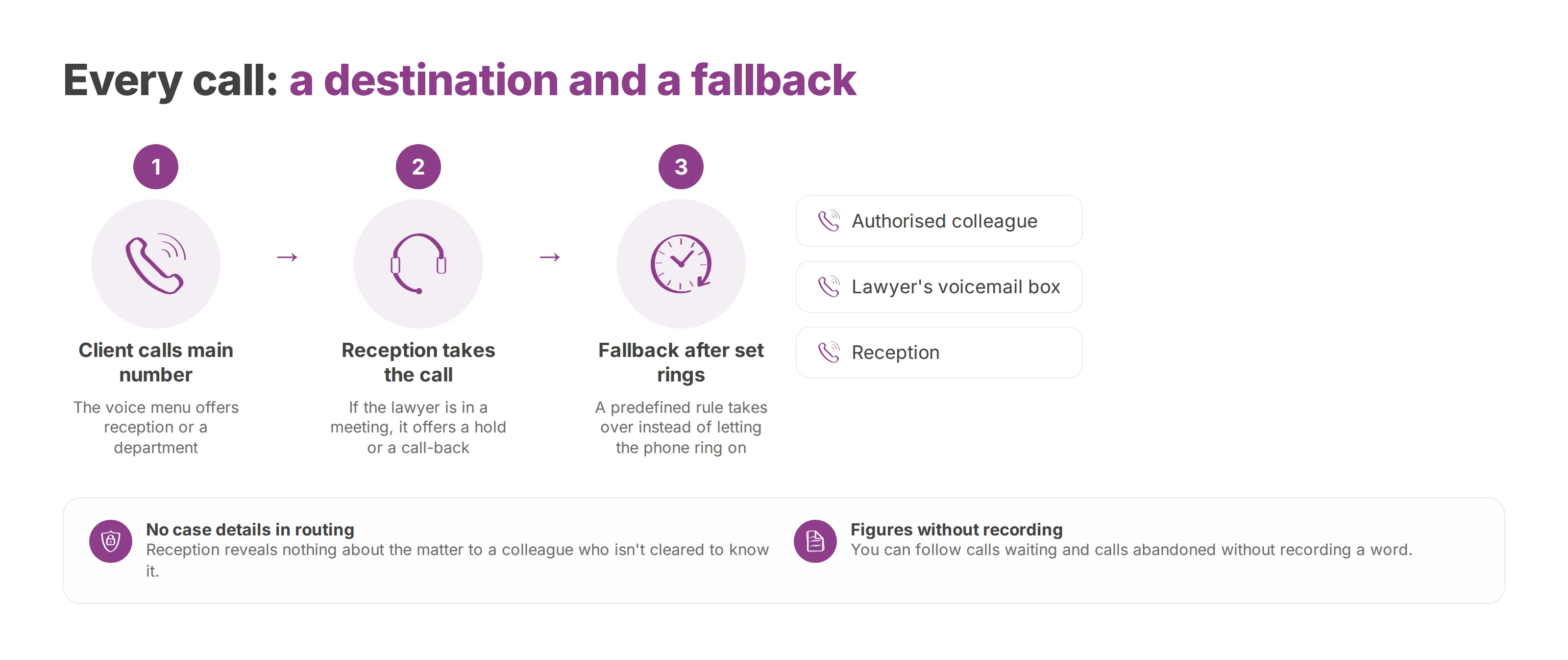
Take a client who calls the main number. The menu sends them on, but the lawyer they want is in a meeting, so reception takes the call and offers a hold or a call-back without revealing anything about the matter to a colleague who isn't cleared to know it. If nobody answers at all, a predefined rule takes over after a set number of rings instead of letting the phone ring on.
The same logic holds when the team is spread across offices or working from home. A call for someone who's away follows a route you set in advance, to an authorised colleague, the right voicemail box or reception. Callers keep reaching the same front door even when the office is empty or the hours change.
Operating rule: every call has a destination and a fallback, and every setting has an owner with defined rights. Routing never becomes a shortcut to case information.
A controlled system also keeps service figures apart from what was said. You can follow calls waiting and calls abandoned without recording a word, and the way each route performs tells you far more about reception than listening in ever would.
So "who picks up?" is the wrong first question. Ask how each call travels, what data it leaves behind and who can read that data. Once the firm has settled those points, it can run a professional front desk without putting client confidentiality at risk.
A sole practitioner mostly needs reliable answering and well-organised voicemail. A practice with several partners, associates and offices also has to manage ring groups, overflow rules and different rights for different people.
Whatever the size, people move. France gives a measure of how often: in a 2024 employment survey for the Conseil national des barreaux, the French national bar council, 19% of the 10,763 lawyers who answered said at least one lawyer had left their firm in 2023, and 17% had lost at least one associate.
Every departure means someone removes or reassigns a line, updates the ring groups and checks the greetings. If each of those changes needs a long technical job, calls go to the wrong person, old forwards stay active and clients wait for answers that never come. That's why easy administration matters as much to a two-lawyer office as to a large firm, and why you should be able to make those changes yourself.
Your phone system processes personal data even when nothing is recorded. Caller numbers, call times, call history and admin logs can reveal who works with whom, and when. As controller, the firm sets the purposes and the retention periods for call data. A provider acting as processor may handle that data only on the firm's instructions and under the safeguards in the contract.
Confidentiality sits at the core of the profession across Europe. The Council of Bars and Law Societies of Europe (CCBE) lists "the right and duty of the lawyer to keep clients' matters confidential and to respect professional secrecy" among the core principles in its Charter of core principles of the European legal profession. National bar rules set the exact scope. France's, for example, call a lawyer's professional secrecy "general, absolute and unlimited in time" in the national rules of the Conseil national des barreaux.
In a phone system, that duty translates into separate rights for routing, user management, log access and any recordings. Each right goes only to the roles that need it, and the firm should be able to trace every access to sensitive data.
The safest default is no routine recording. When a specific purpose does justify recording some calls, the lawful basis, notice and retention rules for call recording apply, and the firm decides which call flows to record, who can listen and when the files are deleted.
Call metadata needs a documented retention period too. For a benchmark, France's data protection authority, the CNIL, says its own phone system logs only the caller's number and the time of the call, and keeps call data for three months. Your firm still has to set its own period, one that fits its purpose and its legal obligations.
Aggregate statistics such as call volumes and abandoned calls help you improve reception and copy nothing from a conversation between lawyer and client. Remote access should run over encrypted channels with strong authentication, and CRM or API integrations should exchange only the fields they need.
Ask the provider where your calls, logs and backups are hosted, who can reach them and how that access is audited. Hosting in the European Union settles where the data sits, but it doesn't replace minimisation or security, and it doesn't end the transfer question. Under Chapter V of the General Data Protection Regulation, a transfer outside the Union that has no adequacy decision behind it needs appropriate safeguards, plus enforceable rights and effective legal remedies for the people concerned.
You also need to act fast on a breach. Under Article 33 of the GDPR, when a breach is likely to put people's rights and freedoms at risk, the controller notifies its supervisory authority without undue delay and, where feasible, within 72 hours of becoming aware of it. Details that aren't known at first can follow in phases. The provider's contract and procedures should help the firm find out quickly which data was affected and what was done about it.
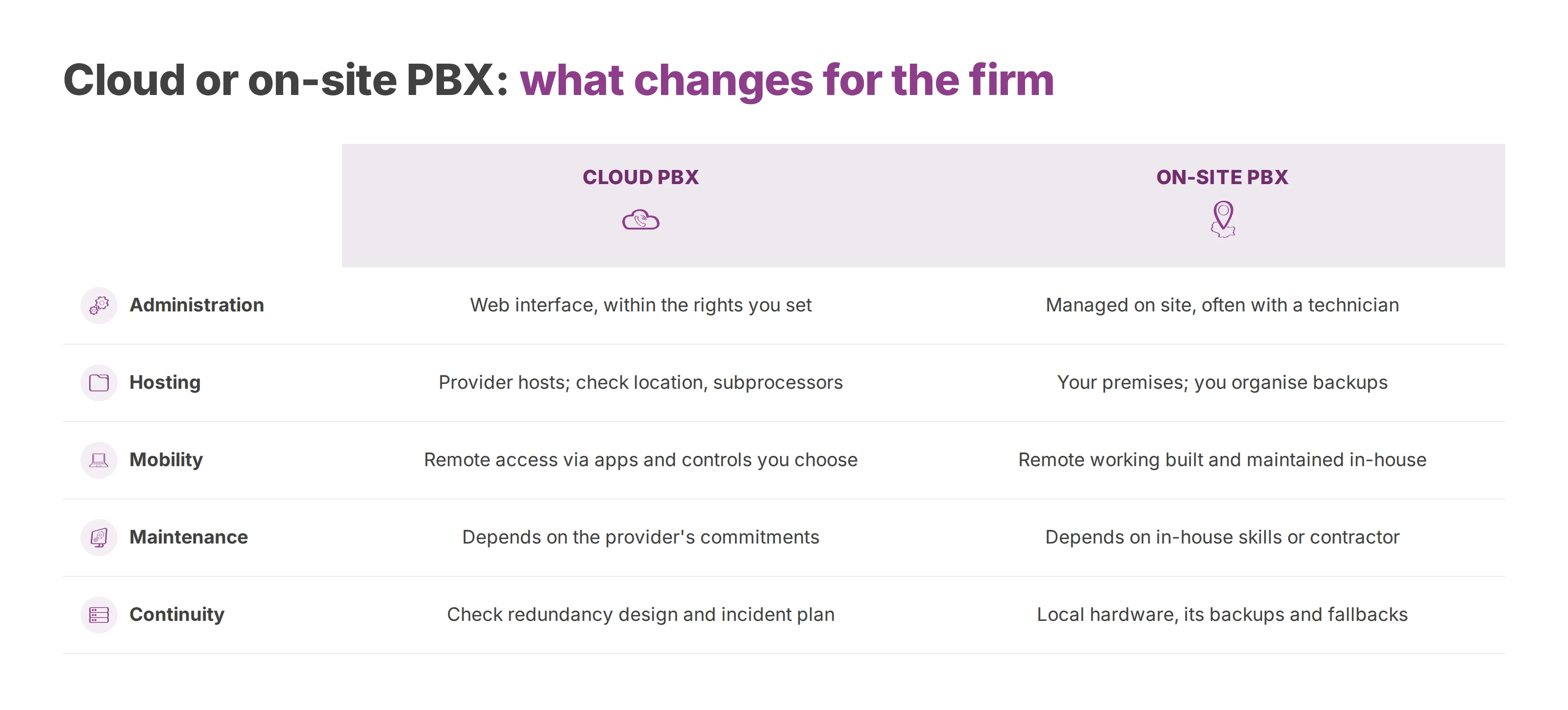
The choice depends on your in-house skills, how much control you want and your continuity plan. Neither model guarantees confidentiality by itself, since that comes from the architecture, the settings, the access rights and how well the system is run day to day.
| Criterion | Cloud PBX | On-site PBX |
|---|---|---|
| Administration | Settings in a web interface, within the rights you configure | Hardware and changes managed on site, often with a technician |
| Hosting | Data entrusted to the provider; location and subprocessors to verify | Equipment in your own premises; backups to organise |
| Mobility | Remote access through the apps and controls you choose | Remote working designed into and maintained in your own setup |
| Maintenance | Depends on the provider's service and commitments | Depends on in-house skills or the hardware contractor |
| Continuity | Check the redundancy design and incident plan | Depends on local hardware, its backups and fallback options |
An on-site PBX still makes sense if you have the skills to maintain it and want direct control of the infrastructure. That choice brings updates, hardware replacement, backups and recovery after a failure with it. When all of that rests on one outside technician, the firm controls the system on paper and depends on one person in practice.
A cloud PBX usually makes administration easier and keeps people reachable away from the office. In exchange the firm hands part of the service to the provider, so it has to check hosting, subprocessors, access and incident procedures. Our guide to the IP PBX and when to keep it on site goes further into that trade-off.
AI is not a kind of phone system. It's a feature that some phone systems include, and it brings its own rules. The European Union's AI Act (Regulation 2024/1689) entered into force on 1 August 2024 and has applied since 2 August 2026, with some obligations on a different timetable. What the firm must do depends on the provider's role, its own role as deployer and the category of the system, all set out in the official text of the AI Act.
Pick features to match the calls you actually receive, not a vendor's checklist. A badly built menu adds steps for the caller, whereas a well-configured queue shows reception who's waiting, so nobody has to improvise a transfer.
Short voice menus. The caller reaches reception, a department or a person, and never has to say anything confidential to a menu.
Visible queues. Reception sees who's waiting and shares the load under the firm's rules.
Schedules and holidays. The system plays the right message when the office is closed, when someone's absent or during out-of-hours duty.
Personal voicemail. Each message goes to its authorised recipient, and no shared mailbox sits open without control.
A transfer to a mobile should keep the call private and follow your rules, so decide who can receive a forwarded call, in which circumstances, and what happens if they don't pick up. Ask about number porting as well. The provider should explain how the migration runs and how reception keeps working during the move.
For daily use, check that the apps you need run in a browser and on the devices the firm has chosen. Integrations link the phone system to your business tools and should pass on only the data they need. Voxbi One includes Odoo, Microsoft 365 and the API from the Plus plan up, and Microsoft Teams costs €50 a month extra on those plans. On Voxbi Managed, API access starts with the Professional plan, and from that plan Odoo (€29.50 a month) and Microsoft Teams (€72.50 a month) are add-ons priced per phone system. Prices exclude VAT. Click to call saves time, and the contacts on screen stay under the firm's access rules.
Recording shouldn't be switched on by reflex. When a specific need justifies it, record only the call flow concerned, let only authorised people listen, log every playback and document when the files are deleted. On Voxbi Managed, recordings stay on our server for 3 to 120 days depending on the plan. To monitor how reception performs, volumes and waiting times are usually enough.
A client dials the main number and the menu offers reception or a department. Reception takes the call and checks who it should go to. If the lawyer the client asked for is busy, the rule offers a wait, a call-back or that lawyer's own voicemail. The log keeps the metadata needed for follow-up, while only the recipient can open the message itself.
The firm publishes one main number. Calls land in a shared queue and go to people by skill or availability, as the firm defines, and when the first office can't answer, the call overflows to the second automatically. The administrator can review the transfer rules and tie every change to an authorised account, without giving reception staff rights over sensitive settings.
A call for the lawyer follows an availability rule and goes to their work phone if that's allowed. If nobody answers, it falls through to a voicemail box set up in advance, and reception books a call-back from the call log, following the firm's internal procedure.
In all three flows the system keeps only a little management data (the number, the time, the call status and the routing action, depending on the configuration). It also keeps general calls apart from dedicated lines and groups, so a reception role can't reach calls meant only for the lawyers.
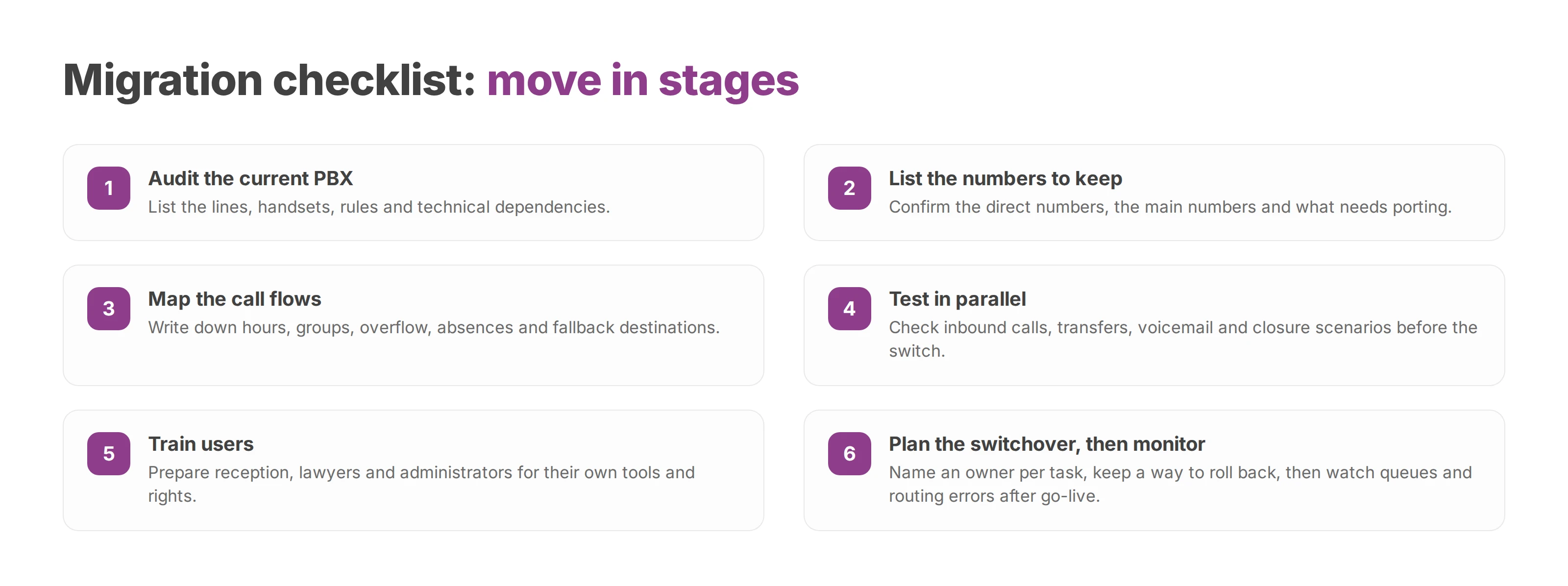
A migration works best in stages. Document the call flows before you touch any equipment, then test real scenarios with the people who'll use them. A new system copies whatever routing it's given, mistakes included.
Audit the current PBX. List the lines, handsets, rules and technical dependencies.
List the numbers to keep. Confirm the direct numbers, the main numbers and what needs porting.
Map the call flows. Write down hours, groups, overflow, absences and fallback destinations.
Test in parallel. Check inbound calls, transfers, voicemail and closure scenarios before the switch.
Train users. Prepare reception, lawyers and administrators for their own tools and rights.
Plan the switchover. Name an owner for each task, pick a quiet period and keep a way to roll back if a route fails.
Monitor after go-live. Watch queues, routing errors and user requests, then adjust the rules.
Don't pick a provider on a sales presentation. Get written answers on data location, subprocessors, call encryption, role-based rights, access logs and the incident notification process. Check which integrations really exist, and whether a qualified integrator can help with setup and migration.
The provider should explain how you export or delete data, how recording stays off by default and how you get the evidence you need to analyse a breach. Those commitments belong in the documentation and the contract, not in a phone call. For the people side of the change, our cloud PBX migration guide covers how to bring your teams with you.
The question that decides it isn't which handset to buy. It's whether the provider can show you, in writing, how its system protects professional secrecy and what data it keeps.
Voxbi is a cloud phone system built and hosted in the European Union. You set up users and call flows in a web interface. Voxbi Managed adds a team that sets the system up and runs it, along with phone support and a service level agreement (SLA) with downtime credit. To go through hosting, access rights and administration for your firm, write to hello@voxbi.com.
A call handling process decides who answers, how long callers wait and where a call goes next. Here's how to build the routing, IVR, queues, scripts and KPIs.
Call queuing holds callers in an ordered line inside your cloud PBX. How it works, which options to switch on, which metrics to watch and how to configure a queue.
How a hotel phone system routes reservation, room and maintenance calls, connects to your PMS, and helps you stay secure and meet the GDPR across one site or many.
Start a free trial, or work with a certified Voxbi partner.