
Branded caller ID: how your business name reaches the screen
Your phone system sends a number and a name. Whether your business name shows depends on number authentication and the receiving operator.
Oct 25, 2026
How to design an IVR menu callers can get through. Start from real call reasons, rank the options, keep a route to a person and plan for silence and wrong keys.

It's opening time at a clinic, a law firm or a company with several sites. Within minutes the switchboard is taking sales enquiries, urgent cases, admin questions and calls for a team that's already swamped. If the IVR menu sends those callers down a long path with no callback and no obvious way to reach a person, nobody gets served any faster. The wait has only moved to a different part of the call.
This guide is for IT integrators and telecom resellers who build menus for their clients, and it works just as well for an office manager doing the job in-house. A good menu sorts the request, shortens the wait, protects urgent calls and hands the caller to a human when the options run out. The sections below show how to design a menu that teams can run, measure and adjust without making callers' lives worse.
An IVR menu is the recorded list of options a caller hears when they ring a business number, such as "press 1 for sales, press 2 for support". IVR stands for interactive voice response. The caller answers by pressing a key, which sends a DTMF tone the phone system recognizes, or in some systems by saying a word. Each choice sends the call to a queue, an extension, a ring group, a recorded message or a second menu. Many providers call the same feature an auto attendant.
The menu sits inside the phone system's call flow. When it's built well, it does the sorting a receptionist would otherwise do by hand, and it applies opening hours before anyone picks up. If you're comparing providers rather than designing the menu itself, the cloud IVR buying guide covers that side.
Picture a prospect who rings a services company and hears four options, none of which fits. They guess, land in the wrong group, get transferred and start again. Meanwhile reception keeps fielding the same questions, staff answer calls that were never meant for them, and the manager only sees a queue that won't shrink.
So start with the calls you receive, not with the org chart. Pull a few weeks of call logs, ask the receptionist which questions come up every hour, and group them by what the caller wants. A clinic usually ends up with appointments, test results, admissions and urgent cases. A law firm separates new matters, existing clients and invoices. A small company often needs only sales, support and general enquiries.
Grouping by the caller's need keeps internal team names out of the recording. Callers don't know those names, and they shouldn't have to.
Keep the greeting short. Say who the caller has reached and mention the hours if they matter right now. Then give only the options worth hearing. A long list tells the caller they're expected to learn your internal structure before anyone helps them.
Put frequent and urgent requests first. A sales option shouldn't come before a medical emergency, and an information message shouldn't bury the route to an agent. You can open a second level under an option. Each extra level, though, adds time and mistakes, and more callers hang up before they get anywhere.
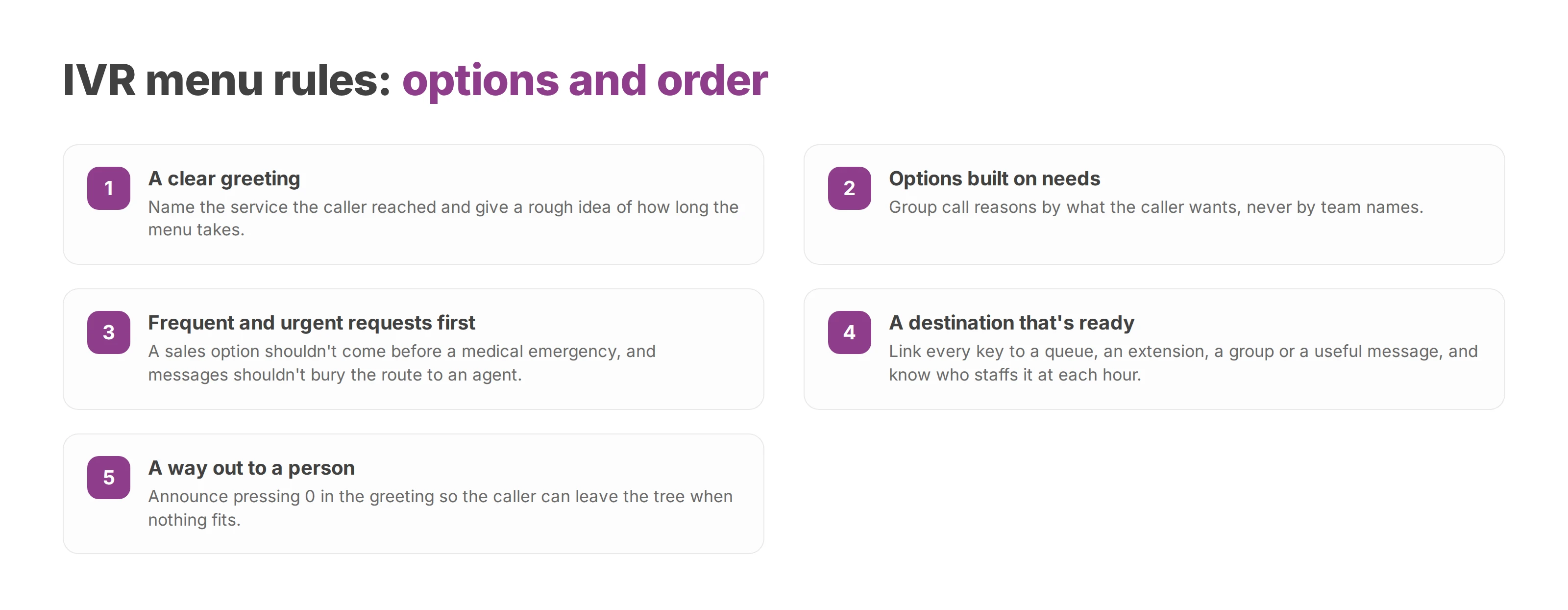
A solid menu usually follows four rules:
A clear greeting. Name the service the caller reached and give a rough idea of how long the menu takes.
Options built on needs. Group call reasons by what the caller wants, never by team names.
A destination that's ready. Link every key to a queue, an extension, a group or a useful message, and know how many people staff it at each hour.
A way out to a person. Make it explicit and reachable from the main menu.
Pressing 0, announced in the greeting, lets the caller leave the tree when nothing fits. The exit still has to follow opening hours, the skills on duty and priority rules, so you can point it at a call queue rather than a single desk phone. Before you keep any key, check three things: the caller understands where it leads, that destination is open right now, and someone follows up on what comes in.
Put together, a main menu for a clinic might sound like this:
"Thank you for calling [clinic name]. If this is a medical emergency, hang up and call your local emergency number. To book or change an appointment, press 1. For test results, press 2. For admissions, press 3. To speak to someone at reception, press 0. To hear these options again, press 9."
The greeting names the place, the urgent case comes first, there are three options plus a way to a person, and a key repeats the menu. Swap in your own call reasons.
Assume the caller missed half the message. Some are driving or calling from a noisy shop. Others are anxious about a test result, hard of hearing, or more at home in another language. The menu should repeat itself and handle a caller who presses nothing. After a couple of failed attempts, it should send the call to a fallback destination. Write the prompts in the words callers use, because internal vocabulary is the first thing to lose an older or worried caller.
Every failure case needs a planned outcome. Decide what happens when the caller presses nothing or the wrong key. Decide what happens when the target queue is full, when the call arrives out of hours, and when the request is something the menu can't handle at all. A call flow diagram drawn before go-live shows which of these paths end nowhere.
Designing the tree is only half the job. The routing settings decide what the caller goes through after pressing a key, so test them one by one. Start with how long the menu listens for a key and how long it waits before a transfer. Then check what happens on silence, on an invalid key and when the destination is saturated.
A timeout that's too short punishes someone who's still finding the phone or listening in a noisy room. One that's too long sounds as if the line has died. The right value depends on how fast the prompt is read, how hard the choice is and where people tend to call from. Test each scenario with people who've never seen the menu tree.
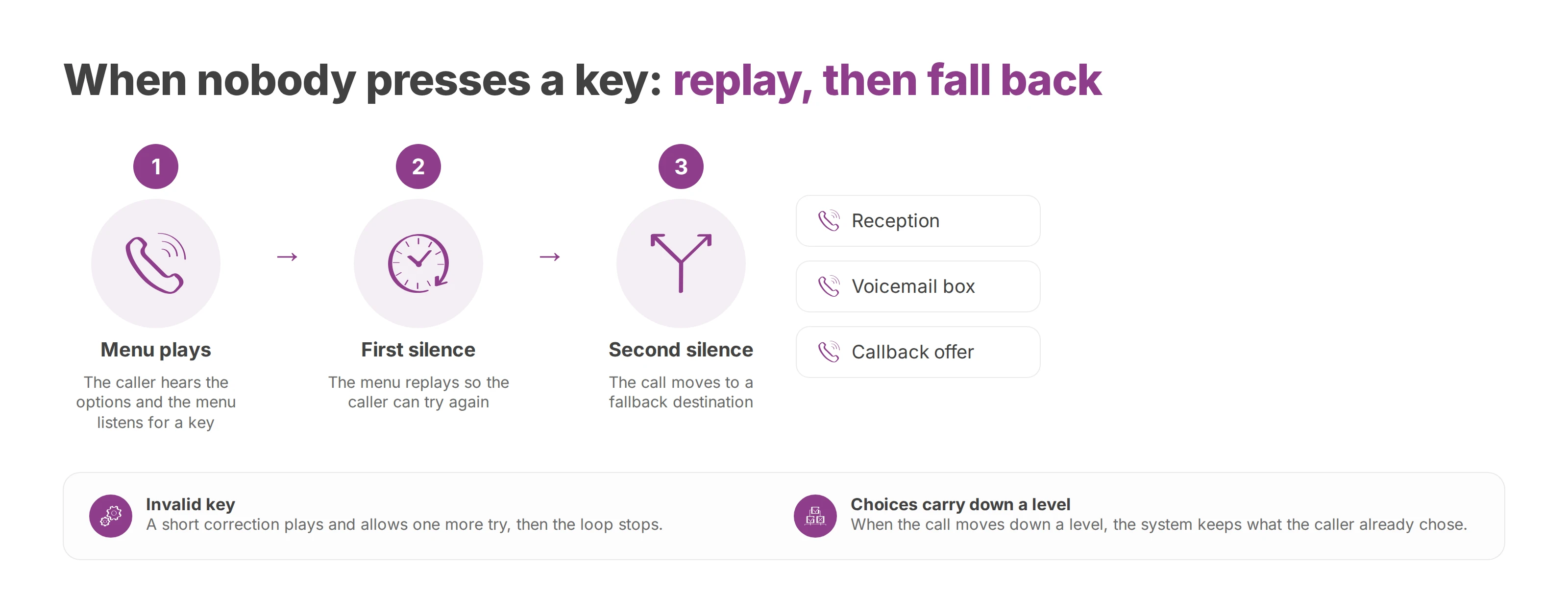
A sensible failure sequence works like this. The first silence replays the menu. A second silence sends the call to reception, a voicemail box or a callback offer. An invalid key plays a short correction and allows one more try, then stops the loop. When the call moves down a level, the system keeps what the caller already chose so they don't have to start over.
Callback lets a caller choose between waiting in the queue and being called back later by an agent. It needs its own configuration, and there's public data on what it does. In France, the public agency Urssaf estimated that callback raised its answer rate by about 2 percentage points on average. The center that used it most heavily saw 4 percentage points. Urssaf's data also shows that callers are most likely to accept a callback a few minutes after they join the queue. Both findings come from a practical guide to setting up automatic callback written by the French government's public transformation office with Urssaf. The guide also warns that the effect is hard to measure and depends on each service's call pattern.
Don't offer callback to everyone by default. Hold the caller's position where the system allows it and confirm the number to call back. Say roughly when the call will come, and keep urgent cases out of the callback route entirely.
Then watch the numbers. How many callers accept the offer, and how many callbacks reach them? Compare abandonment, time to answer and satisfaction before and after. A callback that never arrives turns a long wait into a broken promise.
A holiday calendar should change the message, the destinations and the callback rules automatically. Daytime, closed, public holiday and overflow each get their own recording. That way the caller knows whether their choice still works, whether to leave a message or whether a callback is on offer. A useful menu tells the caller what happens next.
For a company with several sites, routing can take account of the site the caller asked for and their language. It can also weigh the skill needed and who's available locally. A regional closure needn't close the whole organization.
The table sums up these settings and what each one changes for the caller.
| Setting | What it does | Effect on the caller |
|---|---|---|
| Timeout | Replays, transfers or exits after silence | Prevents loops and silent hang-ups |
| Invalid key | Plays a correction and allows another try | Fewer wrong turns |
| Full queue | Announces the wait, keeps position or offers callback | Less time on hold with nothing happening |
| Calendar | Matches the message to hours and public holidays | Information the caller can trust |
| Multiple sites | Routes by location and availability | Reaches the team that can help |
Write down the time-based routing rules with the managers who own each team. The phone system can't decide by itself whether an urgent call may skip the queue. Nor can it judge whether a neighboring site may answer, or whether a request has to stay with its home branch.
Sending a caller to the right queue isn't the same as solving their problem. A menu can work perfectly from a technical point of view and still fail the person on the line, so the answer rate alone says little about it. First-contact resolution tells you more: did the caller's issue get settled on that call, or did they ring back?
Read the other numbers option by option and level by level. Look at where callers abandon, which options end in a transfer to another team, and how satisfied callers are at the end. If callers who pick one option keep being transferred elsewhere, reword or move that option, then compare the next few weeks against the last.
The choice between a PBX installed on site and a cloud phone system depends less on sales pitches than on how you'll run it day to day. An on-premise system still makes sense for an organization that already has staff to look after the hardware, handsets, lines and local changes. The catch is that each change to the menu tree may need a technician, a maintenance window or an internal ticket.
In a multi-site organization that shows up whenever hours change, a site closes for a while or teams are reorganized. On a cloud PBX, an authorized administrator edits users, queues, menus and calendars from a web interface. No one has to work on a server at each site.
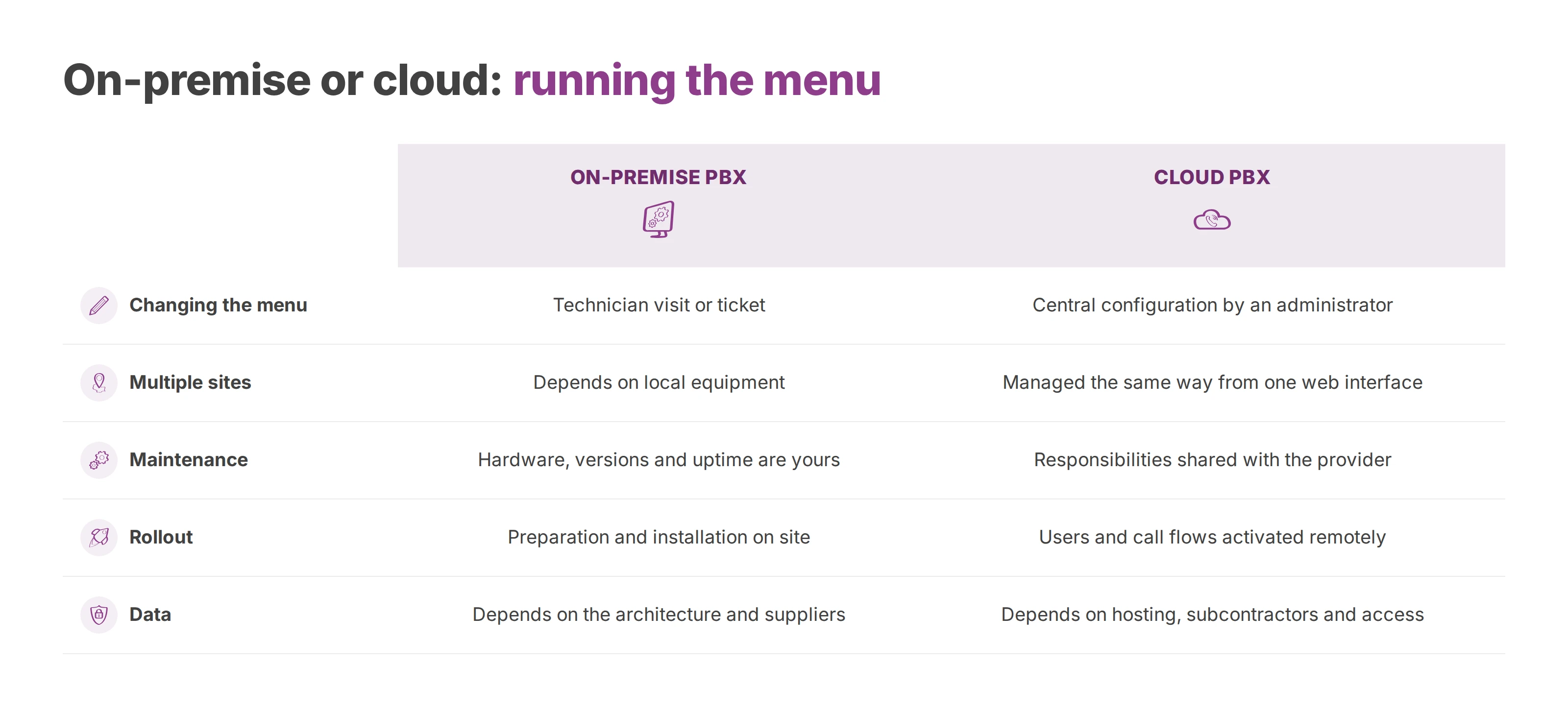
| Criterion | On-premise PBX | Cloud PBX hosted in the European Union |
|---|---|---|
| Changing the menu | Technician visit or ticket | Central configuration by an administrator |
| Multiple sites | Depends on local equipment | Managed the same way from one web interface |
| Maintenance | Hardware, versions and uptime are yours to maintain | Responsibilities shared with the provider |
| Rollout | Preparation and installation on site | Users and call flows activated remotely |
| Data | Depends on the architecture and suppliers | Depends on hosting, subcontractors and access |
Voxbi is one example of a cloud PBX hosted in the European Union. In Voxbi Cockpit, its web app, an administrator sets up users, queues, IVR menus and time-based routing in a browser tab. The integrator still has plenty to do. The work moves to designing the flows, deciding who gets admin rights, testing and training the teams.
Before choosing any cloud provider, ask how you would leave it and which admin roles it offers. Ask what it logs, how it handles incidents and where the data is stored. If you're planning the move itself, the cloud PBX migration guide sets out the steps.
A voice menu often handles more personal data than a greeting suggests. Callers give names, numbers, medical details or contract information. Recordings, call logs, any transcripts and the metadata all belong in your record of processing. The General Data Protection Regulation (GDPR) applies directly in every European Union member state. Hosting inside the European Union reduces exposure to international transfers, but it doesn't make a deployment compliant on its own.
Ask the provider for documentation you can work with, rather than a promise of sovereignty. It should cover:
Purpose: why calls, recordings and metadata are processed.
Retention: how long each is kept, and how it's deleted.
Access: what admins, integrators, agents and subcontractors can each see and do.
Suppliers: which technical providers are involved, and which of them can reach the system remotely.
Security: how calls, admin interfaces and backups are protected. SIP over TLS is one encryption check to raise where the service offers it.
Callers' rights: how callers are informed and how their requests are handled.
Data sovereignty depends on hosting, suppliers and access together. A European data center leaves questions open if an undocumented third party runs a critical component, or if the retention rules are vague. Retention for recorded calls is covered in call recording and GDPR.
An AI feature in the menu raises a separate question: the European Union's Artificial Intelligence Act. Adding AI doesn't make a voice menu compliant with it by default. The regulation entered into force on 1 August 2024 and applies in stages:
2 February 2025: bans on certain practices and the AI literacy duty.
2 August 2025: rules for general-purpose AI models and the governance rules.
2 August 2026: most of the remaining rules.
2 December 2027: high-risk uses in sensitive areas such as employment and critical infrastructure.
2 August 2028: high-risk AI built into regulated products.
The last two dates come from the "AI Omnibus", a simplification of the Act that the Commission proposed in November 2025. It entered into force on 27 July 2026 and gave high-risk systems more time. The European Commission's AI Act page keeps the current timetable.
Before go-live, the IT team has to pin down the use case and each party's role. It also needs to know which data the feature handles, what risk level applies and how much human oversight is required. European hosting simplifies the transfer analysis, but it can't replace that classification or the documentation behind it. How Voxbi handles access control and GDPR is set out on its security page. Your legal and security leads should still sign off the checklist.
To scope an IVR menu, review data governance or plan a rollout with your integrator, contact Voxbi and ask for a walkthrough built around your own call reasons.
Your phone system sends a number and a name. Whether your business name shows depends on number authentication and the receiving operator.
Call transcription turns a phone call into a summary and a next step in your CRM. This guide covers the architecture, field mapping, the review queue, the GDPR and testing.
How E.164 works, how to convert a national number to it, and how to keep the numbers in your CRM and phone system in one consistent form.
Start a free trial, or work with a certified Voxbi partner.