
Cold calling: definition, script and how to run it in B2B
What cold calling means in B2B, how it differs from warm calling, which calling rules apply, and how to script and measure a call that books a meeting.
Nov 13, 2026
Vishing tricks staff over the phone into sharing codes or paying fraudsters. Learn the business scams, the warning signs and a short procedure that stops them.

The switchboard rings while reception is already signing for a delivery and greeting a visitor. The caller says they're from IT support, mentions a login problem and asks for the code that's just arrived on a colleague's phone. It sounds like a small favour. Reading that code out can be enough to hand a company account to a stranger.
That's vishing. It works on the person who picks up, and the phone system itself usually stays untouched. This guide is for small and mid-sized businesses, and for the IT partners and telecoms resellers who support them. It covers the scams that reach a company line, the signals worth listening for and the checks that stop a call from turning into a payment or a login.
Vishing, short for voice phishing, is phishing carried out over the phone. A fraudster poses as a bank, an IT helpdesk, a supplier or a senior manager to get a piece of information or to push someone into an action. The target is the person on the line, who can hand over in one conversation what an attacker would struggle to take from the network.
A phishing email works like a booby-trapped letter slipped into the post. A vishing call is closer to a fake counter clerk who strikes up a conversation, answers your objections and keeps the pressure on. Email filters never see that conversation, so the only check left is the one made by whoever's talking.
A business line gives the caller a friendly setting. You've got regular suppliers, an outside IT provider, a shared reception desk and colleagues who are used to helping. A name taken from the team page on your website is often enough to make a request sound credible.
Phone fraud rarely travels alone. The same fraudsters use email, text messages and fake websites, and a call often follows or prepares one of those.
So the practical question is who can approve an access change, share internal information or release a payment after a phone call. The answer decides how much one convincing caller can achieve.
Starting rule: any call that asks for a secret, a payment or urgent action is a high-risk operation.
Vishing describes the manipulation. Caller ID spoofing fakes the number that appears on screen, which can make that manipulation more convincing. A fraudster can run a vishing call from an unknown number with no spoofing at all. Our guide to how a business name reaches the screen explains how caller ID works and where it can be faked.
The defence follows from that split. Call filtering cuts some unwanted calls, and checking the request covers the ones that get through.
The table maps each scam to what the caller is really after, whatever reason they give.
| Scam | Caller's aim | Information targeted | Who gets the call |
|---|---|---|---|
| Fake IT support | Get access or a verification code | Login details, a text message or authenticator code | Staff without training, any workstation user |
| Fake supplier | Change bank details before a payment | Bank account details | Accounts payable, purchasing |
| Fake CEO | Trigger an urgent transfer | Payment approval, secrecy | Executive assistant, finance team |
| Fake bank adviser | Get a transaction approved | Codes, banking logins | Treasury, managing director |
| Switchboard reconnaissance | Collect names and email addresses | Organisation chart, email addresses | Receptionist, switchboard |
| Fake authority | Push a premium-rate number or collect data | Personal data, payment | Reception, office management |
Fake IT support cites maintenance, a locked account or a suspicious login. In a typical call, the fraudster asks for an authentication code or for approval of a push notification. Some want a remote-access tool installed. A familiar provider's name doesn't justify any of those steps until your usual support channel confirms them.
The fake supplier calls when an invoice is due. They announce a new bank account and ask for the change before the payment date. A real invoice or a correct order reference shows that the caller has seen the paperwork. The new account's owner is confirmed only through a callback to the supplier's known contact.
The fake CEO leans on authority. The story is a confidential acquisition or a deal that has to close while they're travelling. The assistant or the accountant then has to choose between an exceptional request and the normal procedure, and management needs to have said in advance that the procedure wins.
The fake bank adviser claims to be protecting your accounts. The request is usually to approve a transaction that will supposedly cancel a fraudulent one. Approving it sends the money out.
The switchboard call looks harmless. The caller wants the finance manager's name, their email address or the hours they're in. In a reconnaissance call, the fraudster gathers those details to ring back later with a better story. Reception can pass on a caller's message without describing how the company is organised.
The fake authority says an administrative file is incomplete. The caller asks for personal data or directs you to a premium-rate number. Reception hands the matter to the department that owns it, which checks the file through its own contacts.
These scams combine. A round of name-gathering comes first, then a fake IT support call, then a payment request. A spoofed number can add credibility to the whole chain, and the deciding factor is still what the caller asks you to do.
A fraudulent call can be polite and well informed. The caller may know your managing director's name and use your industry's vocabulary. The useful signals lie in what they ask for and which checks they try to block.
Artificial urgency. The caller demands immediate action and treats any check as an obstacle.
Unusual secrecy. They ask you to keep accounts, IT or management out of the loop.
Authentication secrets. They want a password, a code sent by text or a code from an authenticator app.
Sensitive changes. They want to change bank details, an access right, a sign-in method or call forwarding.
No callback. They insist on staying on the line, refuse an independent check or give you a different number to ring.
One signal is enough to stop the action. Fraudsters call from random landline numbers and can display a bank's real number, so a recognised number proves no more about identity than a familiar voice does.
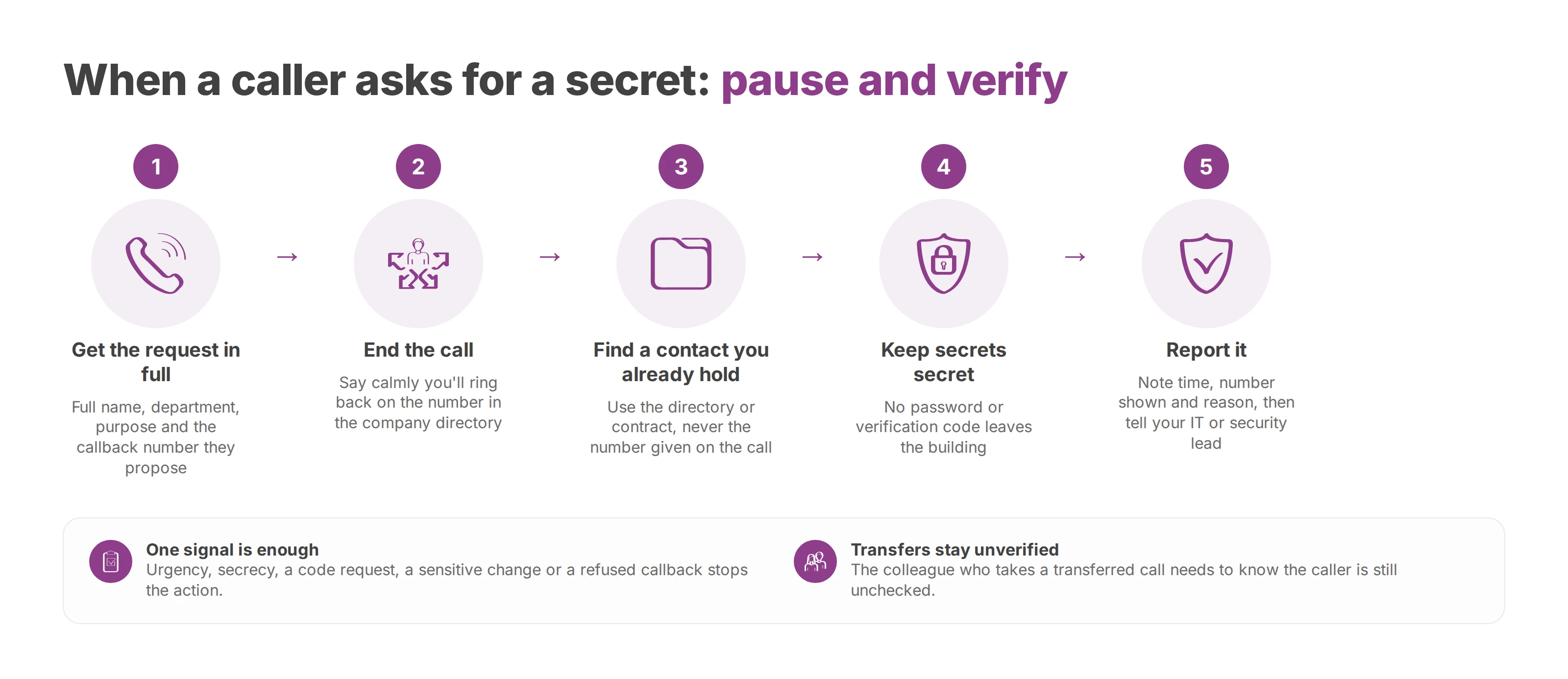
Get the request in full. Ask for the caller's full name, department, exact purpose and the callback number they propose. These details create a record of the call; they don't confirm who's calling.
End the call. Say calmly that you'll ring back on the number in the company directory. You don't need to give a technical reason.
Find a contact you already hold. Use the internal directory, the contract or the supplier record you've already validated, and never the number given during the call.
Keep secrets secret. No password or verification code leaves the building, even for someone who says they're IT support.
Report it. Note the time, the number shown, the reason given and anything already shared, then tell your IT or security lead.
Reception can offer to pass on a message without confirming a name, an email address, someone's working hours or a director's direct line.
An internal transfer keeps the caller unverified. The colleague who takes the transferred call needs to know that the caller's identity is still unchecked.
Practice runs work best when they teach. A fake request for a code or a transfer, set up with your IT team, shows whether everyone knows where to report a suspicious call. The debrief then fixes the procedure and the instructions, and nobody gets blamed for trying to help.
A call described as confidential can't authorise a transfer on its own. In CEO fraud, a form of payment-instruction fraud, the fraudster poses as the managing director or someone acting for them and asks for a transfer, often to an account abroad.
The account's country tells you little. A domestic payment can be fraudulent and a foreign supplier can be entirely above board. The check covers who's asking, who receives the money and who's authorised to pay.
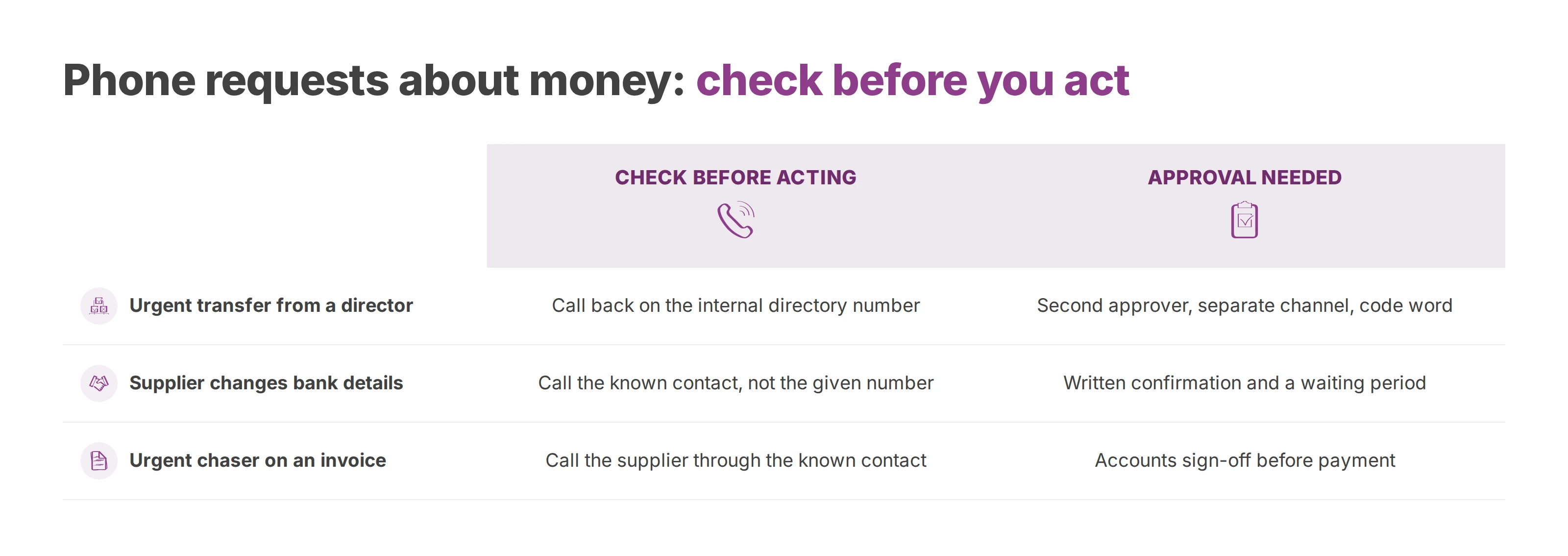
| Request by phone | Check before acting | Approval needed |
|---|---|---|
| Urgent transfer requested by a director | Call back on the number in the internal directory | A second approver on a separate channel, plus a code word agreed in advance |
| Supplier changes bank details | Call the known contact, never the number in the message | Written confirmation and a waiting period before the update |
| Urgent chaser on an invoice | Call the supplier through the known contact | Accounts sign-off before payment |
Two-person approval works when the second approver checks for themselves. They look at the payee, the supporting documents and the outcome of the callback before they sign.
The channels have to be separate too. A phone call followed by an email from the same unknown person counts as one channel. Written confirmation comes from the supplier's known contact, found in the details you already hold.
For bank detail changes, a waiting period stops the update and the payment from happening back to back under pressure. Your procedure sets that period and names an authorised deputy for when the usual approver is away.
A code word agreed in advance between management and finance, outside any incoming call, adds a check on transfers and bank changes. Nobody prompts the caller for it, and the callback still happens. A code word that's leaked or looks compromised gets replaced.
A tight deadline can move a check to the front of the queue. It never removes the check.
Sometimes a colleague has already read out a code, installed a tool or approved a payment. Working out whether they should have spotted the scam wastes time at that point. The priority is to cut off access and stop money moving.
The response reaches past the phone, because fraudsters move between channels. It covers accounts, email and payments.
| When | Action | Owner |
|---|---|---|
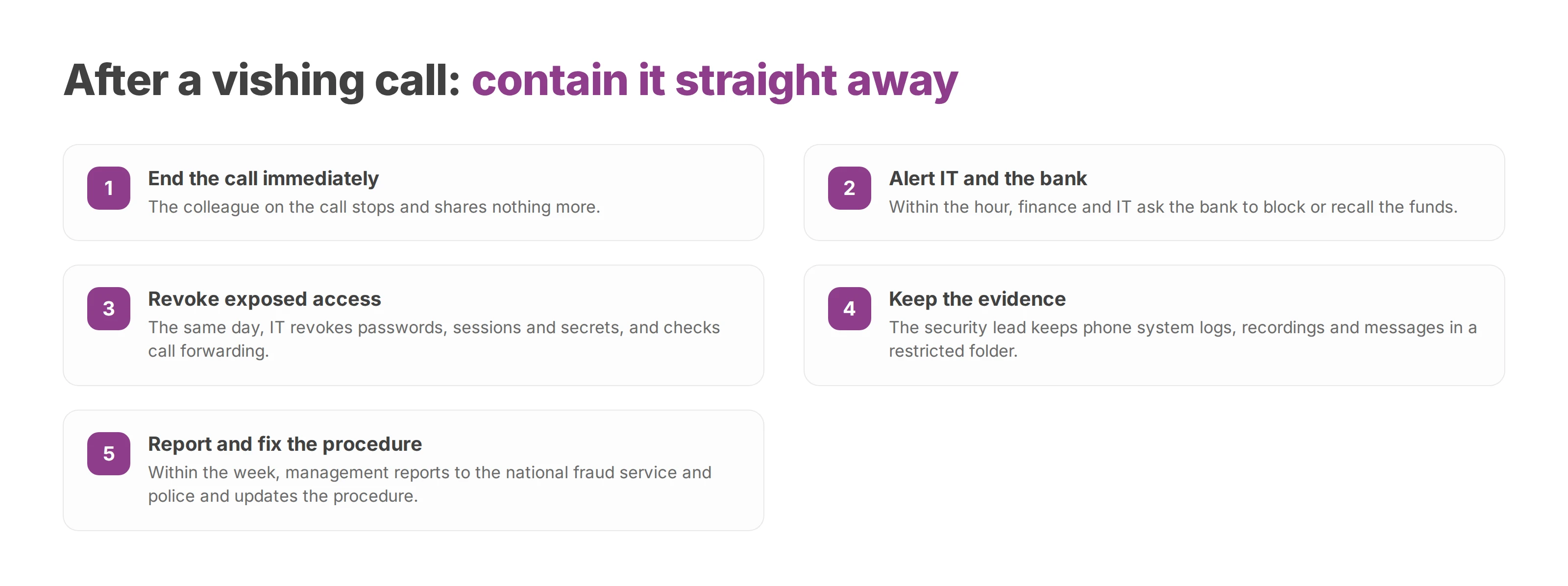
| Immediately | End the call and share nothing more | The colleague on the call |
| Within the hour | Alert IT and the bank, ask the bank to block or recall the funds | Finance lead, IT lead |
| Same day | Revoke exposed passwords, sessions and secrets, check call forwarding | IT team |
| Same day | Keep the phone system logs, recordings and messages | Security lead |
| Within the week | Report to your national fraud reporting service and the police, update the procedure | Management |
The timings give the order of work. A compromised account gets secured at once, and the recall request goes to the bank the moment the fraud comes to light. The bank can't guarantee the money comes back.
Securing an account takes more than a new password. IT also revokes active sessions and checks for newly added sign-in methods. Email forwarding rules get reviewed as well. If a remote-access tool was installed, IT isolates the machine and examines what was done on it.
Phone system logs, messages and screenshots go into a folder with restricted access. Where calls were recorded on a proper legal basis, the recording helps reconstruct exactly what was asked, and our guide to call recording and the GDPR covers notice and retention. The originals stay put, and copies go only to the people investigating.
If a personal data breach puts people at risk, the GDPR (and the UK GDPR) requires you to notify your data protection authority within 72 hours of becoming aware of it, where feasible. In the United Kingdom that's the Information Commissioner's Office. Your data protection officer joins straight away, before the investigation is finished.
The lessons-learned review then tests scenarios that mix phone calls, text messages, email and business tools. Management fixes the permissions, backup contacts and exceptions that let the action through, which goes further than another awareness reminder.
Phone system settings cut exposure and make an incident easier to analyse. Deciding whether a supplier's bank change is authentic stays a human job.
Block lists filter numbers that have been reported. They're a targeted measure. A fraudster can switch numbers, and a list that's too broad stops partners from reaching you. Each addition gets a note and a review date.
Voxbi is a cloud PBX built and hosted in the European Union, so your calls and data stay within European Union borders. Voice menus, call queues and call routing send requests to the right team, which keeps sensitive direct lines away from the front desk. Every Voxbi Managed package includes hosting in our European cloud, security updates and antifraud protection. Voxbi Managed plans keep call recordings on our server for 3 to 120 days, depending on the plan.
Antifraud protection works alongside your call-handling checks, and it can't vouch for what's said on a call. Recordings mainly serve the analysis afterwards. Callers have to be told about them. Access stays restricted, and the retention period follows the purpose.
Hosting in the European Union supports European data sovereignty and keeps processing under your control. GDPR compliance also depends on your own decisions about purpose, notice, access rights and retention.
Review block lists. Remove rules nobody can justify and add recently reported numbers.
Check recording. Confirm that callers are told and that only authorised people can download files.
Update approvals. Keep finance contacts, deputies and the bank detail change procedure current.
Schedule a drill. Ask your IT partner or telecoms reseller to walk a suspicious request from reception through to the report.
Voxbi Managed adds antifraud protection, call routing and call recording to the human checks that stop vishing. Write to hello@voxbi.com to review your switchboard settings and approval chains with our team.
What cold calling means in B2B, how it differs from warm calling, which calling rules apply, and how to script and measure a call that books a meeting.
How to choose music on hold, license it for each country, prepare a seamless loop and give every call queue its own audio file.
What an AI voice agent does on a business phone system, which calls to give it first, how to test handover and languages, and what to ask about data.
Start a free trial, or work with a certified Voxbi partner.