
Branded caller ID: how your business name reaches the screen
Your phone system sends a number and a name. Whether your business name shows depends on number authentication and the receiving operator.
Oct 25, 2026
How to configure VoIP in Odoo, from the access right and SIP provider settings to user extensions, international number format, troubleshooting and the GDPR file.

If you run Odoo in an SME or a mid-sized company, your phone system has probably moved to IP already. The next job is getting calls into Odoo. That's usually when numbers start displaying oddly and a softphone won't register. Odoo VoIP configuration goes smoothly once you split the work in two. Odoo handles the people and the records, and the cloud PBX handles the telephony.
This guide follows the order an integrator would use on a live project, from the first access right to the GDPR file. It covers setup only. The provider shortlist is in best cloud PBX for Odoo users in 2026. Voxbi vs Axivox compares Voxbi with Axivox, a provider that Odoo's own documentation covers.
Odoo VoIP configuration is the set of settings that lets Odoo users make and take calls inside Odoo through a SIP provider. The calls run in the browser over WebRTC. The Phone app talks to the provider's SIP server over a secure WebSocket. Once it's in place, a sales rep clicks a number on a contact or an opportunity and the call starts. The log then lands on the record in CRM, Sales or Helpdesk.
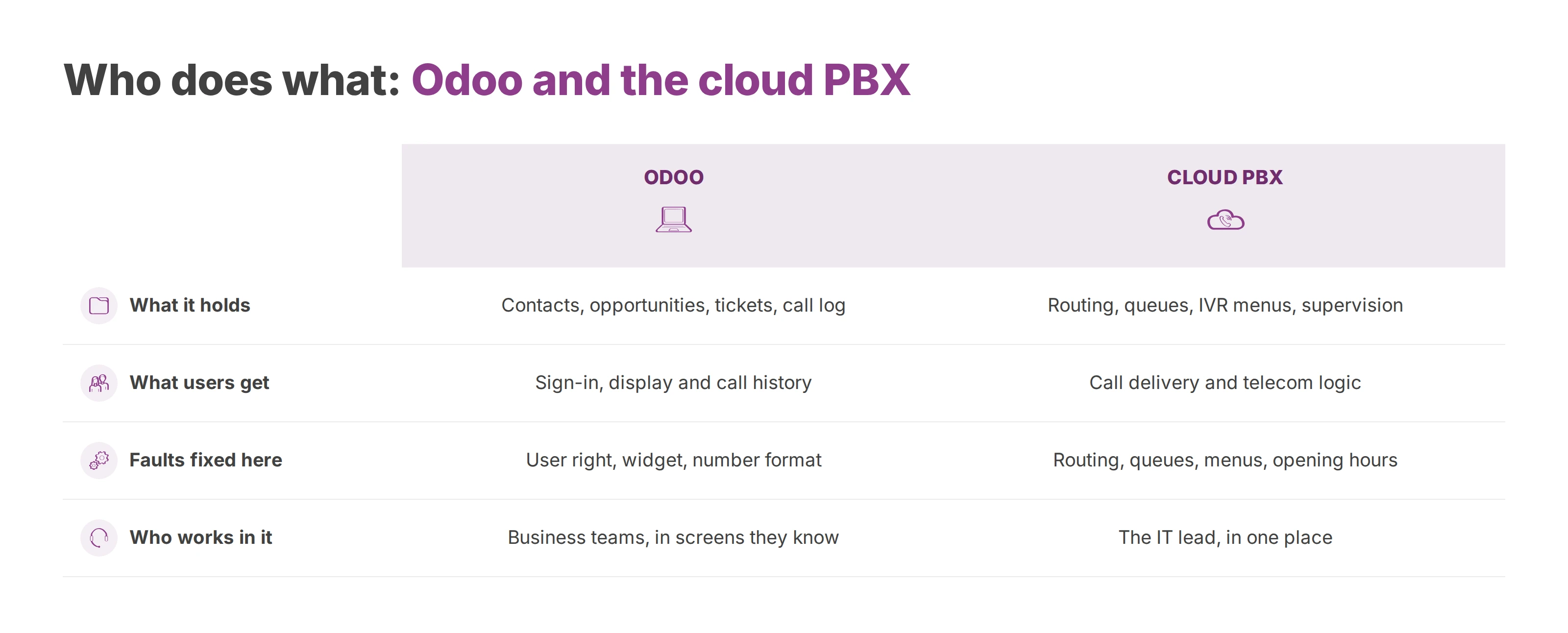
Odoo keeps the user layer, which means contacts, opportunities, tickets and the call log. The cloud PBX carries routing, queues, IVR menus, supervision and the rest of the telecom logic. Every step below puts a setting on one side of that line.
Odoo holds the people and the records. The PBX holds the phone network.
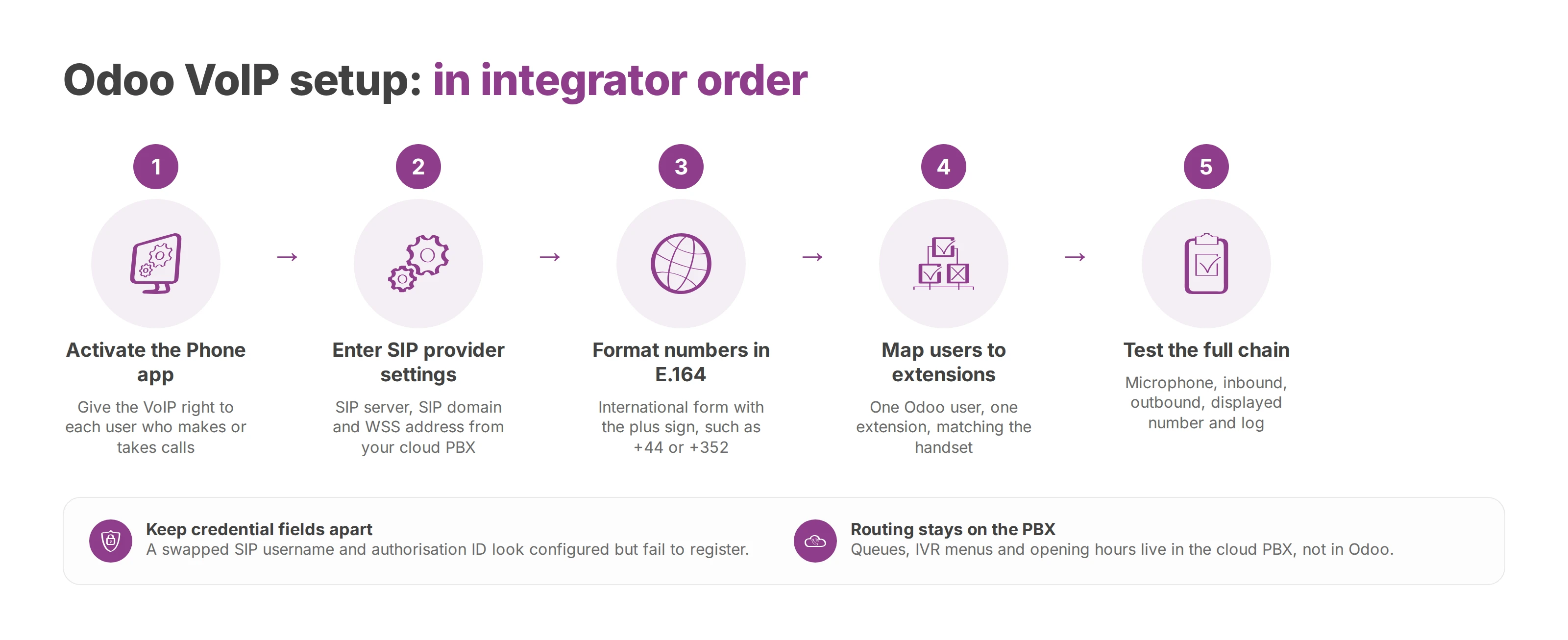
Start with the Phone app (called VoIP in older versions) and nothing else. Activate it, then give the VoIP right to each user who'll make or take calls. In the version this guide follows, the right sits under Settings → Users & Companies → Users → Access Rights → Productivity. Recent versions put the VoIP fields on the user's Preferences tab. Odoo's Phone documentation gives the exact path for each release.
A user without the right can still see the interface. The call button fails as soon as they try to dial out or pick up.
Provider settings go into the Phone app's configuration screen. In the version this guide follows, that's Phone → Configuration → Settings, and the field labels change between releases. Your cloud PBX supplies the values to copy across: the SIP server, the SIP domain, the production environment switch and the secure WebSocket (WSS) address. Each user then gets their own credentials on their user record.
Browser calling depends on WebRTC. It's what lets Odoo's web client send and receive the voice stream, so your provider has to support it.
Keep the SIP username, the authorisation ID, the browser extension and the handset extension in their own fields. If two of them trade places, Odoo shows the account as configured and the SIP server still refuses to register it. The user then sees an account that looks ready and can't place a call.
Odoo expects numbers in international format with the plus sign, which is the E.164 shape. A London number goes in as +44 20 7946 0000, and a Luxembourg one starts with +352. Without the prefix, the widget can flag the number as incorrect. This check belongs before the first test call, because contacts imported from a local address book often carry national formats. The international phone number format guide explains E.164 for CRM and PBX data in more detail.
CTI saves you from typing details twice and from logging a call against the wrong record. It depends on Odoo and the phone sharing one identity, so the Odoo extension has to match the handset extension. Once the two match, a single test call from the click to the connected call shows whether the log lands on the right record.
In a browser setup, voice traffic relies on TLS for signalling and WebRTC for media. Together they help calls get through firewalls and proxies and keep them encrypted on the way. That matters most for sales and support staff who work from home or across several sites, where you don't control the network.
With Odoo on the interface and the PBX on call delivery, nobody needs a manual workaround. The call starts from the record and the caller's identity shows on screen. The call history then follows without any patching.
SIP carries the voice and sets up the session. CTI interfaces start, sync or enrich the call from Odoo's side, and a provider may offer a REST API for that work. TAPI is a Windows desktop telephony interface. It only matters when a desktop phone app runs alongside Odoo, and a browser-based Odoo setup doesn't use it.
Before you open production access, settle what Odoo triggers, what stays in the PBX and what flows back into the CRM. The computer telephony integration guide covers those responsibilities in more depth. It's also the moment to freeze the extension mapping, before a wave of users starts testing.
Routing belongs to the cloud PBX. In a tidy deployment, Odoo handles sign-in, display and call history, while the PBX runs queues, IVR menus and opening hours. As a result, Odoo's settings stay short and every telecom rule lives in one place.
Each Odoo account maps to exactly one extension. When someone changes desk or role, the mapping needs to change the same day. A stale mapping sends inbound calls to the wrong person, or the calls stop showing up in the log. The PBX is the source of truth for routing, and Odoo is where people work with it.
In Voxbi Cockpit you set up queues, IVR menus and opening hours, and none of it changes what users see in Odoo. The IT lead manages the telephony in one place, and the business teams keep the Odoo screens they already know.
Outbound numbers need testing before go-live. Setups often break when a local directory meets a multi-country or multi-site rollout, because one office stores +44 and another stores 020. Calls attach to their contacts only when every number has the same format from day one.
In a working deployment, users dial from the contact record and the format warnings stop appearing. It's also the right time to confirm that the PBX dial plan matches how your sales and support staff actually work.
A complete test covers the microphone, an inbound call, an outbound call, the displayed number and the log entry in Odoo. If any one of them fails, the configuration isn't finished, even when the first ring sounds fine.
| Symptom | Probable cause | Fix |
|---|---|---|
| The widget won't connect | Secure WebSocket problem or credentials in the wrong fields | Check the WSS address, the SIP domain and each user field against the provider's values |
| Audio drops out | Unstable local network or a WebRTC compatibility issue | Check the browser, the firewall and the quality of the IP network |
| A number shows as incorrect | Number entered without the international prefix | Re-enter the contact in international format, such as +44 or +352 |
| CTI triggers nothing | Odoo extension and handset extension don't match | Correct the extension mapping and test with one pilot user |
| Calls don't appear in Odoo | VoIP right missing or account-to-extension link incomplete | Recheck the VoIP right and the user record |
The table separates faults on the handset, in the web client and on the SIP server. It's quicker to work through than a long checklist with no order. Diagnosis goes down the chain in a fixed order, starting with identity and the connection, then the transport, then what's displayed.
Odoo runs the working experience, and the PBX runs the phone network. A problem with routing, queues, menus or opening hours gets fixed in the cloud PBX. A problem with the user right, the widget or how a number was entered gets fixed in Odoo.
That split ends the loop of repeated tests. Support staff look in the right tool first, and integrators get an acceptance test they can run one layer at a time.
GDPR work for Odoo telephony starts with a map of the processing. It records what's captured, where it's stored, who can reach it and for how long. The legal basis, security measures, processors and deletion policy then attach to each item. Odoo's own documentation raises the same points on its side.
Hosting in the European Union reduces exposure to international data transfers. You still need to assess each processor and any supplier subject to foreign law. For a cloud phone system, that review covers recordings, call metadata, technical logs and user data. A "GDPR compliant" badge tells you little until support access, remote administration and encryption are written down.
The file sets out why calls are recorded, how long each item is kept, who can access what by role, which exports exist and how deletion works. Ordinary sales calls and sensitive settings need separate handling. In healthcare, local government or schools, transcription and voice analysis call for a stricter assessment. In those settings, the split between ordinary and sensitive calls decides how much control is expected.
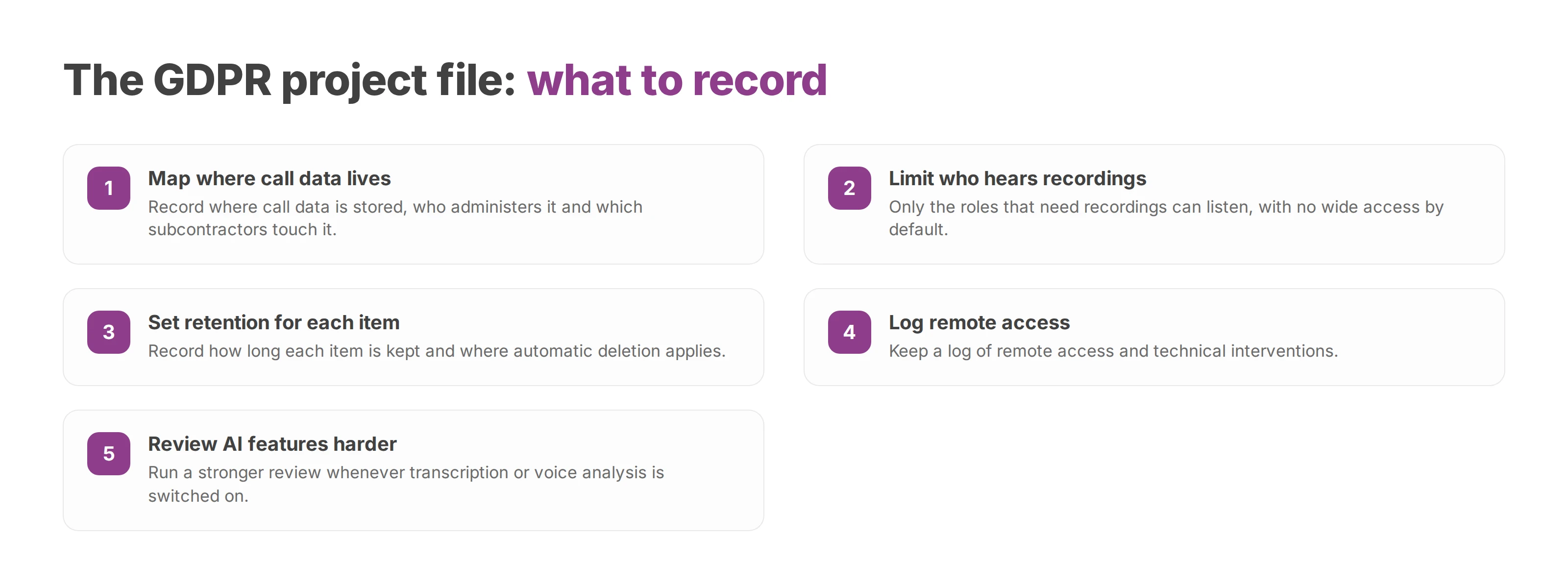
Where call data is stored, who administers it and which subcontractors touch it.
Who can listen to recordings: only the roles that need to, with no wide access by default.
How long each item is kept, and where automatic deletion applies.
A log of remote access and technical interventions.
A stronger review whenever transcription or voice analysis is switched on.
The European Union's AI Act applies in phases. The European Commission's AI Act Service Desk gives 2 August 2026 as the date most rules started to apply. It also lists a transition period for some obligations that runs until 2 December 2026. These dates can be amended, so the Commission's current timeline is the one to rely on. For cloud telephony with AI features, each system needs its own assessment.
On Voxbi One, the self-service line, the Odoo integration comes with Voxbi Plus at €2.90 per user a month and Voxbi Plus AI at €3.10 per user a month. Voxbi Channel includes it too, at €14.50 per channel a month with a minimum of three channels. Calls are billed per minute at the destination rate. Numbers in Germany, France and Switzerland cost €2.00 a month each, and a number in another country is arranged case by case. You set Voxbi One up yourself with the guides and the Cockpit manual, with email support.
On Voxbi Managed, Odoo is an add-on from Voxbi Professional upwards, at +€29.50 a month per phone system. The Voxbi Managed team sets the system up and runs it for you. You also get phone support and an SLA with downtime credit. All prices exclude VAT.
Voxbi is a cloud PBX built and hosted in the European Union, so your calls and data stay within European Union borders. For an Odoo rollout, the next step is a demo where you go through your routing needs, your GDPR file and your support model. Write to hello@voxbi.com to book one.
Your phone system sends a number and a name. Whether your business name shows depends on number authentication and the receiving operator.
How to design an IVR menu callers can get through. Start from real call reasons, rank the options, keep a route to a person and plan for silence and wrong keys.
Call transcription turns a phone call into a summary and a next step in your CRM. This guide covers the architecture, field mapping, the review queue, the GDPR and testing.
Start a free trial, or work with a certified Voxbi partner.