
IVR menu: how to design one that cuts waiting time
How to design an IVR menu callers can get through. Start from real call reasons, rank the options, keep a route to a person and plan for silence and wrong keys.
Oct 25, 2026
Your phone system sends a number and a name. Whether your business name shows depends on number authentication and the receiving operator.

A customer sees an unknown number on their mobile. They hesitate, let it ring, and maybe call back later, once the sales call or the medical appointment has lost its urgency. For a small business, a multi-site switchboard or a clinic, branded caller ID (the name on that screen) decides whether people pick up. Getting it there is partly a compliance job.
Your PBX can send an identity, but it can't control what the other person sees. The number is authenticated along the carrier chain. Whether a business name appears on top of it depends on the network and the phone at the receiving end.
Branded caller ID shows a verified business name on the screen of the person you call, in place of a bare number. Two separate pieces of information are involved, and it pays to keep them apart.
The presented number is the caller ID your PBX and your carrier send. It's the number the other person can call back. The displayed name depends on a reliable link between that number, the company using it and whatever name service the receiving operator runs.
A sales rep can call from a landline number in Voxbi with the company name filled in correctly, and the mobile at the other end may still show only the number, a generic label, or a tag from its own caller-identification service. Your PBX settings prepare the identity, and the receiving side decides what to display.
On the page for its branded calling service, Bouygues Telecom puts the problem in figures for France: 79% of calls from unknown numbers go unanswered, and about 74% of people in France get more than six unknown calls a week, the second-highest rate in Europe. Orange, presenting its own service at Mobile World Congress 2026, said that showing the business name can multiply the answer rate by five. That is the operator's own figure.
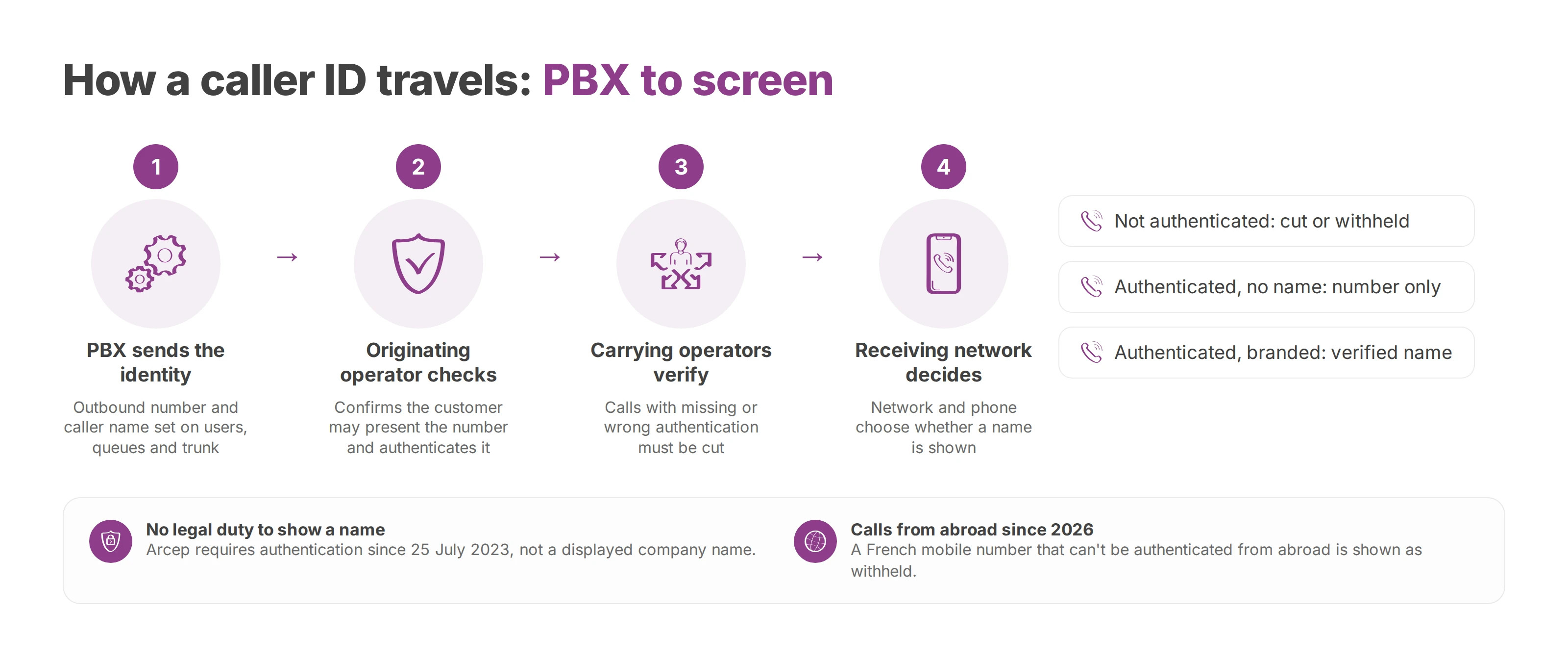
The groundwork under those numbers is regulatory and technical. France has published detailed caller-ID rules, which makes it a useful worked example even if you call elsewhere.
The French regulator, Arcep, states plainly that there is no legal obligation to display a company's name on the user's phone. What the law does require, since 25 July 2023, is that the operator where a call starts checks that its customer is entitled to present the number and authenticates it technically. The operators that carry the call check that authentication, and if it's missing or wrong, they must cut the call.
Arcep adds that any number shown to the person called must let them call back the caller or the organisation the caller represents. A shared number therefore has to stay tied to an identifiable organisation.
The rules tightened again on 1 January 2026. Under Arcep's December 2025 numbering decision, a call arriving from abroad that presents a French mobile number (06 or 07) which can't be authenticated is shown as a withheld number. Arcep also recommends that operators withhold the caller ID when old or limited equipment can't pass authentication data on during a call forward. For a business, a call routed through an international setup or a badly declared forward can lose its visible number, even when the phone system still shows an identity internally.
Three cases follow from this:
Number not authenticated: the call may be cut or shown as withheld.
Number authenticated, no name service: the person sees the number only.
Number authenticated, with branded calling supported on their network: the network can show a verified name, sometimes with more identity details.
Name presentation is often called CNAM (caller name). Phones have no duty to display it, and the receiving operator has its own databases, publishing agreements and identification tools, so the result depends on the whole chain. Our guide to what the suspected spam label means for your calls covers what happens when a directory flags a number instead.
You don't switch branded calling on in a PBX. You buy it from a mobile operator or its partner. The two French offers show what the process looks like.
Bouygues Telecom launched network-level branded calling with Hiya in June 2026. The verified name shows on calls to all Bouygues subscribers, with no app to download and regardless of phone model or saved contacts. Hiya verifies the business information. Bouygues opened it to every sector except finance, insurance and the public sector, with those to follow.
Orange described a three-step check: the business proves its identity and reputation, the name only shows on calls with the highest level of number authentication, and calls are also screened against the Orange Téléphone app's database. Orange works with Real Networks on the database that links business numbers to verified identities, and planned to roll it out in France during 2026.
Both follow the same pattern. You prove who you are, then you register the numbers you call from and the name to show against each. Coverage follows the network. The Bouygues service shows the name to Bouygues subscribers, which is not every mobile in France, and Orange describes its onboarding as creating the customer account, selecting the target operators, then registering the numbers and display names. Ask the provider to put that coverage in writing before you sign.
Outside France, start with the operator that carries your calls and ask whether it, or a partner, offers network-level branded calling, and which networks it reaches.
On cost, Bouygues lists no business price on its branded call page and Orange's announcement gave none, so expect a quote. Bouygues says the service is free for the person receiving the call.
Each outbound number should be on the contract with the carrier that sends your calls. A number that isn't yours can be rejected, rewritten or lose its authentication on the way, and a branded calling provider registers the numbers you hold, not the ones you'd like to show.
On Voxbi, phone numbers come through Mixvoip, the operator that owns Voxbi. Voxbi One offers numbers in Germany, France and Switzerland, at €2.00 a month each, and you can port your existing numbers in from the Starter plan up. Voxbi Managed covers more countries today: talk to us for the price of a number there. To decide which number each team should show, read our guide on how to choose the outbound caller ID your team presents.
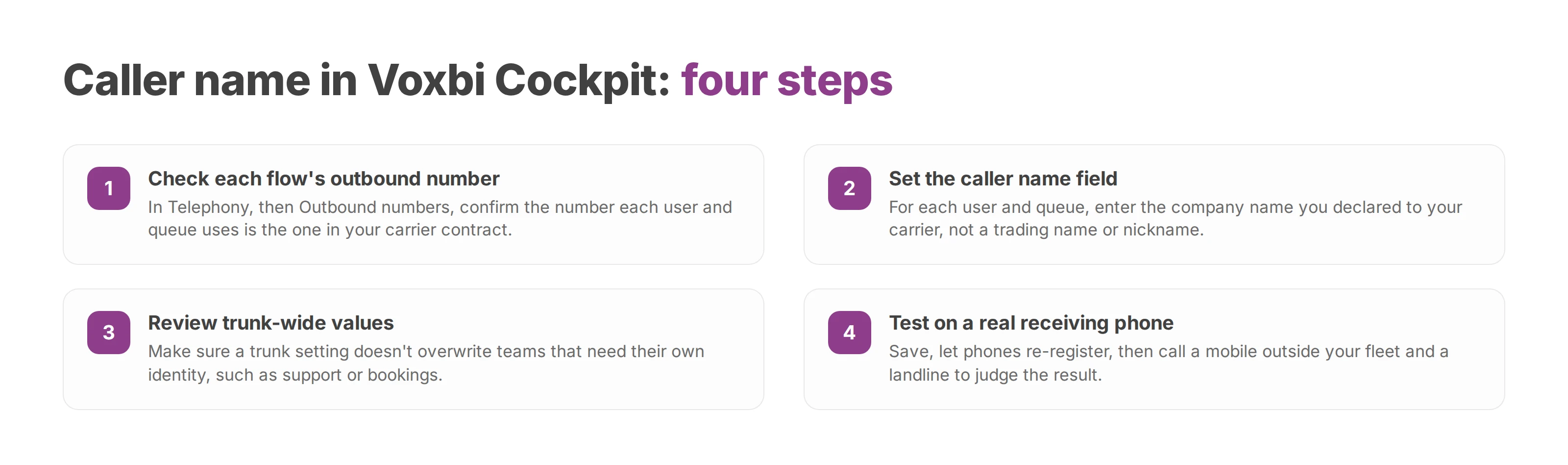
Configuration follows the path a call actually takes. Start with the number allowed to leave the system, then set the label.
In Voxbi Cockpit, an administrator opens Telephony, then Outbound numbers. Check which number each flow really uses: a direct landline number, a mobile range or a number tied to a SIP trunk. A queue can leave on a different number from the agents in it, and a group rule can override what a user picked. The number should be the one in your carrier contract.
For each user and each queue, set the Caller Name field to the company name you declared to your carrier. A loose trading name, a lone team nickname or an old company name creates a mismatch with the identification databases.
On the trunk, check that a trunk-wide value doesn't overwrite individual settings where a team needs its own identity, such as support or bookings.
Save, let the phones re-register or reconnect, then place a test call to a mobile outside your fleet and to a landline.
Judge the result on the receiving phone. The PBX log shows only what left your system. If the number arrives and the name doesn't, your Voxbi settings may well be right. The gap is likely in the operator's name publishing or in what the receiving network supports. If the number itself is wrong, go back to the trunk, the outbound rule and the number contract.
Every SIP call carries its identity in headers. Check the From and P-Asserted-Identity headers in the signalling your carrier receives, and don't assume the value shown in the interface is what went out.
A capture with a tool such as Wireshark shows what really left. The display name should match your company name, and From and P-Asserted-Identity should both point at the contracted number. A number typed in by hand to make the screen look right can be rejected, rewritten or lose its authentication along the route.
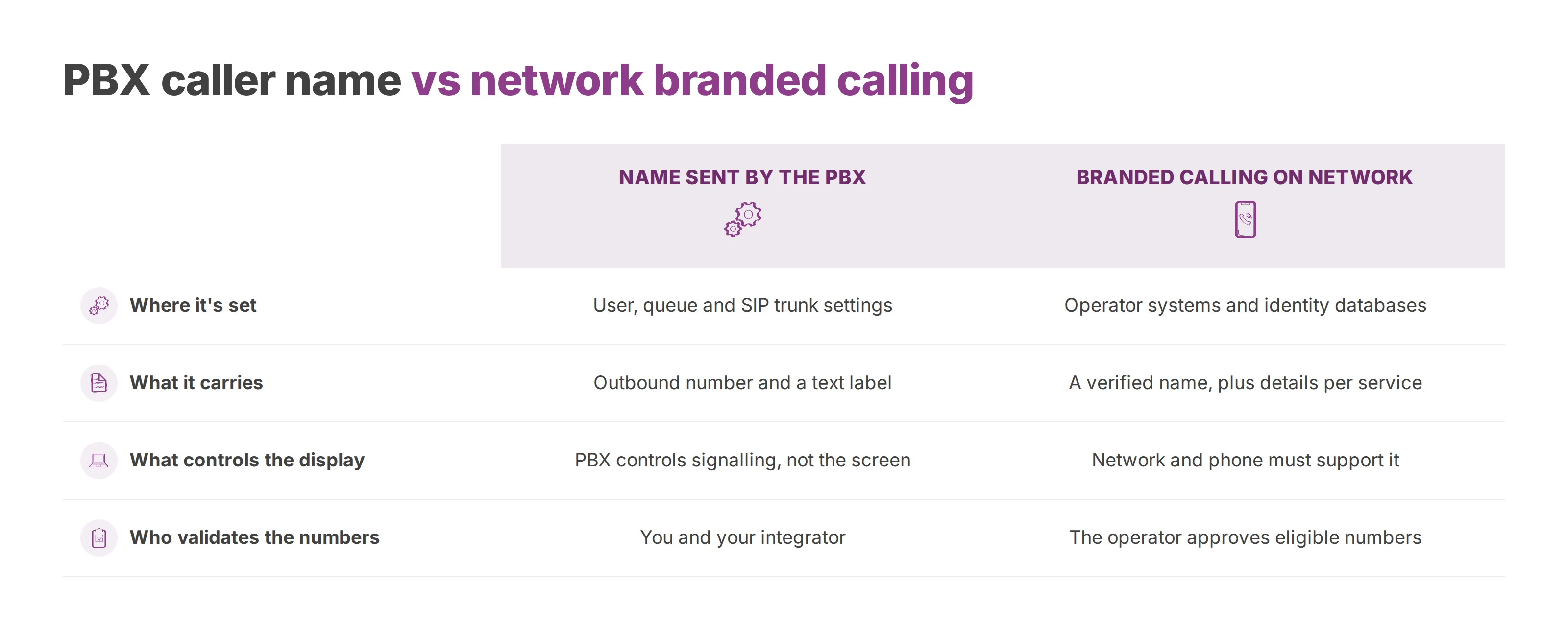
The two work at different points in the call, and you'll usually want both.
| Name sent by the PBX | Branded calling on the network | |
|---|---|---|
| Where it's set | User, queue and SIP trunk settings | The operator's systems and identity databases |
| What it carries | Outbound number and a text label | A verified name, with more details depending on the service |
| What controls the display | The PBX controls the signalling, not the other screen | The network and the phone must support branded display |
| Who validates the numbers | You and your integrator organise numbers and outbound rules | The operator approves eligible numbers and where the name is published |
Voxbi gives you one place to organise users, queues, outbound numbers and call rules, so every call leaves with the right number and a consistent label. A branded calling contract then adds the visible name for the calls where pick-up matters most: appointment reminders, support callbacks and follow-up campaigns.
For integrators, the split also draws a clean service boundary. Your SLA can cover configuration, number consistency and SIP tests, and the display on the mobile stays with the carrier and the handset.
A port is where loose ends show up. A company keeps its number and changes provider, yet an old outbound rule still points at the previous number, or only part of a range has moved. The displayed name then changes from call to call, because the chain no longer carries a single identity.
Before the port, list every number concerned and declare the exact legal company name, since it anchors the link between the number and your organisation between operators. In France you'll also need each line's RIO, the porting code. Our guide on how to port a business phone number without losing calls walks through the sequence.
In Voxbi, the integrator sets outbound rules by range and by use. A trunk can serve a range with its own outbound prefix while staff calls leave on their individual DDI numbers. Your number map should separate:
the main number, for reception and general callbacks
staff DDIs, the identity of one person or desk
queue DDIs, for support, bookings or a shared switchboard
mobile ranges, which in France face tighter checks when calls leave from abroad
Ghost numbers break this map. An undeclared forward can send a call out with an identity nobody sees in the interface. An incomplete port can leave an old configuration running, and a number declared twice confuses authentication checks. A number that isn't on your carrier contract can't legitimately carry your company name, whatever you type into Voxbi. Each number needs a contract owner, a documented outbound rule and a clear use.
Test calls should cover several networks and both mobiles and landlines. In France, for example, that means an SFR mobile, an Orange landline, a Bouygues mobile and a Free landline. For each one, compare the number shown, any name, any spam warning and what the phone's own call log keeps afterwards.
Then check Cockpit against what you saw:
Trunk: the outbound number belongs to the declared range.
User: the label doesn't replace the company identity by accident.
Queue: it presents the number you approved.
Phone call log: the name stays consistent after the first call.
The common faults are a generic name overwriting the display name, a trunk still pointing at an old number after a port, a missing outbound prefix that rewrites the caller ID, and a DDI used for a forward that isn't tied to the company account. Troubleshoot in this order: the number that actually left, the carrier contract, the SIP signalling, then the receiving network's ability to show a name.
Keep a record of the number sent, what each test phone showed and the date you checked. On multi-site setups and fast-changing fleets, recheck every quarter: added ranges, abandoned trunks and routing changes all produce withheld or inconsistent calls months later.
Three habits keep the name reliable. Authenticate each number before you put a name on it. Put every number on a contract and keep the map current. Treat branded calling as a contract with stated coverage: audit the SIP headers, the native call log and the display on iOS and Android, and confirm with the operator which numbers are eligible and which networks are covered.
Voxbi is a cloud PBX hosted in the European Union, with Voxbi Cockpit for managing users, queues, call flows and outbound numbers. To plan caller ID across your sites, write to hello@voxbi.com.
How to design an IVR menu callers can get through. Start from real call reasons, rank the options, keep a route to a person and plan for silence and wrong keys.
Call transcription turns a phone call into a summary and a next step in your CRM. This guide covers the architecture, field mapping, the review queue, the GDPR and testing.
How E.164 works, how to convert a national number to it, and how to keep the numbers in your CRM and phone system in one consistent form.
Start a free trial, or work with a certified Voxbi partner.