
Call queuing: what it is and how to set it up in a cloud PBX
Call queuing holds callers in an ordered line inside your cloud PBX. How it works, which options to switch on, which metrics to watch and how to configure a queue.
Oct 24, 2026
How a cloud voicemail system takes a message from the dialled number to the person who calls back, and the routing, security and GDPR settings behind it.

It's Tuesday morning and the whole sales team is in a meeting when an important call comes in. Nobody picks up, so the caller leaves a message asking for a proposal before the end of the day. The callback number then sits in a mailbox that nobody checks until it's too late. The lead goes cold because nobody knew who had to act or by when.
A voicemail system in a cloud PBX can turn that moment into a process with an owner. This guide is for IT managers, office managers and telecom resellers who run the phones for a growing business or a multi-site organisation. It follows a message from the dialled number to the callback, then looks at how voicemail fits with IVR menus and queues, and at the security and GDPR controls a mailbox needs.
A voicemail system records a message when a call goes unanswered, stores it, alerts the right person and lets them play it back. In an older office it lived in the phone exchange or at the operator, and the only signal was a blinking lamp on a desk phone. In a cloud PBX, voicemail is one step in the call flow. The PBX decides when a call drops to a mailbox, which mailbox it reaches and who gets told.
The message can also carry context. The caller's number, the time, the length of the message and the route the call took (which menu option, which queue) can travel with the recording. Whoever picks it up sees straight away that it's a sales request and can hand it to an account manager before anyone has listened to it.
A useful voicemail gives enough context to trigger the next action without a second round of internal detective work.
A support agent can qualify the problem before ringing back. A sales manager can treat the caller as a warm lead rather than a missed call.
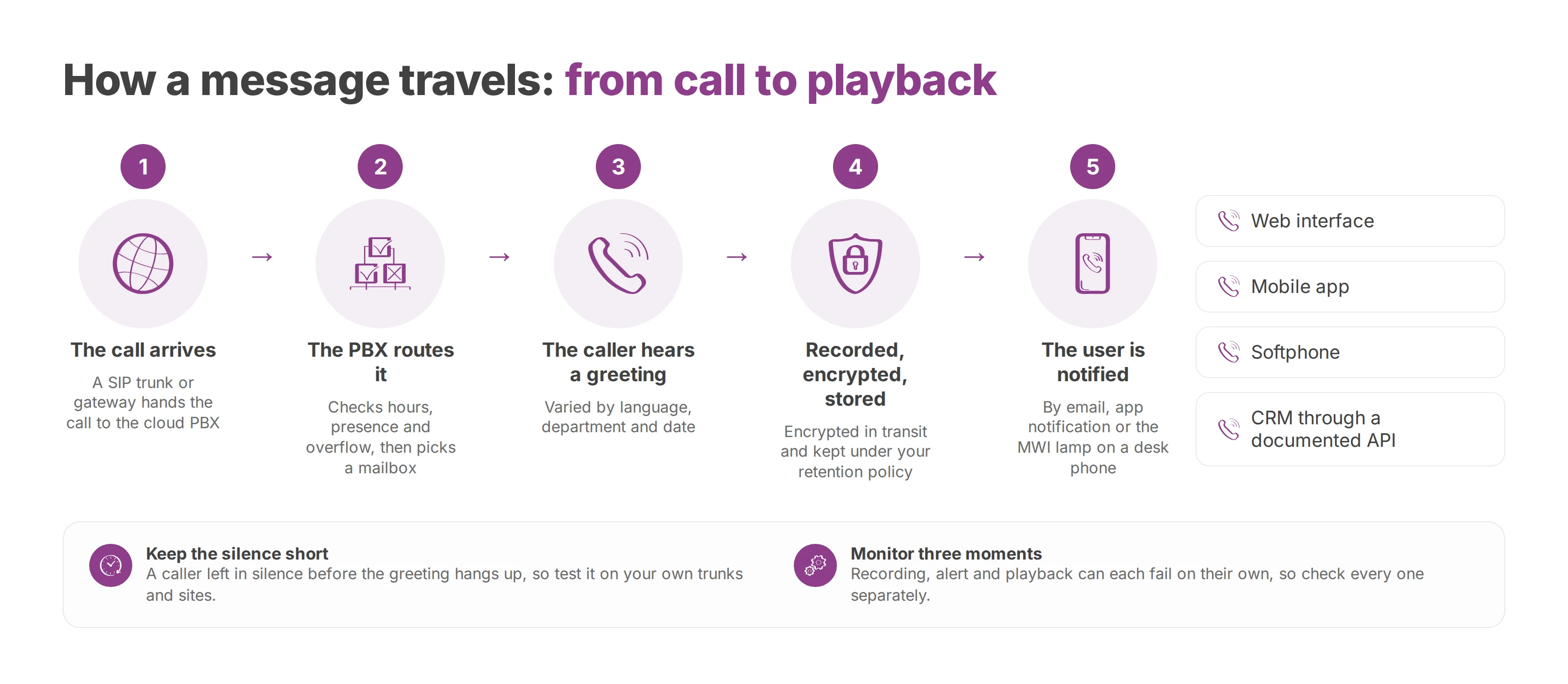
A message passes through the same stations every time, and each one can fail on its own:
The call arrives. A SIP trunk or a gateway to the public phone network hands the call to the cloud PBX. A session border controller (SBC) at the edge checks the signalling and helps shield the internal infrastructure.
The PBX routes it. It checks the extension, the group, the opening hours, the user's presence and the overflow rule, then sends the call to a personal mailbox, a team mailbox or another scenario.
The caller hears a greeting. You can vary it by language, department and date, with separate greetings for opening hours, holidays and bank holidays.
The platform records. After the beep it captures the audio.
The file is protected and stored. It's encrypted in transit, then kept in a data centre under the retention policy you set. Ask where that data centre is: if your messages must stay in the European Union, the answer decides the provider. Metadata such as the number, the time and the length is indexed separately, which makes messages easy to search.
The user is notified. The alert comes by email, as an app notification or through the message-waiting indicator (MWI) lamp on a desk phone.
The user listens or reads. Playback works from a web interface, a mobile app or a softphone. If the provider documents an API, a business tool such as your CRM can pick up the event too.
Keep the time before the greeting short, because a caller left in silence hangs up. Test it on your own trunks and sites rather than trusting a figure from a brochure.
Leaving the message, the alert and playback are three separate moments. A message can be recorded correctly while its notification never arrives, and a notification can arrive for a message nobody can open. Your monitoring should check each moment on its own.
Automatic transcription makes a message readable without anyone playing it. Use the transcript to sort messages and go back to the audio for anything that matters: background noise, names, accents and technical terms can all shift the meaning. Where the system shows a confidence score, it points to the passages worth a second listen. The voicemail transcription guide covers accuracy, languages and set-up in detail.
Match notifications to the user's role. An on-call manager wants a mobile alert, while an admin team works through a shared mailbox. The audio can travel as a WAV or MP3 email attachment, with controls that match how confidential it is. Copying messages into Microsoft Teams or Slack helps day-to-day work, but every copy is one more place a message can be read and has to be deleted.
| Feature | What it does | Where it helps |
|---|---|---|
| Transcription | Turns audio into text, with a human check for sensitive messages | Support qualifies the request before calling back |
| Multichannel notification | Sends alerts by email, mobile app or the MWI lamp | A manager hears about an urgent request quickly |
| Audio attachment | Delivers the file in a format the recipient can open | A secretary files the audio in an authorised folder |
| Service-level rules | Triggers a callback, an escalation or an alert per department | An unanswered message moves to a backup owner |
| Team mailbox | Shares one mailbox, with defined rights and owners | Reception covers absences and staggered hours |
| Call flow portal | Shows routes, groups and conditions as a diagram | An integrator traces a call's path at a glance |
| Presence and MWI | Syncs busy, away and in-a-meeting states | The PBX skips agents who can't answer |
Service rules differ from team to team. A company might set a four-hour callback for sales requests and escalate to a manager after 24 hours. Don't copy those numbers across the whole organisation: a hotel reception and a technical support desk run on very different clocks.
The useful rules are the ones that follow how people work. A call to after-sales can land in a group mailbox during opening hours and in an on-call mailbox after them. Senior managers can get an instant alert, while a less urgent team checks its mailbox at set times.
Your admin portal should make these rules visible. A diagram helps an integrator spot a loop, a contradictory forward or a mailbox with no owner, and it makes maintenance easier when a site or a manager changes.
Measure the whole chain, not just the number of messages. A call centre can track the callback rate, the time from message to first action, reassigned messages and failed notifications. Those figures tell you whether a problem comes from usability, routing or availability.
Voicemail works best when it comes in at the right moment. Too early, and it takes calls an agent could have answered. Too late, and the caller waits with no idea what's happening. Design the interactive voice response (IVR) menu, the queue and the mailbox as one decision path.
The IVR finds out what the caller wants. The queue then distributes the call by skill, priority and presence. Voicemail takes over when the overflow rule allows it, when the caller chooses to leave a message, or when the department is closed.
A support centre might offer:
Press 1 for after-sales, which leads to a queue of technical agents.
Press 2 for sales, which rings the account managers.
Overflow, which sends the call to a team mailbox once the wait grows too long or no agent is free.
The message should keep its routing context. A message left through the after-sales menu should reach the team as an after-sales request, not as a generic one. The service number, the chosen language and the site can travel with it.
A handful of settings decide how this behaves. The time before overflow, counted in rings or seconds of waiting, matters most: set it too long and callers give up before the mailbox ever answers. Keep the greeting short enough that the caller stays on the line. The automatic call distributor (ACD) also needs the same presence data as the desk phones and the apps, or it will keep ringing someone who is in a meeting. Then pick the mailbox (personal, team or on-call) and the callback priority for each department.
Keep menus shallow. A caller who goes through several menus before reaching a person or a mailbox often hangs up without leaving any context. Offer an exit early, such as a callback or a guided message. The cloud IVR guide goes deeper into menu design.
Team mailboxes need a decision of their own. In a medical practice, a shared mailbox suits the front desk as long as every message has an owner and a deadline. In a sales team, personal mailboxes keep each account with one person. Either way, write down who can open each mailbox, who gets notified and when a message escalates.
A mailbox hosted by the phone operator ties voicemail to that operator's access codes and tariffs. For a multi-site organisation, a cloud PBX that centralises routing puts every site's voicemail under one set of rules.
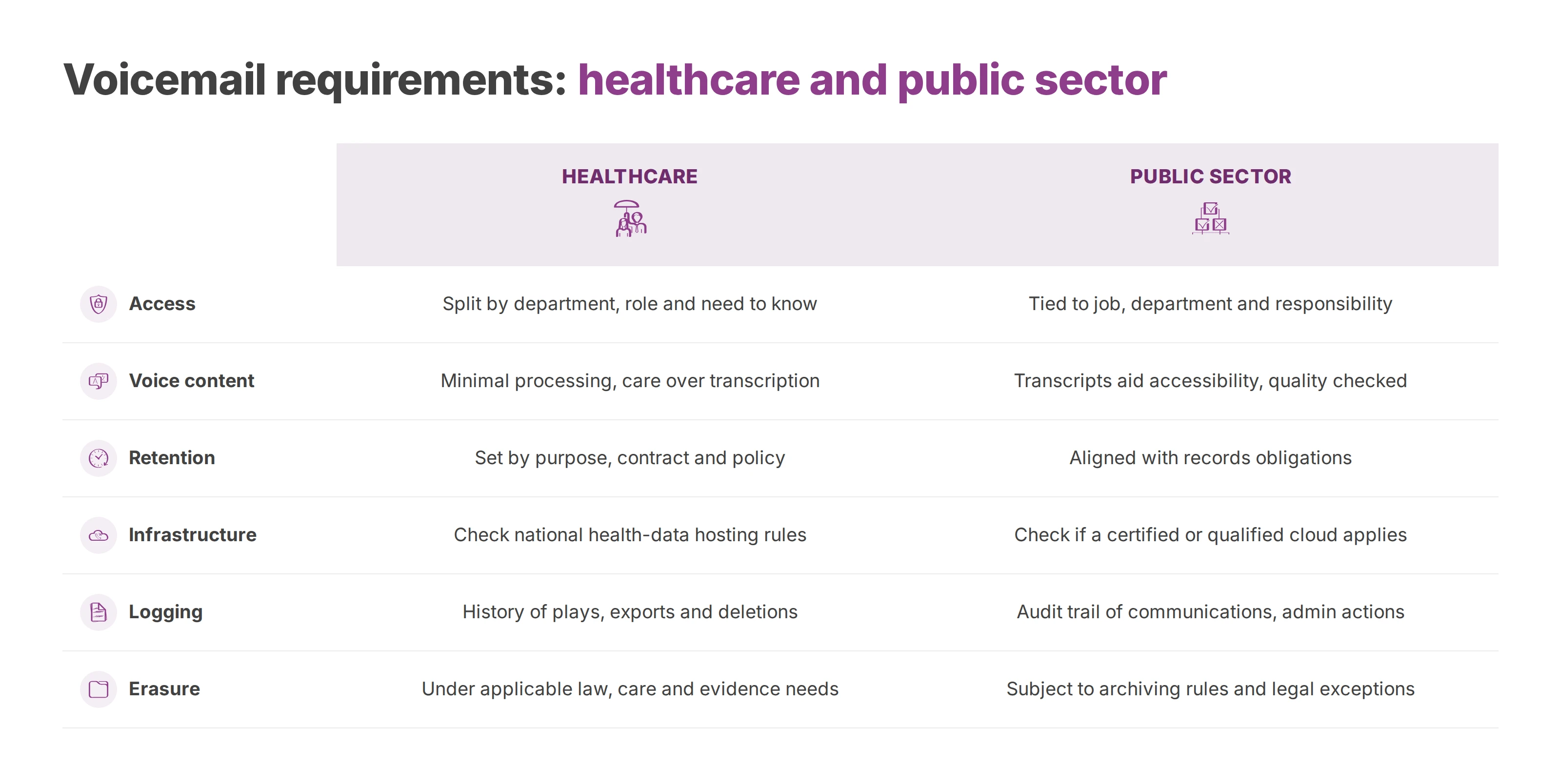
Healthcare and the public sector both need tight control, though their daily constraints differ. A clinic protects patient information. A local authority also has to think about accessibility, records retention and an audit trail.
| Requirement | Healthcare | Public sector |
|---|---|---|
| Access | Split by department, role and need to know | Tied to job, department and administrative responsibility |
| Voice content | Processing kept to the minimum, with care over transcription | Transcription supports accessibility, with checks on text quality |
| Retention | Period set by purpose, contract and the institution's policy | Period aligned with the records obligations that apply |
| Infrastructure | Check any health-data hosting rules in your country | Check whether the scope calls for a certified or qualified cloud |
| Logging | History of plays, exports and deletions | Audit trail of communications and administrative actions |
| Erasure | Deletion under the applicable law, care needs and evidence needs | Erasure subject to archiving rules and legal exceptions |
In a hospital or clinic, split mailboxes by department. Keep the admissions mailbox closed to teams with no part in the patient's administrative journey. Encrypt recordings and transcripts, log every access, and rule out processors outside the European Union where your governance requires it.
In the public sector, accessibility gets particular attention. A transcript can help a member of staff with hearing loss, but someone still has to check it for readability, confidentiality and accuracy. Keep a message that needs quick handling apart from a document that falls under records retention.
A voicemail box makes a poor default archive. Tie its retention period to a documented purpose. If you want storage and processing to stay under European Union jurisdiction, ask your provider where the data is stored, who can reach it, how access is audited and how data is deleted for good.
A platform that offers transcription doesn't make you compliant with the European Union AI Act on its own. Compliance depends on the whole deployment, so your IT department has to review how the data is processed, by whom and with which controls.
Next to the audio, a voicemail system holds phone numbers, times, names, transcripts and sometimes sensitive information. Security has to cover every stage, from the moment a message is recorded to the moment it's deleted.
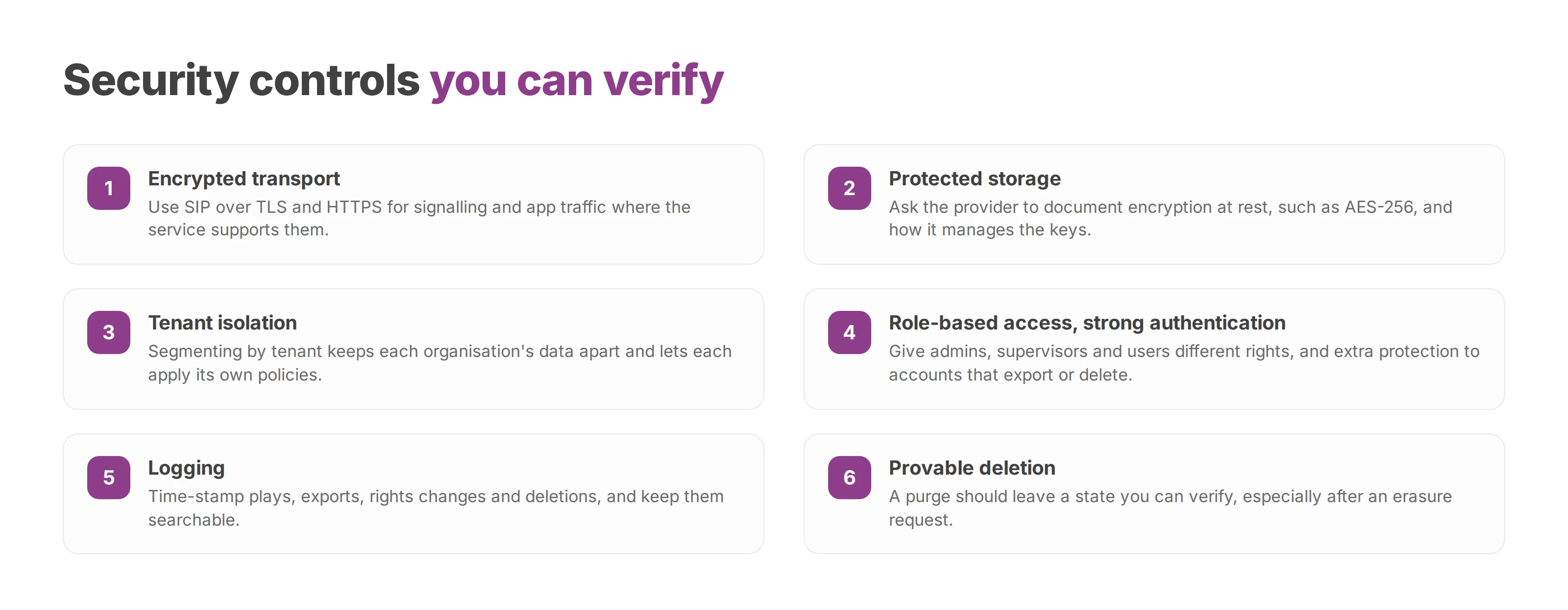
IT teams can run the review against concrete points:
Encrypted transport. Signalling and app traffic should use suitable mechanisms, such as SIP over TLS and HTTPS where the service supports them.
Protected storage. Ask the provider to document encryption at rest (AES-256, for example) and how it manages the keys.
Tenant isolation. Segmenting by tenant keeps one organisation's data apart from another's and lets each apply its own policies.
Role-based access. A telecom administrator, a supervisor and an end user each get different permissions.
Strong authentication. Accounts that can export or delete messages need extra protection.
Logging. Plays, exports, rights changes and deletions should be time-stamped and searchable.
Provable deletion. A purge should leave a state you can verify, especially after an erasure request.
Keep retention proportionate. You might pick a short period, for example 30 to 90 days, and purge automatically after it. The data controller signs off on that period and matches it to the purpose. Document any exception for litigation or a legal obligation, keep it narrow and review it again later. Call records follow the same logic, as the guide to call log retention under the GDPR explains.
A transcript adds a text-processing step. Text is easier to search and share than audio, which also means more copies of the same information. List the audio files, the transcripts, the notifications and any exports to third-party apps in your record of processing activities.
The right of access means finding the recording and its metadata and handing them over in a usable format. The right to erasure means permanent deletion when no exception applies. The right to data portability calls for a standard format and a process that hands the data over without exposing anyone else's.
A data protection impact assessment (DPIA) may be required when voicemail handles sensitive data or poses a high risk to the people concerned. In that case, ask the provider for verifiable details: where the data is hosted, which processors it uses, who has admin access, and how you get your data back out if you leave.
Start with a map of the current PBX: every number and call flow, and who is responsible for each. That map usually turns up old mailboxes with no owner, where messages sit and nobody acts on them.
Audit the current PBX. List every forward and queue, and note what still depends on the old operator.
Check the network. Measure SIP latency at each site and confirm there is a backup path.
Write the routing rules. Cover hours, priorities, overflows and team mailboxes, worded so they still make sense when an agent is away.
Set up the greetings. Write a script for each language, for closure periods such as public holidays, and for emergency messages. The guide to professional voice messages covers the wording.
Assign the rights. Decide who can read transcripts, who can export or delete messages, and how long messages are kept.
Test load and failover. Simulate simultaneous calls, unavailable agents, a trunk failure and the notifications that follow.
Monitor production. Watch for errors, late notifications, failed transcriptions and messages that nobody handles.
Set each service target before go-live: an availability target, a notification delivery time and the transcription quality you expect. Give each target a measurement method and a named owner on the contract.
Once you're live, review the chain metrics described earlier every week. At the end of the first week, compare the time to first action with the target you set before go-live, and adjust the overflow rules to close the gap.
Tell users how the new system behaves. Front-desk staff should know that a transcript helps them sort messages, but that a name, an address or a contract reference still gets checked against the audio. Managers need the callback and escalation procedure. Administrators need a disaster recovery plan and, where the context calls for it, a second phone path.
The most common traps are easy to test for. A transcript nobody reviews will one day get a name or a figure wrong, so check sensitive details against the audio. Without an automatic purge, messages pile up forever. A single trunk means one outage stops both calls and messages, so add a failover path. A long greeting loses callers: tell them early what they're expected to do. And a shared mailbox without an owner and a deputy is the Tuesday-morning problem all over again.
Voxbi is a cloud PBX hosted in the European Union. You set up users, call flows, queues and IVR menus from one portal, and you can drop a voicemail step anywhere in a call flow: after a ring group times out, or as the overflow when a queue is full. Messages arrive as email attachments or in the Voxbi app. The Voxbi Free plan covers up to 3 users if you want to try it on a real line; see the plans.
Call queuing holds callers in an ordered line inside your cloud PBX. How it works, which options to switch on, which metrics to watch and how to configure a queue.
How a hotel phone system routes reservation, room and maintenance calls, connects to your PMS, and helps you stay secure and meet the GDPR across one site or many.
An inbound call reaches your organisation and an outbound call leaves it. Here's how to route, measure and govern each one, and keep your numbers when you migrate.
Start a free trial, or work with a certified Voxbi partner.