Someone browsing a hotel's website on their phone finds the room they want, spots the reception number and taps it. The call goes out without a single digit typed. It lands with the reservations desk, where the receptionist can see which page the guest was reading. That's click to call at work, and the button is the smallest part of it. Behind it sit a routing rule, a queue and often a CRM record.
Callers do use it. Google and Ipsos MediaCT surveyed 1,520 frequent mobile search users in France in February 2015, and 62% of those looking for information expected to be able to call a business straight from the search results (Think with Google, May 2015, archived copy). The same article quotes Google's own ad data: 72% of clicks on a call extension in its search ads led to a call longer than 30 seconds, and those calls averaged close to six minutes. That says nothing about sales, and the data is French and a decade old. It does show that a tap usually turns into a real conversation, which is why the IT integrators and telecom resellers who set the feature up should care what happens after it.
What click to call means
Click to call is a button or a tappable phone number that starts a call with no manual dialling. On a smartphone, the operating system hands the number straight to the dialler. On a desktop, a softphone or the browser places the call. Without it, the caller has to copy the number, open the phone app and type it in, and any one of those steps can end the visit.
After the click, your phone system takes over. The cloud PBX reads the request and looks up the destination you defined for it: a team, a queue, a local office, or a number that changes with the time of day. When nobody's free, the rule can hold the caller, pass the call to another group or offer a callback.
Click to call, click to dial and web callback
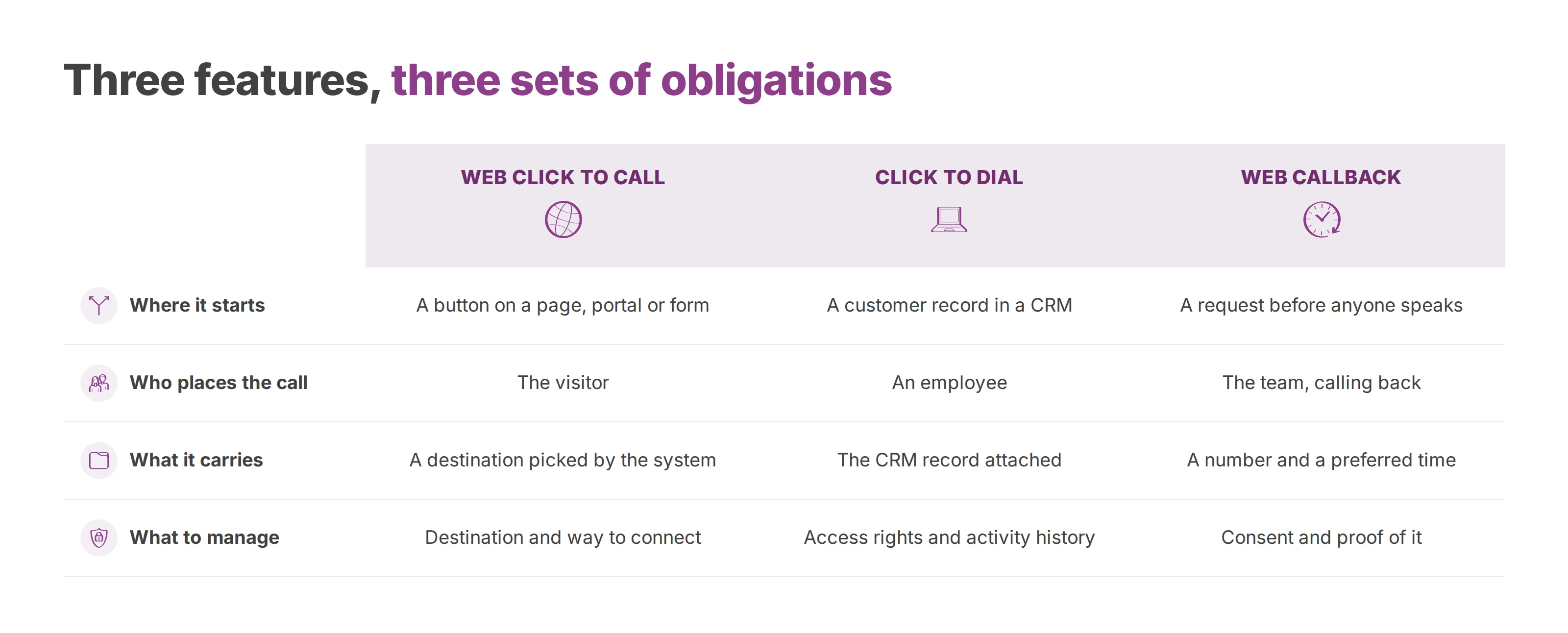
These three get mixed up, and they don't carry the same obligations.
Web click to call puts a button on a page, a customer portal or a contact form. The phone's dialler, a softphone or an audio component built into the page then carries the call. The visitor sees an instant connection, while the system still has to pick a destination and a way to connect.
Click to dial starts from a customer record in a CRM. A salesperson picks the number on screen and the call goes out with the record attached. This time the caller is an employee, with access rights, a business identity and an activity history that the company has to manage. Our guide to computer telephony integration covers that side in depth.
Web callback collects a request before anyone speaks. The visitor usually leaves a number and a preferred time, and a team calls back. Because it gathers more personal data than a plain button, it needs clear rules on consent and on how you keep proof of it.
What the click doesn't guarantee
A tap doesn't promise that an agent answers, that the call reaches the right department, or that you may later use the number for sales. The PBX settings, the opening hours, the queue and mobile coverage decide the first two. Your data rules decide the third. So before you place a button, decide who receives the call, what context arrives with it and what you're allowed to do with it afterwards.
How to make a phone number tappable
The simplest click to call needs no software at all. You wrap the number in a tel: link:
<a href="tel:+33123456789">+33 1 23 45 67 89</a>
The visible text can follow local habits, with spaces and a national format. The href is stricter. RFC 3966, the standard that defines the tel: scheme, says numbers must use the global form whenever they can, which means a +, the country code and the full number. Hyphens, dots and brackets are allowed as visual separators and are ignored when the call is placed, but spaces are not allowed inside the link (RFC 3966, sections 5.1 and 5.1.1). A number written in local format only works for callers in the same country, and it breaks for anyone browsing from abroad.
On a phone, tapping the link opens the dialler with the number filled in. On a desktop, the result depends on which application the operating system has registered for tel: links. If nothing is registered, the click may simply fail. With a softphone registered, the call starts at once. In Voxbi, you register the web app from its Phone settings or set the Windows or macOS app as the default phone application, and from then on any tel: link in a browser or a CRM starts the call in Voxbi. The click to call feature page walks through those settings.
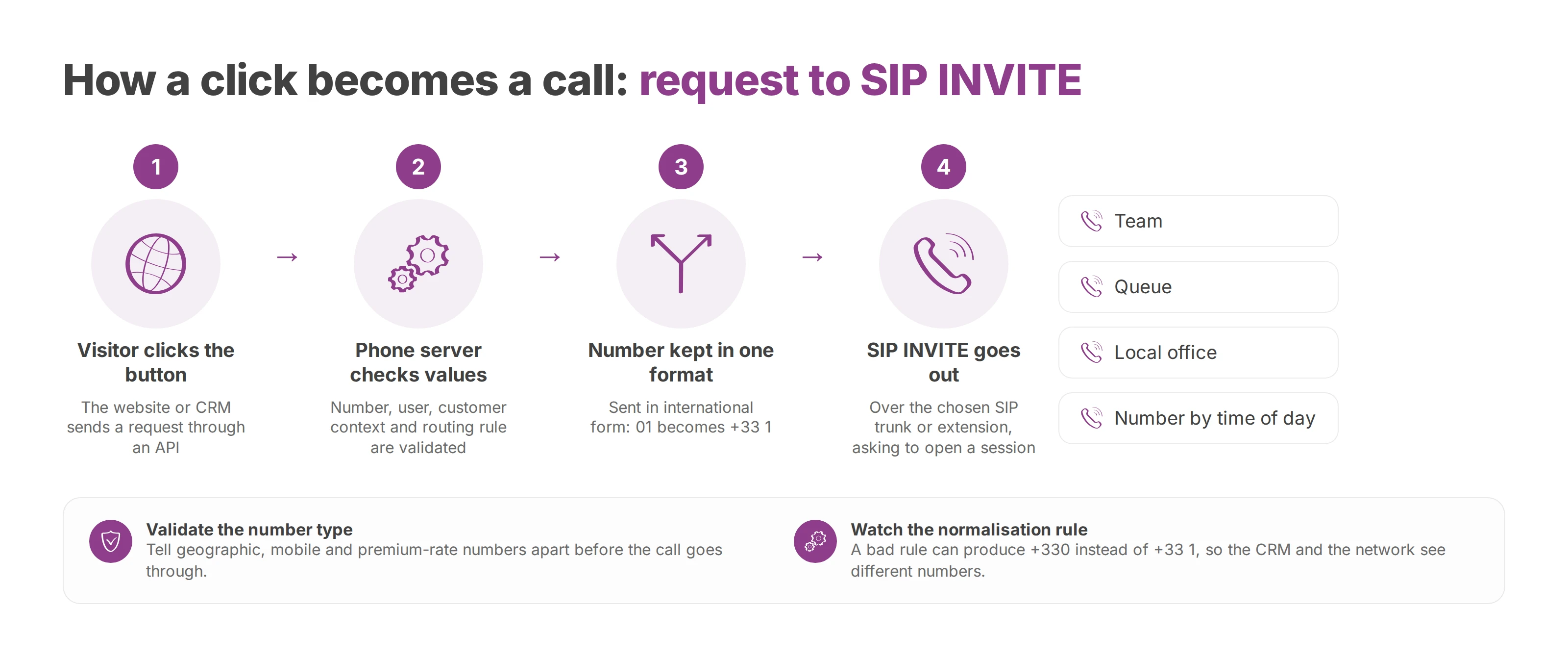
A plain tel: link hands the number to a device. A business setup goes further and routes the call, attaches context and logs the result. That takes a short sequence of requests, and if one of them drops a value, the call fails or lands in the wrong queue.
From the click to the SIP INVITE
The website or CRM first sends a request to the calling service, usually through an API. The request names the number to call, the user placing the call, the customer context and the routing rule. The phone server checks those values and picks the SIP trunk or extension to use. Then it sends a SIP INVITE, the message that asks the far end to open a call session.
The number has to keep one format at every hop. Toward the SIP trunk it travels in international form, with the national 0 dropped: a French number starting 01 goes out as +33 1. A badly configured normalisation rule can produce +330 instead, or leave the CRM showing one number while the network receives another.
The system should also check what kind of number it's about to dial. A button can point at a premium-rate number, so validation tells geographic, mobile and premium-rate numbers apart before letting the call through. In France this check feeds straight into the telemarketing rules described further down.
Choosing the technology
Four building blocks come up in almost every project: WebRTC (Web Real-Time Communication), SIP over TLS (Transport Layer Security), TAPI (Telephony Application Programming Interface) or CTI (computer telephony integration) connectors, and a REST API. Two details catch teams out. WebRTC puts the audio in the browser, so a denied microphone permission ends the call before it starts. And TLS encrypts the SIP signalling only, so the voice stream needs a matching security policy.
Which one fits depends on the device your staff use, how deep the integration goes and your security requirements.
What click to call does for each side of the call
The feature pays off when it connects a visitor who already knows what they want with a team that's ready to answer.
For the customer
The customer doesn't copy a number, hunt for the right department or explain why they've rung the general line. That works when each button is tied to its page. A number on a product page can go to sales, while the button on a support page reaches the helpdesk.
For agents
An agent picks up with more to go on when the system passes along the source page, the CRM record or the reason the visitor selected. The greeting gets easier and nobody has to search mid-call. Team leads can also tell missed calls from callback requests and from conversations someone actually handled.
For management and IT
Match web events with phone events, carefully, and reporting improves. You can see how many clicks turn into answered calls, which queues take them and how long people wait. Those numbers measure where calls stall rather than sales, and they tell you what to fix. If most evening clicks from one page end in voicemail, for example, look at the opening hours or add an overflow rule before you touch the page.
Click to call use cases by sector
The same button looks different depending on who answers it. A multi-site business tends to route by location. A clinic protects the context of each request. A hotel plans its reception around opening hours and bookings.
Multi-site businesses
A visitor lands on the page of a branch, a shop or a regional office. The button can use that site's number and send the call to a local queue, an agent group or a central on-call team. The CRM then attaches the call to the right organisation, site and contact, provided your identification rules match up.
Larger firms tend to struggle with governance. Head office wants common rules, while each site sets its hours, messages and priorities. A cloud platform can run the administration centrally without forcing a single number on every visitor.
Clinics, hospitals and care homes
A page for appointments, admissions or a particular department can offer a direct call to the matching reception desk. Routing has to keep admin questions, bookings and urgent situations apart. The site should also collect as little as possible before the conversation, because health information is highly sensitive.
Click to call doesn't replace emergency channels or internal procedures here. It gets non-urgent requests to a named team quickly, with hours and messages shown plainly.
Hotels and restaurants
On a booking page, the button reaches reception or the reservations team. On a group website, each hotel's page has to pass on the right number and calendar. A call started from a room page can show the agent which room the guest was looking at, without assuming the guest has already made up their mind.
Local authorities and education
A council can route the registry office, technical services and general enquiries to different teams. A school or training centre can send calls to admissions, student records or administration. Integrations with a CRM, Microsoft Teams or Odoo cut double entry, as long as they respect access rights and collect only the data they need.
GDPR and security requirements for click to call
Every click to call request creates personal data: at the very least a phone number and a timestamp, often a page address and a CRM record too. What the law expects depends mostly on why you collect it and what you do with the conversation afterwards.
A click is not consent to sales calls
An explicit callback request covers the contact it asks for. It doesn't turn into a general permission to prospect. The same button can serve support well and still create risk if a sales team later reuses those numbers for a separate campaign.
The rules for marketing calls depend on the country and the channel. In France, the CNIL's guidance on customer relations and GDPR makes that point, and since 11 August 2026 a business may in principle no longer make sales calls to consumers who haven't agreed to them beforehand. The French government's public service website spells out what that consent has to be: freely given, specific, informed, unambiguous and revocable, and valid for one year at most (Service-Public.fr on telephone canvassing). In the United Kingdom, live marketing calls fall under the Privacy and Electronic Communications Regulations (PECR). The Information Commissioner's Office says you must not make them to any number listed on the Telephone Preference Service or the Corporate Telephone Preference Service unless the person has specifically consented to your calls, even if they're an existing customer (ICO guidance on telephone marketing).
Prove, protect and limit
You have to be able to show where each permission came from. An unticked opt-in box, a timestamped callback request or a click log can all count as evidence, as long as the data reaches the CRM and the CTI connector intact.
People can withdraw consent at any time, including out loud during a call. Your records need to say what each permission covers, where it came from and when it runs out, and they need to log any withdrawal.
Call recordings need a set retention period and access by role. Decide who can listen to, export or delete a conversation, and line that up with your call recording rules.
Data sovereignty and technical security
Check hosting and data transfers separately. A cloud PBX hosted in the European Union helps keep calls, recordings and metadata on European soil. You still have to document your processors, your retention periods and who has access.
Encrypting SIP signalling with TLS and securing WebRTC traffic make your calls safer. They don't replace access control, logging or a recording policy. The European Union's AI Act entered into force on 1 August 2024 and became applicable on 2 August 2026, with exceptions: the rules for some high-risk systems apply later, from 2 December 2027 or 2 August 2028 (European Commission). A platform that claims AI Act compliance should be able to show the analysis behind that claim.
Deploying click to call with Voxbi
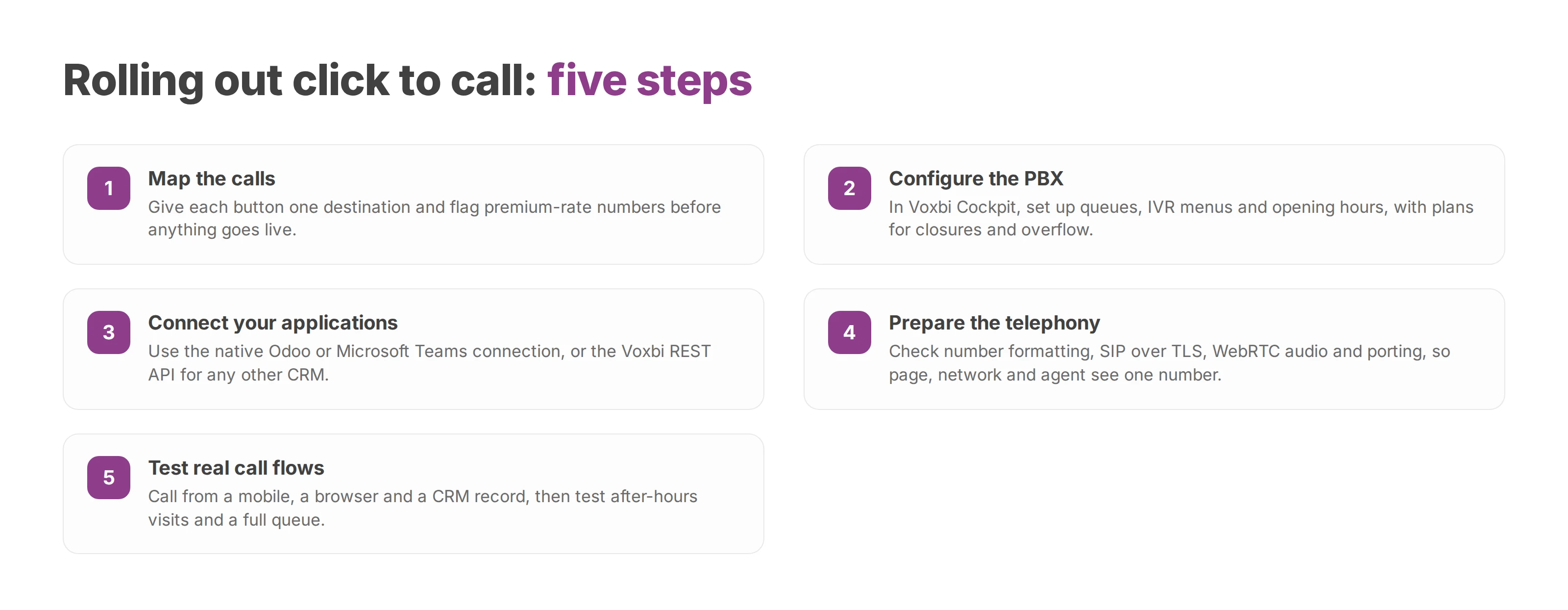
A reliable deployment starts with the call flow. First choose the pages involved, the numbers allowed, the teams that receive calls and the rules for callbacks and sales calls.
A structured rollout
Map the calls. Give each button one destination, whether that's a site, a team or a queue. Flag premium-rate numbers before anything goes live.
Configure the PBX. In Voxbi Cockpit, the administrator sets up the queues, IVR (interactive voice response) menus and opening hours. Plan for closures, overflow and unanswered calls.
Connect your applications. Voxbi connects natively to Odoo, and to Microsoft Teams for calling inside Teams. For any other CRM, your integration calls the call-control endpoint of the Voxbi REST API with the number, and Voxbi places the call from the user's device (CRM integration). Test each scenario with the access rights of each role.
Prepare the telephony. Check international number formatting, SIP over TLS, WebRTC audio and number porting before go-live. Confirm that the number displayed on the page, the number sent to the network and the number the agent sees all match.
Test real call flows. Call from a mobile, from a browser and from a CRM record. Then try the cases that tend to break: a page visited outside opening hours, and a full queue. Check that consent proof is stored and that a withdrawal request goes through.
Voxbi is a cloud PBX hosted in the European Union. It covers click to call, administration from Voxbi Cockpit and a REST API with webhooks. Integrators and resellers still have to fit that setup to each client's call flows and data rules.
Monitoring after launch
Track the experience and the compliance side together. Answer rate and waiting time give you the operational picture, and the share of clicks that become conversations shows whether the buttons sit in the right places. Also watch for dialling errors, calls sent to the wrong queue and permissions that have expired.
Put consent proof in your reporting too. Each record has to stay tied to its source and purpose for as long as the permission lasts, then be deleted or renewed under your policy. In France that is a year at most. To review the setup for your own call flows, write to hello@voxbi.com.