
Telephone etiquette: six steps from greeting to goodbye
How to answer, listen, hold, transfer and close a business call, with lines you can use word for word and an eight-point checklist for the desk.
Nov 27, 2026
How to divert your business landline to a mobile with permanent diversion, simultaneous ring, a mid-call transfer or a mobile app, and what each one changes for your callers.

The office phone rings, nobody picks up, and the caller lands in a voicemail box that nobody checks until the next morning. That evening, a salesperson rings the same customer back from a personal mobile, and the customer doesn't recognise the number on the screen.
For small and mid-sized businesses, the fix usually starts with a menu setting to divert landline to mobile. The setting itself takes a minute. What your caller experiences depends on the number they see and the number they ring back. It also depends on where their message lands and who returns the call. This guide compares the four methods and their trade-offs, so you can pick one by how calls actually flow through your business.
To divert a landline to mobile is to send calls made to your fixed business number on to a mobile phone. The caller still dials the number they know. The diversion happens on the network or inside your phone system, so the desk phone can stay silent or ring alongside the mobile.
Your team spends more of the day away from a desk, while customers keep ringing the number printed on the invoice. That gap is why the method you choose is an organisational decision as much as a technical one.
The four ways to reach a mobile from a fixed number
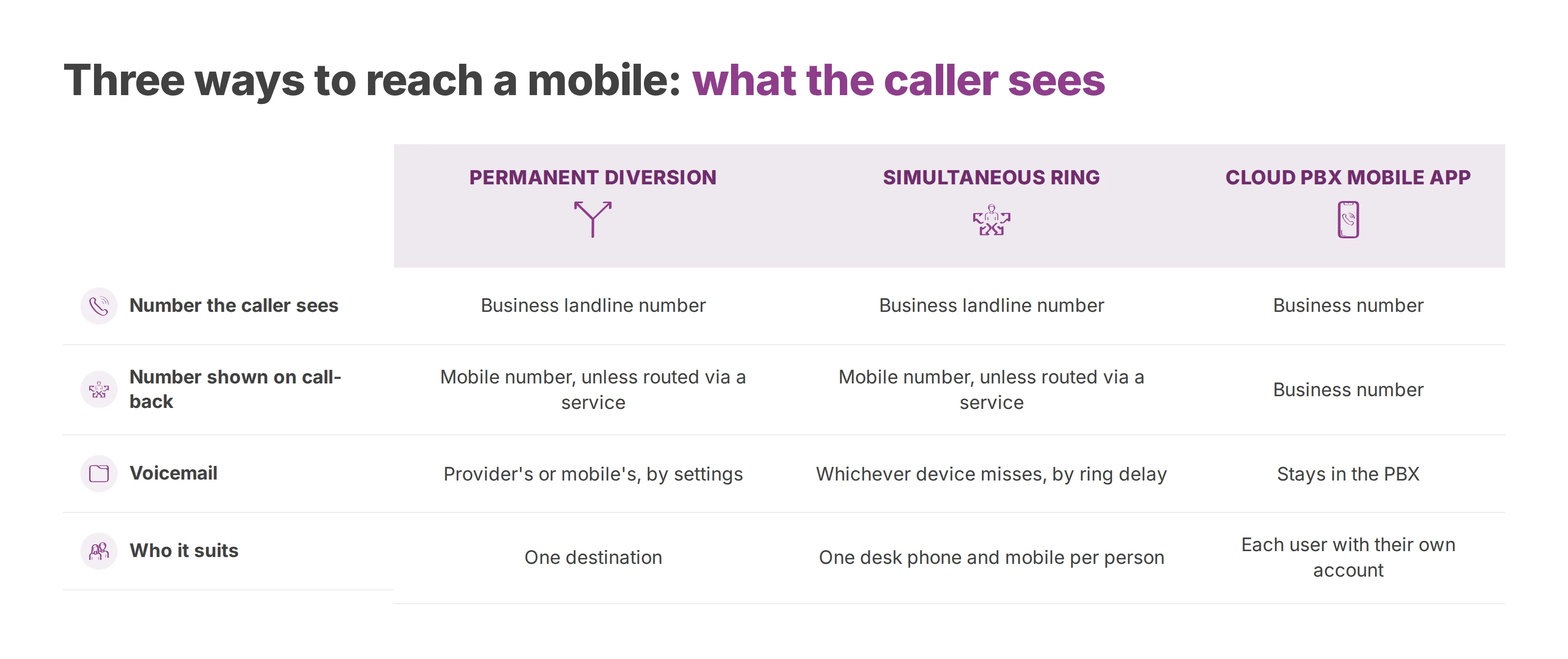
| Method | What the caller sees | Number shown when the mobile calls back | Voicemail | Who it suits |
|---|---|---|---|---|
| Permanent diversion to a mobile | The business landline number | The mobile number, unless calls go through a service that presents the business number | The provider's or the mobile's voicemail, depending on settings | One destination |
| Simultaneous ring on desk phone and mobile | The business landline number | The mobile number, unless calls go through a service that presents the business number | Whichever device doesn't answer, depending on the ring delay | One desk phone and one mobile per person |
| Transfer during a call | The business landline number | The mobile number, unless calls go through a service that presents the business number | None, because the call has already been answered | The colleague who takes the call after reception screens it |
| Cloud PBX mobile app | The business number | The business number | Voicemail and history stay in the PBX | Each user with their own account |
Three of the four rows share the same weak spot in the call-back column. When someone returns a call from their mobile line, the customer sees a personal number unless the call runs through a service that can present the business number. Customers notice that column first, and comparison tables rarely show it.
Decision rule: start from the call flow. One destination, parallel availability, a screened transfer and working on the move each need a different setup.
Permanent diversion solves reachability when there's only one person to reach. Simultaneous ring sends the call to the desk phone and the mobile together, and the first device answered takes it. It suits anyone who splits the week between the office and the road. A transfer during a call assumes reception has already screened the caller before passing them on. A cloud PBX mobile app keeps the company's phone identity all the way through to the call-back.
A diversion leaves your number with its current provider and redirects incoming calls to a mobile. The number stays tied to the original contract. If you cancel that line or change provider, the diversion goes with it. Porting moves the number itself to a new phone service, usually a cloud PBX, and from then on the diversion rules live in that system.
Porting comes with its own paperwork. The account holder named on the bill has to match whoever requests the move, and every number belongs on the request, secondary lines included. List any service that depends on the line too, such as an alarm or a lift phone, because the cutover can cut off something nobody mapped. Plan the switch for a quiet day when reception can test and you can still roll back. Keep the old line active until the port completes, since cancelling it first can cost you the number.
The full process is in how to port a business phone number without losing calls. On Voxbi, inbound porting is included from the Starter plan up, and we handle the move with your current provider. Your callers keep dialling the same number from the first day to the last.
A customer gets a call from your sales team, hangs up, then rings back the number on their screen. If that number is a personal mobile, the conversation has left your phone system. Nobody else knows it happened, and it restarts without any context, sometimes with a discount promised by a colleague who's now on holiday.
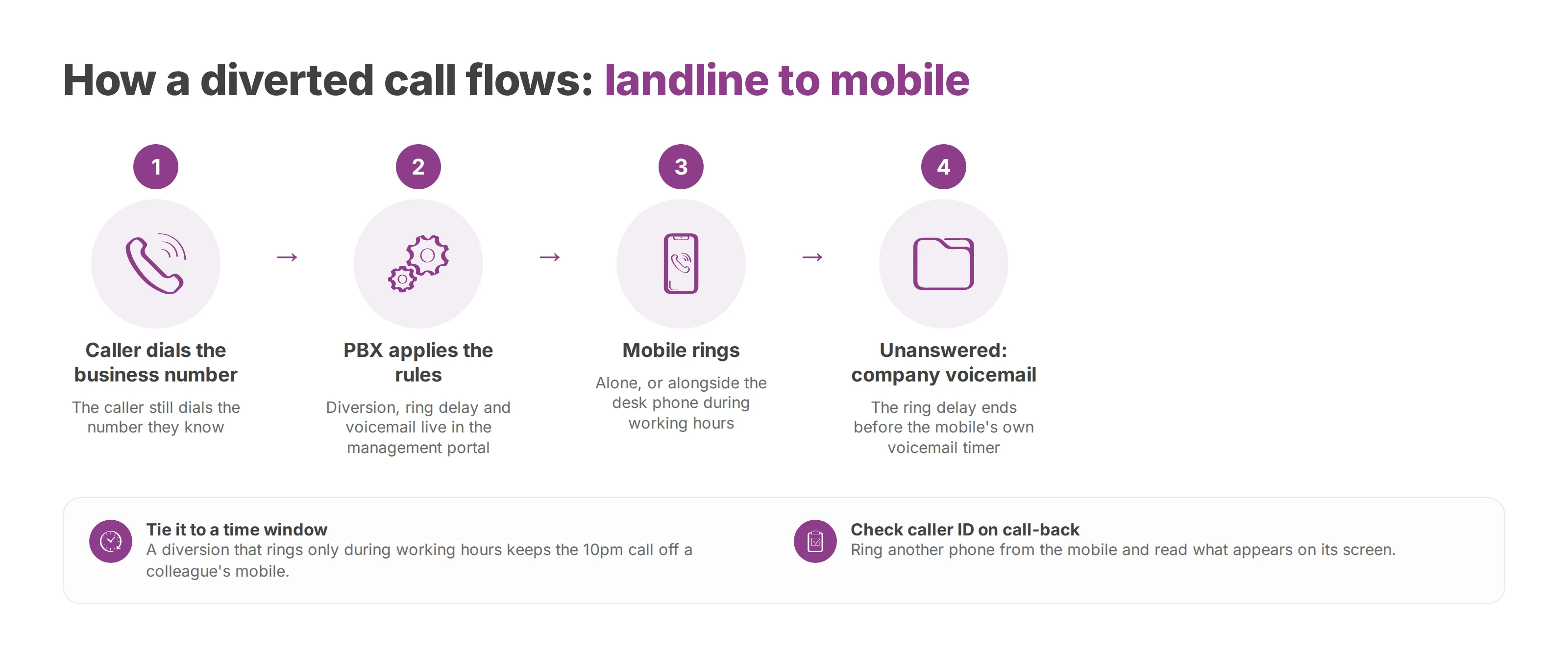
With a plain diversion, the mobile shows the caller's number on incoming calls. Outgoing calls from the same handset present the employee's mobile number unless they go through a service that can present the business number. Whether your provider lets a mobile show the office number is something to settle with that provider before customers rely on it. Outbound caller ID covers how to choose the number your team presents.
Caller ID on call-back: ring another phone from the mobile and read what appears on its screen. A ticked box in a settings page proves very little.
Voicemail outside the mobile: a message left by a caller belongs in the company mailbox, where the team can see it.
Hours covered: decide what rings in the evening and at weekends, and what stays silent.
Access rights: decide who can change the diversion and who sees the call history. Someone also has to pick up a colleague's messages after they leave.
The diversion, the ring delay and the voicemail all live in the phone system's management portal. The handset only receives the result.
Keeping messages and call history in the company's system means they survive a lost or replaced phone. Voicemail stored on a personal mobile disappears when the employee changes handset or leaves, and every request in it goes too. The call log follows the same logic, because it belongs to the business and the person only uses it. The voicemail system guide explains how a cloud PBX stores those messages centrally.
An always-on diversion rings a colleague's mobile at 10pm. Someone calling a business number expects an answer during opening hours, and a switched-off phone with a personal greeting doesn't give them one. A diversion tied to a time window, or an app that rings only during working hours, sorts this out without asking the team for extra discipline.
Each site raises two questions of its own. You need to know which number shows for that branch and who owns its voicemail. One number shown for three branches muddles every call-back. A number per site means someone has to listen to each site's messages.
Privacy sits on the same ground. A mobile app connected to a PBX hosted in the European Union keeps voicemail, history and the call log inside the company's system. That data falls under the GDPR (the UK GDPR for a British business), so you'll want to know where it's stored before go-live.
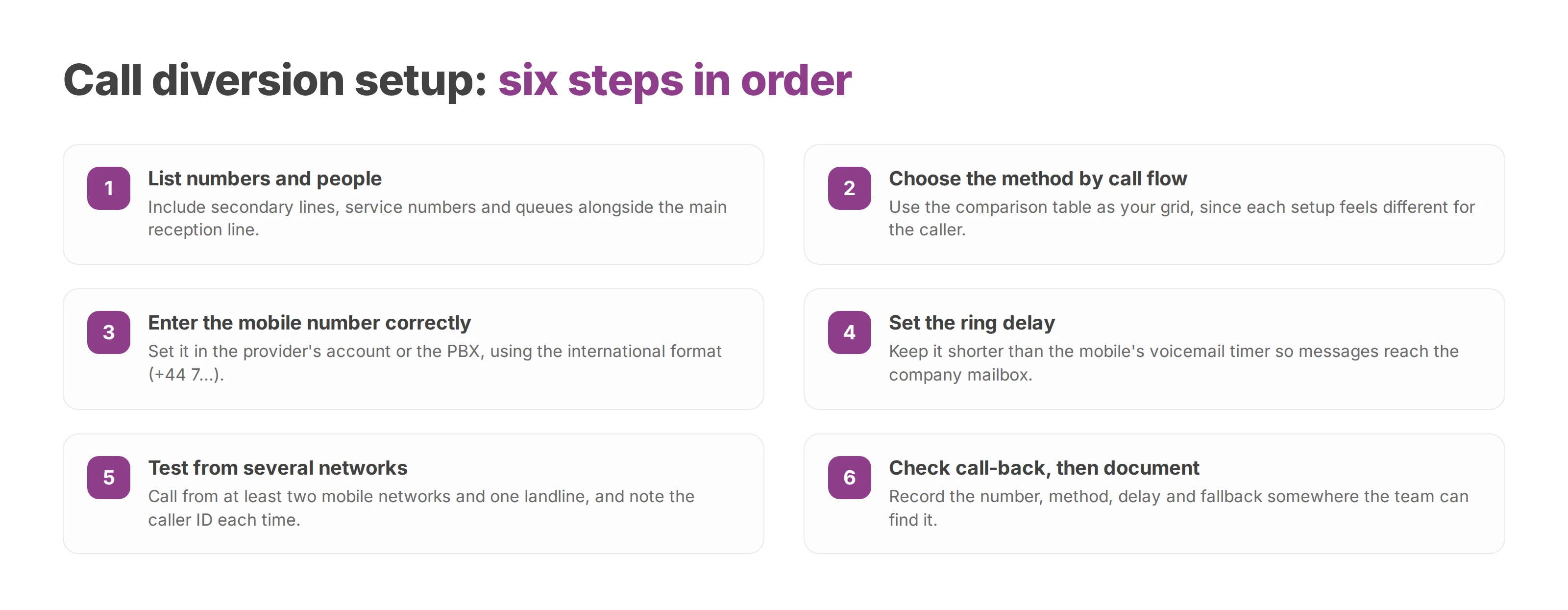
The order of the steps matters more than the method you pick. A mistake in the inventory can't be repaired by the last setting.
List the numbers involved and the people who need to stay reachable. A diversion on the wrong number only shows up at the first missed call. Include secondary lines, service numbers and queues alongside the main reception line.
Choose the method by call flow. Ringing a desk phone and a mobile together feels different from a single diversion, both for the caller and for your colleague. Use the table above as your grid. If the diversion runs from the handset itself, call forwarding on Android walks through the phone settings and the test.
Enter the mobile number in the right place and format. You set the diversion in your provider's online account or in the PBX, using the international format (+44 7…). Many landline providers also offer a star code, listed on their help pages. A mistyped number often fails without any warning, and the interface keeps showing a setting that does nothing.
Set the ring delay before voicemail takes the call. If the PBX rings the mobile for longer than the mobile's own voicemail timer, the mobile network's voicemail answers first. The message then never reaches the company mailbox, so adjust this in the PBX before you touch the phone.
Test from at least two mobile networks and one landline. Try incoming and outgoing calls, and note the caller ID each time. One test from the colleague at the next desk isn't enough, because networks don't all hand calls to each other the same way.
Check the call-back and the voicemail, then write the setup down. An outgoing call from the mobile should show the business number if that's what customers were promised. Record the number, method, delay and fallback somewhere the team can find it, or the next person starts from scratch.
One real test outside peak hours settles the last doubts. An unanswered call should land in your own voicemail, with a trace in your call history.
The most frequent fault never appears as an error in the interface. A missed call drops into an employee's personal voicemail, and nobody hears it for three days. Close behind comes the customer who rings back the number on screen and reaches a personal mobile, outside the phone system.
Symptoms, likely causes and fixes
| Symptom | Likely cause | Fix |
|---|---|---|
| The mobile's voicemail answers before the company's | Ring delay too long for the mobile's voicemail timer | Shorten the PBX ring time and keep voicemail in the company system |
| The customer sees a personal number on the call-back | The call went out over the mobile line | Call back through the PBX app on the business number |
| Choppy audio or dropped calls on the move | Weak mobile coverage | Switch the app to Wi-Fi, or take calls from somewhere with coverage |
| Messages and history can't be found | Voicemail stored on the personal phone | Keep voicemail and the call log in the company system |
| Calls stop arriving after a provider switch | The diversion lived on the old line | Rebuild the routing rules on the new system before cutover, then retest |
Some fixes belong to the user. The ring delay, switching to Wi-Fi and calling back from the app are all in your hands. Others depend on the provider, such as caller ID presentation, the details on a porting request or the routing of a secondary number. Adjusting a handset won't repair a mismatched port request.
Mobile coverage is the hardest cause to fix with settings. If the signal is weak at one site, plan another point to take calls, such as a desk phone or a room with coverage. Piling more settings onto a phone with no signal won't get the call through.
A failed transfer needs its own rule. When the mobile doesn't answer, the call should return to reception or the company voicemail, and that fallback is set in the PBX before go-live. For a transfer during a call, decide whether it's blind or announced and who warns the colleague first. An announced transfer takes a little longer and keeps the customer away from a voicemail box.
Each situation points to one method and one thing to watch.
Recommended method by situation
| Situation | Method | Watch for |
|---|---|---|
| Director or on-call duty with one reachable person | Permanent diversion to a mobile | Voicemail and caller ID still to confirm |
| Someone who alternates between office and travel | Simultaneous ring | The first device answered takes the call |
| Reception that screens calls before passing them on | Transfer during a call | A fallback when the mobile doesn't answer |
| Salesperson or technician on the road | Cloud PBX mobile app | Wi-Fi where the signal is weak, business number on call-back |
| Several sites or teams | Cloud PBX with the mobile app | A number per site and rights per user |
If callers must always reach the business and a shared voicemail, a cloud PBX stays the entry point, with the mobile app for staff on the move. If only one person ever answers, permanent diversion does the job.
One number can combine an out-of-hours diversion with simultaneous ring during the day, provided the rules don't overlap. A permanent diversion left switched on overrides a simultaneous ring set on the same number.
In practice, it starts with a two-column table. The numbers go in one column and the call flows go in the other (reception, sales, on-call, support). Each flow gets one method and one owner before anyone touches a setting. If you already run a cloud PBX, there's often nothing to port. The number stays where it is and the mobile becomes one more device on it.
Voxbi is a cloud PBX built and hosted in the European Union, and your call history stays in the company's system. On Voxbi One you set it up yourself with our setup guides and the Voxbi Cockpit manual, with email support, from €1.20 per user a month. On Voxbi Managed our team sets it up and runs it, with phone support, an SLA and the mobile app in every package. New Voxbi One numbers cost €2.00 a month in Germany, France and Switzerland. For a UK number, write to hello@voxbi.com and we'll go through your options.
How to answer, listen, hold, transfer and close a business call, with lines you can use word for word and an eight-point checklist for the desk.
Choosing a business phone system in Belgium or Luxembourg comes down to caller languages, the number of sites and the line you're replacing. Three customer cases and Voxbi's prices.
Send a fax without a machine or an analogue line. Five steps, three ways to send, and the records to keep in case anyone disputes the fax later.
Start a free trial, or work with a certified Voxbi partner.